leaningtech/webvm là một trong những repo hướng lập trình viên mà TopGit theo dõi, hiện có 17.1k sao, viết chủ yếu bằng JavaScript. Virtual Machine for the Web
Tóm tắt dựng từ metadata GitHub của chính dự án — chưa có bài review TopGit. Trang sẽ tự động cập nhật khi bài review đầy đủ được xuất bản.
VÌ SAO CHƯA CÓ REVIEW
TopGit viết bài đầy đủ cho repo có nhiều sao nhất và được yêu cầu nhiều nhất. Trang này là snapshot trong thời gian chờ — xem README gốc ở tab READ ME.
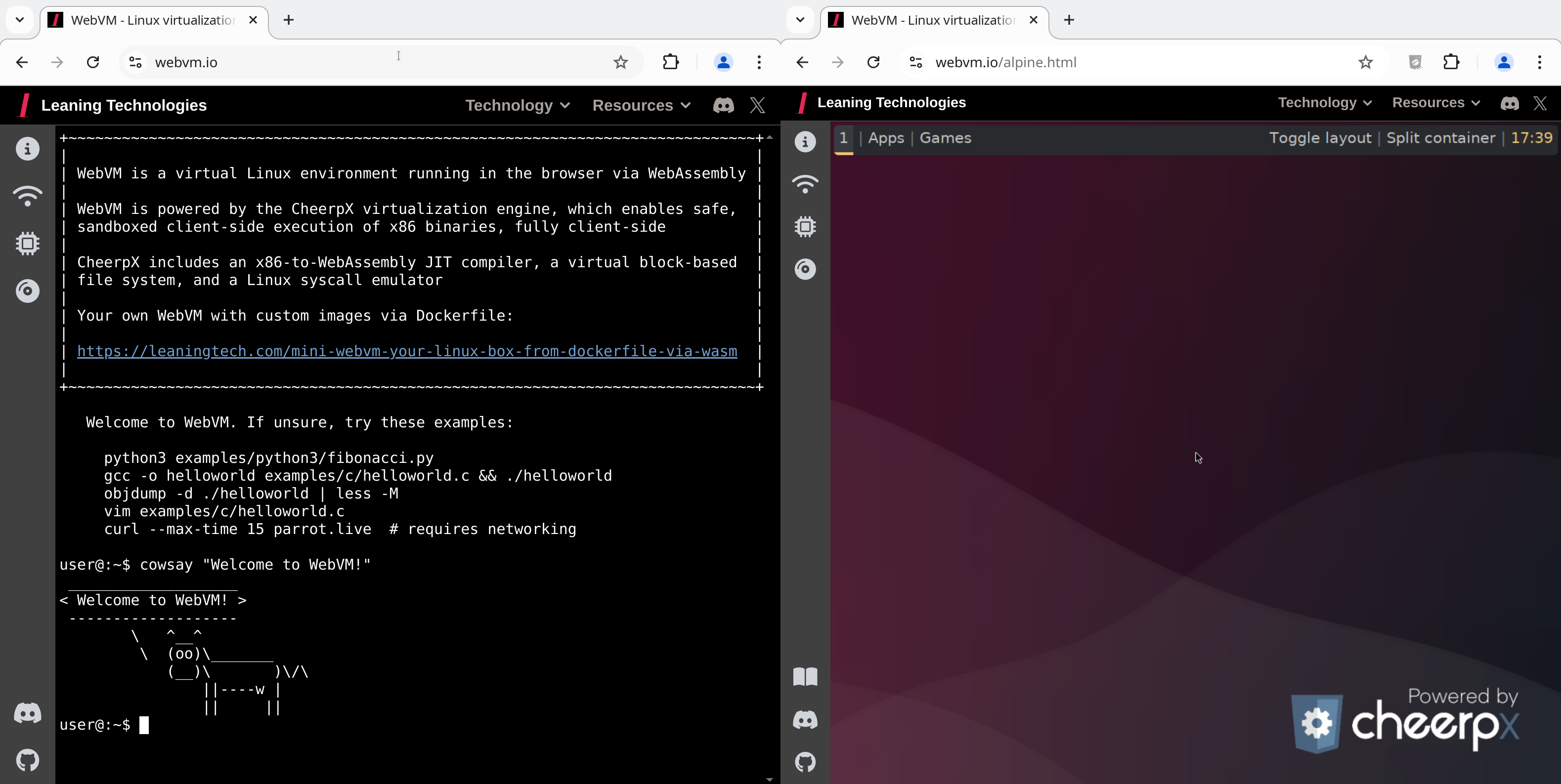
This repository hosts the source code for https://webvm.io, a Linux virtual machine that runs in your browser.
Try out the new Alpine / Xorg / i3 graphical environment: https://webvm.io/alpine.html
What is WebVM?
WebVM is a server-less virtual environment running fully client-side in HTML5/WebAssembly. It's designed to be Linux ABI-compatible and runs an unmodified Debian distribution including many native development toolchains.
WebVM is powered by the CheerpX virtualization engine, which provides:
x86-to-WebAssembly JIT compiler
Virtual block-based file system
Linux syscall emulator
Safe, sandboxed client-side execution
Table of Contents
Networking
Development & Customization
Deploy to GitHub Pages
Local Serving & Image Configuration
Claude AI Integration
Community & Support
Learn More
License
[!NOTE]
Visit https://webvm.io to get started immediately in your browser. No setup required.
For local setup, custom image builds, and fork/deploy guidance, see Development & Customization.
Networking
WebVM supports Tailscale integration. So your browser VM can reach your private network and, with an exit node, the public internet too.
[!NOTE]
Some low-level networking operations (especially ICMP used by ping) are not currently available in this environment. For connectivity checks, use curl or wget.
Local network
Open the "Networking" panel from the sidebar
Click "Connect to Tailscale"
Log in (create a free account at tailscale.com if needed)
Click "Connect" when prompted
WebVM now has access to all machines in your Tailscale network!
Internet Usage Tips
[!TIP]
On slower connections there may be a short delay before initialisation. Connection status is shown as a colored dot on the button: orange = local network, green = global/internet. The button text shows your Tailscale IP address once connected.
To access the public internet from WebVM, set up an Exit Node on another device in your Tailscale network:
Follow the Tailscale Exit Node quickstart (sections: "Advertise a device as an exit node")
WebVM automatically uses the exit node once advertised
Using an Auth Key
As an alternative to interactive login, add your Tailscale auth key to the URL fragment:
https://webvm.io/#authKey=<your-ephemeral-key>
This is equivalent to Tailscale's --login-server option.
[!TIP]
If you also need a custom control server, add controlUrl in the same URL fragment and separate values with &, for example: #authKey=...&controlUrl=....
Self-Hosting Tailscale with Headscale
We also support headscale, a selfhosted open source implementation of the Tailscale control server.
Because Headscale does not add CORS headers by default, you will need a proxy in front of it. See the Headscale reverse proxy setup docs for an example.
Once ready, add the following line to your location / block in your nginx config file.
[!NOTE]
Users have root privileges by default. sudo is not installed though this can easily be added to the Dockerfile if needed.
Deploy to GitHub Pages
This is a simple, beginner-friendly workflow. For local hosting and customization, see below Local Serving & Image Configuration.
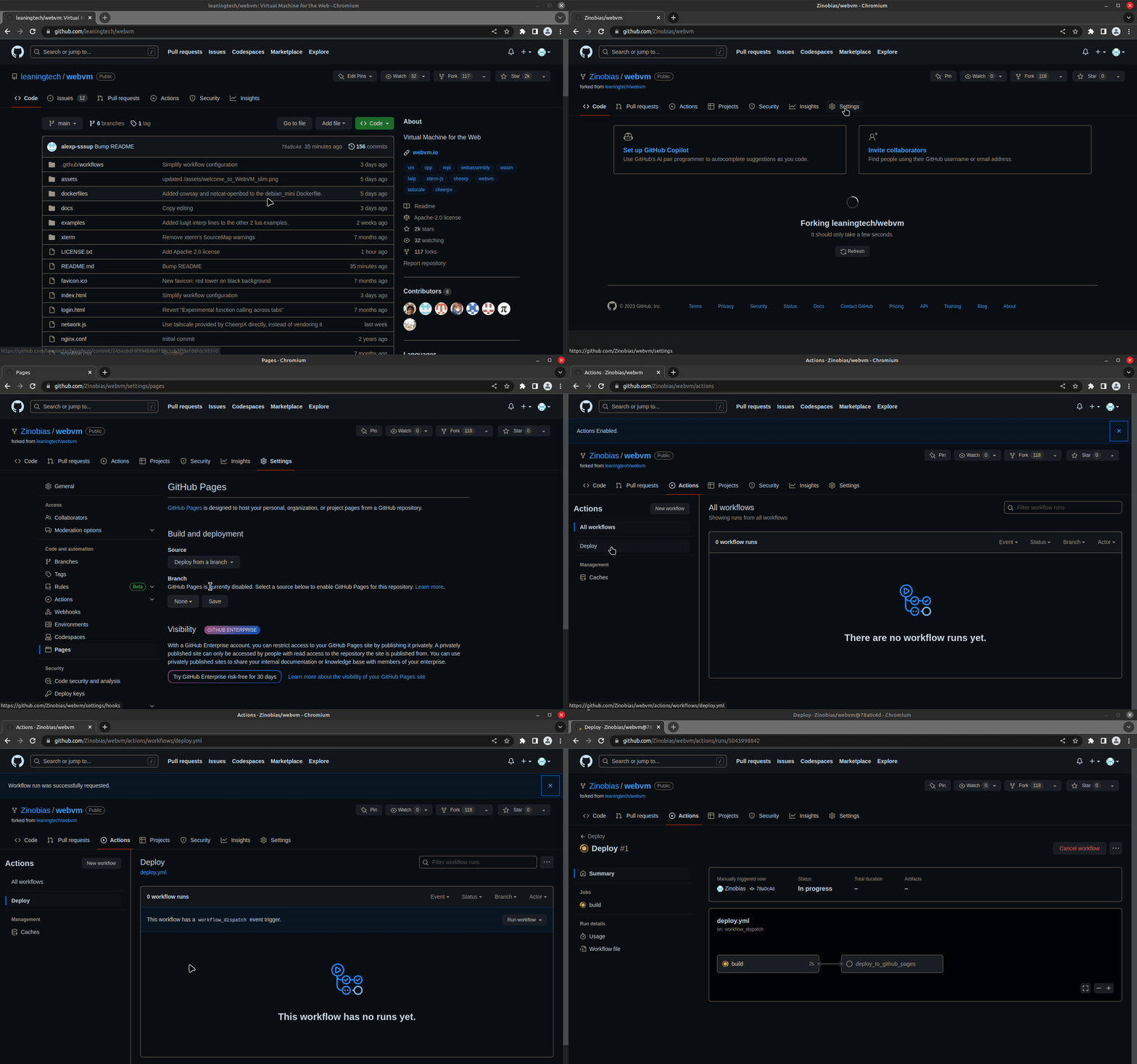
Fork the WebVM repository to deploy your own version to GitHub Pages:
Fork the repository
Enable GitHub Pagesvia forked repository in Settings → Pages using "GitHub Actions" as source
Run the Deploy workflow from Actions
After completion, open the URL shown under the deploy_to_github_pages job
The same Deploy workflow also builds custom .ext2 disk images from a Dockerfile. You can point it at dockerfiles/debian_mini or another Dockerfile, then either publish the result as a GitHub Release asset or deploy the Pages build from your fork.
[!NOTE]
dockerfiles/debian_large is too large of an image for GitHub pages.
Local Serving & Image Configuration
1. Clone the repository
git clone https://github.com/leaningtech/webvm.git
cd webvm
2. Put your image in custom-disk-images/
This repository includes a persistent custom-disk-images/ directory for local .ext2 files.
To use the official Debian mini image, download it from Releases:
Then open http://127.0.0.1:8081 and enjoy your local WebVM!
For the full Alpine desktop environment, see leaningtech/alpine-image.
For more details, see CheerpX Custom Images documentation.
[!TIP]
For Python3 REPL, the Deploy workflow takes into account the CMD specified in the Dockerfile.
To build a REPL you can simply change CMD [ "/bin/bash" ] to CMD [ "/usr/bin/python3" ] and deploy.
Claude AI Integration
To access Claude AI, you need an API key. Follow these steps to get started:
1. Create an account
Visit Anthropic Console and sign up with your e-mail. You'll receive a sign in link to the Anthropic Console.
2. Get your API key
Once logged in, navigate to Get API keys.
Purchase the amount of credits you need. After completing the purchase, you'll be able to generate the key through the API console.
3. Log in with your API key
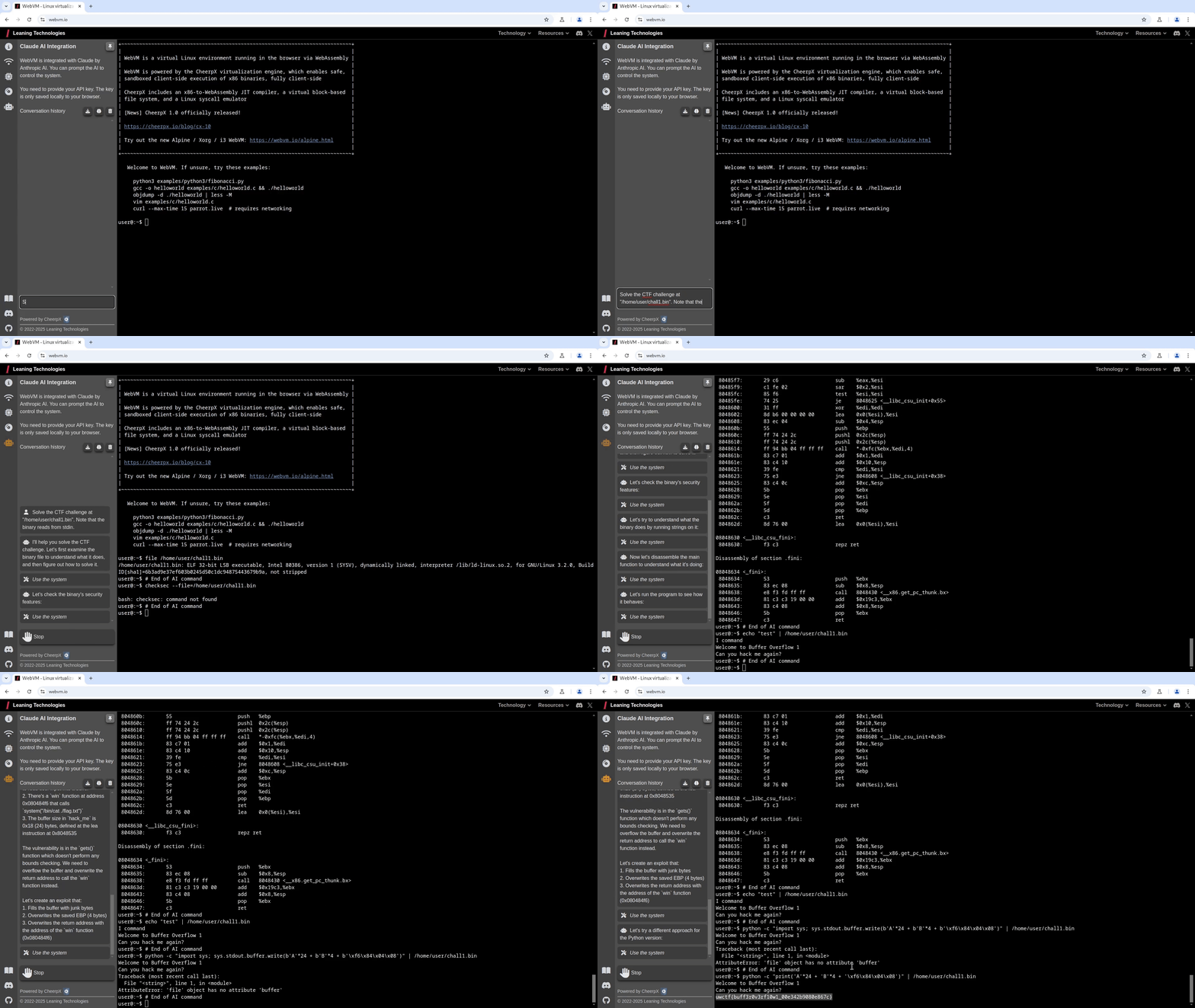
Navigate to your WebVM and hover over the robot icon. This will show the Claude AI Integration tab. For added convenience, you can click the pin button in the top right corner to keep the tab in place.
You'll see a prompt where you can insert your Claude API key.
4. Start using Claude AI
Once your API key is entered, you can begin interacting with Claude AI by asking questions such as:
"Solve the CTF challenge at /home/user/chall1.bin. Note that the binary reads from stdin."
Important: Your API key is private and should never be shared. We do not have access to your key, it is only stored locally in your browser.
Community & Support
Report issues: Use GitHub Issues to report bugs or request features.
Chat with us: Join our Discord community to discuss WebVM, share ideas, and get help.
Learn More
Articles & Resources:
WebVM: Server-less x86 virtual machines in the browser
WebVM: Linux Virtualization in WebAssembly with Full Networking via Tailscale
Mini.WebVM: Your own Linux box from Dockerfile, virtualized in the browser via WebAssembly
Crafting the Impossible: X86 Virtualization in the Browser with WebAssembly — Talk at JsNation 2022
Example Deployment:
Mini.WebVM Reference — A running example deployed to GitHub Pages
Technology Behind WebVM:
This project is powered by:
CheerpX — x86-to-WebAssembly JIT compiler | by Leaning Technologies
xterm.js — Web-based terminal emulator
Tailscale — VPN networking layer
lwIP — TCP/IP stack, compiled for the Web via Cheerp
Versioning:
WebVM uses the CheerpX NPM package, which is updated on every release.
Every build is immutable. If a specific version works well for you today, it will keep working forever.
License
WebVM is released under the Apache License, Version 2.0.
You are welcome to use, modify, and redistribute the contents of this repository.
The public CheerpX deployment is provided as-is and is free to use for technological exploration, testing and use by individuals. Any other use by organizations, including non-profit, academia and the public sector, requires a license. Downloading a CheerpX build for the purpose of hosting it elsewhere is not permitted without a commercial license.
Read more here about our licensing practices.
If you want to build a product on top of CheerpX/WebVM, please see our other licensing options: CheerpX licensing or get in touch: [email protected]
leaningtech/webvm thuộc nhóm Developer Tools trên TopGit, cùng 11 topic GitHub. Trang Trending và Topics liệt kê các repo cùng số sao và cùng ngôn ngữ để so sánh.
Đọc thêm về leaningtech/webvm ở đâu?
Trang TopGit này là một snapshot — tab "Readme" hiển thị nguyên văn README của repo (đã bỏ link, giữ ảnh). Repo GitHub ở github.com/leaningtech/webvm là nguồn chính thức.
leaningtech/webvm có phải mã nguồn mở không?
Có — leaningtech/webvm phát hành theo license Apache-2.0, nghĩa là mã nguồn mở để đọc, fork và (tùy license) tái sử dụng. Mã: github.com/leaningtech/webvm.
leaningtech/webvm có trang demo không?
Dự án có trang chủ ở https://webvm.io. Tab "Readme" ở trang này thường có ảnh chụp và hướng dẫn bắt đầu nhanh.
leaningtech/webvm dùng license gì?
leaningtech/webvm phát hành theo license Apache-2.0. Nên mở file LICENSE trên GitHub để xác nhận — license metadata đôi khi lệch với thực tế dự án.
leaningtech/webvm là gì?
leaningtech/webvm (leaningtech/webvm) là dự án JavaScript trên GitHub. Theo mô tả gốc: Virtual Machine for the Web
Vì sao leaningtech/webvm được xếp vào nhóm Developer Tools?
TopGit xếp leaningtech/webvm vào nhóm Developer Tools dựa trên GitHub topics và mô tả của repo (gắn thẻ: "cheerp", "cheerpx", "cpp"). Việc phân loại dựa trên metadata thật của repo, không phải đoán theo cảm tính biên tập.
Đọc đầy đủ README ở tab phía trên.
Muốn nghe thêm một ý kiến về webvm?
Hỏi một AI đọc được trang này — một cú bấm là có ngay nhận định về webvm.
 /webvm