Snapshot của lindell/JsBarcode: 5.9k★ · JavaScript · Frontend. Barcode generation library written in JavaScript that works in both the browser and on Node.js
Tóm tắt dựng từ metadata GitHub của chính dự án — chưa có bài review TopGit. Trang sẽ tự động cập nhật khi bài review đầy đủ được xuất bản.
VÌ SAO CHƯA CÓ REVIEW
TopGit viết bài đầy đủ cho repo có nhiều sao nhất và được yêu cầu nhiều nhất. Trang này là snapshot trong thời gian chờ — xem README gốc ở tab READ ME.
JsBarcode is a barcode generator written in JavaScript. It supports multiple barcode formats and works in browsers and with Node.js. It has no dependencies when it is used for the web but works with jQuery if you are into that.
Demo
Barcode Generator
Simple CodePen Demo
Settings CodePen Demo
Supported barcodes:
CODE128
CODE128 (automatic mode switching)
CODE128 A/B/C (force mode)
EAN
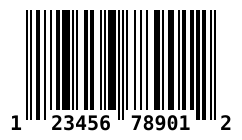
EAN-13
EAN-8
EAN-5
EAN-2
UPC (A)
UPC (E)
CODE39
ITF
ITF
ITF-14
MSI
MSI10
MSI11
MSI1010
MSI1110
Pharmacode
Codabar
CODE93
Examples for browsers:
First create a canvas (or image)
<svg id="barcode"></svg>
<!-- or -->
<canvas id="barcode"></canvas>
<!-- or -->
<img id="barcode"/>
Simple example:
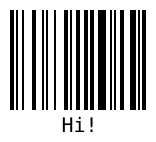
JsBarcode("#barcode", "Hi!");
// or with jQuery
$("#barcode").JsBarcode("Hi!");
Retrieve the barcode values so you can render it any way you'd like
Pass in an object which will be filled with data.
const data = {};
JsBarcode(data, 'text', {...options});
data will be filled with a encodings property which has all the needed values.
See wiki for an example of what data looks like.
Setup for browsers:
Step 1:
Download or get the CDN link to the script:
Name
Supported barcodes
Size (gzip)
CDN / Download
All
All the barcodes!
11.1 kB
JsBarcode.all.min.js
CODE128
CODE128 (auto and force mode)
6.3 kB
JsBarcode.code128.min.js
CODE39
CODE39
5.1 kB
JsBarcode.code39.min.js
EAN / UPC
EAN-13, EAN-8, EAN-5, EAN-2, UPC (A)
6.7 kB
JsBarcode.ean-upc.min.js
ITF
ITF, ITF-14
5.1 kB
JsBarcode.itf.min.js
MSI
MSI, MSI10, MSI11, MSI1010, MSI1110
5 kB
JsBarcode.msi.min.js
Pharmacode
Pharmacode
4.8 kB
JsBarcode.pharmacode.min.js
Codabar
Codabar
4.9 kB
JsBarcode.codabar.min.js
CODE93
CODE93
JsBarcode.code93.min.js
Step 2:
Include the script in your code:
<script src="JsBarcode.all.min.js"></script>
Step 3:
You are done! Go generate some barcodes :smile:
Bower and npm:
You can also use Bower or npm to install and manage the library.
bower install jsbarcode --save
npm install jsbarcode --save
Node.js:
With canvas:
var JsBarcode = require('jsbarcode');

// Canvas v1
var Canvas = require("canvas");
// Canvas v2
var { createCanvas } = require("canvas");

// Canvas v1
var canvas = new Canvas();
// Canvas v2
var canvas = createCanvas();

JsBarcode(canvas, "Hello");

// Do what you want with the canvas
// See https://github.com/Automattic/node-canvas for more information
For information about how to use the options, see the wiki page.
Option
Default value
Type
format
"auto" (CODE128)
String
width
2
Number
height
100
Number
displayValue
true
Boolean
text
undefined
String
fontOptions
""
String
font
"monospace"
String
textAlign
"center"
String
textPosition
"bottom"
String
textMargin
2
Number
fontSize
20
Number
background
"#ffffff"
String (CSS color)
lineColor
"#000000"
String (CSS color)
margin
10
Number
marginTop
undefined
Number
marginBottom
undefined
Number
marginLeft
undefined
Number
marginRight
undefined
Number
valid
function(valid){}
Function
Contributions and feedback:
We :heart: contributions and feedback.
If you want to contribute, please check out the CONTRIBUTING.md file.
If you have any question or suggestion create an issue or ask about it in the gitter chat.
Bug reports should always be done with a new issue.
License:
JsBarcode is shared under the MIT license. This means you can modify and use it however you want, even for comercial use. But please give this the Github repo a :star: and write a small comment of how you are using JsBarcode in the gitter chat.
lindell/JsBarcode thuộc nhóm Frontend trên TopGit, cùng 5 topic GitHub. Trang Trending và Topics liệt kê các repo cùng số sao và cùng ngôn ngữ để so sánh.
Đọc thêm về lindell/JsBarcode ở đâu?
Trang TopGit này là một snapshot — tab "Readme" hiển thị nguyên văn README của repo (đã bỏ link, giữ ảnh). Repo GitHub ở github.com/lindell/JsBarcode là nguồn chính thức.
lindell/JsBarcode có phải mã nguồn mở không?
Có — lindell/JsBarcode phát hành theo license MIT, nghĩa là mã nguồn mở để đọc, fork và (tùy license) tái sử dụng. Mã: github.com/lindell/JsBarcode.
lindell/JsBarcode là gì?
lindell/JsBarcode (lindell/JsBarcode) là dự án JavaScript trên GitHub. Theo mô tả gốc: Barcode generation library written in JavaScript that works in both the browser and on Node.js
lindell/JsBarcode so với các dự án Frontend khác thế nào?
lindell/JsBarcode được TopGit xếp vào nhóm Frontend, với 5.9k sao GitHub và viết bằng JavaScript. Xem trang chủ đề Frontend trên TopGit để so sánh với các dự án tương tự theo số sao và mức độ hoạt động.
Vì sao lindell/JsBarcode được xếp vào nhóm Frontend?
TopGit xếp lindell/JsBarcode vào nhóm Frontend dựa trên GitHub topics và mô tả của repo (gắn thẻ: "barcode", "barcode-generator", "es2015"). Việc phân loại dựa trên metadata thật của repo, không phải đoán theo cảm tính biên tập.
Đọc đầy đủ README ở tab phía trên.
Vẫn đang phân vân về JsBarcode?
Một cú bấm sẽ gửi câu hỏi kèm trang này cho AI — xem AI nói gì về JsBarcode.

 /JsBarcode