line/promgen là dự án phía máy chủ trên GitHub với 1.1k sao, viết chủ yếu bằng Python. Promgen is a configuration file generator for Prometheus
Tóm tắt dựng từ metadata GitHub của chính dự án — chưa có bài review TopGit. Trang sẽ tự động cập nhật khi bài review đầy đủ được xuất bản.
VÌ SAO CHƯA CÓ REVIEW
TopGit viết bài đầy đủ cho repo có nhiều sao nhất và được yêu cầu nhiều nhất. Trang này là snapshot trong thời gian chờ — xem README gốc ở tab READ ME.
Promgen is a configuration file generator for Prometheus. Promgen is a web application written with Django and can help you do the following jobs.
Create and manage Prometheus configuration files
Configure alert rules and notification options
See the Promgen introduction slides for the original history of Promgen.
See https://line.github.io/promgen/ for additional documentation.
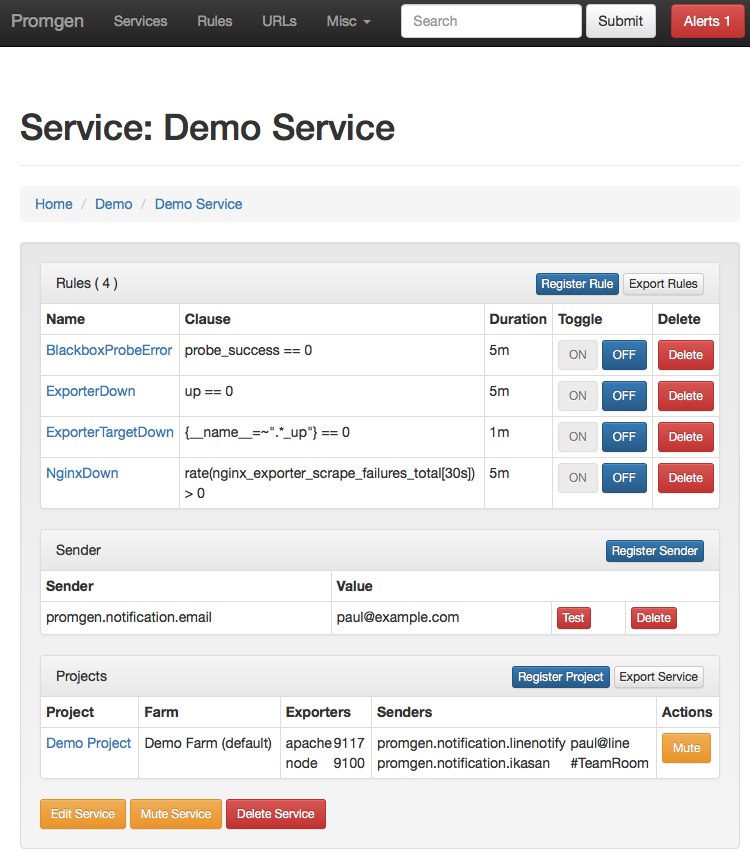
Promgen screenshots
Contributing
Below are the steps to get started with Promgen.
Please see CONTRIBUTING.md for contributing to Promgen.
If you believe you have discovered a vulnerability or have an issue related to security, please DO NOT open a public issue. Instead, send us a mail to [email protected].
1. Initialize Promgen
Initialize Promgen using Docker.
# Create promgen setting directory.
mkdir -p ~/.config/promgen
chmod 777 ~/.config/promgen

# Initialize required settings with Docker container
# This will prompt you for connection settings for your database and Redis broker
# using the standard DSN syntax.
# Database example: mysql://username:password@hostname/databasename
# Broker example: redis://localhost:6379/0
docker run --rm -it -v ~/.config/promgen:/etc/promgen/ line/promgen docker-compose-bootstrap

# Apply database updates
docker run --rm -v ~/.config/promgen:/etc/promgen/ line/promgen migrate

# You can then check your configuration to ensure everything correct
docker run --rm -v ~/.config/promgen:/etc/promgen/ line/promgen check

# Create initial login user. This is the same as the default django-admin command
# https://docs.djangoproject.com/en/1.10/ref/django-admin/#django-admin-createsuperuser
docker run --rm -it -v ~/.config/promgen:/etc/promgen/ line/promgen createsuperuser
You can then use your favorite configuration management system to deploy to each worker.
Note: Promgen aims to use the XDG specs and follows suggestions made by the 12-Factor App.
2. Configure Prometheus
Configure Prometheus to load the target file from Prometheus and configure AlertManager to send notifications back to Promgen.
See the example settings files for proper configuration of Prometheus and AlertManager.
Example settings file
Example Prometheus file
Example AlertManager file
3. Run Promgen
Run Promgen using the following command.
# Run Promgen web worker. This is typically balanced behind an NGINX instance.
# For this sample command we just allow all hosts, but you should set the
# ALLOWED_HOSTS variable properly. See:
# https://docs.djangoproject.com/en/4.2/ref/settings/#allowed-hosts
docker run --rm -p 8000:8000 -e ALLOWED_HOSTS=* -v ~/.config/promgen:/etc/promgen/ line/promgen

# Run Promgen celery worker. Make sure to run it on the same machine as your Prometheus server to manage the config settings
docker run --rm -v ~/.config/promgen:/etc/promgen/ -v /etc/prometheus:/etc/prometheus line/promgen worker

# If you are using docker compose, you can spin up a demo environment
docker-compose up -d
# Database migration to populate with initial data
docker-compose run web docker-compose-bootstrap
# If you want to create a different admin user
docker-compose run web createsuperuser
# Now you should be able to open the demo environment in your browser
The MIT License
Copyright (c) 2017 LINE Corporation
Permission is hereby granted, free of charge, to any person obtaining a copy
of this software and associated documentation files (the "Software"), to deal
in the Software without restriction, including without limitation the rights
to use, copy, modify, merge, publish, distribute, sublicense, and/or sell
copies of the Software, and to permit persons to whom the Software is
furnished to do so, subject to the following conditions:
The above copyright notice and this permission notice shall be included in all
copies or substantial portions of the Software.
THE SOFTWARE IS PROVIDED "AS IS", WITHOUT WARRANTY OF ANY KIND, EXPRESS OR
IMPLIED, INCLUDING BUT NOT LIMITED TO THE WARRANTIES OF MERCHANTABILITY,
FITNESS FOR A PARTICULAR PURPOSE AND NONINFRINGEMENT. IN NO EVENT SHALL THE
AUTHORS OR COPYRIGHT HOLDERS BE LIABLE FOR ANY CLAIM, DAMAGES OR OTHER
LIABILITY, WHETHER IN AN ACTION OF CONTRACT, TORT OR OTHERWISE, ARISING FROM,
OUT OF OR IN CONNECTION WITH THE SOFTWARE OR THE USE OR OTHER DEALINGS IN THE
SOFTWARE.
line/promgen thuộc nhóm Backend trên TopGit, cùng 3 topic GitHub. Trang Trending và Topics liệt kê các repo cùng số sao và cùng ngôn ngữ để so sánh.
Đọc thêm về line/promgen ở đâu?
Trang TopGit này là một snapshot — tab "Readme" hiển thị nguyên văn README của repo (đã bỏ link, giữ ảnh). Repo GitHub ở github.com/line/promgen là nguồn chính thức.
line/promgen có bao nhiêu sao?
line/promgen có 1.1k sao GitHub — tải lại trang để xem số mới nhất, hoặc xem trực tiếp github.com/line/promgen. TopGit phản chiếu số sao của GitHub nhưng không cam kết đến từng phút.
line/promgen có phải mã nguồn mở không?
Có — line/promgen phát hành theo license MIT, nghĩa là mã nguồn mở để đọc, fork và (tùy license) tái sử dụng. Mã: github.com/line/promgen.
line/promgen còn đang phát triển không?
Commit gần nhất trên line/promgen là 13 ngày trước (theo timestamp GitHub). Repo có 152 fork — một chỉ báo về mức độ quan tâm của cộng đồng.
line/promgen dùng license gì?
line/promgen phát hành theo license MIT. Nên mở file LICENSE trên GitHub để xác nhận — license metadata đôi khi lệch với thực tế dự án.
line/promgen là gì?
line/promgen (line/promgen) là dự án Python trên GitHub. Theo mô tả gốc: Promgen is a configuration file generator for Prometheus
line/promgen viết bằng ngôn ngữ gì?
line/promgen chủ yếu viết bằng Python. Trường "language" của GitHub dựa trên phần lớn byte ở nhánh mặc định.
Đọc đầy đủ README ở tab phía trên.
Muốn nghe thêm một ý kiến về promgen?
Hỏi một AI đọc được trang này — một cú bấm là có ngay nhận định về promgen.

 /promgen