Được TopGit lập chỉ mục từ metadata GitHub: line/tsr có 1.3k sao, viết chủ yếu bằng TypeScript. TypeScript Remove (tsr) is a utility that removes unused code from TypeScript projects – It's like tree shaking, but for source files
Tóm tắt dựng từ metadata GitHub của chính dự án — chưa có bài review TopGit. Trang sẽ tự động cập nhật khi bài review đầy đủ được xuất bản.
VÌ SAO CHƯA CÓ REVIEW
TopGit viết bài đầy đủ cho repo có nhiều sao nhất và được yêu cầu nhiều nhất. Trang này là snapshot trong thời gian chờ — xem README gốc ở tab READ ME.
This project has ended.
If you need similar functionality, please use similar tools such as Knip.
tsr
TypeScript Remove (tsr) is a utility that removes unused code from TypeScript projects – It's like tree shaking, but for source files
English | 한국어
Migrating from v0.x (ts-remove-unused)
Features
🕵️ Find unused code
tsr statically analyses your TypeScript project like how tree-shaking is implemented in bundlers. Run tsr to get a list of unused exports and files (modules) in your TypeScript project. Use tsr in your CI pipeline to detect unused code from being added.
🧹 Remove unused code automatically
tsr is built for automatic code removal. Not only does tsr remove the export keyword from unused declarations, it will remove the whole declaration if the declaration not used within the file. tsr will also remove imports and other local declarations that became unnecessary after removing the declaration. Check out the examples of how tsr edits your files.
📦 Works out of the box
tsr uses the TypeScript compiler to detect files in your project and resolve imports. The only requirement is a valid tsconfig.json. There's no need to setup another config file to get tsr running. Specify your entrypoint file and start using tsr in seconds.
Install
npm i tsr
TypeScript is a peer dependency.
Quick Start
🔍 Check your tsconfig.json – Make sure include and exclude are configured thoroughly so that tsr can correctly detect unused code.
🔍 Check your entrypoint files – Without entrypoint files, all files are unnecessary. Usually it is some file like src/main.ts or maybe a group of files like src/pages/*.
🚀 Execute – Pass regex patterns that match the entrypoints. Use --write to change the files in place.
npx tsr 'src/main\.ts$'
Usage
CLI
Usage:
  tsr [options] [...entrypoints]

Options:
  -p, --project <file>    Path to your tsconfig.json
  -w, --write             Write changes in place
  -r, --recursive         Recursively look into files until the project is clean
  --include-d-ts          Check for unused code in .d.ts files
  -h, --help              Display this message
  -v, --version           Display version number

Examples:
  # Check unused code for a project with an entrypoint of src/main.ts
  tsr 'src/main\.ts$'

  # Write changes in place
  tsr --write 'src/main\.ts$'

  # Check unused code for a project with a custom tsconfig.json
  tsr --project tsconfig.app.json 'src/main\.ts$'

  # Check unused code for a project with multiple entrypoints in src/pages
  tsr 'src/pages/.*\.ts$'
-p, --project
Specifies the tsconfig.json that is used to analyze your codebase. Defaults to tsconfig.json in your project root.
npx tsr --project tsconfig.client.json 'src/main\.ts$'
-w, --write
Writes fixable changes in place.
[!WARNING]
This will delete code. Using it in a git controlled environment is highly recommended.
-r, --recursive
The default behavior of the CLI is to process all files once. Some issues may not be detected if the unused code is a result of the modification of another file in the project. When this option is enabled, tsr will recursively look into files that may be affected by a file edit.
This will take longer but is helpful when you want to edit in one pass.
--include-d-ts
By default, exported types in .d.ts files are not detected. Use the --include-d-ts option if you want to include types in .d.ts files.
JavaScript API
Alternatively, you can use the JavaScript API to execute tsr.
import { tsr } from 'tsr';

await tsr({
  entrypoints: [/main\.ts/],
  mode: 'check',
}).catch(() => {
  process.exitCode = 1;
});
The project path and/or the custom tsconfig.json can be manually specified.
Check the type definition import('tsr').Config for all of the available options.
Skip
When you add a comment // tsr-skip to your export declaration, it will be skipped from being removed.
// tsr-skip
export const hello = 'world';
Test files
If you have a separate tsconfig for tests using Project References, that would be great! tsr will remove exports/files that exist for the sake of testing.
If you pass a tsconfig.json to the CLI that includes both the implementation and the test files, tsr will remove your test files since they are not referenced by your entry point file by default. You can avoid tests being deleted by passing a pattern that matches your test files to the args in the meantime, but the recommended way is to use project references to ensure your TypeScript config is more robust and strict (not just for using this tool).
npx tsr -w 'src/main\.ts$' ## depending on the tsconfig, this will delete test files
npx tsr -w 'src/main\.ts$' '.*\.test\.ts$' ## Specifying test files as entrypoints will avoid deletion
Comparison
TypeScript
If you enable compilerOptions.noUnusedLocals, declarations that are never read will be reported.
// 'a' is declared but its value is never read.
const a = 'a';
However, when you export it, no errors will be reported regardless of its usage within the project. tsr's aim is to report/fix unused code while taking project wide usage into account.
ESLint
ESLint will detect unused imports. Plugins such as eslint-plugin-unused-imports can also auto-fix this issue.
// 'foo' is defined but never used.
import { foo } from './foo';
However, we can't detect unused exports. ESLint's architecture works in a file by file basis and was never intended to provide linting based on project-wide usage stats.
// a lint rule that detects if this export is used within the project is unlikely to be introduced
export const a = 'a';
tsr's main goal is to remove unused exports and delete unused modules, but it will also delete unused imports that are a result of removing an export declaration.
Knip
Knip aims to be a comprehensive solution around the idea of detecting unused code (and even dependencies) in repositories. While there are obvious differences like tsr supporting TypeScript projects only, here are some notable differences.
Built for automatic editing
tsr was designed for automatic code editing from the beginning. Knip currently does support automatic fixing, however there are limitations to what it provides. For example, given the following code:
export const a = 'a';

export const f = () => a2;

const a2 = 'a2';
When f() is not used within the project,
Knip will only remove the export keyword
tsr will remove the whole declaration of f() and will also remove a2
Zero Configuration
Knip expects users to provide a config file. While this adds the flexibility, it's difficult to correctly configure Knip to suit your needs. tsr relies on tsconfig.json to avoid additional setup. If you have a tsconfig.json configured in your repository, it works out of the box.
Less ambiguity
Knip makes some assumptions on how your project is structured to detect code usage. Also, Knip has a custom module resolution behavior. While these design decisions might be helpful for some users and opens the possibility to support file types that TypeScript can't handle, the behavior becomes less predictable.
tsr's behavior is clear by design. TypeScript is used to detect modules in your project and to resolve import statements so you can take full control with tsconfig.json. Basically, if your project passes type checking, tsr will work. If tsc fails, tsr will also fail to produce the correct results.
Minimal Design
tsr is designed to be minimal and serve a single purpose. The install size is substantially smaller. Also, tsr is runtime dependent, not relying on @types/node.
tsr
Knip
98kB
5.86MB
Better Performance
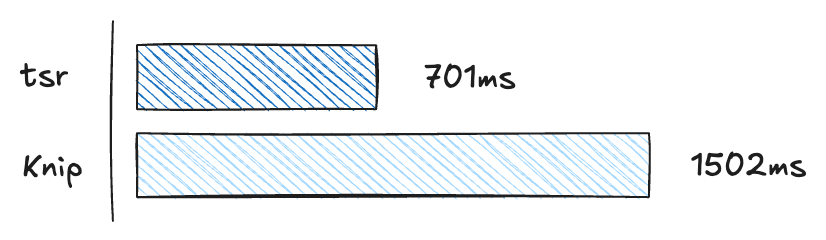
Our benchmark shows that tsr is 2.14x faster compared to Knip 🚀 (see benchmark/vue_core.sh for details)
Recursive Editing
tsr provides --recursive option which will edit your files until there are no unused code in one pass.
Key Differences
Feature
tsr
Knip
Automatic Editing
✅ Comprehensive
Limited
Zero Configuration
✅ Works with tsconfig.json
Requires a config file for correct results
Predictable Behavior
✅ TypeScript-based logic
Assumptions for project structure
Install Size
✅ 98kB, minimal dependencies
5.86MB, requires @types/node
Performance
✅ 2.14x faster
Recursive Editing
✅ --recursive option
Examples
Here are some examples of how tsr edits your files when it finds unused code.
When b is not used within the project but f() is used within the project:
--- src/b.ts
+++ src/b.ts
@@ -1,5 +1,5 @@
-export const b = 'b';
+const b = 'b';

 export function f() {
     return b;
 }
When f() is not used within the project and when deleting it will result in import being unnecessary:
--- src/c.ts
+++ src/c.ts
@@ -1,7 +1 @@
-import { cwd } from "node:process";
-
 export const c = 'c';
-
-export function f() {
-    return cwd();
-}
When f() and exported are not used within the project and when deleting f() will result in exported and local being unnecessary:
--- src/d.ts
+++ src/d.ts
@@ -1,8 +1 @@
-export const exported = "exported";
-const local = "local";
-
 export const d = "d";
-
-export function f() {
-  return { exported, local };
-}
Contributing
Contributions are welcomed!
Author
Kazushi Konosu (https://github.com/kazushisan)
License
Copyright (C) 2023 LINE Corp.

Licensed under the Apache License, Version 2.0 (the "License");
you may not use this file except in compliance with the License.
You may obtain a copy of the License at

   http://www.apache.org/licenses/LICENSE-2.0

Unless required by applicable law or agreed to in writing, software
distributed under the License is distributed on an "AS IS" BASIS,
WITHOUT WARRANTIES OR CONDITIONS OF ANY KIND, either express or implied.
See the License for the specific language governing permissions and
limitations under the License.
Trang TopGit này là một snapshot — tab "Readme" hiển thị nguyên văn README của repo (đã bỏ link, giữ ảnh). Repo GitHub ở github.com/line/tsr là nguồn chính thức.
line/tsr có bao nhiêu sao?
line/tsr có 1.3k sao GitHub — tải lại trang để xem số mới nhất, hoặc xem trực tiếp github.com/line/tsr. TopGit phản chiếu số sao của GitHub nhưng không cam kết đến từng phút.
line/tsr có phải mã nguồn mở không?
Có — line/tsr phát hành theo license Apache-2.0, nghĩa là mã nguồn mở để đọc, fork và (tùy license) tái sử dụng. Mã: github.com/line/tsr.
line/tsr còn đang phát triển không?
Commit gần nhất trên line/tsr là 1.1 năm trước (theo timestamp GitHub). Repo có 21 fork — một chỉ báo về mức độ quan tâm của cộng đồng.
line/tsr là gì?
line/tsr (line/tsr) là dự án TypeScript trên GitHub. Theo mô tả gốc: TypeScript Remove (tsr) is a utility that removes unused code from TypeScript projects – It's like tree shaking, but for source files
line/tsr so với các dự án Frontend khác thế nào?
line/tsr được TopGit xếp vào nhóm Frontend, với 1.3k sao GitHub và viết bằng TypeScript. Xem trang chủ đề Frontend trên TopGit để so sánh với các dự án tương tự theo số sao và mức độ hoạt động.
Đọc đầy đủ README ở tab phía trên.
Chưa chắc tsr có hợp với bạn?
Để ChatGPT, Claude hoặc Perplexity tìm hiểu giúp — bấm bên dưới và xem AI nói gì về tsr.

 /tsr