linexjlin/ChatGPT-Next-Web — 8★ trên GitHub (TypeScript). One-Click to deploy well-designed ChatGPT web UI on Vercel. 一键拥有你自己的 ChatGPT 网页服务。
Tóm tắt dựng từ metadata GitHub của chính dự án — chưa có bài review TopGit. Trang sẽ tự động cập nhật khi bài review đầy đủ được xuất bản.
VÌ SAO CHƯA CÓ REVIEW
TopGit viết bài đầy đủ cho repo có nhiều sao nhất và được yêu cầu nhiều nhất. Trang này là snapshot trong thời gian chờ — xem README gốc ở tab READ ME.
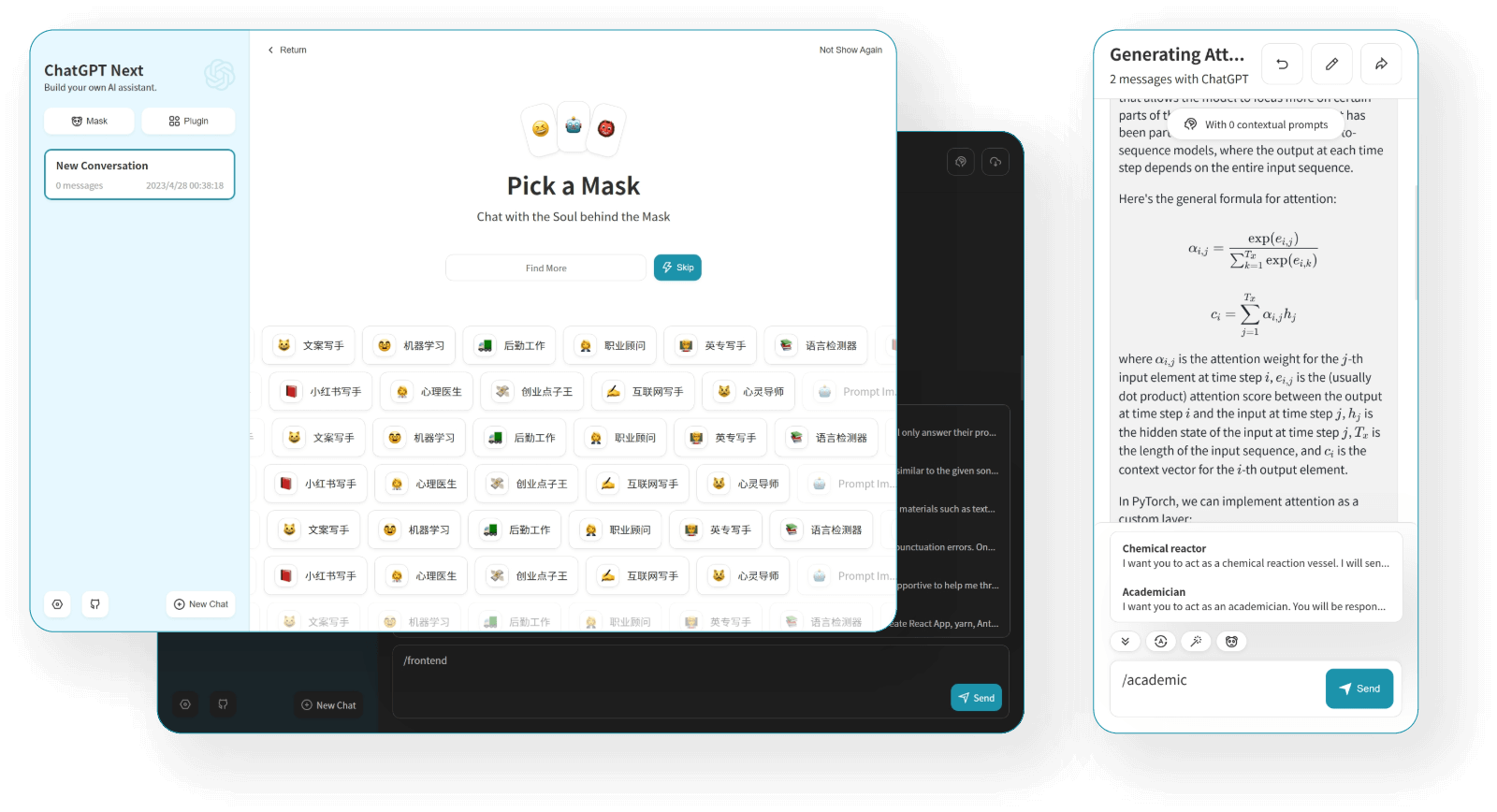
One-Click to get a well-designed cross-platform ChatGPT web UI, with GPT3, GPT4 & Gemini Pro support.
一键免费部署你的跨平台私人 ChatGPT 应用, 支持 GPT3, GPT4 & Gemini Pro 模型。
Web App / Desktop App / Discord / Twitter
网页版 / 客户端 / 反馈
Features
Deploy for free with one-click on Vercel in under 1 minute
Compact client (~5MB) on Linux/Windows/MacOS, download it now
Fully compatible with self-deployed LLMs, recommended for use with RWKV-Runner or LocalAI
Privacy first, all data is stored locally in the browser
Markdown support: LaTex, mermaid, code highlight, etc.
Responsive design, dark mode and PWA
Fast first screen loading speed (~100kb), support streaming response
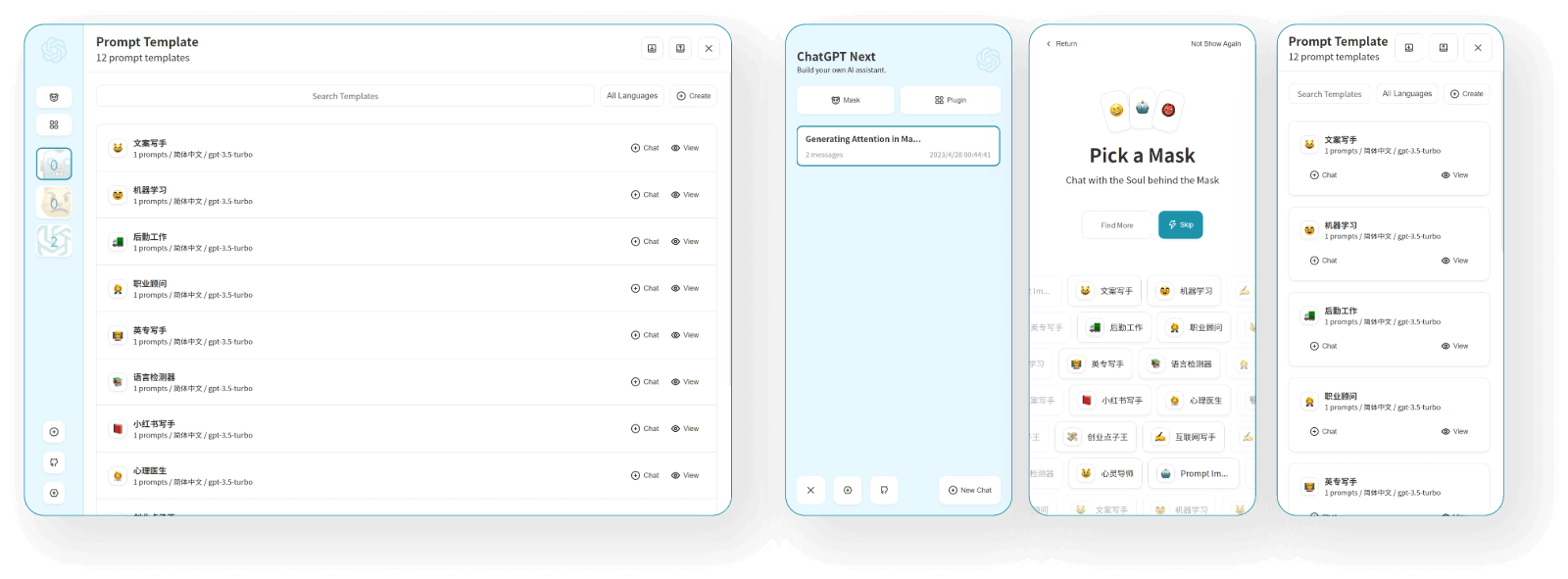
New in v2: create, share and debug your chat tools with prompt templates (mask)
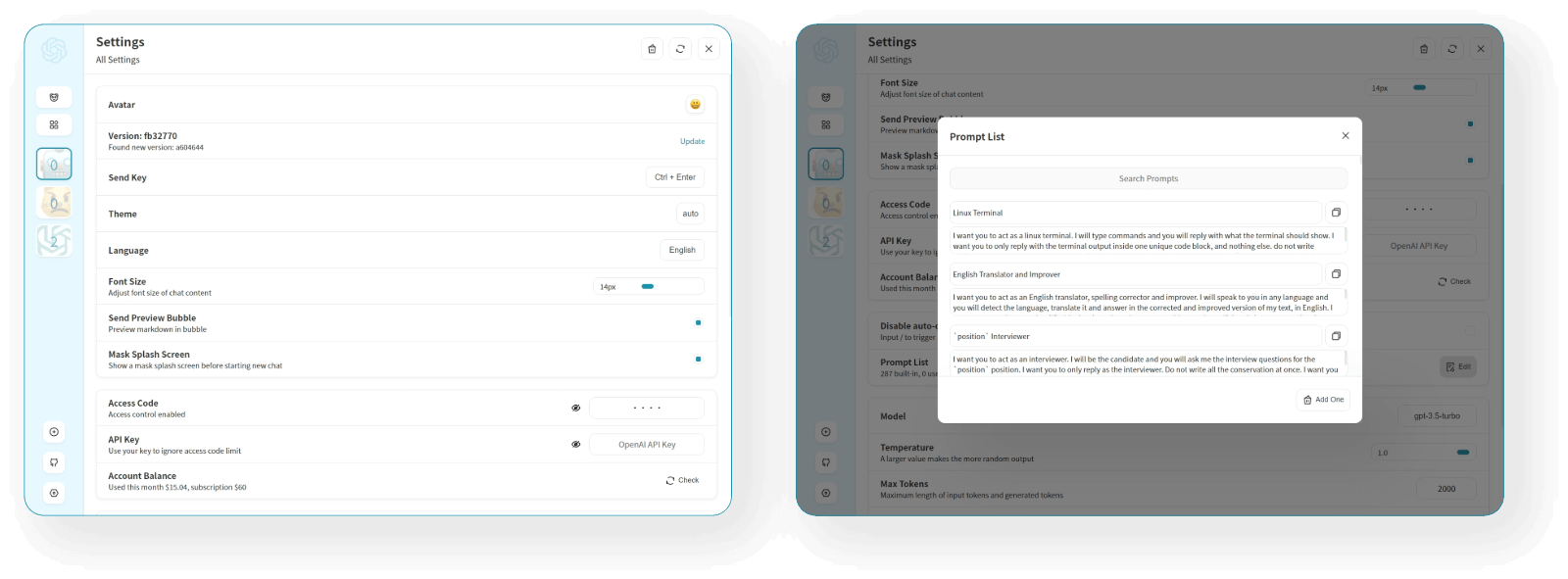
Awesome prompts powered by awesome-chatgpt-prompts-zh and awesome-chatgpt-prompts
Automatically compresses chat history to support long conversations while also saving your tokens
I18n: English, 简体中文, 繁体中文, 日本語, Français, Español, Italiano, Türkçe, Deutsch, Tiếng Việt, Русский, Čeština, 한국어, Indonesia
Roadmap
System Prompt: pin a user defined prompt as system prompt #138
User Prompt: user can edit and save custom prompts to prompt list
Prompt Template: create a new chat with pre-defined in-context prompts #993
Share as image, share to ShareGPT #1741
Desktop App with tauri
Self-host Model: Fully compatible with RWKV-Runner, as well as server deployment of LocalAI: llama/gpt4all/rwkv/vicuna/koala/gpt4all-j/cerebras/falcon/dolly etc.
Plugins: support network search, calculator, any other apis etc. #165
What's New
🚀 v2.10.1 support Google Gemini Pro model.
🚀 v2.9.11 you can use azure endpoint now.
🚀 v2.8 now we have a client that runs across all platforms!
🚀 v2.7 let's share conversations as image, or share to ShareGPT!
🚀 v2.0 is released, now you can create prompt templates, turn your ideas into reality! Read this: ChatGPT Prompt Engineering Tips: Zero, One and Few Shot Prompting.
主要功能
在 1 分钟内使用 Vercel 免费一键部署
提供体积极小(~5MB)的跨平台客户端(Linux/Windows/MacOS), 下载地址
完整的 Markdown 支持:LaTex 公式、Mermaid 流程图、代码高亮等等
精心设计的 UI,响应式设计,支持深色模式,支持 PWA
极快的首屏加载速度(~100kb),支持流式响应
隐私安全,所有数据保存在用户浏览器本地
预制角色功能(面具),方便地创建、分享和调试你的个性化对话
海量的内置 prompt 列表,来自中文和英文
自动压缩上下文聊天记录,在节省 Token 的同时支持超长对话
多国语言支持:English, 简体中文, 繁体中文, 日本語, Español, Italiano, Türkçe, Deutsch, Tiếng Việt, Русский, Čeština, 한국어, Indonesia
If you have deployed your own project with just one click following the steps above, you may encounter the issue of "Updates Available" constantly showing up. This is because Vercel will create a new project for you by default instead of forking this project, resulting in the inability to detect updates correctly.
We recommend that you follow the steps below to re-deploy:
Delete the original repository;
Use the fork button in the upper right corner of the page to fork this project;
Choose and deploy in Vercel again, please see the detailed tutorial.
Enable Automatic Updates
If you encounter a failure of Upstream Sync execution, please manually sync fork once.
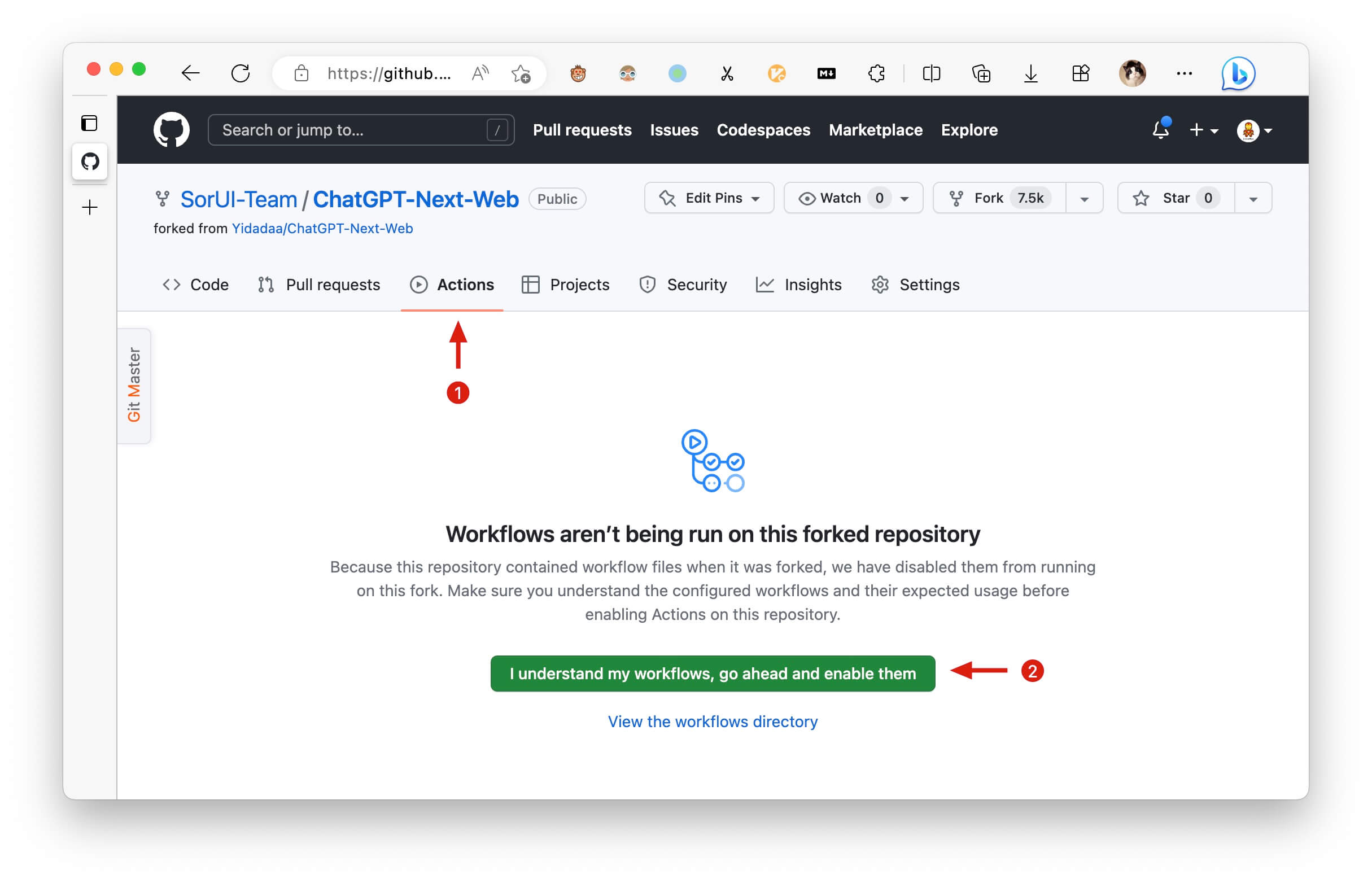
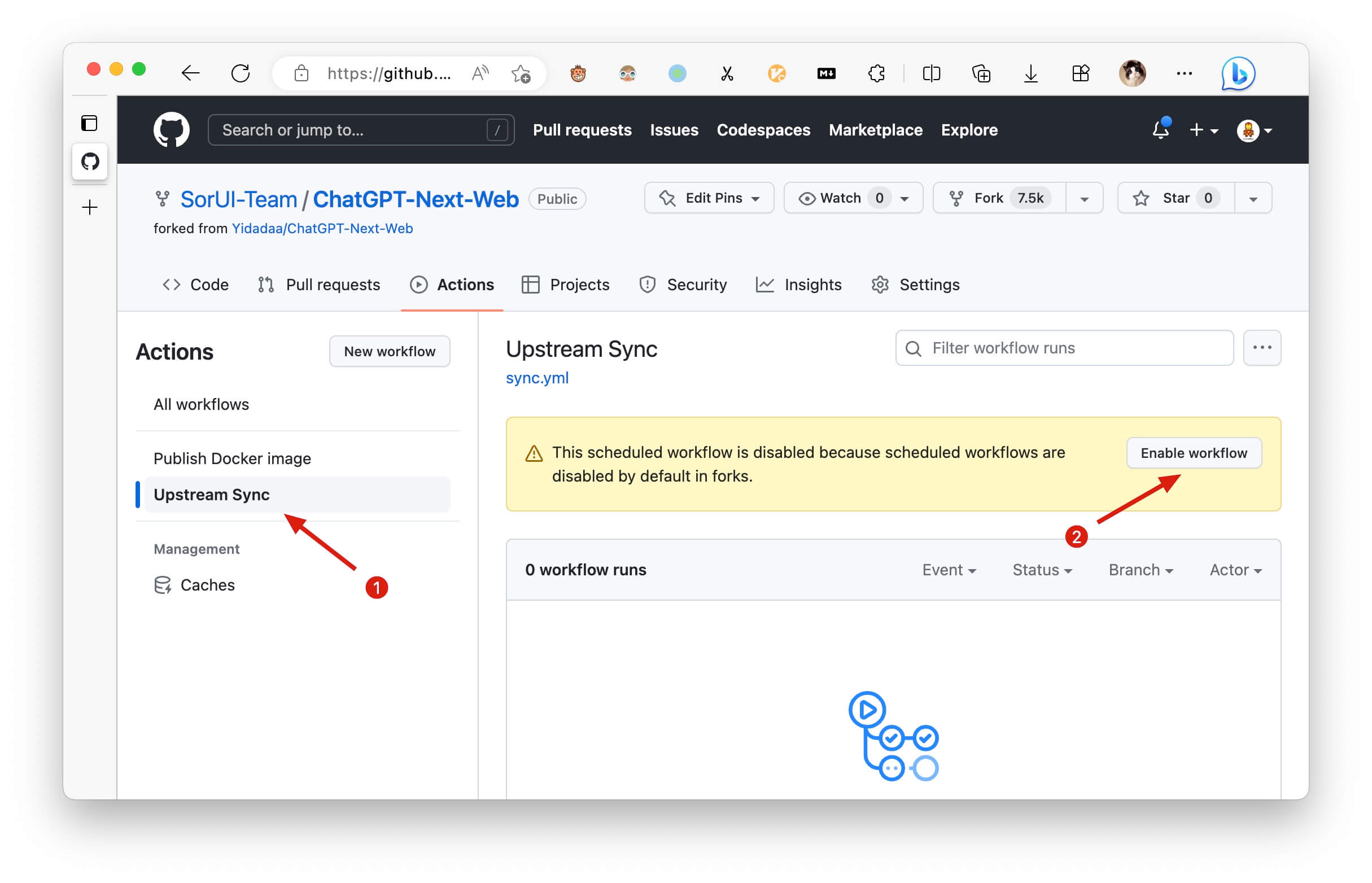
After forking the project, due to the limitations imposed by GitHub, you need to manually enable Workflows and Upstream Sync Action on the Actions page of the forked project. Once enabled, automatic updates will be scheduled every hour:
Manually Updating Code
If you want to update instantly, you can check out the GitHub documentation to learn how to synchronize a forked project with upstream code.
You can star or watch this project or follow author to get release notifications in time.
Access Password
简体中文 > 如何增加访问密码
This project provides limited access control. Please add an environment variable named CODE on the vercel environment variables page. The value should be passwords separated by comma like this:
code1,code2,code3
After adding or modifying this environment variable, please redeploy the project for the changes to take effect.
Environment Variables
简体中文 > 如何配置 api key、访问密码、接口代理
CODE (optional)
Access password, separated by comma.
OPENAI_API_KEY (required)
Your openai api key, join multiple api keys with comma.
Azure Api Version, find it at Azure Documentation.
GOOGLE_API_KEY (optional)
Google Gemini Pro Api Key.
GOOGLE_URL (optional)
Google Gemini Pro Api Url.
HIDE_USER_API_KEY (optional)
Default: Empty
If you do not want users to input their own API key, set this value to 1.
DISABLE_GPT4 (optional)
Default: Empty
If you do not want users to use GPT-4, set this value to 1.
ENABLE_BALANCE_QUERY (optional)
Default: Empty
If you do want users to query balance, set this value to 1, or you should set it to 0.
DISABLE_FAST_LINK (optional)
Default: Empty
If you want to disable parse settings from url, set this to 1.
CUSTOM_MODELS (optional)
Default: Empty
Example: +llama,+claude-2,-gpt-3.5-turbo,gpt-4-1106-preview=gpt-4-turbo means add llama, claude-2 to model list, and remove gpt-3.5-turbo from list, and display gpt-4-1106-preview as gpt-4-turbo.
To control custom models, use + to add a custom model, use - to hide a model, use name=displayName to customize model name, separated by comma.
User -all to disable all default models, +all to enable all default models.
Requirements
NodeJS >= 18, Docker >= 20
Development
简体中文 > 如何进行二次开发
Before starting development, you must create a new .env.local file at project root, and place your api key into it:
OPENAI_API_KEY=<your api key here>

# if you are not able to access openai service, use this BASE_URL
BASE_URL=https://chatgpt1.nextweb.fun/api/proxy
Local Development
# 1. install nodejs and yarn first
# 2. config local env vars in `.env.local`
# 3. run
yarn install
yarn dev
Trang TopGit này là một snapshot — tab "Readme" hiển thị nguyên văn README của repo (đã bỏ link, giữ ảnh). Repo GitHub ở github.com/linexjlin/ChatGPT-Next-Web là nguồn chính thức.
linexjlin/ChatGPT-Next-Web có phải mã nguồn mở không?
Có — linexjlin/ChatGPT-Next-Web phát hành theo license MIT, nghĩa là mã nguồn mở để đọc, fork và (tùy license) tái sử dụng. Mã: github.com/linexjlin/ChatGPT-Next-Web.
linexjlin/ChatGPT-Next-Web có trang demo không?
Dự án có trang chủ ở https://chatgpt.nextweb.fun. Tab "Readme" ở trang này thường có ảnh chụp và hướng dẫn bắt đầu nhanh.
linexjlin/ChatGPT-Next-Web dùng license gì?
linexjlin/ChatGPT-Next-Web phát hành theo license MIT. Nên mở file LICENSE trên GitHub để xác nhận — license metadata đôi khi lệch với thực tế dự án.
linexjlin/ChatGPT-Next-Web là gì?
linexjlin/ChatGPT-Next-Web (linexjlin/ChatGPT-Next-Web) là dự án TypeScript trên GitHub. Theo mô tả gốc: One-Click to deploy well-designed ChatGPT web UI on Vercel. 一键拥有你自己的 ChatGPT 网页服务。
Đọc đầy đủ README ở tab phía trên.
Vẫn đang phân vân về ChatGPT-Next-Web?
Một cú bấm sẽ gửi câu hỏi kèm trang này cho AI — xem AI nói gì về ChatGPT-Next-Web.

 /ChatGPT-Next-Web