
m1k1o/blog

Là một công cụ cho lập trình viên, m1k1o/blog đã đạt 307 sao trên GitHub, ngôn ngữ PHP. Lightweight self-hosted facebook-styled PHP blog.
Tóm tắt dựng từ metadata GitHub của chính dự án — chưa có bài review TopGit. Trang sẽ tự động cập nhật khi bài review đầy đủ được xuất bản.
TopGit viết bài đầy đủ cho repo có nhiều sao nhất và được yêu cầu nhiều nhất. Trang này là snapshot trong thời gian chờ — xem README gốc ở tab READ ME.
Snapshot
Cộng tác viên hàng đầu
Xem cộng tác viên hàng đầu
blog
This is a simple self-hosted, lightweight, singe-user PHP blog, where you can create your own Facebook-like feed. Give read access to other people, and you can share rich text with photos including highlighted code or links.
In this context lightweight means:
- No npm dependency, there won't be an annoying 1GB
node_modulesdirectory. - No pipeline. What you see is pure code without a need to install it.
- No overhead, essential features, simple usage.
Screenshots
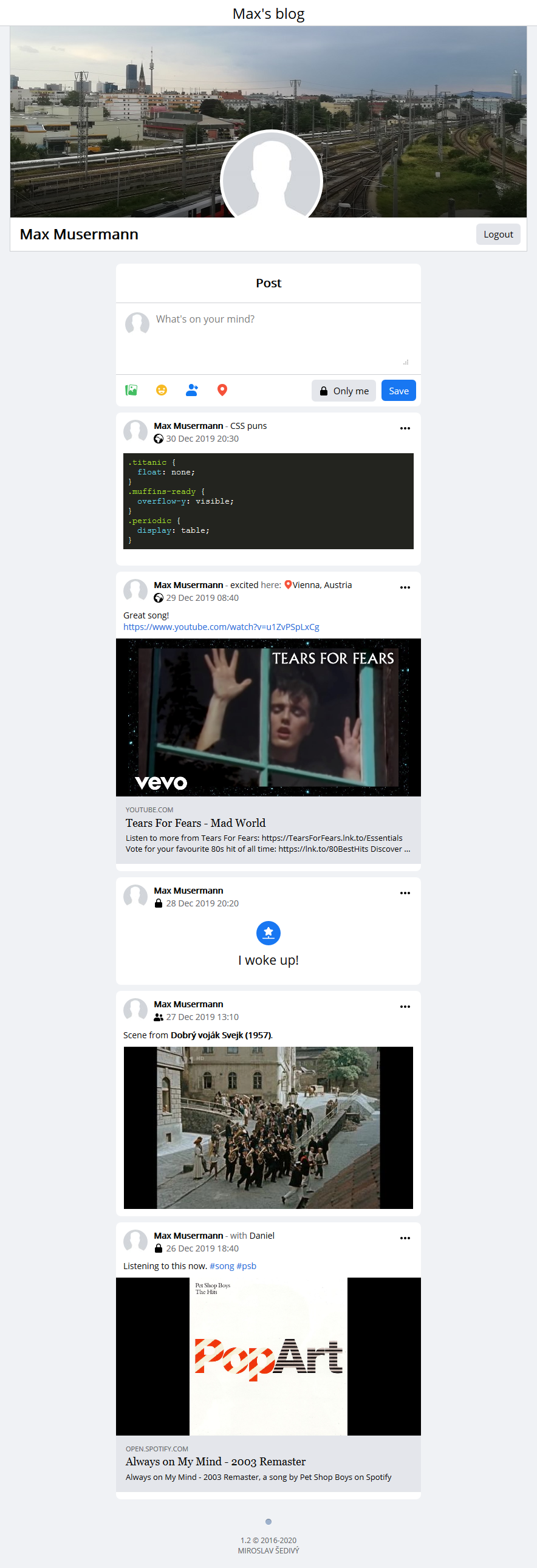
Light theme
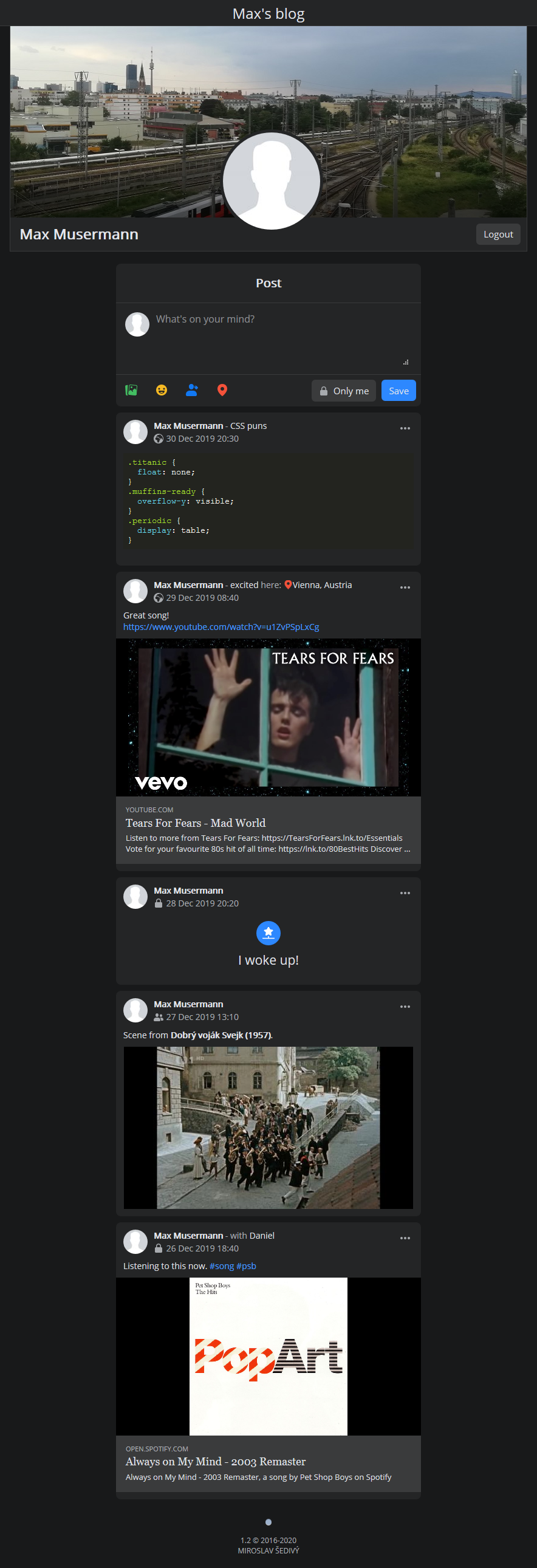
Dark theme
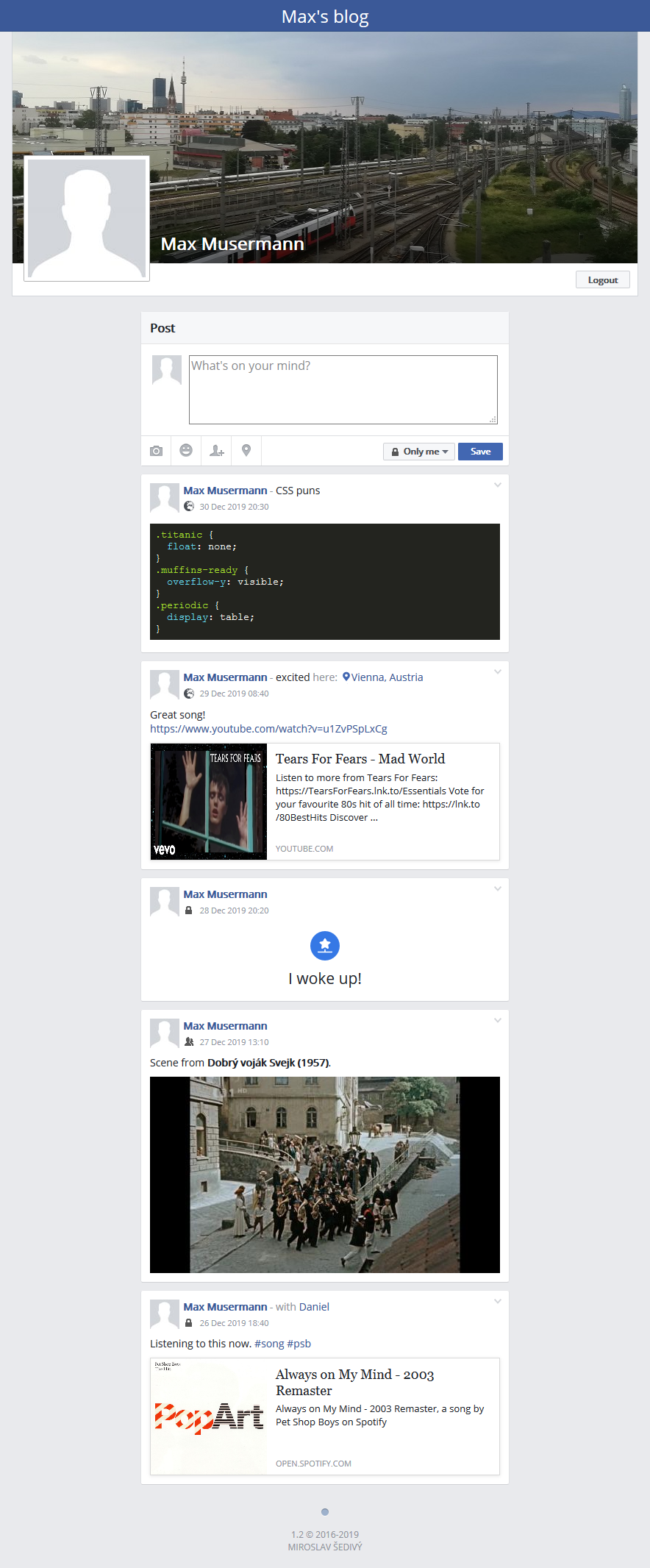
Legacy theme (compatible with older browsers)
Zero configuration setup
Container will run without any initial configuration needed using SQLite as database provider. For better performance consider using MySQL.
docker run -d -p 80:80 -v $PWD/data:/var/www/html/data m1k1o/blog:latest
You can set environment variables, prefixed with BLOG_ and uppercase. They can be found in config.ini.
docker run -d \
  -p 80:80 \
  -e "TZ=Europe/Vienna" \
  -e "BLOG_TITLE=Blog" \
  -e "BLOG_NAME=Max Musermann" \
  -e "BLOG_NICK=username" \
  -e "BLOG_PASS=password" \
  -e "BLOG_LANG=en" \
  -v $PWD/data:/var/www/html/data \
  m1k1o/blog:latest
Or for docker-compose format, see docker-compose.yml.
Install standalone app using docker-compose with external database
You need to install docker-compose.
MySQL
version: "3"
services:
  webserver:
    image: m1k1o/blog:latest
    container_name: blog_apache
    environment:
      TZ: Europe/Vienna
      BLOG_DB_CONNECTION: mysql
      BLOG_MYSQL_HOST: mariadb
      BLOG_MYSQL_PORT: 3306
      BLOG_MYSQL_USER: blog
      BLOG_MYSQL_PASS: blog # use secure password
      BLOG_DB_NAME: blog
    restart: unless-stopped
    ports:
      - ${HTTP_PORT-80}:80
    volumes:
      - ${DATA-./data}:/var/www/html/data
  mariadb:
    image: mariadb:10.1
    container_name: blog_mariadb
    environment:
      MYSQL_USER: blog
      MYSQL_PASSWORD: blog # use secure password
      MYSQL_DATABASE: blog
      MYSQL_ROOT_PASSWORD: root # use secure password
    restart: unless-stopped
    volumes:
      - mariadb:/var/lib/mysql
      - ./app/db/mysql:/docker-entrypoint-initdb.d:ro
volumes:
  mariadb:
Postgres
version: "3"
services:
  webserver:
    image: m1k1o/blog:latest
    container_name: blog_apache
    environment:
      TZ: Europe/Vienna
      BLOG_DB_CONNECTION: postgres
      BLOG_POSTGRES_HOST: postgres
      BLOG_POSTGRES_PORT: 5432
      BLOG_POSTGRES_USER: blog
      BLOG_POSTGRES_PASS: blog # use secure password
      BLOG_DB_NAME: blog
    restart: unless-stopped
    ports:
      - ${HTTP_PORT-80}:80
    volumes:
      - ${DATA-./data}:/var/www/html/data
  postgres:
    image: postgres:14
    container_name: blog_postgres
    environment:
      POSTGRES_USER: blog
      POSTGRES_PASSWORD: blog # use secure password
      POSTGRES_DB: blog
    restart: unless-stopped
    volumes:
      - postgres:/var/lib/postgresql/data
      - ./app/db/postgres:/docker-entrypoint-initdb.d:ro
volumes:
  postgres:
Step 1: Run docker-compose.yml.
Select one of configurations above and save it to docker-compose.yml. Then run:
docker-compose up -d
You can specify these environment variables, otherwise the default ones will be used:
- HTTP_PORT=80 - where the blog will be accessible.
- DATA=./data - directory to store the user data.
These environment variables can be stored in the .env file or passed to the command directly:
HTTP_PORT=3001 DATA=/home/user/blog docker-compose up -d
Step 2: Create data/ directory and download config.ini file.
Download default config file and copy to your new ./data/ directory.
mkdir data && cd data
wget https://raw.githubusercontent.com/m1k1o/blog/master/config.ini
Now you can modify your config. Or you can set environment variables, in uppercase, starting with BLOG_, e.g. BLOG_NAME: Max's blog.
Correct permissions
Make sure your ./data/ directory has correct permissions. Apache is running as a www-data user, which needs to have write access to the ./data/ directory (for uploading images).
Prefered solution
Change the directory owner to the www-data user:
chown 33:33 ./data/
Alternatively, add the www-data user to the user group that owns the ./data/ directory.
Bad solution (but it works)
Set 777 permission for your ./data/, so everyone can read, write, and execute:
chmod 777 ./data/
NOTICE: You should not use 777. You are giving access to anyone for this directory. Maybe to some attacker, who can run his exploit here.
Install
If you have decided that you don't want to use Docker, you can intall it manually.
Requirements: Apache 2.0*, PHP 8.0+, (MariaDB 10.1 or SQLite 3)
NOTICE: If you would like to use Nginx or another web server, make sure that the sensitive data are not exposed to the public. Since .htaccess is protecting those files in Apache, that could not be the case in a different environment. Take care of:
- config.ini - disallow access to all .ini files for the public.
- data/logs/_ANY_.log - make sure no sensitive information are located in .log.
Database Schema
You can find database schema in ./app/db folder.
Emojis in MySQL
MySQL tables created with older versions use the utf8 charset, which can't store emojis and other 4-byte characters, so they are removed from posts. To keep them, convert the tables to utf8mb4:
ALTER TABLE `posts` CONVERT TO CHARACTER SET utf8mb4;
ALTER TABLE `images` CONVERT TO CHARACTER SET utf8mb4;
Emojis are removed until both tables are converted. New MySQL databases, SQLite and Postgres support them out of the box.
Debug mode
To check if your server is set up correctly, turn on a debug mode (in config add debug = true) to see the details. In the debug mode, an error may be shown if you are missing some PHP extensions needed to be installed on your server.
Config file
DO NOT edit ./config.ini file. If you wish to modify the config, simply make a copy to the ./data/config.ini directory and edit it there.
But, why? If there is any change in config file (most likely adding a new feature), you will have problems with merging a new version. Also, if you would fork this repository, you might accidentally push your secrets to the git. We don't want that to happen. Content of the /data directory is ignored by the git, so none of your pictures or personal data should ever be published to git.
Features
- Dark mode, retina ready, legacy theme available.
- Use BBcode in texts, see Text formatting.
- Use emojis in posts 🎉 (MySQL databases created with older versions need to be converted, see Emojis in MySQL).
- Make posts available for everyone, only you or just for friends.
- Extra fields in post: Feeling, With and At.
- Hide posts from timeline so they are visible only when you need them to be.
- Pin posts to the top of the timeline, e.g. to always show an important announcement first (pinned posts are not moved to the top when posts are filtered).
- Delete posts permanently, including their uploaded images (set
hard_delete = truein config, by default deleted posts are kept in the database). - All pasted links will get preview with page title, description and image (can be configured proxy).
- Images of link previews and pasted image links are saved on your server, so they are preserved when the linked page goes down (set
save_link_images = falsein config to load them from the linked page instead). - Upload images using button (for mobile).
- Upload images using drag & drop (drop it into textarea).
- Upload images using CTRL + V (paste it into textarea).
- Add multiple images to a single post, they are shown as a grid and can be browsed in a gallery.
- HEIC images are converted to JPEG on upload (requires PHP
imagickextension with HEIC support, included in Docker image). - Upload videos (MP4, WebM, Ogg or MOV) using button or drag & drop, they are played directly in the post. A post can have either images or a single video. Uploads are limited to 256 MB, the limit can be changed in
.htaccess(upload_max_filesizeandpost_max_size). - Highlight code in post using
[code]..your code..[/code]. - Highlight your goal using
[goal]Text of your goal.[/goal]. - Use tags in posts (allowed characters
A-Za-z0-9-_terminated by space or EOL):#song. - Sort posts in reverse order (oldest first):
http://blog/#sort=reverse. - Filter posts by hashtags:
http://blog/#tag=songs. - Filter posts by location in url using:
http://blog/#loc=Vienna. - Display posts from chosen date using (format YYYY-MM-DD or YYY-MM):
http://blog/#from=2017-06. - Display posts to chosen date using (format YYYY-MM-DD or YYY-MM):
http://blog/#to=2017-06. - Combine parameters in url using
&, e.g. show posts between dates:http://blog/#from=2017-06&to=2017-08. - Export posts as a static page using the Export button, see Export.
Export
When you are logged in, the Export button downloads a ZIP archive with the posts shown on the timeline. The archive contains index.html, a static page that looks like your blog, together with all uploaded images and videos used by the exported posts, so it can be opened offline and archived. Link previews and linked images are not downloaded, they are still loaded from the original page.
All matching posts are exported, not only the ones already loaded on the page, including private and hidden posts. Filters in the URL apply to the export as well, so you can export only a part of your posts, e.g.:
- Posts from 2017:
http://blog/#from=2017-01&to=2018-01. - Posts with a tag:
http://blog/#tag=songs. - Posts from oldest to newest:
http://blog/#sort=reverse.
Export requires the PHP zip extension (included in Docker image).
Text formatting
Posts support the following BBCode tags:
| Tag | Result |
|---|---|
[b]text[/b] | Bold text. |
[i]text[/i] | Italic text. |
[u]text[/u] | Underlined text. |
[url]https://example.com[/url] | Link, the URL is used as its text. |
[url=https://example.com]text[/url] | Link with custom text, which can contain other tags. |
[img]https://example.com/image.png[/img] | Image, a full URL is required (relative paths are not supported). |
[img=alt text]https://example.com/image.png[/img] | Image with alternative text. |
[color=red]text[/color] | Colored text, accepts CSS colors such as red, #ff0000 or rgb(255,0,0). |
[code]code[/code] | Highlighted code, language can be specified as [code=css]. Requires highlight = true in config (enabled by default). |
[goal]text[/goal] | Highlighted goal with a star icon, use [goal=trophy] for a trophy icon. |
Formatting that works without tags:
*text*is shown in bold.http://andhttps://URLs are converted to links.#tags(allowed charactersA-Za-z0-9-_terminated by space or EOL) can be clicked to filter posts.- New lines are kept.
Other tags, such as [s] or [list], are not supported and are shown as plain text. You can add your own tags in config, {param} is replaced with the content of the tag:
[bbcode]
bbtags[quote] = "<blockquote>{param}</blockquote>"
Access control
This blog is using Mandatory Access Control (MAC), with 3 types of access levels:
- Private posts are visible only to your single account specified in
nickandpass. - You can specify group of your friends and share posts only for them.
- Public posts are visible to everyone, without login.
In docker-compose.yml file, specify your credentials and friends like this:
version: "3"
services:
  blog:
    image: m1k1o/blog:latest
    restart: unless-stopped
    environment:
        TZ: Europe/Vienna
        BLOG_NICK: admin_username
        BLOG_PASS: admin_password
        BLOG_FRIENDS: |
          jane:mysecretpass
          thomas:anotherpass
    ports:
      - 80:80
    volumes:
      - ./data:/var/www/html/data
You can specify your credentials and friends in your config.ini file e.g.:
[admin]
force_login = true
nick = admin_username
pass = admin_password

[friends]
friends[jane] = mysecretpass
friends[thomas] = anotherpass
Localisation
Timezone can be set in config or, for docker users, TZ environment variable is supported. List of timezones can be found here.
Date format
Dates of posts are shown as 13 Nov 2026 18:30 by default. The format can be changed with datetime_format in config (or BLOG_DATETIME_FORMAT environment variable), using PHP date format characters. Full month names (F) are translated to the selected language, e.g. j. F Y, H:i is shown as 13. November 2026, 18:30 in German.
[language]
datetime_format = "j. F Y, H:i"
Language support
Feel free to create new PR and add a new language. Specify language in config or in url: http://blog/?hl=sk.
- en - 🇬🇧 English
- de - 🇩🇪 German
- sk - 🇸🇰 Slovak
- fr - 🇫🇷 French (thanks @Phundrak)
- cz - 🇨🇿 Czech (thanks @djfinch)
- bs - 🇧🇦 Bosnian (thanks @hajro92)
- es - 🇪🇸 Spanish (thanks @ManuLinares)
- ru - 🇷🇺 Russian (thanks @ozzyst)
Repo liên quan
#1 PDF Application on GitHub that lets you edit PDFs on any device anywhere
DevOps Exercises is a GitHub repository collecting 2624 questions and exercises spanning Linux, networking, Kubernetes, Terraform, and cloud platforms, written as plain markdown Q&A with no app or course wrapped around it.
Bring projects, wikis, and teams together with AI. AppFlowy is the AI collaborative workspace where you achieve more without losing control of your data. The leading open source Notion alternative.
OpenClaw's README promises a self-hosted assistant in 20+ chat apps. We set that against GitHub activity and the published advisory record.
Trả lời nhanh
Đọc thêm về m1k1o/blog ở đâu?
Trang TopGit này là một snapshot — tab "Readme" hiển thị nguyên văn README của repo (đã bỏ link, giữ ảnh). Repo GitHub ở github.com/m1k1o/blog là nguồn chính thức.
m1k1o/blog có bao nhiêu sao?
m1k1o/blog có 307 sao GitHub — tải lại trang để xem số mới nhất, hoặc xem trực tiếp github.com/m1k1o/blog. TopGit phản chiếu số sao của GitHub nhưng không cam kết đến từng phút.
m1k1o/blog có phải mã nguồn mở không?
Có — m1k1o/blog phát hành theo license GPL-3.0, nghĩa là mã nguồn mở để đọc, fork và (tùy license) tái sử dụng. Mã: github.com/m1k1o/blog.
m1k1o/blog còn đang phát triển không?
Commit gần nhất trên m1k1o/blog là 7 ngày trước (theo timestamp GitHub). Repo có 37 fork — một chỉ báo về mức độ quan tâm của cộng đồng.
m1k1o/blog là gì?
m1k1o/blog (m1k1o/blog) là dự án PHP trên GitHub. Theo mô tả gốc: Lightweight self-hosted facebook-styled PHP blog.
m1k1o/blog so với các dự án Developer Tools khác thế nào?
m1k1o/blog được TopGit xếp vào nhóm Developer Tools, với 307 sao GitHub và viết bằng PHP. Xem trang chủ đề Developer Tools trên TopGit để so sánh với các dự án tương tự theo số sao và mức độ hoạt động.
Đọc đầy đủ README ở tab phía trên.
blog có đáng để bạn bỏ thời gian?
ChatGPT, Claude và Perplexity đều đọc được trang này. Hỏi thử xem họ nghĩ gì về blog.