Được TopGit lập chỉ mục từ metadata GitHub: mbnuqw/sidebery có 4.6k sao, viết chủ yếu bằng TypeScript. Firefox extension for managing tabs and bookmarks in sidebar.
Tóm tắt dựng từ metadata GitHub của chính dự án — chưa có bài review TopGit. Trang sẽ tự động cập nhật khi bài review đầy đủ được xuất bản.
VÌ SAO CHƯA CÓ REVIEW
TopGit viết bài đầy đủ cho repo có nhiều sao nhất và được yêu cầu nhiều nhất. Trang này là snapshot trong thời gian chờ — xem README gốc ở tab READ ME.
[!NOTE]
Nightly release is a signed build created via github actions. It supports auto-updates and is designed for testing new features. A few previous nightly releases can be found in the Assets section of the latest release notes.
If you're manually updating an already installed Sidebery version you also need to open the Add-ons Manager (about:addon) and click on the 'Update Now' button in the Sidebery card or restart the browser.
About
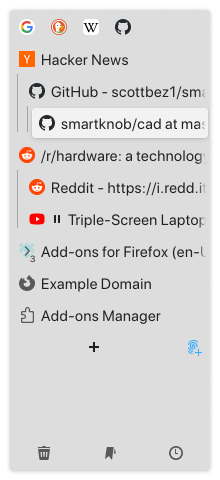
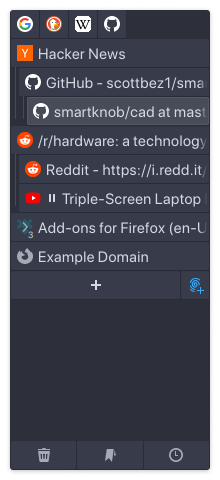
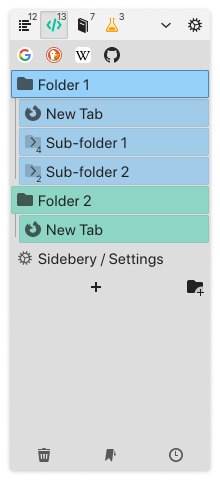
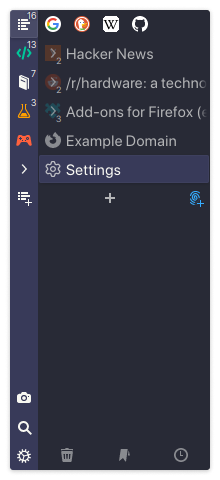
Sidebery is a highly configurable sidebar with panels of different types. Some of the key features:
Vertical tabs panels with tree or flat layout
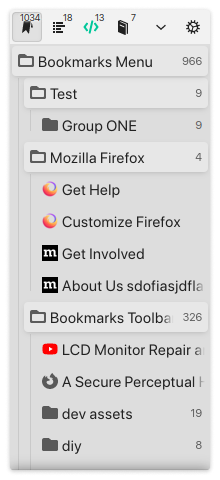
Bookmarks panels
History panel
Search in panels
Customizable context menu
Customizable styles
Snapshots (saved windows/panels/tabs)
...and more
Incompatibility with other addons
Sidebery may conflict with addons that handle position of new tabs (e.g. Tree Style Tabs) or addons that move/sort tabs, which may result in unexpected behavior or broken tabs state at initialization. To avoid potential issues, please, disable such addons in Add-ons Manager page (about:addons).
How to hide native tabs?
Option 1 (Activating native vertical tabs)
Enable native vertical tabs. This can be done in one of the following ways:
Right-click on the free space of the toolbar or tab-bar and click on the "Turn on Vertical Tabs".
Open about:config and enable these settings: sidebar.revamp, sidebar.verticalTabs.
Then resize the native sidebar (with the vertical tabs) to its minimum.
Optionally, you can round the corner of the web page area by enabling sidebar.revamp.round-content-area in about:config.
This will save vertical space, but the native tabs will still be showed and Firefox's sidebar header will take some space from Sidebery.
You can also try to hide vertical native tabs and sidebar: Right-click on the free space of the native sidebar, then in the "Sidebar settings" section enable "Vertical tabs" and "Hide tabs and sidebar" settings, then open Sidebery. But due to a Firefox bug this setting might be ignored on the next browser start or on the opening a new window.
Option 2 (Using userChrome.css)
Learn how to comment/uncomment parts of your CSS.
Enable toolkit.legacyUserProfileCustomizations.stylesheets in about:config.
In 'Profile Directory' (Firefox Menu > Help > Troubleshooting Information > Profile Directory)
create folder chrome with file userChrome.css.
Paste, edit (to your needs) and save this code in userChrome.css file:
/**
* Hide sidebar-panel-header (sidebar.revamp: true)
*/
#sidebar-panel-header {
  display: none;
}

/**
* Dynamic styles
*
* Choose when styles below will be activated (comment/uncomment line)
* - When Sidebery set title preface "."
* - When Sidebery sidebar is active
*/
#main-window[titlepreface="."] {
/* #main-window:has(#sidebar-box[sidebarcommand="_3c078156-979c-498b-8990-85f7987dd929_-sidebar-action"][checked="true"]) { */

  /* Hide horizontal native tabs toolbar */
  #TabsToolbar > * {
    display: none !important;
  }

  /* Hide top window border */
  #nav-bar {
    border-color: transparent !important;
  }

  /* Hide new Firefox sidebar, restyle addon's sidebar */
  #sidebar-main, #sidebar-container, #sidebar-launcher-splitter {
    display: none !important;
  }
  #sidebar-box {
    padding: 0 !important;
  }
  #sidebar-box #sidebar {
    box-shadow: none !important;
    border: none !important;
    outline: none !important;
    border-radius: 0 !important;
  }
  #sidebar-splitter {
    --splitter-width: 3px !important;
    min-width: var(--splitter-width) !important;
    width: var(--splitter-width) !important;
    padding: 0 !important;
    margin: 0 calc(-1*var(--splitter-width) + 1px) 0 0 !important;
    border: 0 !important;
    opacity: 0 !important;
  }

  /* Update background color of the #browser area (it's visible near the
  rounded corner of the web page) so it blends with sidebery color with
  vertical nav-bar. */
  /* #browser {
    background-color: var(--lwt-accent-color) !important;
    background-image: none !important;
  } */

  /* Hide sidebar header (sidebar.revamp: false) */
  #sidebar-header {
    display: none !important;
  }

  /* Uncomment the block below to show window buttons in Firefox nav-bar
  (maybe, I didn't test it on non-linux-tiled-wm env) */
  /* #nav-bar > .titlebar-buttonbox-container,
  #nav-bar > .titlebar-buttonbox-container > .titlebar-buttonbox {
    display: flex !important;
  } */

  /* Uncomment one of the lines below if you need space near window buttons */
  /* #nav-bar > .titlebar-spacer[type="pre-tabs"] { display: flex !important; } */
  /* #nav-bar > .titlebar-spacer[type="post-tabs"] { display: flex !important; } */
}
Restart the browser
Optionally, try to turn on/off native vertical tabs to know how it changes the color of the browser toolbar.
Result:
Optionally, add some bells and whistles (add to Sidebery styles editor):
Create Add-on archive in ./dist: npm run build.ext
After creating the Add-on archive, you can then use the version in Firefox as follows:
Open Firefox
Go to about:debugging
Go to "This Firefox"
At "Temporary Extensions" click on "Load Temporary Add-on..."
Select the .zip file in the dist directory.
Close the settings tab
Your Firefox now always runs with the development version
For updating: Repeat all steps.
Development
Prerequisites: latest LTS Node.js version
Install dependencies: npm install
Build and watch for changes: npm run dev
Run browser with Add-on: npm run dev.run -- <firefox-executable>
Donate
You can donate to this project, which will motivate me to answer questions, fix reported bugs, implement requested features and generally will speed up development process.
You can also donate to resolving a specific issue (feature request or bug report). To do this, message me to [email protected], we discuss the issue and its possible resolution, and I'll spend my time on that issue after donation.
To purchase cryptocurrency you can use any exchange services, e.g.: buy.coingate.com, www.coinbase.com, www.binance.com, www.kraken.com, etc...
Trang TopGit này là một snapshot — tab "Readme" hiển thị nguyên văn README của repo (đã bỏ link, giữ ảnh). Repo GitHub ở github.com/mbnuqw/sidebery là nguồn chính thức.
mbnuqw/sidebery có bao nhiêu sao?
mbnuqw/sidebery có 4.6k sao GitHub — tải lại trang để xem số mới nhất, hoặc xem trực tiếp github.com/mbnuqw/sidebery. TopGit phản chiếu số sao của GitHub nhưng không cam kết đến từng phút.
mbnuqw/sidebery có phải mã nguồn mở không?
Có — mbnuqw/sidebery phát hành theo license MIT, nghĩa là mã nguồn mở để đọc, fork và (tùy license) tái sử dụng. Mã: github.com/mbnuqw/sidebery.
mbnuqw/sidebery có website riêng không?
TopGit chưa ghi nhận URL trang chủ cho mbnuqw/sidebery. Phần README ở tab phía trên thường có link demo, hoặc xem mô tả GitHub của repo.
mbnuqw/sidebery là gì?
mbnuqw/sidebery (mbnuqw/sidebery) là dự án TypeScript trên GitHub. Theo mô tả gốc: Firefox extension for managing tabs and bookmarks in sidebar.
Đọc đầy đủ README ở tab phía trên.
Chưa chắc sidebery có hợp với bạn?
Để ChatGPT, Claude hoặc Perplexity tìm hiểu giúp — bấm bên dưới và xem AI nói gì về sidebery.
 /sidebery