Là một dự án mã nguồn mở, memononen/nanovg đã đạt 5.7k sao trên GitHub, ngôn ngữ C. Antialiased 2D vector drawing library on top of OpenGL for UI and visualizations.
Tóm tắt dựng từ metadata GitHub của chính dự án — chưa có bài review TopGit. Trang sẽ tự động cập nhật khi bài review đầy đủ được xuất bản.
VÌ SAO CHƯA CÓ REVIEW
TopGit viết bài đầy đủ cho repo có nhiều sao nhất và được yêu cầu nhiều nhất. Trang này là snapshot trong thời gian chờ — xem README gốc ở tab READ ME.
NanoVG is small antialiased vector graphics rendering library for OpenGL. It has lean API modeled after HTML5 canvas API. It is aimed to be a practical and fun toolset for building scalable user interfaces and visualizations.
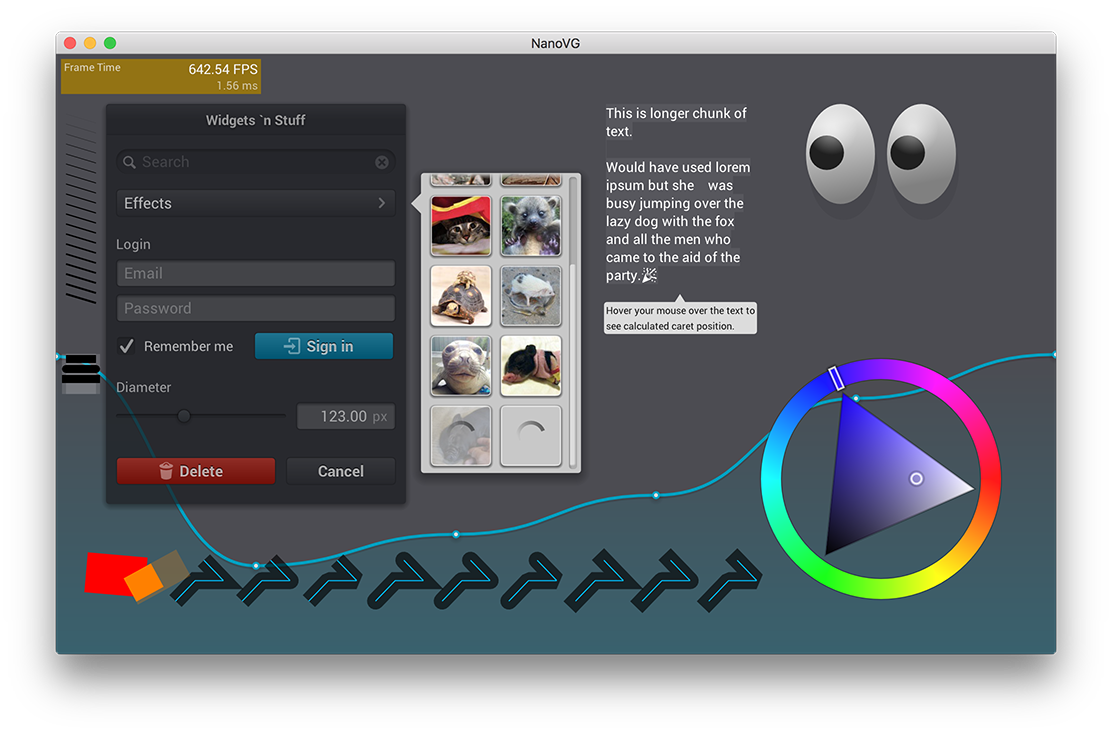
Screenshot
Usage
The NanoVG API is modeled loosely on HTML5 canvas API. If you know canvas, you're up to speed with NanoVG in no time.
Creating drawing context
The drawing context is created using platform specific constructor function. If you're using the OpenGL 2.0 back-end the context is created as follows:
The first parameter defines flags for creating the renderer.
NVG_ANTIALIAS means that the renderer adjusts the geometry to include anti-aliasing. If you're using MSAA, you can omit this flags.
NVG_STENCIL_STROKES means that the render uses better quality rendering for (overlapping) strokes. The quality is mostly visible on wider strokes. If you want speed, you can omit this flag.
Currently there is an OpenGL back-end for NanoVG: nanovg_gl.h for OpenGL 2.0, OpenGL ES 2.0, OpenGL 3.2 core profile and OpenGL ES 3. The implementation can be chosen using a define as in above example. See the header file and examples for further info.
NOTE: The render target you're rendering to must have stencil buffer.
Drawing shapes with NanoVG
Drawing a simple shape using NanoVG consists of four steps: 1) begin a new shape, 2) define the path to draw, 3) set fill or stroke, 4) and finally fill or stroke the path.
Calling nvgBeginPath() will clear any existing paths and start drawing from blank slate. There are number of number of functions to define the path to draw, such as rectangle, rounded rectangle and ellipse, or you can use the common moveTo, lineTo, bezierTo and arcTo API to compose the paths step by step.
Understanding Composite Paths
Because of the way the rendering backend is build in NanoVG, drawing a composite path, that is path consisting from multiple paths defining holes and fills, is a bit more involved. NanoVG uses even-odd filling rule and by default the paths are wound in counter clockwise order. Keep that in mind when drawing using the low level draw API. In order to wind one of the predefined shapes as a hole, you should call nvgPathWinding(vg, NVG_HOLE), or nvgPathWinding(vg, NVG_CW)after defining the path.
nvgBeginPath(vg);
nvgRect(vg, 100,100, 120,30);
nvgCircle(vg, 120,120, 5);
nvgPathWinding(vg, NVG_HOLE);	// Mark circle as a hole.
nvgFillColor(vg, nvgRGBA(255,192,0,255));
nvgFill(vg);
Rendering is wrong, what to do?
make sure you have created NanoVG context using one of the nvgCreatexxx() calls
make sure you have initialised OpenGL with stencil buffer
make sure you have cleared stencil buffer
make sure all rendering calls happen between nvgBeginFrame() and nvgEndFrame()
to enable more checks for OpenGL errors, add NVG_DEBUG flag to nvgCreatexxx()
if the problem still persists, please report an issue!
OpenGL state touched by the backend
The OpenGL back-end touches following states:
When textures are uploaded or updated, the following pixel store is set to defaults: GL_UNPACK_ALIGNMENT, GL_UNPACK_ROW_LENGTH, GL_UNPACK_SKIP_PIXELS, GL_UNPACK_SKIP_ROWS. Texture binding is also affected. Texture updates can happen when the user loads images, or when new font glyphs are added. Glyphs are added as needed between calls to nvgBeginFrame() and nvgEndFrame().
The data for the whole frame is buffered and flushed in nvgEndFrame(). The following code illustrates the OpenGL state touched by the rendering code:
Trang TopGit này là một snapshot — tab "Readme" hiển thị nguyên văn README của repo (đã bỏ link, giữ ảnh). Repo GitHub ở github.com/memononen/nanovg là nguồn chính thức.
memononen/nanovg có phải mã nguồn mở không?
Có — memononen/nanovg phát hành theo license Zlib, nghĩa là mã nguồn mở để đọc, fork và (tùy license) tái sử dụng. Mã: github.com/memononen/nanovg.
memononen/nanovg là gì?
memononen/nanovg (memononen/nanovg) là dự án C trên GitHub. Theo mô tả gốc: Antialiased 2D vector drawing library on top of OpenGL for UI and visualizations.
Đọc đầy đủ README ở tab phía trên.
Chưa chắc nanovg có hợp với bạn?
Để ChatGPT, Claude hoặc Perplexity tìm hiểu giúp — bấm bên dưới và xem AI nói gì về nanovg.

 /nanovg