Điểm qua mikepenz/action-junit-report: 429 sao trên GitHub, viết chủ yếu bằng TypeScript, thuộc nhóm Automation. Reports junit test results as GitHub Pull Request Check
Tóm tắt dựng từ metadata GitHub của chính dự án — chưa có bài review TopGit. Trang sẽ tự động cập nhật khi bài review đầy đủ được xuất bản.
VÌ SAO CHƯA CÓ REVIEW
TopGit viết bài đầy đủ cho repo có nhiều sao nhất và được yêu cầu nhiều nhất. Trang này là snapshot trong thời gian chờ — xem README gốc ở tab READ ME.
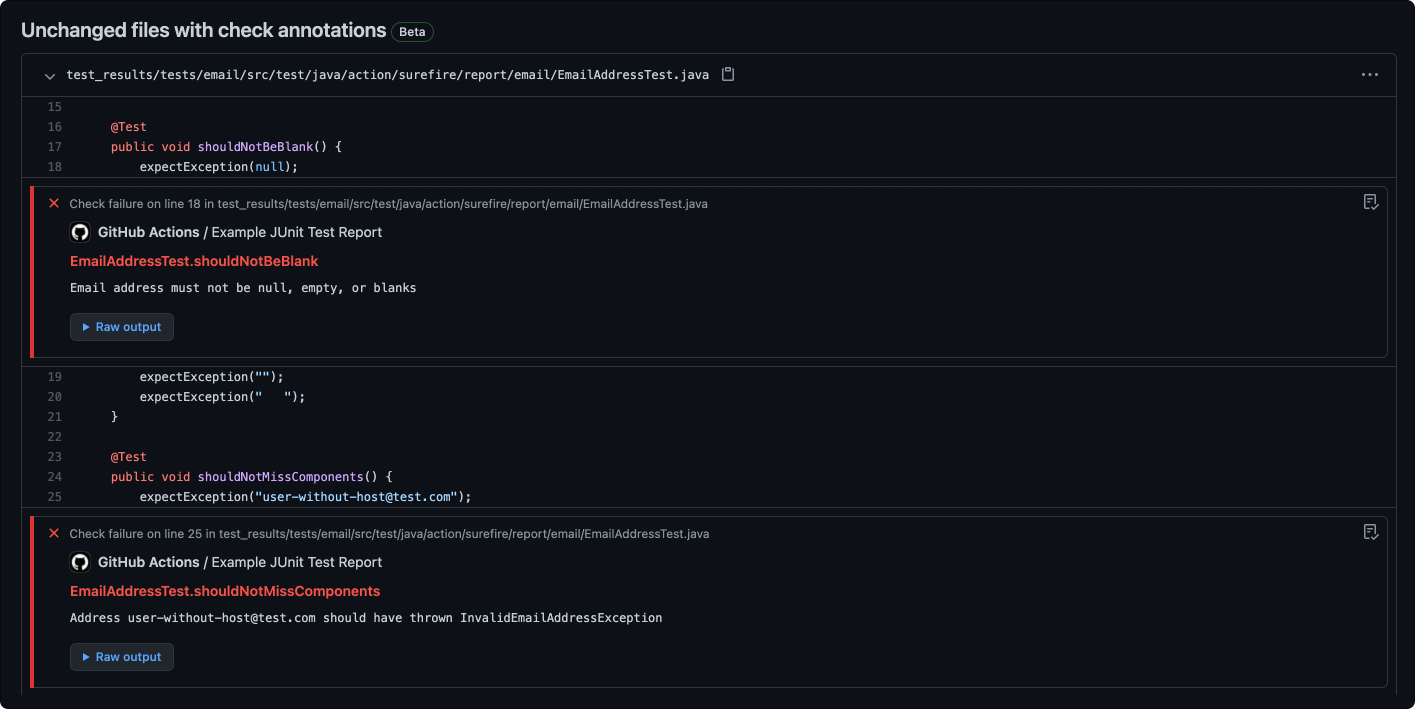
One check run per report, with the failure annotated on the line that failed
📊 Summaries where you look
job_summary, detailed_summary, flaky_summary — and comment: true to post them on the PR
🧩 Parses what other tools emit
<failure> and <error>, nested suites, retries via check_retries, any language
🔐 No checks: write? Still works
annotate_only: true annotates forks and read-only tokens without a check run
🏷️ Titles you control
check_title_template with {{BREAD_CRUMB}}, {{SUITE_NAME}}, {{TEST_NAME}}, {{CLASS_NAME}}
📈 Counts as outputs
total, passed, failed, skipped, retried, report_url for downstream steps
Quickstart 🛠️
1. Add the action after your test step, and let it run even when the tests failed:
- name: Publish Test Report
  id: report
  uses: mikepenz/action-junit-report@v6
  if: success() || failure() # always run even if the previous step fails
  with:
    report_paths: '**/build/test-results/test/TEST-*.xml'
2. Give the workflow permission to create the check:
permissions:
  checks: write
  pull-requests: write # only required if `comment: true` was enabled
3. Optionally read the counts back out — see Action outputs:
[!TIP]
Running from a workflow_run workflow, or from a fork? See PR run permissions.
Showcase 🖥️
The failure is annotated inline, on the line the test failed on:
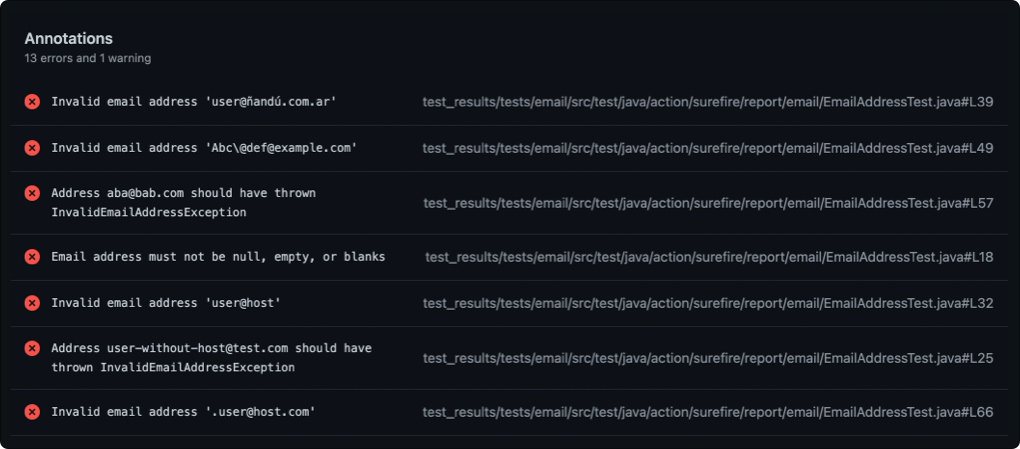
...and collected on the check run, one entry per failed test case:
Reference
Topic
What's included
The short feature list
Configure the workflow
The full workflow example
Inputs
Every input the action accepts
Common Configurations
report_paths per build tool, Node heap tuning
Action outputs
total, passed, failed, summary, report_url, …
PR run permissions
Forks, workflow_run, and annotate_only
Contribute
Build and test the action locally
What's included 🚀
Flexible JUnit parser with wide support
Supports both <failure> and <error> test case results
Supports nested test suites
Blazingly fast execution
Lighweight
Rich build log output
This action processes JUnit XML test reports on pull requests and shows the result as a PR check with summary and
annotations.
Based on action for Surefire Reports by ScaCap
Setup
Configure the workflow
name: build
on:
  pull_request:

jobs:
  build:
    name: Build and Run Tests
    runs-on: ubuntu-latest
    steps:
      - name: Checkout Code
        uses: actions/checkout@v4
      - name: Build and Run Tests
        run: # execute your tests generating test results
      - name: Publish Test Report
        uses: mikepenz/action-junit-report@v6
        if: success() || failure() # always run even if the previous step fails
        with:
          report_paths: '**/build/test-results/test/TEST-*.xml'
Inputs
Input
Description
report_paths
Optional. Glob expression to junit report paths. Defaults to: **/junit-reports/TEST-*.xml.
token
Optional. GitHub token for creating a check run. Set to ${{ github.token }} by default.
group_reports
Optional. Defines if different reports found by a single report_paths glob expression are grouped together. Defaults to true.
test_files_prefix
Optional. Prepends the provided prefix to test file paths within the report when annotating on GitHub.
exclude_sources
Optional. Provide , or newline separated list of folders to ignore for source lookup. Defaults to: /build/,/__pycache__/
check_name
Optional. Check name to use when creating a check run. The default is JUnit Test Report.
suite_regex
REMOVED (as of v5). Instead use check_title_template and configure: {{BREAD_CRUMB}}{{SUITE_NAME}}/{{TEST_NAME}}
commit
Optional. The commit SHA to update the status. This is useful when you run it with workflow_run.
fail_on_failure
Optional. Fail the build in case of a test failure.
fail_on_parse_error
Optional. Fail the build if the test report file cannot be parsed.
require_tests
Optional. Fail if no test are found.
require_passed_tests
Optional. Fail if no passed test are found. (This is stricter than require_tests, which accepts skipped tests).
include_passed
Optional. By default the action will skip passed items for the annotations. Enable this flag to include them.
include_skipped
Optional. Controls whether skipped tests are included in the detailed summary table. Defaults to true.
check_retries
Optional. If a testcase is retried, ignore the original failure.
check_title_template
Optional. Template to configure the title format. Placeholders: {{FILE_NAME}}, {{SUITE_NAME}}, {{TEST_NAME}}, {{CLASS_NAME}}, {{BREAD_CRUMB}}.
bread_crumb_delimiter
Optional. Defines the delimiter characters between the breadcrumb elements. Defaults to: /.
summary
Optional. Additional text to summary output
check_annotations
Optional. Defines if the checks will include annotations. If disabled skips all annotations for the check. (This does not affect annotate_only, which uses no checks).
update_check
Optional. Uses an alternative API to update checks, use for cases with more than 50 annotations. Default: false.
annotate_only
Optional. Will only annotate the results on the files, won't create a check run. Defaults to false.
transformers
Optional. Array of Transformers offering the ability to adjust the fileName. Defaults to: [{"searchValue":"::","replaceValue":"/"}]
job_summary
Optional. Enables the publishing of the job summary for the results. Defaults to true. May be required to disable Enterprise Server
job_summary_text
Optional. Additional text to include in the job summary prior to the tables. Defaults to empty string.
detailed_summary
Optional. Include table with all test results in the summary (Also applies to comment). Defaults to false.
failed_summary
Optional. Include the failed tests in the detailed summary, when false they are removed from it (Also applies to comment). Requires detailed_summary. Defaults to true.
failed_summary_logs
Optional. Show failed tests as collapsible blocks with the error message and stack trace after the table, instead of rows in the table. Requires detailed_summary and failed_summary. When false, failed tests stay in the table. Defaults to false.
flaky_summary
Optional. Include table with all flaky results in the summary (Also applies to comment). Defaults to false.
verbose_summary
Optional. Detail table will note if there were no test annotations for a test suite (Also applies to comment). Defaults to true.
skip_success_summary
Optional. Skips the summary table if only successful tests were detected (Also applies to comment). Defaults to false.
include_empty_in_summary
Optional. Include entries in summaries that have 0 count. Defaults to true.
include_time_in_summary
Optional. Include spent time in summaries. Defaults to false.
simplified_summary
Optional. Use icons instead of text to indicate status in summary. Defaults to false.
group_suite
Optional. If enabled, will group the testcases by test suite in the detailed_summary. Defaults to false.
comment
Optional. Enables a comment being added to the PR with the summary tables (Respects the summary configuration flags). Defaults to false.
updateComment
Optional. If a prior action run comment exists, it is updated. If disabled, new comments are creted for each run. Defaults to true.
annotate_notice
Optional. Annotate passed test results along with warning/failed ones. Defaults to false. (Changed in v3.5.0)
follow_symlink
Optional. Enables to follow symlinks when searching test files via the globber. Defaults to false.
job_name
Optional. Specify the name of a check to update
annotations_limit
Optional. Specify the limit for annotations. This will also interrupt parsing all test-suites if the limit is reached. Defaults to: No Limit.
skip_annotations
Optional. Setting this flag will result in no annotations being added to the run. Defaults to false.
truncate_stack_traces
Optional. Truncate stack traces from test output to 2 lines in annotations. Defaults to true.
resolve_ignore_classname
Optional. Force ignore test case classname from the xml report (This can help fix issues with some tools/languages). Defaults to false.
skip_comment_without_tests
Optional. Disable commenting if no tests are detected. Defaults to false.
pr_id
Optional. PR number to comment on (useful for workflow_run contexts where the action runs outside the PR context). When provided, overrides the automatic PR detection.
Common Configurations
Common report_paths
Surefire:
**/target/surefire-reports/TEST-*.xml
sbt:
**/target/test-reports/*.xml
If you observe out-of-memory errors, follow the below configuration suggestion.
[!TIP]
FATAL ERROR: Reached heap limit Allocation failed - JavaScript heap out of memory
Increase Node Heap Memory
If you encounter an out-of-memory from Node, such as
FATAL ERROR: Ineffective mark-compacts near heap limit Allocation failed - JavaScript heap out of memory
you can increase the memory allocation by setting an environment variable
- name: Publish Test Report
  uses: mikepenz/action-junit-report@v6
  env:
    NODE_OPTIONS: "--max-old-space-size=4096"
  if: success() || failure() # always run even if the previous step fails
  with:
    report_paths: '**/build/test-results/test/TEST-*.xml'
Action outputs
After action execution it will return the test counts as output.
# ${{steps.{CHANGELOG_STEP_ID}.outputs.total}}
A full set list of possible output values for this action.
Output
Description
outputs.total
The total number of test cases covered by this test-step.
outputs.passed
The number of passed test cases.
outputs.skipped
The number of skipped test cases.
outputs.retried
The number of retried test cases.
outputs.failed
The number of failed test cases.
outputs.summary
The short summary of the junit report. In html format (as also constructed by GitHub for the summary).
outputs.detailed_summary
The detailed summary in HTML, including a table and optional collapsible failed-test logs.
outputs.flaky_summary
The full table with all flaky results in a summary. In html format (as also constructed by GitHub for the summary).
outputs.report_url
The URL(s) to the test report(s). If multiple reports are created, they are separated by newlines.
PR run permissions
The action requires write permission on the checks. If the GA token is read-only (this is a repository
configuration) please enable write permission via:
permissions:
  checks: write
  pull-requests: write # only required if `comment: true` was enabled
Additionally for security reasons, the github token used for pull_request workflows is marked as read-only.
If you want to post checks to a PR from an external repository, you will need to use a separate workflow
which has a read/write token, or use a PAT with elevated permissions.
Example
name: build
on:
  pull_request:

jobs:
  build:
    name: Build and Run Tests
    runs-on: ubuntu-latest
    steps:
      - name: Checkout Code
        uses: actions/checkout@v3
      - name: Build and Run Tests
        run: # execute your tests generating test results
      - name: Upload Test Report
        uses: actions/upload-artifact@v3
        if: always() # always run even if the previous step fails
        with:
          name: junit-test-results
          path: '**/build/test-results/test/TEST-*.xml'
          retention-days: 1

---
name: report
on:
  workflow_run:
    workflows: [ build ]
    types: [ completed ]

permissions:
  checks: write

jobs:
  checks:
    runs-on: ubuntu-latest
    steps:
      - name: Download Test Report
        uses: dawidd6/action-download-artifact@v2
        with:
          name: junit-test-results
          workflow: ${{ github.event.workflow.id }}
          run_id: ${{ github.event.workflow_run.id }}
      - name: Publish Test Report
        uses: mikepenz/action-junit-report@v6
        with:
          commit: ${{github.event.workflow_run.head_sha}}
          report_paths: '**/build/test-results/test/TEST-*.xml'
          # Optional: if you want to add PR comments from workflow_run context
          # comment: true
          # pr_id: ${{ github.event.workflow_run.pull_requests[0].number }}
This will securely post the check results from the privileged workflow onto the PR's checks report.
[!TIP]
When running from workflow_run context, use the pr_id parameter to enable PR comments: pr_id: ${{ github.event.workflow_run.pull_requests[0].number }}
In environments that do not allow checks: write, the action can be configured to leverage the annotate_only option.
Example
name: pr

on:
  pull_request:

jobs:
  unit_test:
    runs-on: ubuntu-latest
    steps:
      - name: Checkout Code
        uses: actions/checkout@v4

      - name: Build and Run Tests
        run: # execute your tests generating test results

      - name: Write out Unit Test report annotation for forked repo
        if: ${{ failure() &&  (github.event.pull_request.head.repo.full_name != github.repository) }}
        uses: mikepenz/action-junit-report@v6
        with:
          annotate_only: true # forked repo cannot write to checks so just do annotations
This will selectively use different methods for forked and unforked repos.
## Contribute 🧬
# Install the dependencies
$ npm install

# Verify lint is happy
$ npm run lint -- --fix

# Format
$ npm run format

# Build the typescript and package it for distribution
$ npm run build && npm run package

# Run the tests, use to debug, and test it out
$ npm test
Credits
Original idea and GitHub Actions by: https://github.com/ScaCap/action-surefire-report
Other actions
release-changelog-builder-action
xray-action
jira-release-composition-action
License
Copyright (C) 2025 Mike Penz

Licensed under the Apache License, Version 2.0 (the "License");
you may not use this file except in compliance with the License.
You may obtain a copy of the License at

   http://www.apache.org/licenses/LICENSE-2.0

Unless required by applicable law or agreed to in writing, software
distributed under the License is distributed on an "AS IS" BASIS,
WITHOUT WARRANTIES OR CONDITIONS OF ANY KIND, either express or implied.
See the License for the specific language governing permissions and
limitations under the License.
mikepenz/action-junit-report thuộc nhóm Automation trên TopGit, cùng 10 topic GitHub. Trang Trending và Topics liệt kê các repo cùng số sao và cùng ngôn ngữ để so sánh.
Đọc thêm về mikepenz/action-junit-report ở đâu?
Trang TopGit này là một snapshot — tab "Readme" hiển thị nguyên văn README của repo (đã bỏ link, giữ ảnh). Repo GitHub ở github.com/mikepenz/action-junit-report là nguồn chính thức.
mikepenz/action-junit-report có phải mã nguồn mở không?
Có — mikepenz/action-junit-report phát hành theo license Apache-2.0, nghĩa là mã nguồn mở để đọc, fork và (tùy license) tái sử dụng. Mã: github.com/mikepenz/action-junit-report.
mikepenz/action-junit-report có trang demo không?
Dự án có trang chủ ở https://blog.mikepenz.dev. Tab "Readme" ở trang này thường có ảnh chụp và hướng dẫn bắt đầu nhanh.
mikepenz/action-junit-report dùng license gì?
mikepenz/action-junit-report phát hành theo license Apache-2.0. Nên mở file LICENSE trên GitHub để xác nhận — license metadata đôi khi lệch với thực tế dự án.
mikepenz/action-junit-report là gì?
mikepenz/action-junit-report (mikepenz/action-junit-report) là dự án TypeScript trên GitHub. Theo mô tả gốc: Reports junit test results as GitHub Pull Request Check
Vì sao mikepenz/action-junit-report được xếp vào nhóm Automation?
TopGit xếp mikepenz/action-junit-report vào nhóm Automation dựa trên GitHub topics và mô tả của repo (gắn thẻ: "actions", "automation", "cd"). Việc phân loại dựa trên metadata thật của repo, không phải đoán theo cảm tính biên tập.
Đọc đầy đủ README ở tab phía trên.
action-junit-report có đáng để bạn bỏ thời gian?
ChatGPT, Claude và Perplexity đều đọc được trang này. Hỏi thử xem họ nghĩ gì về action-junit-report.
 /action-junit-report