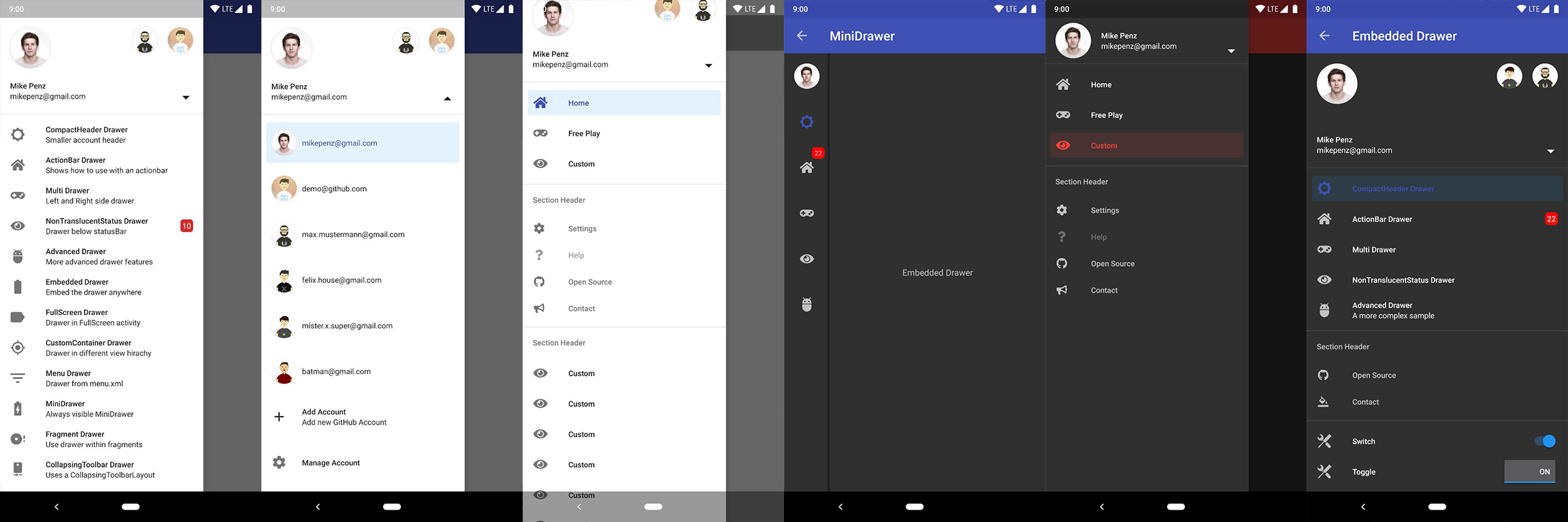
TopGit theo dõi mikepenz/MaterialDrawer trên GitHub trong nhóm Mobile, đã đạt 11.6k sao. The flexible, easy to use, all in one drawer library for your Android project. Now brand new with material 2 design.
Tóm tắt dựng từ metadata GitHub của chính dự án — chưa có bài review TopGit. Trang sẽ tự động cập nhật khi bài review đầy đủ được xuất bản.
VÌ SAO CHƯA CÓ REVIEW
TopGit viết bài đầy đủ cho repo có nhiều sao nhất và được yêu cầu nhiều nhất. Trang này là snapshot trong thời gian chờ — xem README gốc ở tab READ ME.
Using v9.x with Material 3 theming requires a Material3 theme as base for the activity.
Additional Setup
Add items and adding some functionality
//if you want to update the items at a later time it is recommended to keep it in a variable
val item1 = PrimaryDrawerItem().apply { nameRes = R.string.drawer_item_home; identifier = 1 }
val item2 = SecondaryDrawerItem().apply { nameRes = R.string.drawer_item_settings; identifier = 2 }
// get the reference to the slider and add the items
slider.itemAdapter.add(
item1,
DividerDrawerItem(),
item2,
SecondaryDrawerItem().apply { nameRes = R.string.drawer_item_settings }
)
// specify a click listener
slider.onDrawerItemClickListener = { v, drawerItem, position ->
// do something with the clicked item :D
false
}
Selecting an item
//set the selection to the item with the identifier 1
slider.setSelection(1)
//set the selection to the item with the identifier 2
slider.setSelection(item2)
//set the selection and also fire the `onItemClick`-listener
slider.setSelection(1, true)
By default, when a drawer item is clicked, it becomes the new selected item. If this isn't the expected behavior,
you can disable it for this item using isSelectable = false:
//modify an item of the drawer
item1.apply {
nameText = "A new name for this drawerItem"; badge = StringHolder("19")
badgeStyle = BadgeStyle().apply { textColor = ColorHolder.fromColor(Color.WHITE); color = ColorHolder.fromColorRes(R.color.md_red_700) }
}
//notify the drawer about the updated element. it will take care about everything else
slider.updateItem(item1)
//to update only the name, badge, icon you can also use one of the quick methods
slider.updateName(1, "A new name")
//the result object also allows you to add new items, remove items, add footer, sticky footer, ..
slider.addItem(DividerDrawerItem())
slider.addStickyFooterItem(PrimaryDrawerItem().apply { nameTest = "StickyFooter" })
//remove items with an identifier
slider.removeItem(2)
//open / close the drawer
slider.drawerLayout?.openDrawer(slider)
slider.drawerLayout?.closeDrawer(slider)
//get the reference to the `DrawerLayout` itself
slider.drawerLayout
Add profiles and an AccountHeader
// Create the AccountHeader
headerView = AccountHeaderView(this).apply {
attachToSliderView(slider) // attach to the slider
addProfiles(
ProfileDrawerItem().apply { nameText = "Mike Penz"; descriptionText = "[email protected]"; iconRes = R.drawable.profile; identifier = 102 }
)
onAccountHeaderListener = { view, profile, current ->
// react to profile changes
false
}
withSavedInstance(savedInstanceState)
}
Android-Iconics support
The MaterialDrawer provides an extension for the Android-Iconics library. This allows you to create your DrawerItems with an icon from any font.
Choose the fonts you need. Available Fonts
// Add for Android-Iconics support
implementation "com.mikepenz:materialdrawer-iconics:${lastestMaterialDrawerRelease}"
// fonts
implementation 'com.mikepenz:google-material-typeface:x.y.z@aar' //Google Material Icons
implementation 'com.mikepenz:fontawesome-typeface:x.y.z@aar' //FontAwesome
//now you can simply use any icon of the Google Material Icons font
PrimaryDrawerItem().apply { iconicsIcon = GoogleMaterial.Icon.gmd_wb_sunny }
//Or an icon from FontAwesome
SecondaryDrawerItem().apply { iconicsIcon = FontAwesomeBrand.Icon.fab_github }
Advanced Setup
For advanced usecases. Please have a look at the provided sample activities.
Load images via url
The MaterialDrawer supports fetching images from URLs and setting them for the Profile icons. As the MaterialDrawer does not contain an ImageLoading library
the dev can choose his own implementation (Picasso, Glide, ...). This has to be done, before the first image should be loaded via URL. (Should be done in the Application, but any other spot before loading the first image is working too)
SAMPLE using PICASSO
SAMPLE using GLIDE
//initialize and create the image loader logic
DrawerImageLoader.init(object : AbstractDrawerImageLoader() {
    override fun set(imageView: ImageView, uri: Uri, placeholder: Drawable) {
        Picasso.get().load(uri).placeholder(placeholder).into(imageView)
    }

    override fun cancel(imageView: ImageView) {
        Picasso.get().cancelRequest(imageView)
    }

    /*
    override fun set(imageView: ImageView, uri: Uri, placeholder: Drawable, tag: String?) {
        super.set(imageView, uri, placeholder, tag)
    }

    override fun placeholder(ctx: Context): Drawable {
        return super.placeholder(ctx)
    }

    override fun placeholder(ctx: Context, tag: String?): Drawable {
        return super.placeholder(ctx, tag)
    }
    */
})
An implementation with GLIDE v4 (See tag v6.1.1 for glide v3 sample) can be found in the sample application
JVM Target 1.8
// Since 8.1.0 the drawer includes core ktx 1.3.0 which requires jvm 1.8
kotlinOptions {
    jvmTarget = "1.8"
}
Style the drawer 🖌️
Custom style - styles.xml
Create your custom style. If you don't need a custom theme see the next section, how you can set the colors just by overwriting the original colors.
Copyright 2021 Mike Penz

Licensed under the Apache License, Version 2.0 (the "License");
you may not use this file except in compliance with the License.
You may obtain a copy of the License at

   http://www.apache.org/licenses/LICENSE-2.0

Unless required by applicable law or agreed to in writing, software
distributed under the License is distributed on an "AS IS" BASIS,
WITHOUT WARRANTIES OR CONDITIONS OF ANY KIND, either express or implied.
See the License for the specific language governing permissions and
limitations under the License.
mikepenz/MaterialDrawer thuộc nhóm Mobile trên TopGit, cùng 16 topic GitHub. Trang Trending và Topics liệt kê các repo cùng số sao và cùng ngôn ngữ để so sánh.
Đọc thêm về mikepenz/MaterialDrawer ở đâu?
Trang TopGit này là một snapshot — tab "Readme" hiển thị nguyên văn README của repo (đã bỏ link, giữ ảnh). Repo GitHub ở github.com/mikepenz/MaterialDrawer là nguồn chính thức.
mikepenz/MaterialDrawer có bao nhiêu sao?
mikepenz/MaterialDrawer có 11.6k sao GitHub — tải lại trang để xem số mới nhất, hoặc xem trực tiếp github.com/mikepenz/MaterialDrawer. TopGit phản chiếu số sao của GitHub nhưng không cam kết đến từng phút.
mikepenz/MaterialDrawer có phải mã nguồn mở không?
Có — mikepenz/MaterialDrawer phát hành theo license Apache-2.0, nghĩa là mã nguồn mở để đọc, fork và (tùy license) tái sử dụng. Mã: github.com/mikepenz/MaterialDrawer.
mikepenz/MaterialDrawer có trang demo không?
Dự án có trang chủ ở https://mikepenz.dev. Tab "Readme" ở trang này thường có ảnh chụp và hướng dẫn bắt đầu nhanh.
mikepenz/MaterialDrawer là gì?
mikepenz/MaterialDrawer (mikepenz/MaterialDrawer) là dự án Kotlin trên GitHub. Theo mô tả gốc: The flexible, easy to use, all in one drawer library for your Android project. Now brand new with material 2 design.
mikepenz/MaterialDrawer so với các dự án Mobile khác thế nào?
mikepenz/MaterialDrawer được TopGit xếp vào nhóm Mobile, với 11.6k sao GitHub và viết bằng Kotlin. Xem trang chủ đề Mobile trên TopGit để so sánh với các dự án tương tự theo số sao và mức độ hoạt động.
Đọc đầy đủ README ở tab phía trên.
MaterialDrawer có đáng để bạn bỏ thời gian?
ChatGPT, Claude và Perplexity đều đọc được trang này. Hỏi thử xem họ nghĩ gì về MaterialDrawer.
 /MaterialDrawer