Được TopGit lập chỉ mục từ metadata GitHub: mozilla/TTS có 10.2k sao, viết chủ yếu bằng Jupyter Notebook. :robot: :speech_balloon: Deep learning for Text to Speech (Discussion forum: https://discourse.mozilla.org/c/tts)
Tóm tắt dựng từ metadata GitHub của chính dự án — chưa có bài review TopGit. Trang sẽ tự động cập nhật khi bài review đầy đủ được xuất bản.
VÌ SAO CHƯA CÓ REVIEW
TopGit viết bài đầy đủ cho repo có nhiều sao nhất và được yêu cầu nhiều nhất. Trang này là snapshot trong thời gian chờ — xem README gốc ở tab READ ME.
TTS is a library for advanced Text-to-Speech generation. It's built on the latest research, was designed to achieve the best trade-off among ease-of-training, speed and quality.
TTS comes with pretrained models, tools for measuring dataset quality and already used in 20+ languages for products and research projects.
:loudspeaker: English Voice Samples and SoundCloud playlist
:man_cook: TTS training recipes
:page_facing_up: Text-to-Speech paper collection
💬 Where to ask questions
Please use our dedicated channels for questions and discussion. Help is much more valuable if it's shared publicly, so that more people can benefit from it.
Type
Platforms
🚨 Bug Reports
GitHub Issue Tracker
❔ FAQ
TTS/Wiki
🎁 Feature Requests & Ideas
GitHub Issue Tracker
👩💻 Usage Questions
Discourse Forum
🗯 General Discussion
Discourse Forum and Matrix Channel
🔗 Links and Resources
Type
Links
💾 Installation
TTS/README.md
👩🏾🏫 Tutorials and Examples
TTS/Wiki
🚀 Released Models
TTS/Wiki
💻 Docker Image
Repository by @synesthesiam
🖥️ Demo Server
TTS/server
🤖 Running TTS on Terminal
TTS/README.md
✨ How to contribute
TTS/README.md
🥇 TTS Performance
"Mozilla*" and "Judy*" are our models.
Details...
Features
High performance Deep Learning models for Text2Speech tasks.
|- notebooks/       (Jupyter Notebooks for model evaluation, parameter selection and data analysis.)
|- utils/           (common utilities.)
|- TTS
    |- bin/             (folder for all the executables.)
      |- train*.py                  (train your target model.)
      |- distribute.py              (train your TTS model using Multiple GPUs.)
      |- compute_statistics.py      (compute dataset statistics for normalization.)
      |- convert*.py                (convert target torch model to TF.)
    |- tts/             (text to speech models)
        |- layers/          (model layer definitions)
        |- models/          (model definitions)
        |- tf/              (Tensorflow 2 utilities and model implementations)
        |- utils/           (model specific utilities.)
    |- speaker_encoder/ (Speaker Encoder models.)
        |- (same)
    |- vocoder/         (Vocoder models.)
        |- (same)
Sample Model Output
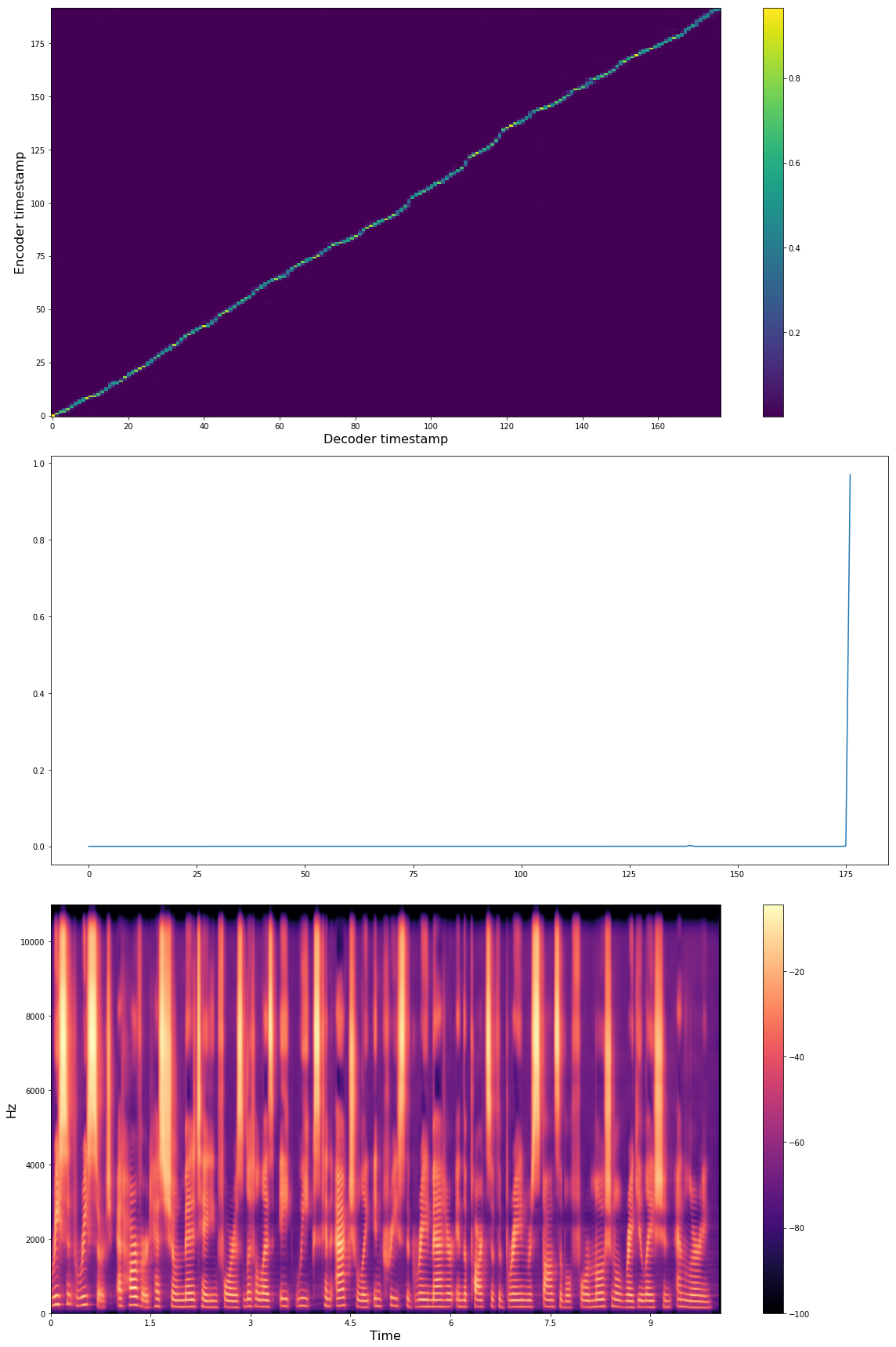
Below you see Tacotron model state after 16K iterations with batch-size 32 with LJSpeech dataset.
"Recent research at Harvard has shown meditating for as little as 8 weeks can actually increase the grey matter in the parts of the brain responsible for emotional regulation and learning."
Audio examples: soundcloud
Datasets and Data-Loading
TTS provides a generic dataloader easy to use for your custom dataset.
You just need to write a simple function to format the dataset. Check datasets/preprocess.py to see some examples.
After that, you need to set dataset fields in config.json.
Some of the public datasets that we successfully applied TTS:
LJ Speech
Nancy
TWEB
M-AI-Labs
LibriTTS
Spanish - thx! @carlfm01
Example: Synthesizing Speech on Terminal Using the Released Models.
After the installation, TTS provides a CLI interface for synthesizing speech using pre-trained models. You can either use your own model or the release models under the TTS project.
Listing released TTS models.
tts --list_models
Run a tts and a vocoder model from the released model list. (Simply copy and paste the full model names from the list as arguments for the command below.)
Note: You can use ./TTS/bin/synthesize.py if you prefer running tts from the TTS project folder.
Example: Training and Fine-tuning LJ-Speech Dataset
Here you can find a CoLab notebook for a hands-on example, training LJSpeech. Or you can manually follow the guideline below.
To start with, split metadata.csv into train and validation subsets respectively metadata_train.csv and metadata_val.csv. Note that for text-to-speech, validation performance might be misleading since the loss value does not directly measure the voice quality to the human ear and it also does not measure the attention module performance. Therefore, running the model with new sentences and listening to the results is the best way to go.
To train a new model, you need to define your own config.json to define model details, trainin configuration and more (check the examples). Then call the corressponding train script.
For instance, in order to train a tacotron or tacotron2 model on LJSpeech dataset, follow these steps.
Each run creates a new output folder accomodating used config.json, model checkpoints and tensorboard logs.
In case of any error or intercepted execution, if there is no checkpoint yet under the output folder, the whole folder is going to be removed.
You can also enjoy Tensorboard, if you point Tensorboard argument--logdir to the experiment folder.
Contribution Guidelines
This repository is governed by Mozilla's code of conduct and etiquette guidelines. For more details, please read the Mozilla Community Participation Guidelines.
Create a new branch.
Implement your changes.
(if applicable) Add Google Style docstrings.
(if applicable) Implement a test case under tests folder.
Send a PR to dev branch, explain what the change is about.
Let us discuss until we make it perfect :).
We merge it to the dev branch once things look good.
Feel free to ping us at any step you need help using our communication channels.
Collaborative Experimentation Guide
If you like to use TTS to try a new idea and like to share your experiments with the community, we urge you to use the following guideline for a better collaboration.
(If you have an idea for better collaboration, let us know)
mozilla/TTS thuộc nhóm AI Tools trên TopGit, cùng 16 topic GitHub. Trang Trending và Topics liệt kê các repo cùng số sao và cùng ngôn ngữ để so sánh.
Đọc thêm về mozilla/TTS ở đâu?
Trang TopGit này là một snapshot — tab "Readme" hiển thị nguyên văn README của repo (đã bỏ link, giữ ảnh). Repo GitHub ở github.com/mozilla/TTS là nguồn chính thức.
mozilla/TTS có phải mã nguồn mở không?
Có — mozilla/TTS phát hành theo license MPL-2.0, nghĩa là mã nguồn mở để đọc, fork và (tùy license) tái sử dụng. Mã: github.com/mozilla/TTS.
mozilla/TTS có website riêng không?
TopGit chưa ghi nhận URL trang chủ cho mozilla/TTS. Phần README ở tab phía trên thường có link demo, hoặc xem mô tả GitHub của repo.
mozilla/TTS dùng license gì?
mozilla/TTS phát hành theo license MPL-2.0. Nên mở file LICENSE trên GitHub để xác nhận — license metadata đôi khi lệch với thực tế dự án.
mozilla/TTS là gì?
mozilla/TTS (mozilla/TTS) là dự án Jupyter Notebook trên GitHub. Theo mô tả gốc: :robot: :speech_balloon: Deep learning for Text to Speech (Discussion forum: https://discourse.mozilla.org/c/tts)
Vì sao mozilla/TTS được xếp vào nhóm AI Tools?
TopGit xếp mozilla/TTS vào nhóm AI Tools dựa trên GitHub topics và mô tả của repo (gắn thẻ: "dataset-analysis", "deep-learning", "gantts"). Việc phân loại dựa trên metadata thật của repo, không phải đoán theo cảm tính biên tập.
Đọc đầy đủ README ở tab phía trên.
Muốn nghe thêm một ý kiến về TTS?
Hỏi một AI đọc được trang này — một cú bấm là có ngay nhận định về TTS.

 /TTS