4.4k sao GitHub và vẫn tăng — mr-karan/doggo là dự án Go mà TopGit đang theo dõi trên nền tảng. :dog: Command-line DNS Client for Humans. Written in Golang
Tóm tắt dựng từ metadata GitHub của chính dự án — chưa có bài review TopGit. Trang sẽ tự động cập nhật khi bài review đầy đủ được xuất bản.
VÌ SAO CHƯA CÓ REVIEW
TopGit viết bài đầy đủ cho repo có nhiều sao nhất và được yêu cầu nhiều nhất. Trang này là snapshot trong thời gian chờ — xem README gốc ở tab READ ME.
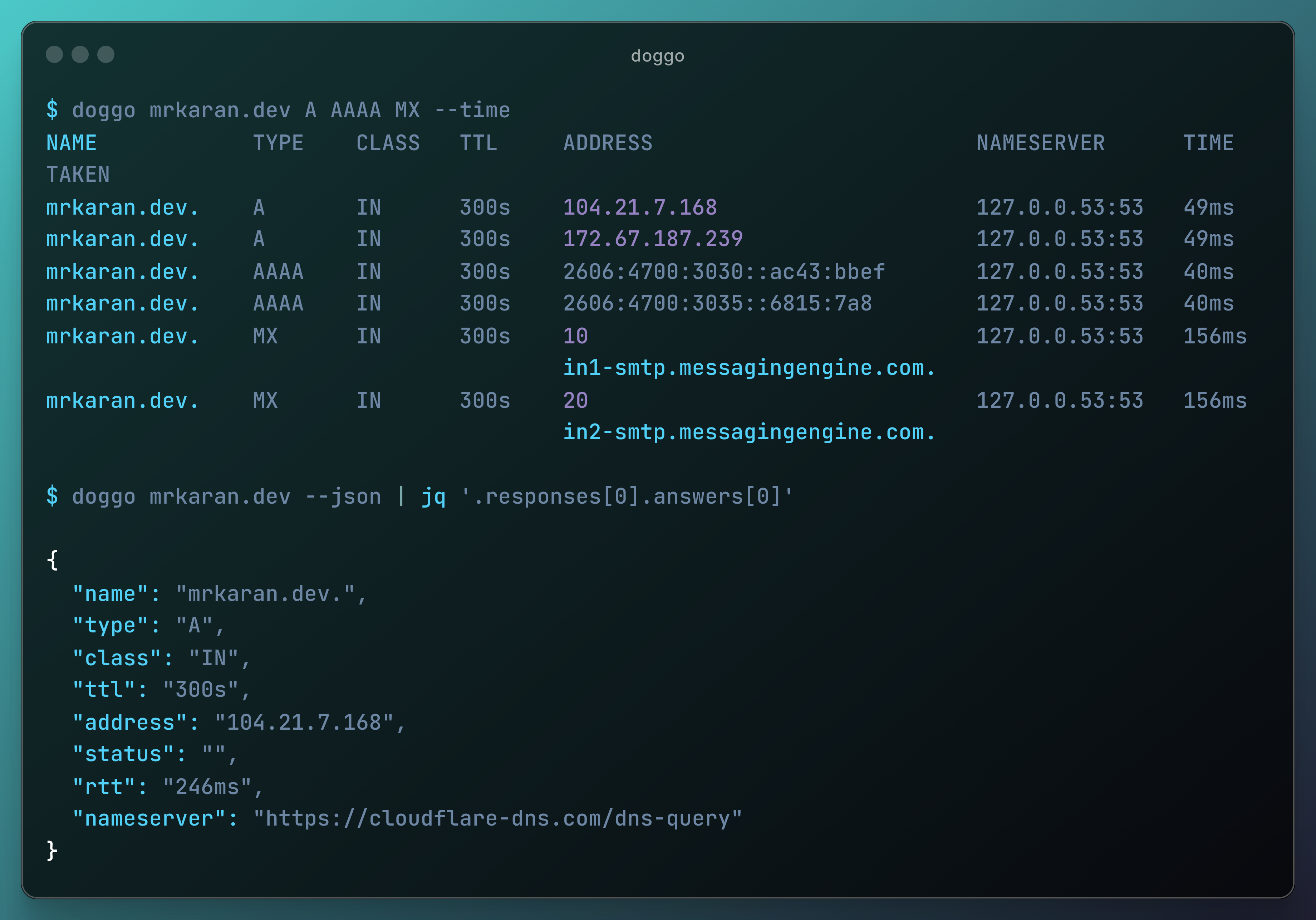
doggo is a modern command-line DNS client (like dig) written in Golang. It outputs information in a neat concise manner and supports protocols like DoH, DoT, DoQ, and DNSCrypt as well.
It's totally inspired by dog which is written in Rust. I wanted to add some features to it but since I don't know Rust, I found it as a nice opportunity to experiment with writing a DNS Client from scratch in Go myself. Hence the name dog + go => doggo.
Installation
Easy Install (Recommended)
curl -fsSL https://raw.githubusercontent.com/mr-karan/doggo/main/install.sh | sh
Package Managers
Arch Linux: pacman -S doggo
Eget: eget mr-karan/doggo
Gentoo: emerge net-dns/doggo
Homebrew: brew install doggo
MacPorts (macOS): port install doggo
Mise: mise use -g doggo@latest
Nix: nix profile install nixpkgs#doggo
Scoop (Windows): scoop install doggo
Winget (Windows): winget install doggo
Binary Install
You can download pre-compiled binaries for various operating systems and architectures from the Releases page.
Linux 32-bit ARM releases are available as doggo-linux-armv6.tar.gz (ARMv6) and doggo-linux-armv7.tar.gz (ARMv7 and 32-bit ARMv8). The doggo-linux-arm.tar.gz compatibility asset is the ARMv7 build.
FreeBSD, OpenBSD, and NetBSD ARMv7 releases use the explicit doggo-<os>-armv7.tar.gz name and retain their historical doggo-<os>-arm.tar.gz aliases.
Go Install
If you have Go installed on your system, you can use the go install command:
go install github.com/mr-karan/doggo/cmd/doggo@latest
The binary will be available at $GOPATH/bin/doggo.
Docker
docker pull ghcr.io/mr-karan/doggo:latest
docker run --rm ghcr.io/mr-karan/doggo:latest example.com
For more installation options, including binary downloads and Docker images, please refer to the full installation guide.
Quick Start
Here are some quick examples to get you started with doggo:
# Simple DNS lookup
doggo example.com

# Query MX records using a specific nameserver
doggo MX github.com @9.9.9.9

# Use DNS over HTTPS
doggo example.com @https://cloudflare-dns.com/dns-query

# JSON output for scripting
doggo example.com --json | jq '.responses[0].answers[].address'

# Reverse DNS lookup
doggo --reverse 8.8.8.8 --short

# Using Globalping
doggo example.com --gp-from Germany,Japan --gp-limit 2
Configuration
Defaults for any flag can be set via a TOML config file or DOGGO_* environment variables, so you don't have to repeat flags on every invocation:
# ~/.config/doggo/config.toml (or $XDG_CONFIG_HOME/doggo/config.toml, ~/.doggo.toml)
strategy = "first"
color    = false
timeout  = "10s"

# HTTP/3 must be paired with a persistent HTTPS (DoH) nameserver.
nameserver = ["https://cloudflare-dns.com/dns-query"]
http3     = true
Precedence (lowest to highest): flag defaults < config file < environment variables < command line flags. Use --config=PATH or DOGGO_CONFIG to load a file from a custom location.
config-cli-sample.toml documents every supported key with its default. See the CLI reference for details.
Features
Human-readable output with color-coded and tabular format
JSON output support for easy scripting and parsing
Multiple transport protocols: DoH, DoT, DoQ, TCP, UDP, DNSCrypt
Explicit DNS-over-HTTPS over HTTP/3 with --http3
EDNS support with Client Subnet (ECS), NSID, Cookies, Padding, and Extended Errors
Additional section support for glue records and supplementary data
Internationalized Domain Names (IDN) with automatic punycode conversion
Support for ndots and search configurations
Multiple resolver support with customizable query strategies
IPv4 and IPv6 support
Web interface available
Shell completions for zsh and fish
Reverse DNS lookups
Flexible query options including various DNS flags
Debug mode for troubleshooting
Response time measurement
Cross-platform support
Documentation
For comprehensive documentation, including detailed usage instructions, configuration options, and advanced features, please visit our official documentation site.
Sponsorship
If you find doggo useful and would like to support its development, please consider becoming a sponsor. Your support helps maintain and improve this open-source project.
Every contribution, no matter how small, is greatly appreciated and helps keep this project alive and growing. Thank you for your support! 🐶❤️
Trang TopGit này là một snapshot — tab "Readme" hiển thị nguyên văn README của repo (đã bỏ link, giữ ảnh). Repo GitHub ở github.com/mr-karan/doggo là nguồn chính thức.
mr-karan/doggo có phải mã nguồn mở không?
Có — mr-karan/doggo phát hành theo license GPL-3.0, nghĩa là mã nguồn mở để đọc, fork và (tùy license) tái sử dụng. Mã: github.com/mr-karan/doggo.
mr-karan/doggo có trang demo không?
Dự án có trang chủ ở https://doggo.mrkaran.dev/. Tab "Readme" ở trang này thường có ảnh chụp và hướng dẫn bắt đầu nhanh.
mr-karan/doggo dùng license gì?
mr-karan/doggo phát hành theo license GPL-3.0. Nên mở file LICENSE trên GitHub để xác nhận — license metadata đôi khi lệch với thực tế dự án.
mr-karan/doggo là gì?
mr-karan/doggo (mr-karan/doggo) là dự án Go trên GitHub. Theo mô tả gốc: :dog: Command-line DNS Client for Humans. Written in Golang
Đọc đầy đủ README ở tab phía trên.
Vẫn đang phân vân về doggo?
Một cú bấm sẽ gửi câu hỏi kèm trang này cho AI — xem AI nói gì về doggo.
 /doggo