352 sao GitHub và vẫn tăng — mxcl/xcodebuild là dự án TypeScript mà TopGit đang theo dõi trên nền tảng. A continuously resilient `xcodebuild` “GitHub Action”. Also it’s the best.
Tóm tắt dựng từ metadata GitHub của chính dự án — chưa có bài review TopGit. Trang sẽ tự động cập nhật khi bài review đầy đủ được xuất bản.
VÌ SAO CHƯA CÓ REVIEW
TopGit viết bài đầy đủ cho repo có nhiều sao nhất và được yêu cầu nhiều nhất. Trang này là snapshot trong thời gian chờ — xem README gốc ở tab READ ME.
You can use this action to just select Xcode and perform no action:
jobs:
  build:
    runs-on: ${{ matrix.os }}
    steps:
      - uses: mxcl/xcodebuild@v3
        with:
          action: none
      - run: … # do your own thing
Specifying workspace
You can specify workspace.
If you are using CocoaPods you will likely need to specify the workspace, it is NOT automatically
deciphered for you.
Specifying scheme
You can specify scheme.
If you don’t we try to figure it out for you; this sometimes fails.
Ideally if there is only one scheme you wouldn’t need to specify it,
if you think we could have figured it out but didn’t please open a ticket.
Available Xcodes
GitHub’s images have a limited selection of Xcodes.
GitHub list what is available for the current 10.15
and 11 images.
We run a scheduled workflow to determine what is available here.
To install other versions first use sinoru/actions-setup-xcode, then
mxcl/xcodebuildwill find that Xcode if you specify an appropriate value for
the xcode input.
Logs
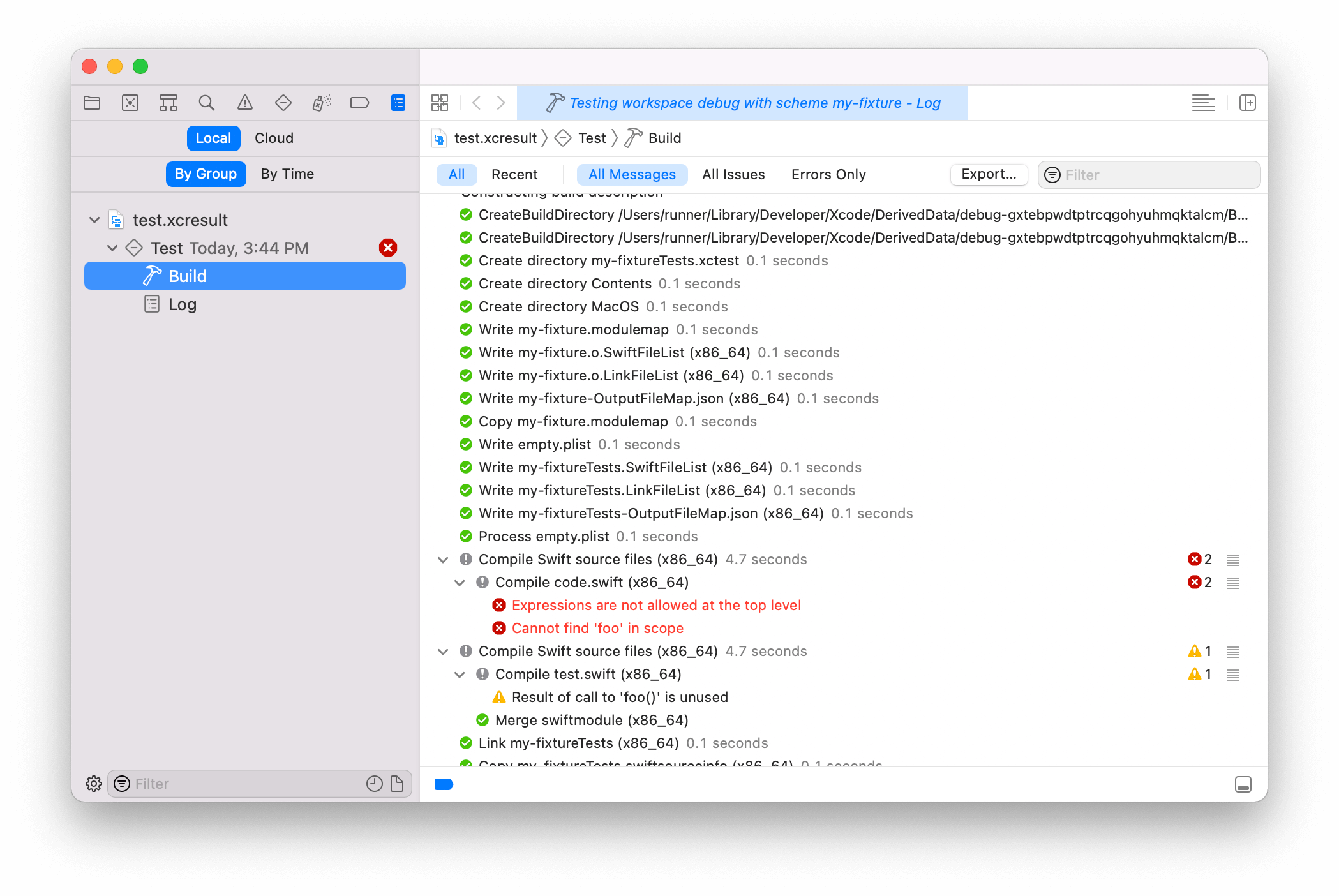
We automatically upload the build logs as artifacts on failure.
The resulting artifact is an .xcresult “bundle” and once downloaded can be
opened in Xcode:
You'll even get your coverage report!
Note this feature requires Xcode >= 11
Sanitizers
You can enable sanitizers to help detect bugs during testing. Only one sanitizer can be enabled at a time.
Thread Sanitizer
Thread Sanitizer (TSan) detects data races and other threading issues:
- uses: mxcl/xcodebuild@v3
  with:
    action: test
    sanitizer: thread
Address Sanitizer
Address Sanitizer (ASan) detects memory corruption issues like buffer overflows and use-after-free:
- uses: mxcl/xcodebuild@v3
  with:
    action: test
    sanitizer: address
Sanitizers are only applied for test and build-for-testing actions.
.swift-version File
If your repo has a .swift-version file and neither swift nor xcode is
specified it will be read and that Swift version resolved.
If working-directory is set, the .swift-version file is read from this
directory.
This behavior cannot currently be disabled, PR welcome.
Code Signing
This feature requires macOS.
Code signing can be enabled with either an App Store Connect API key, or with a
certificate.
Using an App Store Connect API Key
This feature requires Xcode 13 or later.
Create an API key on
App Store Connect. Download your key and Base64-encode it:
base64 AuthKey_9XXXX9XXXX.p8
Create GitHub Secrets for your base64-encoded key, the key ID, and
the key's issuer ID. The IDs are displayed on App Store Connect.
Certificates and provisioning profiles will be created automatically using the
App Store Connect API. Certificates will appear in your
list of certificates as Created via API.
Devices will be registered automatically. GitHub-hosted runners will appear in
in your list of devices as mac-NUMBER.local.
:warning: This may cause undesired behavior when using GitHub-hosted runners.
For best results, use App Store Connect API keys only on self-hosted runners.
For more information on this method of code signing, please review the
"Distribute apps in Xcode with cloud signing" talk from WWDC21.
Using a Specific Certificate
If you are not able to use an App Store Connect API key, and you have a specific
code signing certificate you'd like to use, it can be installed to the macOS
Keychain. It is automatically removed from the Keychain in a post action.
To export your certificate from Xcode and Base64 encode it, follow
these instructions. Store any secrets, including certificates and
passphrases, in GitHub as Encrypted Secrets.
Specifying an Identity
You may specify a code-sign-identity to override any CODE_SIGN_IDENTITY
specified by your project.
Disabling Code Signing
To disable code signing, you can specify code-sign-identity: '-'.
Provisioning Profiles
If you are not able to use an App Store Connect API key, and you have specific
provisioning profiles you'd like to use, you can specify profiles for Mac
provisioning-profiles-base64, or for iOS or other devices using
mobile-provisioning-profiles-base64.
To export your provisioning profiles from Xcode and Base64 encode these, follow
these instructions. Store any secrets, including provisioning
profiles, in GitHub as Encrypted Secrets.
The selected Xcode remains the default Xcode for the image for the duration of
your job.
Neat Stuff
We’re smart based on the selected Xcode version, for example we know watchOS
cannot be tested prior to 12.5 and run xcodebuild with build instead
We figure out the the simulator destination for you automatically. Stop
specifying fragile strings like platform=iphonesimulator,os=14.5,name=iPhone 12
that will break when Xcode updates next week.
You probably don’t need to specify project or scheme since we aren’t tedious
if possible
warnings-as-errors is only applied to normal targets: not your tests
Continuous Resilience
Use macos-latest and trust this action to always work
This because GitHub deprecate old environments, so if you want your CI to
continue to work in 5 years you need to use latest
This makes specifying specific xcode versions problematic however, we
haven’t got a good story for this yet.
Set up a scheduled job for your CI for at least once a week
This way you’ll be notified if a new version of something (like Xcode)
causes breakage in your builds
Linux
If your project is a Swift Package (which it would have to be to build on Linux)
then by far the best and quickest way to build on Linux is by using the official
Swift docker containers:
jobs:
  build:
    runs-on: ubuntu-latest
    strategy:
      matrix:
        swift:
          - '5.0' # string or you’ll get 5.5!
          - 5.1
    container:
      image: swift:${{ matrix.swift }}
    steps:
      - run: swift test
Trang TopGit này là một snapshot — tab "Readme" hiển thị nguyên văn README của repo (đã bỏ link, giữ ảnh). Repo GitHub ở github.com/mxcl/xcodebuild là nguồn chính thức.
mxcl/xcodebuild có bao nhiêu sao?
mxcl/xcodebuild có 352 sao GitHub — tải lại trang để xem số mới nhất, hoặc xem trực tiếp github.com/mxcl/xcodebuild. TopGit phản chiếu số sao của GitHub nhưng không cam kết đến từng phút.
mxcl/xcodebuild có phải mã nguồn mở không?
Có — mxcl/xcodebuild phát hành theo license Unlicense, nghĩa là mã nguồn mở để đọc, fork và (tùy license) tái sử dụng. Mã: github.com/mxcl/xcodebuild.
mxcl/xcodebuild có website riêng không?
TopGit chưa ghi nhận URL trang chủ cho mxcl/xcodebuild. Phần README ở tab phía trên thường có link demo, hoặc xem mô tả GitHub của repo.
mxcl/xcodebuild là gì?
mxcl/xcodebuild (mxcl/xcodebuild) là dự án TypeScript trên GitHub. Theo mô tả gốc: A continuously resilient `xcodebuild` “GitHub Action”. Also it’s the best.
Đọc đầy đủ README ở tab phía trên.
Muốn nghe thêm một ý kiến về xcodebuild?
Hỏi một AI đọc được trang này — một cú bấm là có ngay nhận định về xcodebuild.