nccgroup/PMapper là dự án Backend trên GitHub, viết chủ yếu bằng Python, với 1.6k sao. A tool for quickly evaluating IAM permissions in AWS.
Tóm tắt dựng từ metadata GitHub của chính dự án — chưa có bài review TopGit. Trang sẽ tự động cập nhật khi bài review đầy đủ được xuất bản.
VÌ SAO CHƯA CÓ REVIEW
TopGit viết bài đầy đủ cho repo có nhiều sao nhất và được yêu cầu nhiều nhất. Trang này là snapshot trong thời gian chờ — xem README gốc ở tab READ ME.
Principal Mapper (PMapper) is a script and library for identifying risks in the configuration of AWS Identity and
Access Management (IAM) for an AWS account or an AWS organization. It models the different IAM Users and Roles in an
account as a directed graph, which enables checks for privilege escalation and for alternate paths an attacker could
take to gain access to a resource or action in AWS.
PMapper includes a querying mechanism that uses a local simulation of AWS's authorization behavior.
When running a query to determine if a principal has access to a certain action/resource, PMapper also checks if the
user or role could access other users or roles that have access to that action/resource. This catches scenarios such as
when a user doesn't have permission to read an S3 object, but could launch an EC2 instance that can read the S3 object.
Additional information can be found in the project wiki.
Installation
Requirements
Principal Mapper is built using the botocore library and Python 3.5+. Principal Mapper
also requires pydot (available on pip), and graphviz (available on Windows, macOS, and Linux from
https://graphviz.org/ ).
cd PMapper
docker build -t $TAG .
docker run -it $TAG
You can use -e|--env or --env-file to pass the AWS_* environment variables for credentials when calling
docker run ..., or use -v to mount your ~/.aws/ directory and use the AWS_CONFIG_FILE and AWS_SHARED_CREDENTIALS_FILE environment variables.
The current Dockerfile should put you into a shell with pmapper -h ready to go as well as
graphviz already installed.
Usage
See the Getting Started Page in the wiki for more information
on how to use PMapper via command-line. There are also pages with full details on all command-line functions and
the library code.
Here's a quick example:
# Create a graph for the account, accessed through AWS CLI profile "skywalker"
pmapper --profile skywalker graph create
# [... graph-creation output goes here ...]

# Run a query to see who can make IAM Users
$ pmapper --profile skywalker query 'who can do iam:CreateUser'
# [... query output goes here ...]

# Run a query to see who can launch a big expensive EC2 instance, aside from "admin" users
$ pmapper --account 000000000000 argquery -s --action 'ec2:RunInstances' --condition 'ec2:InstanceType=c6gd.16xlarge'
# [... query output goes here ...]

# Run the privilege escalation preset query, skip reporting current "admin" users
$ pmapper --account 000000000000 query -s 'preset privesc *'
# [... privesc report goes here ...]

# Create an SVG representation of the admins/privescs/inter-principal access
$ pmapper --account 000000000000 visualize --filetype svg
# [... information output goes here, file created ...]
Note the use of --profile, which should behave the same as the AWS CLI. Also, later calls with
query/argquery/visualize use an --account arg which just shortcuts around checking which account to work
with (otherwise PMapper makes an API call to determine that).
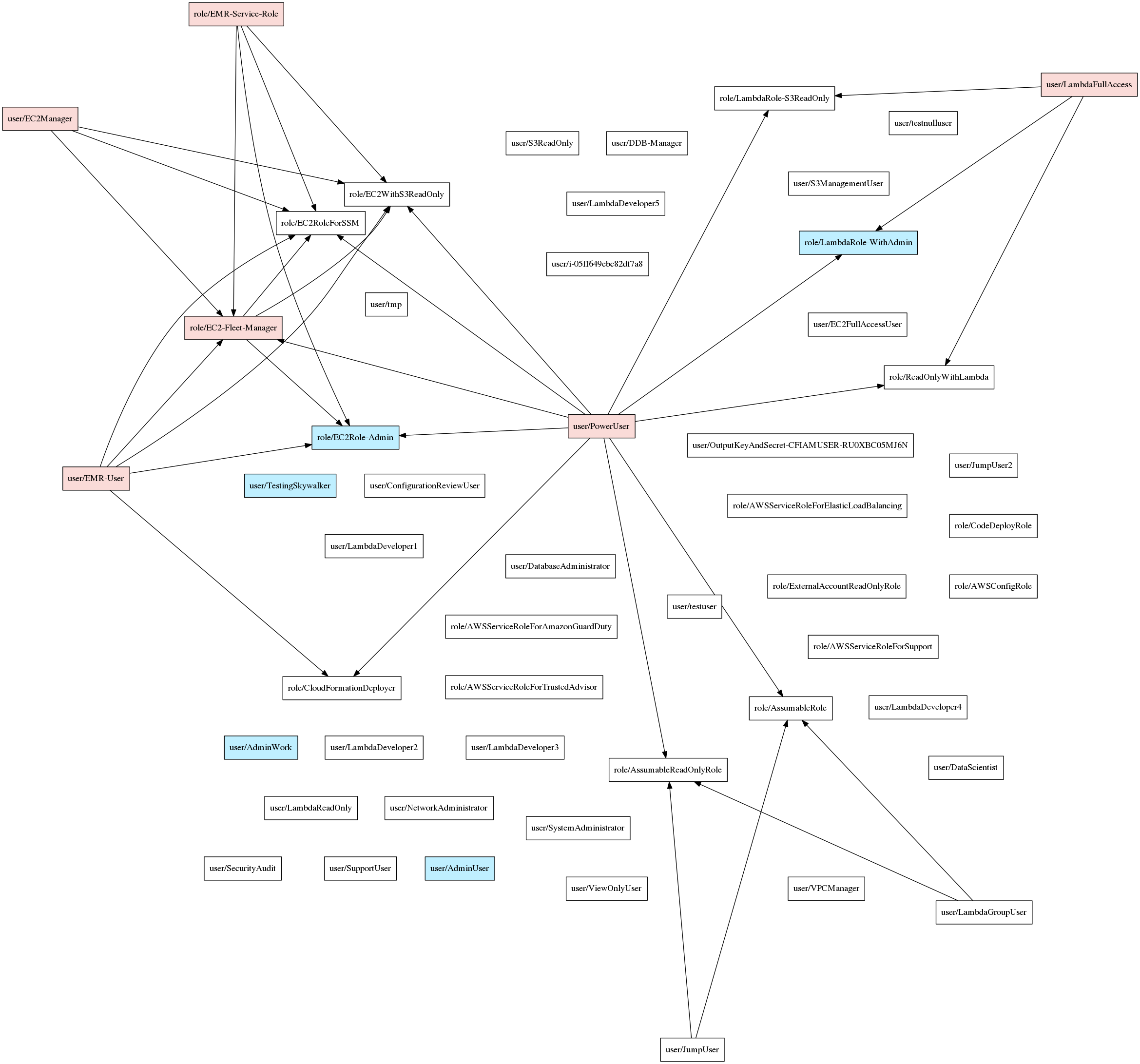
Here's an example of the visualization:
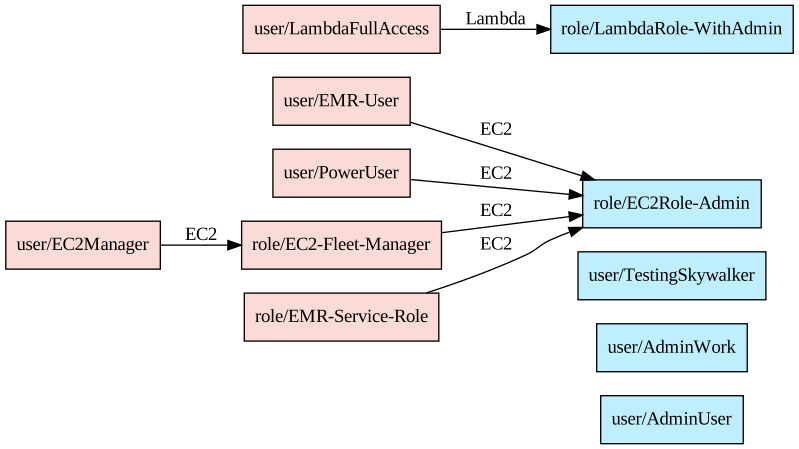
And again when using --only-privesc:
Contributions
100% welcome and appreciated. Please coordinate through issues before
starting and target pull-requests at the current development branch (typically of the form vX.Y.Z-dev).
License
Copyright (c) NCC Group and Erik Steringer 2019. This file is part of Principal Mapper.

  Principal Mapper is free software: you can redistribute it and/or modify
  it under the terms of the GNU Affero General Public License as published by
  the Free Software Foundation, either version 3 of the License, or
  (at your option) any later version.

  Principal Mapper is distributed in the hope that it will be useful,
  but WITHOUT ANY WARRANTY; without even the implied warranty of
  MERCHANTABILITY or FITNESS FOR A PARTICULAR PURPOSE.  See the
  GNU Affero General Public License for more details.

  You should have received a copy of the GNU Affero General Public License
  along with Principal Mapper.  If not, see <https://www.gnu.org/licenses/>.
nccgroup/PMapper thuộc nhóm Backend trên TopGit, cùng 5 topic GitHub. Trang Trending và Topics liệt kê các repo cùng số sao và cùng ngôn ngữ để so sánh.
Đọc thêm về nccgroup/PMapper ở đâu?
Trang TopGit này là một snapshot — tab "Readme" hiển thị nguyên văn README của repo (đã bỏ link, giữ ảnh). Repo GitHub ở github.com/nccgroup/PMapper là nguồn chính thức.
nccgroup/PMapper có bao nhiêu sao?
nccgroup/PMapper có 1.6k sao GitHub — tải lại trang để xem số mới nhất, hoặc xem trực tiếp github.com/nccgroup/PMapper. TopGit phản chiếu số sao của GitHub nhưng không cam kết đến từng phút.
nccgroup/PMapper có những chủ đề gì?
GitHub topics của nccgroup/PMapper: "aws", "botocore", "cloudsecurity", "iam", "python". TopGit xếp repo vào nhóm Backend.
nccgroup/PMapper có phải mã nguồn mở không?
Có — nccgroup/PMapper phát hành theo license AGPL-3.0, nghĩa là mã nguồn mở để đọc, fork và (tùy license) tái sử dụng. Mã: github.com/nccgroup/PMapper.
nccgroup/PMapper có website riêng không?
TopGit chưa ghi nhận URL trang chủ cho nccgroup/PMapper. Phần README ở tab phía trên thường có link demo, hoặc xem mô tả GitHub của repo.
nccgroup/PMapper còn đang phát triển không?
Commit gần nhất trên nccgroup/PMapper là 2.3 năm trước (theo timestamp GitHub). Repo có 200 fork — một chỉ báo về mức độ quan tâm của cộng đồng.
Đọc đầy đủ README ở tab phía trên.
Muốn nghe thêm một ý kiến về PMapper?
Hỏi một AI đọc được trang này — một cú bấm là có ngay nhận định về PMapper.

 /PMapper