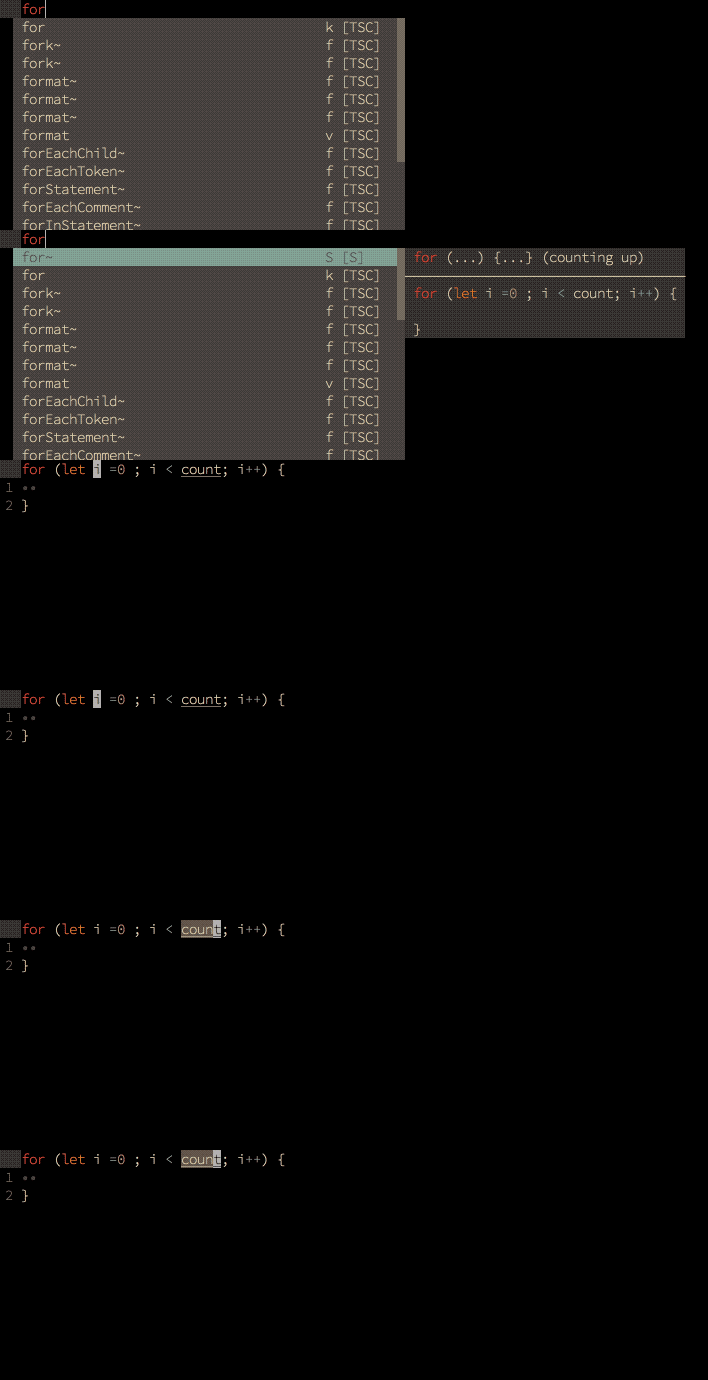
neoclide/coc-snippets là dự án TypeScript với 975 sao trong nhóm Developer Tools. Snippets solution for coc.nvim
Tóm tắt dựng từ metadata GitHub của chính dự án — chưa có bài review TopGit. Trang sẽ tự động cập nhật khi bài review đầy đủ được xuất bản.
VÌ SAO CHƯA CÓ REVIEW
TopGit viết bài đầy đủ cho repo có nhiều sao nhất và được yêu cầu nhiều nhất. Trang này là snapshot trong thời gian chờ — xem README gốc ở tab READ ME.
Snippet preview requires neovim 0.4 or latest vim8
It's capable of:
Load UltiSnips snippets.
Load snipmate snippets.
Load VSCode snippets from coc.nvim extensions.
Load VSCode snippets from custom directories.
Load VSCode snippets from ${workspaceFolder}/.vscode.
Load UltiSnips snippets from configured folder.
Load massCode snippets from running massCode application (disabled by default).
Create massCode snippets through the snippets.editMassCodeSnippets command.
Provide snippets as completion items.
Provide expand and expandOrJump keymaps for snippet.
Provide snippets list for edit snippet.
Provide snippets.editSnippets command for edit user snippets of current filetype.
Note: some features of ultisnips and snipmate format snippets not supported,
checkout Ultisnips features.
Why?
Use same keys for jump placeholder.
Nested snippet support.
Always async, never slows you down.
Preview snippet context in float window/popup.
Improved match for complete items with TextEdit support.
Edit snippets of current buffer by :CocList snippets.
Python support
Ultisnips provider needs pythonx support on (neo)vim, to check the feature exists,
try:
:echo has('pythonx')
On neovim, run command:
:checkhealth
If it is not installed, run:
pip install pynvim
and make sure you have Python 3 provider for neovim installed.
On vim8, run command:
:pyx print(1)
in your vim, if it throws, it means your vim is not compiled with python support
or the python dynamic lib required by vim is missing(or broken).
Note: some python code may require python feature that not supported by the
python interpreter used by vim, error will throw on that case.
Error will be shown when pythonx with (neo)vim can't work, fix pythonx
support or disable ultisnips support by add "snippets.ultisnips.enable": false
in your configuration file.
Install
In your vim/neovim, run command:
:CocInstall coc-snippets
Examples
" Use <C-l> for trigger snippet expand.
imap <C-l> <Plug>(coc-snippets-expand)

" Use <C-j> for select text for visual placeholder of snippet.
vmap <C-j> <Plug>(coc-snippets-select)

" Use <C-j> for jump to next placeholder, it's default of coc.nvim
let g:coc_snippet_next = '<c-j>'

" Use <C-k> for jump to previous placeholder, it's default of coc.nvim
let g:coc_snippet_prev = '<c-k>'

" Use <C-j> for both expand and jump (make expand higher priority.)
imap <C-j> <Plug>(coc-snippets-expand-jump)

" Use <leader>x for convert visual selected code to snippet
xmap <leader>x  <Plug>(coc-convert-snippet)
Make <tab> used for trigger completion, completion confirm, snippet expand and jump like VSCode.
Note from coc.nvim 0.0.82, functions starts with coc#pum should be used for
custom completion of coc.nvim.
Update python code block after change of placeholder.
Execute shell code with custom shabang (will not support).
Option m, trim all whitespaces from right side of snippet lines.
Reformat snippet options, including t, s.
All snippet actions including pre_expand, post_expand and jump (can't support).
snip.expand_anon() and other properties with UltiSnips actions.
Note: snip.expand_anon expand the snippet in async manner by use timer
when used with pre_expand and post_expand action, which means the state is
lost in your python script (should only happens on some rare cases).
Note: python regex in snippet are converted to javascript regex, however,
some regex patterns can't be supported by javascript, including
(?x)(?s)\Z(?(id/name)yes-pattern|no-pattern).
Functions
coc#expandable() return 1 when can do snippet expand.
coc#jumpable() return 1 when snippet activated and can jump to next placeholder.
coc#expandableOrJumpable() return 1 when can do snippet expand or can jump
to next placeholder.
Key-mappings
Note you can't use noremap with <Plug> key-mappings.
<Plug>(coc-convert-snippet) Create new snippet with current selected text,
visual mode only.
<Plug>(coc-snippets-expand) Expand snippet with current inserted text,
insert mode only.
<Plug>(coc-snippets-expand-async) None block variant of
<Plug>(coc-snippets-expand).
<Plug>(coc-snippets-expand-jump) Expand snippet or jump to next placeholder
of current snippet when possible, insert mode only.
<Plug>(coc-snippets-expand-jump-async) None block variant of
<Plug>(coc-snippets-expand-jump).
<Plug>(coc-snippets-select) Remove selected text and save to
g:coc_selected_text which will replace $VISUAL on next snippet expand.
Commands
Use :CocList snippets to open snippets list used by current buffer, the last
used snippet item would be preselected.
Use :CocCommand snippets.openSnippetFiles to choose and open a snippet file
that used by current document.
Use :CocCommand snippets.editSnippets to edit user's ultisnips snippets of
current document filetype.
Use :CocCommand snippets.openOutput to open output channel of snippets.
Use :CocCommand snippets.addFiletypes to add additional filetypes of current
buffer.
Use b:coc_snippets_filetypes to add additional filetypes on buffer create.
Options
snippets.priority: Completion source priority of snippets. Default: 90
snippets.editSnippetsCommand: Open command used for snippets.editSnippets command, use coc.preferences.jumpCommand by default. Default: ""
snippets.trace: Trace level of snippets channel, used for textmate snippets only. Default: "error"
Valid options: ["error","verbose"]
snippets.excludePatterns: List of minimatch patterns for filepath to exclude, support expand homedir and environment variables. Default: []
snippets.loadFromExtensions: Enable load snippets from extensions. Default: true
snippets.textmateSnippetsRoots: List of directories that contains textmate/VSCode snippets to load. Default: []
snippets.loadVSCodeProjectSnippets: Load code snippets in folder ${workspaceFolder}/.vscode Default: true
snippets.userSnippetsDirectory: Directory that contains custom user ultisnips snippets, use ultisnips in extension root of coc.nvim by default. Default: ""
snippets.shortcut: Shortcut in completion menu. Default: "S"
snippets.triggerCharacters: Trigger characters for trigger snippets completion. Default: []
snippets.disableSyntaxes: Disable snippets completion when syntax name matches one of disabled syntaxes. Default: []
snippets.execContext: Execute a snippet's context (if it exists) to check if the snippet should be shown in completion menu Default: false
snippets.autoTrigger: Enable trigger auto trigger snippet after type character. Default: true
snippets.ultisnips.enable: Enable load snippets from ultisnips folders. Default: true
snippets.ultisnips.pythonPrompt: Show prompt for user when python not supported on vim. Default: true
snippets.ultisnips.directories: Directories that searched for ultisnips snippet files, could be directory as subfolder in $runtimepath or absolute paths. Default: ["UltiSnips"]
snippets.massCode.enable: Enable load snippets from MassCode. Default: false
snippets.massCode.host: Http host of MassCode. Default: "localhost"
snippets.massCode.port: Http port of MassCode. Default: 3033
snippets.snipmate.author: Author name used for g:snips_author Default: ""
F.A.Q
Q: How to add snippet filetypes on buffer create?
A: Use autocmd like: autocmd BufRead *.md let b:coc_snippets_filetypes = ['tex']
Q: How to trigger snippets completion when type special characters?
A: Use configuration like: "snippets.triggerCharacters": ["'"]. Completion
input only contains word characters, so a snippet with a non-word prefix such as
/// shows up only after the trigger characters match its prefix, for example:
{
  "snippets.triggerCharacters": ["/"]
}
Alternatively, expand such snippets directly with the snippets-expand keymap,
which does not require the completion menu.
Q: How to check if a snippet successfully loaded?
A: Use command :CocCommand workspace.showOutput snippets
Q: How to get debug output from snippets?
A: Enable tracing with snippets.ultisnips.trace: true,
snippets.snipmate.trace: true, snippets.massCode.trace: true or
snippets.trace: "verbose" (textmate snippets), then open the snippets output
channel with :CocCommand snippets.openOutput. Exceptions thrown in UltiSnips
python interpolation are always caught and appended to the channel with the
stack trace. To log custom info from interpolation code without throwing, write
to a file from the python code, e.g.:
A: Reformat after change of placeholder feature can't be supported for now,
and some regex pattern can't be converted to javascript regex pattern, so the
snippet can be failed to load.
Q: Where to get snippets?
A: One solution is install honza/vim-snippets which is widely used.
To create snippets yourself:
For Ultisnips, create ${filetype}.snippets in "snippets.ultisnips.directories"
For snipmate snippets, create ${filetype}.snippets in snippets folder
under your vim's runtimepath.
For VSCode snippets, create ${filetype}.json in your "snippets.textmateSnippetsRoots".
Q: Get error message ModuleNotFoundError: No module named 'vimsnippets'
A: Make sure honza/vim-snippets in
your vim's &runtimepath.
Q: Do I need to install Ultisnips.
A: No! This extension is designed to work with or without Ultisnips, you can
still install Ultisnips, but this extension would not run any code or read
configuration from it.
Q: How to check jumpable or expandable at current position.
A: Use functions provided by coc.nvim: coc#expandable()coc#jumpable() and coc#expandableOrJumpable().
Q: How could I add custom UltiSnips snippets.
A: You can create snippet files in folder: $VIMCONFIG/coc/ultisnips, use
command :CocCommand snippets.editSnippets to open user snippet of current
filetype.
Supporting
If you like this extension, consider supporting me on Patreon or PayPal:
Trang TopGit này là một snapshot — tab "Readme" hiển thị nguyên văn README của repo (đã bỏ link, giữ ảnh). Repo GitHub ở github.com/neoclide/coc-snippets là nguồn chính thức.
neoclide/coc-snippets có bao nhiêu sao?
neoclide/coc-snippets có 975 sao GitHub — tải lại trang để xem số mới nhất, hoặc xem trực tiếp github.com/neoclide/coc-snippets. TopGit phản chiếu số sao của GitHub nhưng không cam kết đến từng phút.
neoclide/coc-snippets có phải mã nguồn mở không?
TopGit chưa ghi nhận license cho neoclide/coc-snippets. Phần lớn repo public trên GitHub là mã nguồn mở, nhưng điều khoản khác nhau từng repo — mở file LICENSE để xác nhận.
neoclide/coc-snippets còn đang phát triển không?
Commit gần nhất trên neoclide/coc-snippets là 2 ngày trước (theo timestamp GitHub). Repo có 44 fork — một chỉ báo về mức độ quan tâm của cộng đồng.
neoclide/coc-snippets là gì?
neoclide/coc-snippets (neoclide/coc-snippets) là dự án TypeScript trên GitHub. Theo mô tả gốc: Snippets solution for coc.nvim
neoclide/coc-snippets so với các dự án Developer Tools khác thế nào?
neoclide/coc-snippets được TopGit xếp vào nhóm Developer Tools, với 975 sao GitHub và viết bằng TypeScript. Xem trang chủ đề Developer Tools trên TopGit để so sánh với các dự án tương tự theo số sao và mức độ hoạt động.
Đọc đầy đủ README ở tab phía trên.
Chưa chắc coc-snippets có hợp với bạn?
Để ChatGPT, Claude hoặc Perplexity tìm hiểu giúp — bấm bên dưới và xem AI nói gì về coc-snippets.
 /coc-snippets