netlify/netlify-identity-widget — 804★ trên GitHub (HTML). A zero config, framework free Netlify Identity widget
Tóm tắt dựng từ metadata GitHub của chính dự án — chưa có bài review TopGit. Trang sẽ tự động cập nhật khi bài review đầy đủ được xuất bản.
VÌ SAO CHƯA CÓ REVIEW
TopGit viết bài đầy đủ cho repo có nhiều sao nhất và được yêu cầu nhiều nhất. Trang này là snapshot trong thời gian chờ — xem README gốc ở tab READ ME.
A component used to authenticate with Netlify's Identity service.
Live demo
What is Netlify Identity
Netlify's Identity service is a plug-and-play microservice for handling site
functionalities like signups, logins, password recovery, user metadata, and
roles. You can use it from single page apps instead of rolling your own, and
integrate with any service that understands JSON Web Tokens (JWTs).
Learn more about this service from this
blog post.
Usage
Simply include the widget on your site, and things like invites, confirmation
codes, etc, will start working.
You can add controls for the widget with HTML:
<!DOCTYPE html>
<html>
  <head>
    <title>A static website</title>

    <!-- include the widget -->
    <script
      type="text/javascript"
      src="https://identity.netlify.com/v1/netlify-identity-widget.js"
    ></script>
  </head>
  <body>
    <!-- Add a menu:
   Log in / Sign up - when the user is not logged in
   Username / Log out - when the user is logged in
  -->
    <div data-netlify-identity-menu></div>

    <!-- Add a simpler button:
    Simple button that will open the modal.
  -->
    <div data-netlify-identity-button>Login with Netlify Identity</div>
  </body>
</html>
The widget will automatically attach itself to the window object as
window.netlifyIdentity.
You can use this global object like this:
// Open the modal
netlifyIdentity.open();
netlifyIdentity.open("login"); // open the modal to the login tab
netlifyIdentity.open("signup"); // open the modal to the signup tab
netlifyIdentity.open("signup", { full_name: "Jane Doe" }); // pass metadata to pre-fill signup fields

// Get the current user:
// Available after on('init') is invoked
const user = netlifyIdentity.currentUser();

// Bind to events
netlifyIdentity.on("init", (user) => console.log("init", user));
netlifyIdentity.on("login", (user) => console.log("login", user));
netlifyIdentity.on("logout", () => console.log("Logged out"));
netlifyIdentity.on("error", (err) => console.error("Error", err));
netlifyIdentity.on("open", () => console.log("Widget opened"));
netlifyIdentity.on("close", () => console.log("Widget closed"));

// Unbind from events
netlifyIdentity.off("login"); // to unbind all registered handlers
netlifyIdentity.off("login", handler); // to unbind a single handler

// Close the modal
netlifyIdentity.close();

// Log out the user
netlifyIdentity.logout();

// Refresh the user's JWT
// Call in on('login') handler to ensure token refreshed after it expires (1hr)
// Note: this method returns a promise.
netlifyIdentity.refresh().then((jwt) => console.log(jwt));

// Change language
netlifyIdentity.setLocale("en");
JWT refresh tokens
The access token (JWT) issued by Netlify Identity expires after 1 hour. After
expiry, the widget automatically uses the refresh token to obtain a new access
token when you call netlifyIdentity.refresh().
To keep the token fresh, call refresh() before making authenticated requests:
netlifyIdentity.on("login", async (user) => {
  // Get a fresh JWT for API calls
  const jwt = await netlifyIdentity.refresh();
  // Use jwt in Authorization header for your functions/API
  fetch("/.netlify/functions/my-function", {
    headers: { Authorization: `Bearer ${jwt}` }
  });
});
You do not need to call .refresh() on every request — only when the token
may have expired (i.e. more than 1 hour since the last login or refresh). The
method returns a promise that resolves with the new JWT string.
A note on script tag versioning
The v1 in the above URL is not pinned to the major version of the module API,
and will only reflect breaking changes in the markup API.
Module API
Netlify Identity Widget also has a
module API:
yarn add netlify-identity-widget
Import or require as usual:
const netlifyIdentity = require("netlify-identity-widget");

netlifyIdentity.init({
  container: "#netlify-modal", // defaults to document.body
  locale: "en" // defaults to 'en'
});

netlifyIdentity.open(); // open the modal
netlifyIdentity.open("login"); // open the modal to the login tab
netlifyIdentity.open("signup"); // open the modal to the signup tab
netlifyIdentity.open("signup", { full_name: "Jane Doe" }); // pass metadata to pre-fill signup fields

netlifyIdentity.on("init", (user) => console.log("init", user));
netlifyIdentity.on("login", (user) => console.log("login", user));
netlifyIdentity.on("logout", () => console.log("Logged out"));
netlifyIdentity.on("error", (err) => console.error("Error", err));
netlifyIdentity.on("open", () => console.log("Widget opened"));
netlifyIdentity.on("close", () => console.log("Widget closed"));

// Unbind from events
netlifyIdentity.off("login"); // to unbind all registered handlers
netlifyIdentity.off("login", handler); // to unbind a single handler

// Close the modal
netlifyIdentity.close();

// Log out the user
netlifyIdentity.logout();

// refresh the user's JWT
// Note: this method returns a promise.
netlifyIdentity.refresh().then((jwt) => console.log(jwt));

// Change language
netlifyIdentity.setLocale("en");

// Access the underlying GoTrue JS client.
// Note that doing things directly through the GoTrue client brings a risk of getting out of
// sync between your state and the widget’s state.
netlifyIdentity.gotrue;
netlifyIdentity.init([opts])
You can pass an optional opts object to configure the widget when using the
module API. Options include:
{
  container: '#some-query-selector'; // container to attach to
  APIUrl: 'https://www.example.com/.netlify/functions/identity'; // Absolute url to endpoint.  ONLY USE IN SPECIAL CASES!
  logo: true; // set to false to hide the Netlify logo in the modal
  namePlaceholder: 'some-placeholder-for-Name'; // custom placeholder for name input form
  locale: 'en'; // language code for translations - available: en, fr, es, pt, hu, pl, cs, sk, de, it, ar, zhCN, nl, sv, sw, ru - default to en
  cookieDomain: '.example.com'; // domain for the nf_jwt cookie, enabling cross-subdomain auth
Generally avoid setting the APIUrl. You should only set this when your app is
served from a domain that differs from where the identity endpoint is served.
This is common for Cordova or Electron apps where you host from localhost or a
file.
cookieDomain: By default, the nf_jwt cookie is scoped to the exact
hostname that set it. If your app spans multiple subdomains (e.g.
app.example.com and api.example.com), set cookieDomain to the parent
domain with a leading dot (e.g. ".example.com") so the cookie is included in
requests to all subdomains. Only set this if you need cross-subdomain auth.
Localhost
When using the widget on localhost, it will prompt for your Netlify SiteURL the
first time it is opened. Entering the siteURL populates the browser's
localStorage.
This allows the widget to know which instance of Netlify Identity it should
communicate with zero configuration.
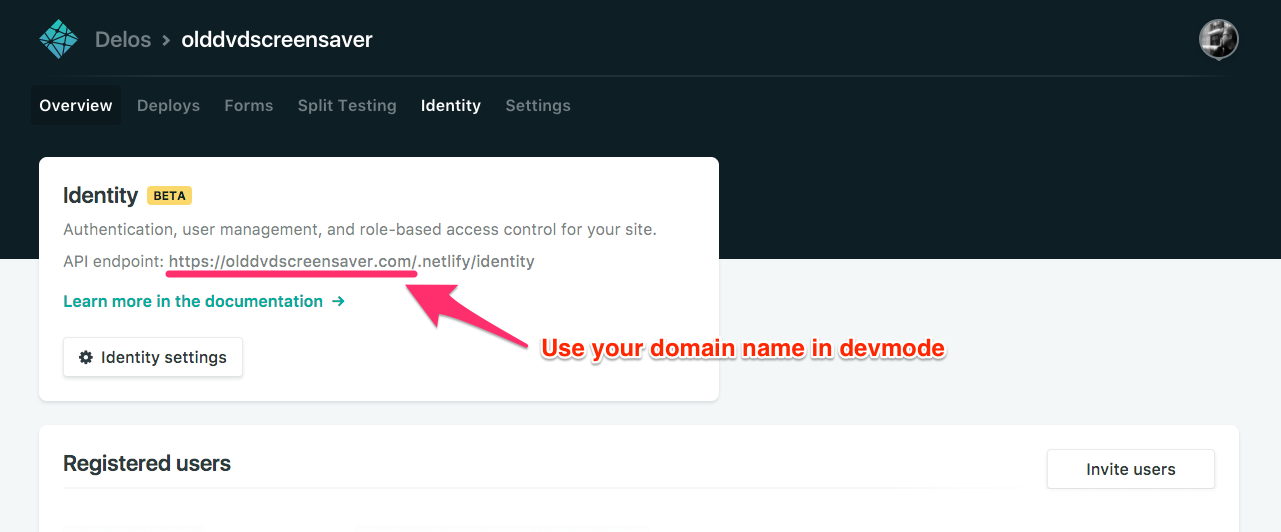
E.g. If your Netlify site is served from the olddvdscreensaver.com domain
name, enter the following when prompted by the widget when in development mode:
https://olddvdscreensaver.com
List of Alternatives
| Library | UI provided | Notes |
| ----------------------------------------------------------------------------- | ------------- | --------------------------------------------------------------------- | --- |
| gotrue-js | No | Low-level JS client for GoTrue, Netlify's underlying Identity service |
| netlify-identity-widget | Yes (overlay) | This library — drop-in modal widget, no framework needed | |
You can also see an example of wrapping netlify-identity-widget in a React Hook here: https://github.com/sw-yx/netlify-fauna-todo/blob/main/src/hooks/useNetlifyIdentity.js
Browser Support
This widget supports all modern browsers. The browserslist query used is:
defaults, not IE 11
This covers the latest two versions of all major browsers, any browser with >0.5%
global usage, and Firefox ESR. Internet Explorer is not supported.
FAQ
TypeScript Typings are maintained by @nkprince007 (see PR): npm install @types/netlify-identity-widget and then import * as NetlifyIdentityWidget from "netlify-identity-widget" (or import NetlifyIdentityWidget from "netlify-identity-widget" if you have --allowSyntheticDefaultImports on)
If you experience a 404 while testing the Netlify Identity Widget on a local
environment, you can manually remove the netlifySiteURL from localStorage by
doing the following in the console.
Đọc thêm về netlify/netlify-identity-widget ở đâu?
Trang TopGit này là một snapshot — tab "Readme" hiển thị nguyên văn README của repo (đã bỏ link, giữ ảnh). Repo GitHub ở github.com/netlify/netlify-identity-widget là nguồn chính thức.
netlify/netlify-identity-widget có bao nhiêu sao?
netlify/netlify-identity-widget có 804 sao GitHub — tải lại trang để xem số mới nhất, hoặc xem trực tiếp github.com/netlify/netlify-identity-widget. TopGit phản chiếu số sao của GitHub nhưng không cam kết đến từng phút.
netlify/netlify-identity-widget có tag gì không?
Bản đồng bộ chưa ghi nhận topic GitHub nào cho netlify/netlify-identity-widget. GitHub topics hiển thị ở thanh bên phải trang repo — đó là nơi đáng kiểm tra nhất.
netlify/netlify-identity-widget còn đang phát triển không?
Commit gần nhất trên netlify/netlify-identity-widget là 6 ngày trước (theo timestamp GitHub). Repo có 241 fork — một chỉ báo về mức độ quan tâm của cộng đồng.
netlify/netlify-identity-widget viết bằng ngôn ngữ gì?
netlify/netlify-identity-widget chủ yếu viết bằng HTML. Trường "language" của GitHub dựa trên phần lớn byte ở nhánh mặc định.
Đọc đầy đủ README ở tab phía trên.
netlify-identity-widget có đáng để bạn bỏ thời gian?
ChatGPT, Claude và Perplexity đều đọc được trang này. Hỏi thử xem họ nghĩ gì về netlify-identity-widget.
 /netlify-identity-widget