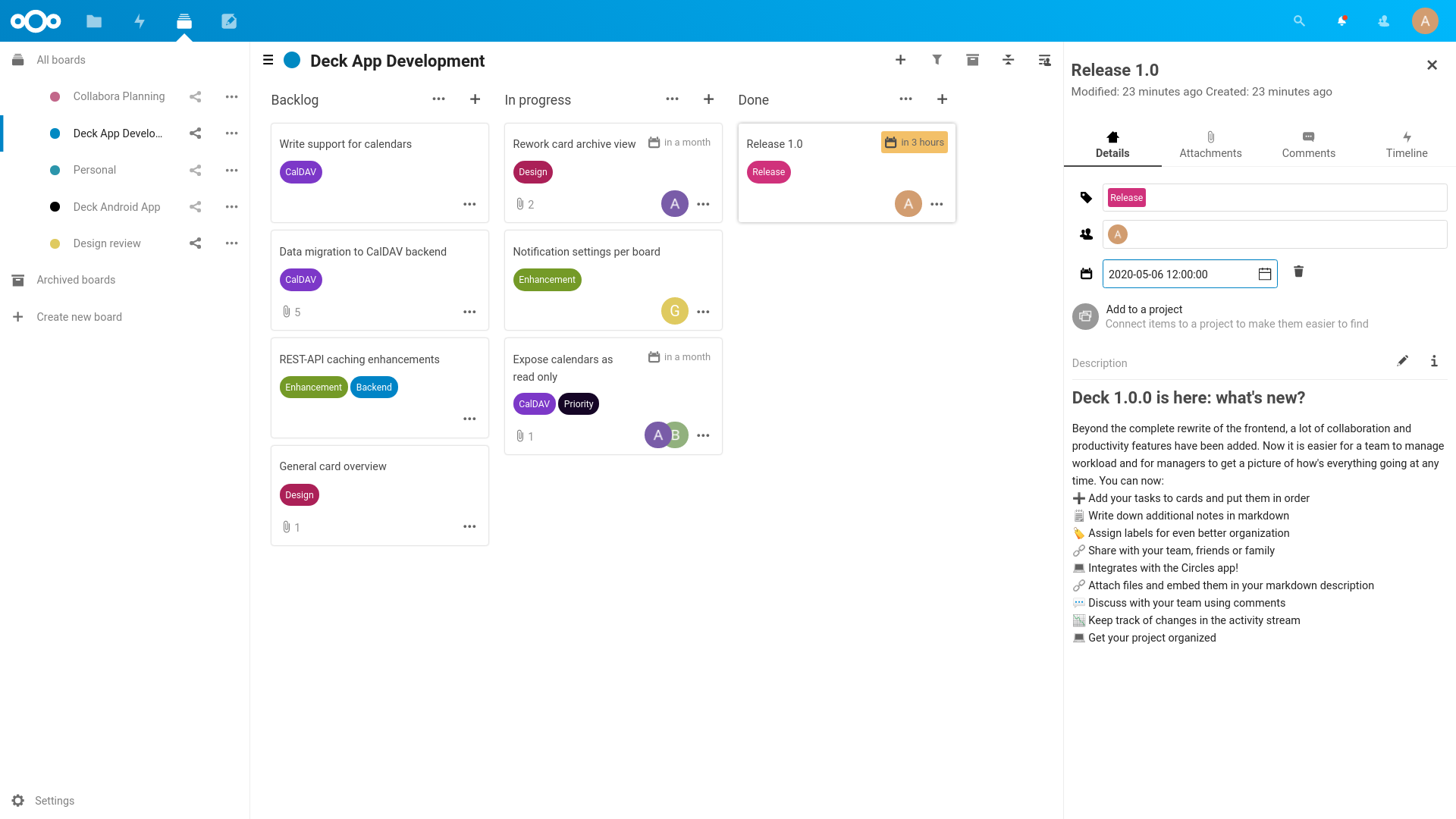
nextcloud/deck — 1.4k★ trên GitHub (JavaScript). 🗂 Kanban-style project & personal management tool for Nextcloud, similar to Trello
Tóm tắt dựng từ metadata GitHub của chính dự án — chưa có bài review TopGit. Trang sẽ tự động cập nhật khi bài review đầy đủ được xuất bản.
VÌ SAO CHƯA CÓ REVIEW
TopGit viết bài đầy đủ cho repo có nhiều sao nhất và được yêu cầu nhiều nhất. Trang này là snapshot trong thời gian chờ — xem README gốc ở tab READ ME.
Deck is a kanban style organization tool aimed at personal planning and project organization for teams integrated with Nextcloud.
Add your tasks to cards and put them in order
Write down additional notes in markdown
Assign labels for even better organization
Share with your team, friends or family
Integrates with the Circles app!
Attach files and embed them in your markdown description
Discuss with your team using comments
Keep track of changes in the activity stream
Get your project organized
Mobile apps
Nextcloud Deck app for Android - It is available in F-Droid and the Google Play Store
Nextcloud Deck app for iOS - It is available in Apple App store
3rd-Party Integrations
trello-to-deck - Migrates cards from Trello
mail2deck - Provides an "email in" solution
A-deck - Chrome Extension that allows to create new card in selected stack based on current tab
QOwnNotes - Quickly creates cards and links to them in Markdown notes
Installation/Update
The app can be installed through the app store within Nextcloud. You can also download the latest release from the release page.
Performance limitations
Deck is not yet ready for intensive usage.
A lot of database queries are generated when the number of boards, cards and attachments is high.
For example, a user having access to 13 boards, with each board having on average 100 cards,
and each card having on average 5 attachments,
would generate 6500 database queries when doing the file related queries
which would increase the page loading time significantly.
Improvements on Nextcloud server and Deck itself will improve the situation.
Developing
There are multiple ways to develop on Deck. As you will need a Nextcloud server running, the individual options are described below.
General build instructions
General build instructions for the app itself are the same for all options.
To build you will need to have Node.js and Composer installed.
You need to setup a development environment of the current Nextcloud version. You can also alternatively install & run the nextcloud docker container.
After the finished installation, you can clone the deck project directly in the /[nextcloud-docker-dev-dir]/workspace/server/apps/ folder.
Running tests
You can use the provided Makefile to run all tests by using:
make test
Running behat integration tests
Within tests/integration/ run composer install and then choose one of the two options:
Run tests with a local php server: bash run.sh
Run against an existing Nextcloud installation: BEHAT_SERVER_URL=http://nextcloud.local ./vendor/bin/behat --colors features/decks.feature
Documentation
The documentation for our REST API can be found at https://deck.readthedocs.io/en/latest/API/
Contribution Guidelines
Please read the Code of Conduct. This document offers some guidance to ensure Nextcloud participants can cooperate effectively in a positive and inspiring atmosphere, and to explain how together we can strengthen and support each other.
For more information please review the guidelines for contributing to this repository.
Apply a license
All contributions to this repository are considered to be licensed under
the GNU AGPLv3 or any later version.
Contributors to the Deck app retain their copyright. Therefore we recommend
to add following line to the header of a file, if you changed it substantially:
For further information on how to add or update the license header correctly please have a look at our licensing HowTo.
Sign your work
We use the Developer Certificate of Origin (DCO) as a additional safeguard
for the Nextcloud project. This is a well established and widely used
mechanism to assure contributors have confirmed their right to license
their contribution under the project's license.
Please read developer-certificate-of-origin.
If you can certify it, then just add a line to every git commit message:
Use your real name (sorry, no pseudonyms or anonymous contributions).
If you set your user.name and user.email git configs, you can sign your
commit automatically with git commit -s. You can also use git aliases
like git config --global alias.ci 'commit -s'. Now you can commit with
git ci and the commit will be signed.
Trang TopGit này là một snapshot — tab "Readme" hiển thị nguyên văn README của repo (đã bỏ link, giữ ảnh). Repo GitHub ở github.com/nextcloud/deck là nguồn chính thức.
nextcloud/deck có bao nhiêu sao?
nextcloud/deck có 1.4k sao GitHub — tải lại trang để xem số mới nhất, hoặc xem trực tiếp github.com/nextcloud/deck. TopGit phản chiếu số sao của GitHub nhưng không cam kết đến từng phút.
nextcloud/deck có phải mã nguồn mở không?
Có — nextcloud/deck phát hành theo license AGPL-3.0, nghĩa là mã nguồn mở để đọc, fork và (tùy license) tái sử dụng. Mã: github.com/nextcloud/deck.
nextcloud/deck còn đang phát triển không?
Commit gần nhất trên nextcloud/deck là 1 tháng trước (theo timestamp GitHub). Repo có 354 fork — một chỉ báo về mức độ quan tâm của cộng đồng.
nextcloud/deck là gì?
nextcloud/deck (nextcloud/deck) là dự án JavaScript trên GitHub. Theo mô tả gốc: 🗂 Kanban-style project & personal management tool for Nextcloud, similar to Trello
Đọc đầy đủ README ở tab phía trên.
Chưa chắc deck có hợp với bạn?
Để ChatGPT, Claude hoặc Perplexity tìm hiểu giúp — bấm bên dưới và xem AI nói gì về deck.
 /deck
/deck