nextcloud/nextcloudpi hiện có 2.9k sao trên GitHub, viết chủ yếu bằng Shell. 📦 Build code for NextcloudPi: Raspberry Pi, Odroid, Rock64, curl installer...
Tóm tắt dựng từ metadata GitHub của chính dự án — chưa có bài review TopGit. Trang sẽ tự động cập nhật khi bài review đầy đủ được xuất bản.
VÌ SAO CHƯA CÓ REVIEW
TopGit viết bài đầy đủ cho repo có nhiều sao nhất và được yêu cầu nhiều nhất. Trang này là snapshot trong thời gian chờ — xem README gốc ở tab READ ME.
English | Traditional Chinese 繁體中文 | Simplified Chinese 简体中文
(The translated README pages are not updated at this time)
NextcloudPi
This is the build code for the NextcloudPi open-source community project.
NextcloudPi is a ready to use image for Virtual Machines, Raspberry Pi, Odroid HC1, Rock64 and other boards. (⇒ Downloads)
This code also generates the NextcloudPi LXD and LXC containers and there is an install script for the latest supported Debian based system as well.
Find the documentation at docs.nextcloudpi.com, the documentation is all written by volunteers.
Please reach out in the Matrix or Telegram Wiki group chats if you want to help out to keep them up-to-date and we'll add you to the Wiki Group on the forum.
Test Status
master
devel
Features
Raspberry Pi OS/Debian 12 (Bookworm)
Nextcloud
Apache, with HTTP2 enabled
PHP 8.1
MariaDB
Redis memory cache
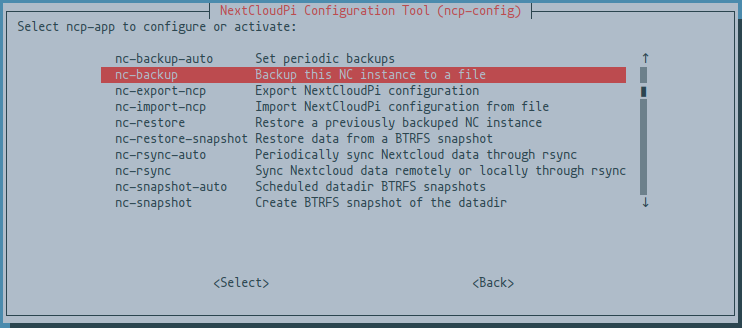
ncp-config TUI for easy setup ( RAM logs, USB drive and more )
Automatic redirection to HTTPS
APCu PHP cache
PHP Zend OPcache enabled with file cache
HSTS
Cron jobs for Nextcloud
Sane configuration defaults
Full emoji support
Postfix email
Secure
Extras
Setup wizard
NextcloudPi Web Panel
Wi-Fi ready
Ram logs
Automatic security updates, activated by default.
Let’s Encrypt for trusted HTTPS certificates.
Fail2Ban protection against brute force attacks.
UFW firewall
Dynamic DNS support for no-ip.org
Dynamic DNS support for freeDNS
Dynamic DNS support for duckDNS
Dynamic DNS support for spDYN
Dynamic DNS support for Namecheap
dnsmasq DNS server with DNS cache
ModSecurity Web Application Firewall
NFS ready to mount your files over LAN
SAMBA ready to share your files with Windows/Mac/Linux
USB automount
Remote updates
Automatic NCP updates
Automatic Nextcloud updates
Update notifications
Nextcloud backup and restore
Nextcloud online installation
Format USB drive to BTRFS
BTRFS snapshots
Automatic BTRFS snapshots
BTRFS snapshot auto sync
scheduled rsync
UPnP automatic port forwarding
Security audits with Lynis and Debsecan
ZRAM
SMART hard drive health monitoring
Extras can be activated and configured using the web interface at HTTPS port 4443
Or from the command line using
sudo ncp-config
Docker has been discontinued
Docker has been discontinued for the time being, please read the announcement here: https://help.nextcloud.com/t/nextcloudpi-planning-to-discontinue-its-docker-version-with-nc-25/158895
Run in LXD
# Imports the LXC image, replace the X's with version number
lxc image import "NextcloudPi_LXD_vX.XX.X.tar.gz" --alias "nextcloudpi"

# Launches a container from the image
lxc launch "nextcloudpi" ncp

# Starts the container you've launched from the imported image
lxc start ncp
Run in Proxmox
There are two ways to run NCP on Proxmox:
1. Using the official release image
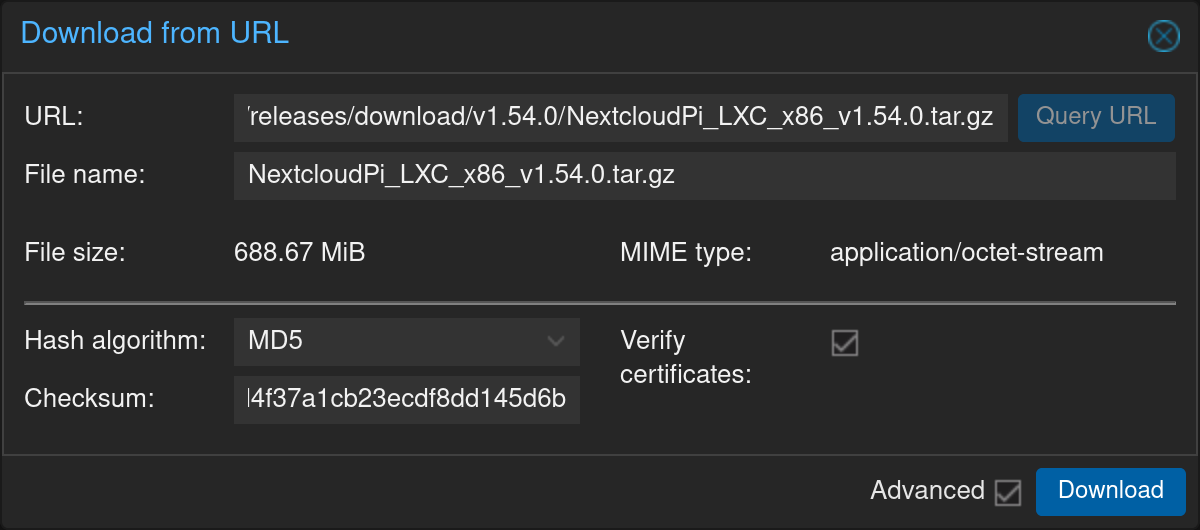
In your Proxmox web interface, head to any storage pool that has CT Templates enabled, go to CT Templates,
click "Download from URL" and enter the link to the latest LXC image from the Nextcloudpi releases page
and press "Download".
Optionally, you can copy the corresponding md5 sum from the releases page and paste it in the "Checksum" field to have
Proxmox check that the downloaded image was not corrupted
2. Installer by community-scripts (formerly tteck)
Use the install script from community-scripts to install the LXC container on your Proxmox instance
community-scripts has multiple helper scripts available for Proxmox on their website, go have a look if you're using Proxmox. :+1:
Trang TopGit này là một snapshot — tab "Readme" hiển thị nguyên văn README của repo (đã bỏ link, giữ ảnh). Repo GitHub ở github.com/nextcloud/nextcloudpi là nguồn chính thức.
nextcloud/nextcloudpi có phải mã nguồn mở không?
TopGit chưa ghi nhận license cho nextcloud/nextcloudpi. Phần lớn repo public trên GitHub là mã nguồn mở, nhưng điều khoản khác nhau từng repo — mở file LICENSE để xác nhận.
nextcloud/nextcloudpi là gì?
nextcloud/nextcloudpi (nextcloud/nextcloudpi) là dự án Shell trên GitHub. Theo mô tả gốc: 📦 Build code for NextcloudPi: Raspberry Pi, Odroid, Rock64, curl installer...
Đọc đầy đủ README ở tab phía trên.
Chưa chắc nextcloudpi có hợp với bạn?
Để ChatGPT, Claude hoặc Perplexity tìm hiểu giúp — bấm bên dưới và xem AI nói gì về nextcloudpi.
 /nextcloudpi