Là một công cụ xử lý ảnh, nextcloud/spreed đã đạt 2.2k sao trên GitHub, ngôn ngữ JavaScript. 🗨️ Nextcloud Talk – chat, video & audio calls for Nextcloud
Tóm tắt dựng từ metadata GitHub của chính dự án — chưa có bài review TopGit. Trang sẽ tự động cập nhật khi bài review đầy đủ được xuất bản.
VÌ SAO CHƯA CÓ REVIEW
TopGit viết bài đầy đủ cho repo có nhiều sao nhất và được yêu cầu nhiều nhất. Trang này là snapshot trong thời gian chờ — xem README gốc ở tab READ ME.
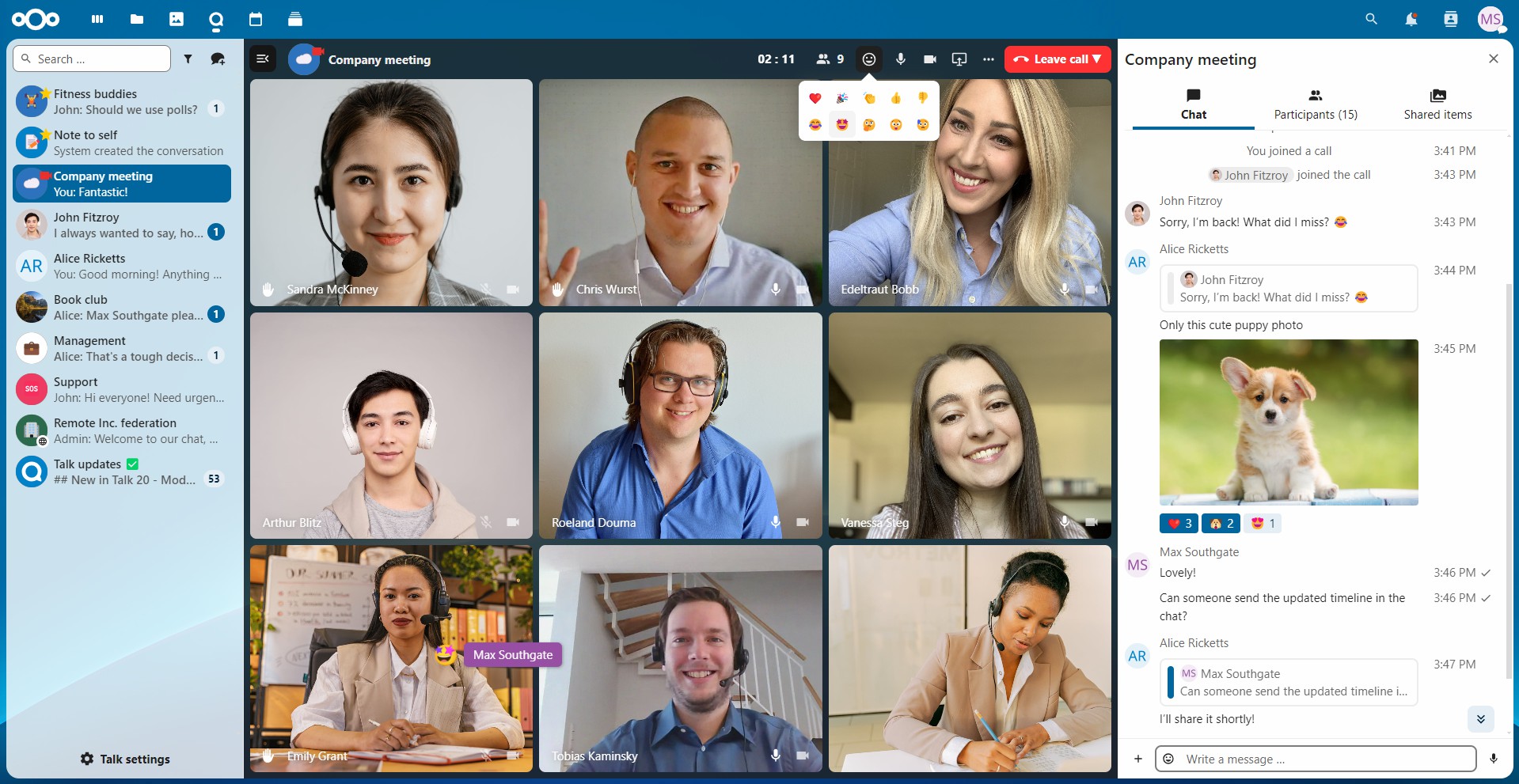
💬 Chat Nextcloud Talk comes with a simple text chat, allowing you to share or upload files from your Nextcloud Files app or local device and mention other participants.
👥 Private, group, public and password protected calls! Invite someone, a whole group or send a public link to invite to a call.
🌐 Federated chats Chat with other Nextcloud users on their servers
💻 Screen sharing! Share your screen with the participants of your call.
🚀 Integration with other Nextcloud apps like Files, Calendar, User status, Dashboard, Flow, Maps, Smart picker, Contacts, Deck, and many more.
🌉 Sync with other chat solutions With Matterbridge being integrated in Talk, you can easily sync a lot of other chat solutions to Nextcloud Talk and vice-versa.
More in the works for the coming versions.
If you have suggestions or problems, please open an issue or contribute directly 🤓
📚 Documentation
👤 User system requirements
📙 User documentation
💻 Server system requirements
📗 Administration documentation
🤖 Bots/Webhooks documentation
⚙️ API documentation
📦 Installing for Production
Nextcloud Talk is really easy to install. You just need to enable the app from the Nextcloud App Store and everything will work out of the box.
There are some scenarios (users behind strict firewalls / symmetric NATs) where a TURN server is needed. That's a bit more tricky to install. You can find instructions in our documentation and the team behind the Nextcloud VM has developed a script that takes care of everything for you (vm-talk.sh). The script is tested on the recent Ubuntu Server LTS. Please keep in mind that it's developed for the VM specifically and any issues should be reported in that repository, not here.
Here's a short video on how it's done.
💙 Contribution Guidelines
⚙️ 🖌️ Code contributions
For general information please see the guidelines for contributing to this repository.
✨ AI submissions / 🚛 Big submissions
Please be mindful when sending AI generated pull requests. Especially with larger features that result in thousands of changed or added lines maintainers have to review.
We respectfully ask you to discuss your plan with us in the issue beforehand, to avoid too many discussions in the review process.
It also makes sense to split your work into multiple smaller chunks. We appreciate if you …
… check if your whole contribution can be divided into separate functioning PRs. The lesser change per PR is made, the faster it can get fully reviewed and merged
… split backend vs. frontend changes in different commits or even different pull requests, as they require different expertise on reviewing
… splitting any chores and artefacts recompile into separate commits (e.g. regenerating OpenAPI, adding npm or composer dependencies, …)
…, when possible, split changes into meaningful commits (e.g. if feature is implemented in three logical steps, make it in three commits)
… address review changes in separate fixup! commits, that simplify the review process as we don't have to go through a single big diff and a rewritten history all the time. It can be squashed later
🔣 Translations
There is no need to manually modify translation files in /l10n, it is handled automatically by a separate service (where contributors can also help with translating strings extracted from the app).
Feel free to contribute translations directly via Transifex.
Translations are synced from there on a nightly basis.
📚 Documentation
Developer and admin related documentation is written in the markdown files in the docs/ directory.
Install mkdocs locally: apt install mkdocs mkdocs-bootstrap and run mkdocs serve afterwards to see your changes live locally.
User documentation source code is available in the general documentation repository.
See the ReadMe.md file there for build instructions.
🚧 Development Setup
Simply clone this repository into the apps folder of your Nextcloud development instance.
Run make dev-setup to install the dependencies.
Run make build-js.
Then activate it through the apps management. 🎉
To build the docs locally, install mkdocs locally: apt install mkdocs mkdocs-bootstrap.
Also see our step by step guide on how to set up a full development environment.
🏎️ Faster frontend developing with HMR
You can enable HMR (Hot module replacement) to avoid page reloads when working on the frontend:
Install and enable hmr_enabler app
Run npm run serve
Open the normal Nextcloud server URL (not the URL given by above command)
We are also available on our public Talk team conversation, if you want to join the discussion.
When testing federated conversations locally, some additional steps might be needed,
to improve the behaviour and allowing the servers to talk to each others:
Additionally you can enable debug mode that will list local users as federated users options
allowing you to federate with accounts on the same instance. Federation will still work
and use the full federation experience and opposed to the federated files sharing not
create a local share instead.
🪄 Useful tricks for testing video calls
👥 Joining a test call with multiple users
Send fake-stream (audio and video) in Firefox:
Open about:config
Search for fake
Toggle media.navigator.streams.fake to true
Set media.navigator.audio.fake_frequency to 60 for more pleasant sound experience
Afterwards install the Firefox Multi-Account Containers addon
Now you can create multiple account containers, log in with a different Nextcloud account on each of them and join the same call with multiple different users
📸 Modifying available media devices
Disable camera until reboot: sudo modprobe -r uvcvideo
Re-enable camera: sudo modprobe uvcvideo
🔃 Milestones and Branches
Branches
In the Talk app we have one branch per Nextcloud server version. stable* branches of the app should always work with the same branch of the Nextcloud server.
This is only off close to releases of the server, to allow easier finishing of features, so we don't have to backport them.
Milestones
v17.0.0 - Numeric milestones are settled and waiting for their release or some final polishing
💛 Next Patch (27) - The next patch milestone is for issues/PR that go into the next Dot-Release for the given Nextcloud version (in the example 27 - e.g. 17.0.1)
💚 Next Major (28) - The next major milestone is for issues/PR that go into the next feature release for the new Major Nextcloud version (as there are Patch releases for 27, this would be 28)
💔 Backlog - The backlog milestone is assigned to all remaining issues
You can always pick a task of any milestone, and we will help you to get it into the assigned milestone or also an earlier one if time permits. It's just a matter of having an overview and better visibility what we think should be worked on, but it's not exclusive.
nextcloud/spreed thuộc nhóm Image Tools trên TopGit, cùng 8 topic GitHub. Trang Trending và Topics liệt kê các repo cùng số sao và cùng ngôn ngữ để so sánh.
Đọc thêm về nextcloud/spreed ở đâu?
Trang TopGit này là một snapshot — tab "Readme" hiển thị nguyên văn README của repo (đã bỏ link, giữ ảnh). Repo GitHub ở github.com/nextcloud/spreed là nguồn chính thức.
nextcloud/spreed có phải mã nguồn mở không?
Có — nextcloud/spreed phát hành theo license AGPL-3.0, nghĩa là mã nguồn mở để đọc, fork và (tùy license) tái sử dụng. Mã: github.com/nextcloud/spreed.
nextcloud/spreed có trang demo không?
Dự án có trang chủ ở https://nextcloud.com/talk. Tab "Readme" ở trang này thường có ảnh chụp và hướng dẫn bắt đầu nhanh.
nextcloud/spreed dùng license gì?
nextcloud/spreed phát hành theo license AGPL-3.0. Nên mở file LICENSE trên GitHub để xác nhận — license metadata đôi khi lệch với thực tế dự án.
nextcloud/spreed là gì?
nextcloud/spreed (nextcloud/spreed) là dự án JavaScript trên GitHub. Theo mô tả gốc: 🗨️ Nextcloud Talk – chat, video & audio calls for Nextcloud
Vì sao nextcloud/spreed được xếp vào nhóm Image Tools?
TopGit xếp nextcloud/spreed vào nhóm Image Tools dựa trên GitHub topics và mô tả của repo (gắn thẻ: "call", "hacktoberfest", "nextcloud"). Việc phân loại dựa trên metadata thật của repo, không phải đoán theo cảm tính biên tập.
Đọc đầy đủ README ở tab phía trên.
Muốn nghe thêm một ý kiến về spreed?
Hỏi một AI đọc được trang này — một cú bấm là có ngay nhận định về spreed.
 /spreed