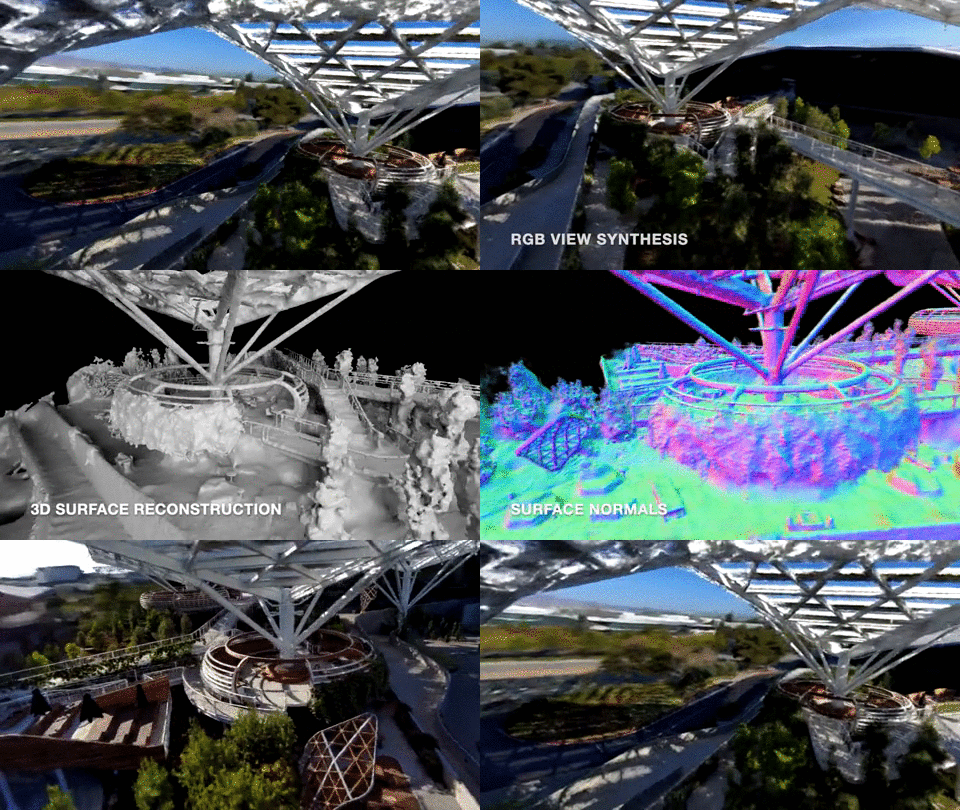
Một mục tích hợp AI trong kho dữ liệu GitHub của TopGit: NVlabs/neuralangelo, 4.6k sao, nhóm AI Tools, Python. Official implementation of "Neuralangelo: High-Fidelity Neural Surface Reconstruction" (CVPR 2023)
Tóm tắt dựng từ metadata GitHub của chính dự án — chưa có bài review TopGit. Trang sẽ tự động cập nhật khi bài review đầy đủ được xuất bản.
VÌ SAO CHƯA CÓ REVIEW
TopGit viết bài đầy đủ cho repo có nhiều sao nhất và được yêu cầu nhiều nhất. Trang này là snapshot trong thời gian chờ — xem README gốc ở tab READ ME.
This is the official implementation of Neuralangelo: High-Fidelity Neural Surface Reconstruction.
Zhaoshuo Li,
Thomas Müller,
Alex Evans,
Russell H. Taylor,
Mathias Unberath,
Ming-Yu Liu,
Chen-Hsuan Lin
IEEE Conference on Computer Vision and Pattern Recognition (CVPR), 2023
Project page | Paper | Colab notebook
The code is built upon the Imaginaire library from the Deep Imagination Research Group at NVIDIA.
For business inquiries, please submit the NVIDIA research licensing form.
Installation
We offer two ways to setup the environment:
We provide prebuilt Docker images, where
docker.io/chenhsuanlin/colmap:3.8 is for running COLMAP and the data preprocessing scripts. This includes the prebuilt COLMAP library (CUDA-supported).
docker.io/chenhsuanlin/neuralangelo:23.04-py3 is for running the main Neuralangelo pipeline.
The corresponding Dockerfiles can be found in the docker directory.
The conda environment for Neuralangelo. Install the dependencies and activate the environment neuralangelo with
For COLMAP, alternative installation options are also available on the COLMAP website.
Data preparation
Please refer to Data Preparation for step-by-step instructions.
We assume known camera poses for each extracted frame from the video.
The code uses the same json format as Instant NGP.
Run Neuralangelo!
EXPERIMENT=toy_example
GROUP=example_group
NAME=example_name
CONFIG=projects/neuralangelo/configs/custom/${EXPERIMENT}.yaml
GPUS=1  # use >1 for multi-GPU training!
torchrun --nproc_per_node=${GPUS} train.py \
    --logdir=logs/${GROUP}/${NAME} \
    --config=${CONFIG} \
    --show_pbar
Some useful notes:
This codebase supports logging with Weights & Biases. You should have a W&B account for this.
Add --wandb to the command line argument to enable W&B logging.
Add --wandb_name to specify the W&B project name.
More detailed control can be found in the init_wandb() function in imaginaire/trainers/base.py.
Configs can be overridden through the command line (e.g. --optim.params.lr=1e-2).
Set --checkpoint={CHECKPOINT_PATH} to initialize with a certain checkpoint; set --resume to resume training.
If appearance embeddings are enabled, make sure data.num_images is set to the number of training images.
Isosurface extraction
Use the following command to run isosurface mesh extraction:
Add --keep_lcc to remove noises. May also remove thin structures.
Lower BLOCK_RES to reduce GPU memory usage.
Lower RESOLUTION to reduce mesh size.
Frequently asked questions (FAQ)
Q: CUDA out of memory. How do I decrease the memory footprint? A: Neuralangelo requires at least 24GB GPU memory with our default configuration. If you run out of memory, consider adjusting the following hyperparameters under model.object.sdf.encoding.hashgrid (with suggested values):
GPU VRAM
Hyperparameter
8GB
dict_size=20, dim=4
12GB
dict_size=21, dim=4
16GB
dict_size=21, dim=8
Please note that the above hyperparameter adjustment may sacrifice the reconstruction quality.
If Neuralangelo runs fine during training but CUDA out of memory during evaluation, consider adjusting the evaluation parameters under data.val, including setting smaller image_size (e.g., maximum resolution 200x200), and setting batch_size=1, subset=1.
Q: The reconstruction of my custom dataset is bad. What can I do? A: It is worth looking into the following:
The camera poses recovered by COLMAP may be off. We have implemented tools (using Blender or Jupyter notebook) to inspect the COLMAP results.
The computed bounding regions may be off and/or too small/large. Please refer to data preprocessing on how to adjust the bounding regions manually.
The video capture sequence may contain significant motion blur or out-of-focus frames. Higher shutter speed (reducing motion blur) and smaller aperture (increasing focus range) are very helpful.
Citation
If you find our code useful for your research, please cite
@inproceedings{li2023neuralangelo,
  title={Neuralangelo: High-Fidelity Neural Surface Reconstruction},
  author={Li, Zhaoshuo and M\"uller, Thomas and Evans, Alex and Taylor, Russell H and Unberath, Mathias and Liu, Ming-Yu and Lin, Chen-Hsuan},
  booktitle={IEEE Conference on Computer Vision and Pattern Recognition ({CVPR})},
  year={2023}
}
NVlabs/neuralangelo có 4.6k sao GitHub — tải lại trang để xem số mới nhất, hoặc xem trực tiếp github.com/NVlabs/neuralangelo. TopGit phản chiếu số sao của GitHub nhưng không cam kết đến từng phút.
NVlabs/neuralangelo có những chủ đề gì?
GitHub topics của NVlabs/neuralangelo: "3d-reconstruction", "computer-graphics", "computer-vision", "neural-rendering", "neural-representation". TopGit xếp repo vào nhóm AI Tools.
NVlabs/neuralangelo còn đang phát triển không?
Commit gần nhất trên NVlabs/neuralangelo là 2.6 năm trước (theo timestamp GitHub). Repo có 403 fork — một chỉ báo về mức độ quan tâm của cộng đồng.
NVlabs/neuralangelo là gì?
NVlabs/neuralangelo (NVlabs/neuralangelo) là dự án Python trên GitHub. Theo mô tả gốc: Official implementation of "Neuralangelo: High-Fidelity Neural Surface Reconstruction" (CVPR 2023)
NVlabs/neuralangelo so với các dự án AI Tools khác thế nào?
NVlabs/neuralangelo được TopGit xếp vào nhóm AI Tools, với 4.6k sao GitHub và viết bằng Python. Xem trang chủ đề AI Tools trên TopGit để so sánh với các dự án tương tự theo số sao và mức độ hoạt động.
NVlabs/neuralangelo viết bằng ngôn ngữ gì?
NVlabs/neuralangelo chủ yếu viết bằng Python. Trường "language" của GitHub dựa trên phần lớn byte ở nhánh mặc định.
Vì sao NVlabs/neuralangelo được xếp vào nhóm AI Tools?
TopGit xếp NVlabs/neuralangelo vào nhóm AI Tools dựa trên GitHub topics và mô tả của repo (gắn thẻ: "3d-reconstruction", "computer-graphics", "computer-vision"). Việc phân loại dựa trên metadata thật của repo, không phải đoán theo cảm tính biên tập.
Đọc đầy đủ README ở tab phía trên.
Vẫn đang phân vân về neuralangelo?
Một cú bấm sẽ gửi câu hỏi kèm trang này cho AI — xem AI nói gì về neuralangelo.

 /neuralangelo