Trên GitHub, octobox/octobox đã đạt 4.5k sao, nhóm Backend, ngôn ngữ Ruby. 📮 Untangle your GitHub Notifications
Tóm tắt dựng từ metadata GitHub của chính dự án — chưa có bài review TopGit. Trang sẽ tự động cập nhật khi bài review đầy đủ được xuất bản.
VÌ SAO CHƯA CÓ REVIEW
TopGit viết bài đầy đủ cho repo có nhiều sao nhất và được yêu cầu nhiều nhất. Trang này là snapshot trong thời gian chờ — xem README gốc ở tab READ ME.
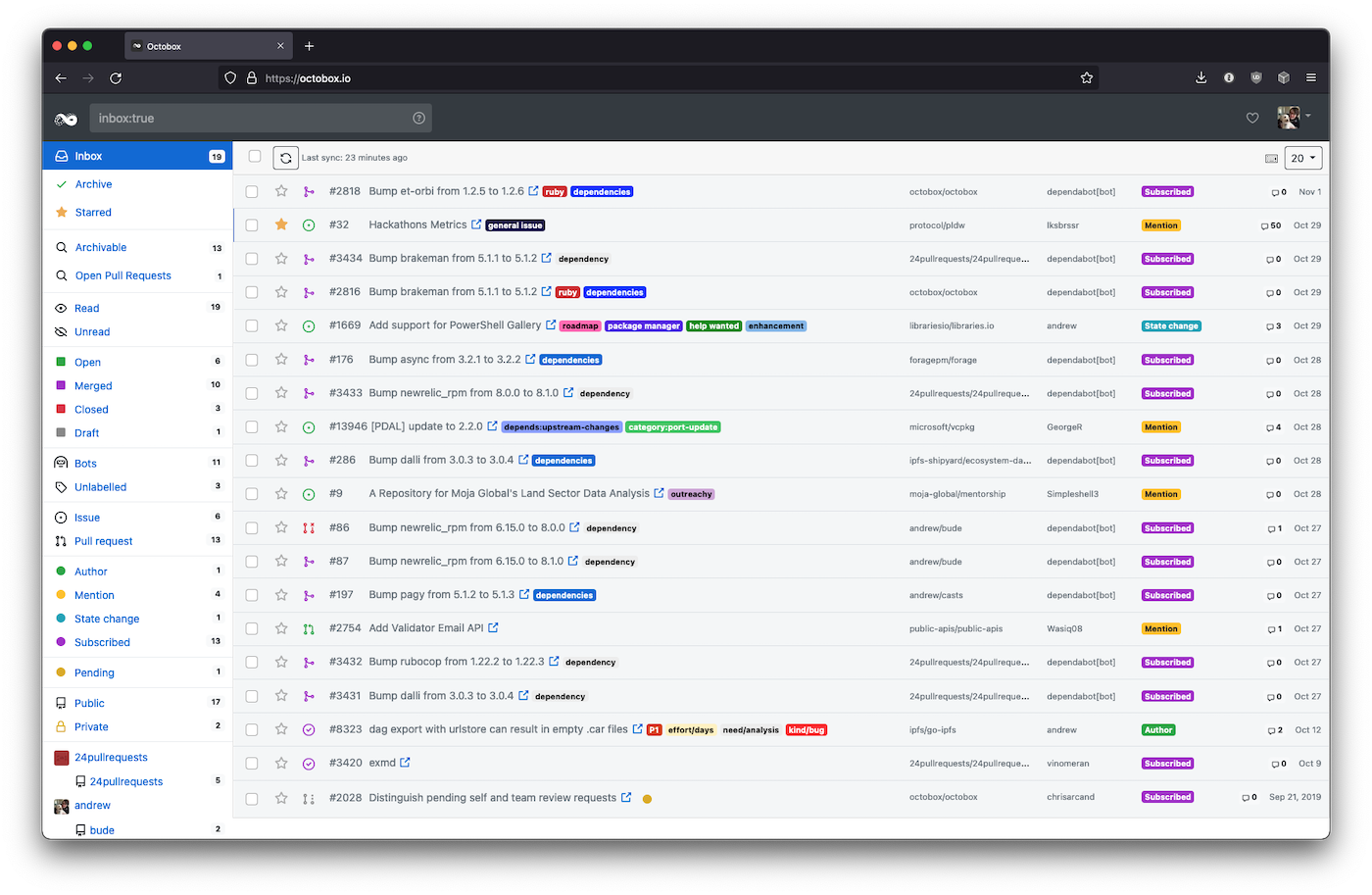
Octobox helps you manage your GitHub notifications efficiently so you can spend less time managing and more time getting things done.
Don't lose track - Octobox adds an extra "archived" state to each notification so you can mark it as "done". If anything happens on an archived thread, issue or PR, Octobox will move it back into your inbox.
Starred notifications - Let's be honest, you probably don't have a 'favourite' issue but Octobox lets you highlight important notifications with a star so you can come back and find them easily.
Enhanced notifications - Like notifications, but better. With issue/pull-request status, CI status, labels and more shown alongside basic title, organisation, repo and type information.
Filter all the things - Filter notifications by repository, organisation, type, action, state, CI status and reason and keep notifications from bots alongside your regular labels, author and assignees.
Search with prefix filters - No more Jedi mind tricks. Combine a wide range of powerful search filters help you get straight to the notification you're looking for and focus on just what you need.
Built for keyboard warriors - Navigate, triage and manage your notifications like a pro using Gmail-inspired keyboard shortcuts for every function, no mouse required.
Open for everyone - Octobox developers use Octobox to develop Octobox. 100% developed and managed in the open on GitHub under a FLOSS license.
Why is this a thing?
If you manage any active projects on GitHub, you probably find GitHub Notifications pretty lacking.
Notifications are marked as read and disappear from the list as soon as you load the page or view the email of the notification. This makes it very hard to keep on top of which notifications you still need to follow up on. Most open source maintainers and GitHub staff end up using a complex combination of filters and labels in Gmail to manage their notifications from their inbox. If, like me, you try to avoid email, then you might want something else.
Octobox adds an extra "archived" state to each notification so you can mark it as "done". If new activity happens on the thread/issue/pr, the next time you sync the app the relevant item will be unarchived and moved back into your inbox.
Table of Contents
Octobox 📮 Untangle your GitHub Notifications.
Why is this a thing?
Table of Contents
Getting Started
Install
Desktop usage
Web extension
Requirements
Viewing comment threads
Keyboard shortcuts
API Documentation
Backers
Sponsors
Contribute
Note on Patches/Pull Requests
Vulnerability disclosure
Code of Conduct
Copyright
Getting Started
Install
You can also host Octobox yourself! See the installation guide
for installation instructions and details regarding deployment to Heroku, Docker, and more.
Desktop usage
You can run Octobox locally as a desktop app too if you'd like, using Nativefier:
npm install -g nativefier
nativefier "https://octobox.io" # Or your own self-hosted URL
This will build a local application (.exe, .app, etc) and put it in your current folder, ready to use.
Web extension
You can also install the cross-browser Octobox Web Extension. It is available for Google Chrome and Mozilla Firefox, but you can also use it with other browsers that support web extensions.
Requirements
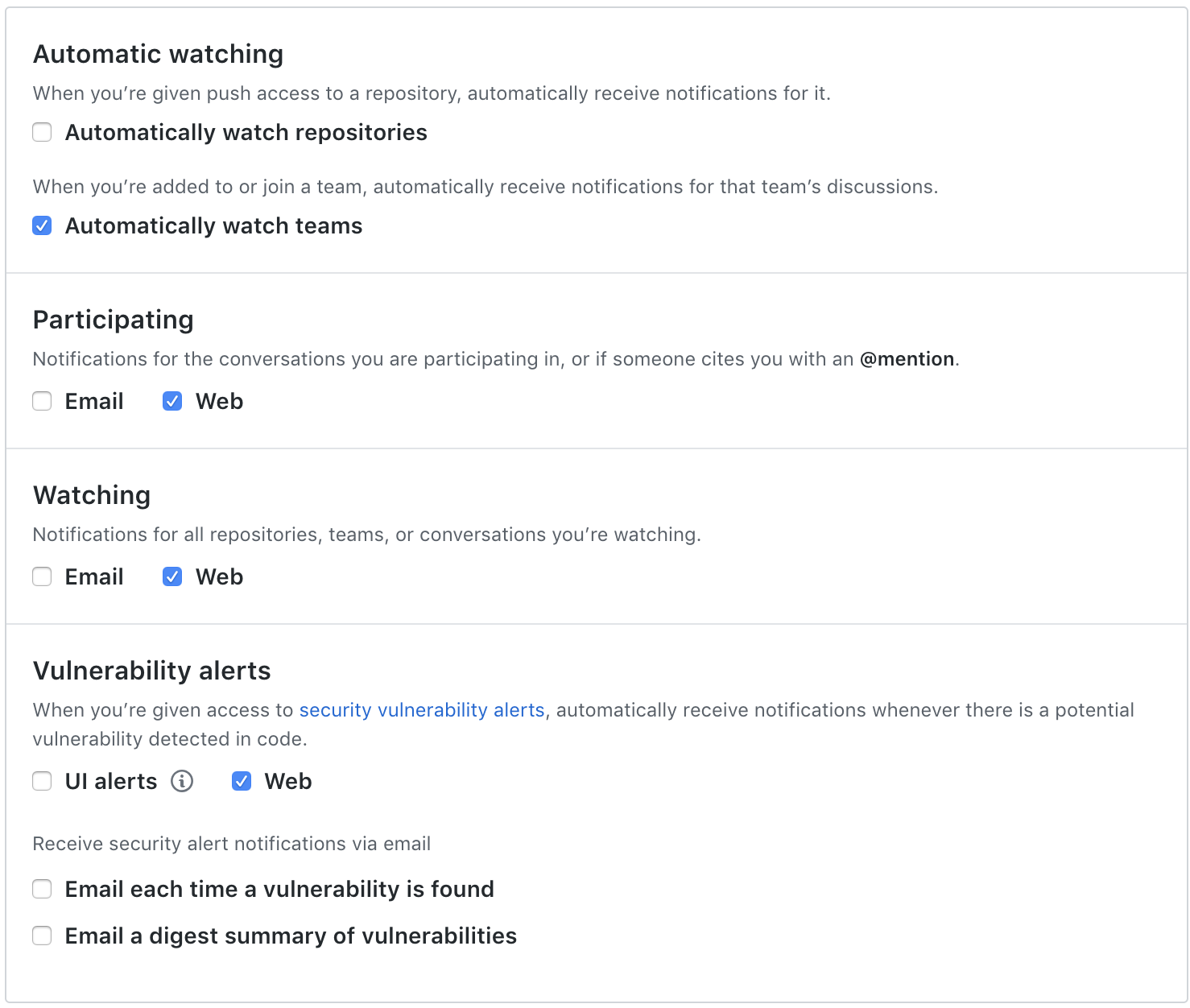
Web notifications must be enabled in your GitHub settings for Octobox to work. To receive vulnerability notifications, you must enable them as well.
Viewing comment threads
Octobox's thread view support is currently in public beta. To enable it select 'on octobox' from the 'Open notifications' menu in /settings.
Threads need to be synchronised in order to view them in Octobox. Some notifications will still show the :link-external: icon from the notification window if they do not have an associated thread or have yet to synchronise one.
Keyboard shortcuts
You can use keyboard shortcuts to navigate and perform certain actions:
a - Select/deselect all
r or . - Refresh list
j or ↓ - Move down the list
k or ↑ - Move up the list
p or ← - Previous page
n or → - Next page
s - Star current notification
x - Mark/unmark current notification
y or e - Archive current/marked notification(s)
m - Mute current/marked notification(s)
d - Mark current/marked notification(s) as read here and on GitHub
o or Enter - Open current notification in a new window
Press ? for the help menu.
API Documentation
Octobox provides a REST API for managing notifications, users, and pinned searches. The complete API specification is available as an OpenAPI document:
OpenAPI Specification - Complete API reference with examples
Interactive API Explorer - Try the API directly in your browser
The API supports Bearer token authentication and covers all major Octobox functionality including notification management, user settings, and pinned search operations.
Backers
Thank you to all our backers! 🙏 [Become a backer]
Sponsors
Support this project by becoming a sponsor. Your logo will show up here with a link to your website. [Become a sponsor]
Testing
Run the full test suite with:
bundle exec rails test
System tests (browser tests)
System tests run in a real browser using Playwright via capybara-playwright-driver. They test interactive behavior like keyboard shortcuts, checkbox selection, and AJAX actions.
One-time setup:
npx playwright install chromium
Run system tests:
bundle exec rails test:system
To watch tests in a visible browser window:
HEADLESS=false bundle exec rails test:system
Contribute
Please do! The source code is hosted at GitHub. If you want something, open an issue or a pull request.
If you need want to contribute but don't know where to start, take a look at the issues tagged as "Help Wanted".
You can also help triage issues. This can include reproducing bug reports, or asking for vital information such as version numbers or reproduction instructions. If you would like to start triaging issues, one easy way to get started is to subscribe to Octobox on CodeTriage.
Finally, this is an open source project. If you would like to become a maintainer, we will consider adding you if you contribute frequently to the project. Feel free to ask.
For other updates, follow the project on Twitter: @octoboxio.
Note on Patches/Pull Requests
Fork the project.
Make your feature addition or bug fix.
Add tests for it. This is important so we don't break it in a future version unintentionally.
Send a pull request. Bonus points for topic branches.
Vulnerability disclosure
We support and encourage security research on Octobox under the terms of our vulnerability disclosure policy.
Code of Conduct
Please note that this project is released with a Contributor Code of Conduct. By participating in this project you agree to abide by its terms.
octobox/octobox thuộc nhóm Backend trên TopGit, cùng 8 topic GitHub. Trang Trending và Topics liệt kê các repo cùng số sao và cùng ngôn ngữ để so sánh.
Đọc thêm về octobox/octobox ở đâu?
Trang TopGit này là một snapshot — tab "Readme" hiển thị nguyên văn README của repo (đã bỏ link, giữ ảnh). Repo GitHub ở github.com/octobox/octobox là nguồn chính thức.
octobox/octobox có bao nhiêu sao?
octobox/octobox có 4.5k sao GitHub — tải lại trang để xem số mới nhất, hoặc xem trực tiếp github.com/octobox/octobox. TopGit phản chiếu số sao của GitHub nhưng không cam kết đến từng phút.
octobox/octobox có những chủ đề gì?
GitHub topics của octobox/octobox: "github", "github-notifications", "inbox", "notifications", "octobox", "rails", "ruby", "triage". TopGit xếp repo vào nhóm Backend.
octobox/octobox còn đang phát triển không?
Commit gần nhất trên octobox/octobox là 3 tháng trước (theo timestamp GitHub). Repo có 349 fork — một chỉ báo về mức độ quan tâm của cộng đồng.
octobox/octobox viết bằng ngôn ngữ gì?
octobox/octobox chủ yếu viết bằng Ruby. Trường "language" của GitHub dựa trên phần lớn byte ở nhánh mặc định.
Vì sao octobox/octobox được xếp vào nhóm Backend?
TopGit xếp octobox/octobox vào nhóm Backend dựa trên GitHub topics và mô tả của repo (gắn thẻ: "github", "github-notifications", "inbox"). Việc phân loại dựa trên metadata thật của repo, không phải đoán theo cảm tính biên tập.
Đọc đầy đủ README ở tab phía trên.
Vẫn đang phân vân về octobox?
Một cú bấm sẽ gửi câu hỏi kèm trang này cho AI — xem AI nói gì về octobox.

 /octobox