Một mục hướng lập trình viên trong kho dữ liệu GitHub của TopGit: ogham/dog, 6.7k sao, nhóm Developer Tools, Rust. A command-line DNS client.
Tóm tắt dựng từ metadata GitHub của chính dự án — chưa có bài review TopGit. Trang sẽ tự động cập nhật khi bài review đầy đủ được xuất bản.
VÌ SAO CHƯA CÓ REVIEW
TopGit viết bài đầy đủ cho repo có nhiều sao nhất và được yêu cầu nhiều nhất. Trang này là snapshot trong thời gian chờ — xem README gốc ở tab READ ME.
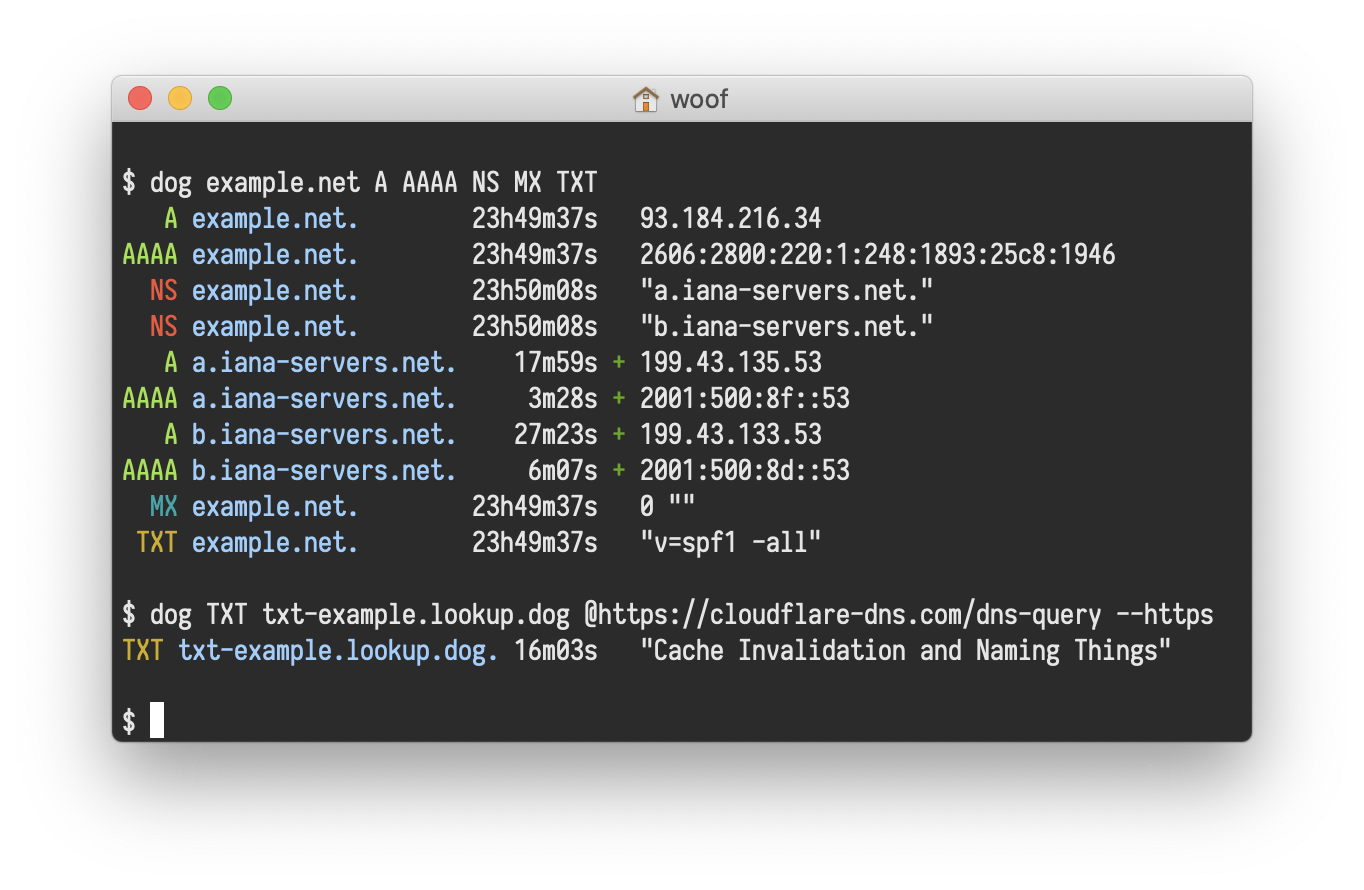
dog is a command-line DNS client, like dig.
It has colourful output, understands normal command-line argument syntax, supports the DNS-over-TLS and DNS-over-HTTPS protocols, and can emit JSON.
Examples
dog example.net                          Query a domain using default settings
dog example.net MX                       ...looking up MX records instead
dog example.net MX @1.1.1.1              ...using a specific nameserver instead
dog example.net MX @1.1.1.1 -T           ...using TCP rather than UDP
dog -q example.net -t MX -n 1.1.1.1 -T   As above, but using explicit arguments
Command-line options
Query options
<arguments>              Human-readable host names, nameservers, types, or classes
-q, --query=HOST         Host name or domain name to query
-t, --type=TYPE          Type of the DNS record being queried (A, MX, NS...)
-n, --nameserver=ADDR    Address of the nameserver to send packets to
--class=CLASS            Network class of the DNS record being queried (IN, CH, HS)
Sending options
--edns=SETTING           Whether to OPT in to EDNS (disable, hide, show)
--txid=NUMBER            Set the transaction ID to a specific value
-Z=TWEAKS                Set uncommon protocol-level tweaks
Protocol options
-U, --udp                Use the DNS protocol over UDP
-T, --tcp                Use the DNS protocol over TCP
-S, --tls                Use the DNS-over-TLS protocol
-H, --https              Use the DNS-over-HTTPS protocol
Output options
-1, --short              Short mode: display nothing but the first result
-J, --json               Display the output as JSON
--color, --colour=WHEN   When to colourise the output (always, automatic, never)
--seconds                Do not format durations, display them as seconds
--time                   Print how long the response took to arrive
Installation
To install dog, you can download a pre-compiled binary, or you can compile it from source. You may be able to install dog using your OS’s package manager, depending on your platform.
Packages
For Arch Linux, install the dog package.
For Homebrew on macOS, install the dog formula.
For NixOS, install the dogdns package.
Downloads
Binary downloads of dog are available from the releases section on GitHub for 64-bit Windows, macOS, and Linux targets. They contain the compiled executable, the manual page, and shell completions.
Compilation
dog is written in Rust.
You will need rustc version 1.45.0 or higher.
The recommended way to install Rust for development is from the official download page, using rustup.
To build, download the source code and run:
$ cargo build
$ cargo test
The just command runner can be used to run some helpful development commands, in a manner similar to make.
Run just --list to get an overview of what’s available.
If you are compiling a copy for yourself, be sure to run cargo build --release or just build-release to benefit from release-mode optimisations.
Copy the resulting binary, which will be in the target/release directory, into a folder in your $PATH.
/usr/local/bin is usually a good choice.
To compile and install the manual pages, you will need pandoc.
The just man command will compile the Markdown into manual pages, which it will place in the target/man directory.
To use them, copy them into a directory that man will read.
/usr/local/share/man is usually a good choice.
Container image
To build the container image of dog, you can use Docker or Kaniko. Here an example using Docker:
$ docker build -t dog .
You can then run it using the following command:
$ docker run -it --rm dog
To run dog directly, you can then define the following alias:
$ alias dog="docker run -it --rm dog"
End-to-end testing
dog has an integration test suite written as Specsheet check documents.
If you have a copy installed, you can run:
$ just xtests
Specsheet will test the compiled binary by making DNS requests over the network, checking that dog returns the correct results and does not crash.
Note that this will expose your IP address.
For more information, read the xtests README.
Feature toggles
dog has three Cargo features that can be switched off to remove functionality.
While doing so makes dog less useful, it results in a smaller binary that takes less time to build.
There are three feature toggles available, all of which are active by default:
with_idna, which enables IDNA processing
with_tls, which enables DNS-over-TLS
with_https, which enables DNS-over-HTTPS (requires with_tls)
Use cargo to build a binary that uses feature toggles. For example, to disable TLS and HTTPS support but keep IDNA support enabled, you can run:
ogham/dog thuộc nhóm Developer Tools trên TopGit, cùng 4 topic GitHub. Trang Trending và Topics liệt kê các repo cùng số sao và cùng ngôn ngữ để so sánh.
Đọc thêm về ogham/dog ở đâu?
Trang TopGit này là một snapshot — tab "Readme" hiển thị nguyên văn README của repo (đã bỏ link, giữ ảnh). Repo GitHub ở github.com/ogham/dog là nguồn chính thức.
ogham/dog có bao nhiêu sao?
ogham/dog có 6.7k sao GitHub — tải lại trang để xem số mới nhất, hoặc xem trực tiếp github.com/ogham/dog. TopGit phản chiếu số sao của GitHub nhưng không cam kết đến từng phút.
ogham/dog có phải mã nguồn mở không?
Có — ogham/dog phát hành theo license EUPL-1.2, nghĩa là mã nguồn mở để đọc, fork và (tùy license) tái sử dụng. Mã: github.com/ogham/dog.
ogham/dog còn đang phát triển không?
Commit gần nhất trên ogham/dog là 2.4 năm trước (theo timestamp GitHub). Repo có 216 fork — một chỉ báo về mức độ quan tâm của cộng đồng.
ogham/dog dùng license gì?
ogham/dog phát hành theo license EUPL-1.2. Nên mở file LICENSE trên GitHub để xác nhận — license metadata đôi khi lệch với thực tế dự án.
ogham/dog là gì?
ogham/dog (ogham/dog) là dự án Rust trên GitHub. Theo mô tả gốc: A command-line DNS client.
ogham/dog viết bằng ngôn ngữ gì?
ogham/dog chủ yếu viết bằng Rust. Trường "language" của GitHub dựa trên phần lớn byte ở nhánh mặc định.
Đọc đầy đủ README ở tab phía trên.
Vẫn đang phân vân về dog?
Một cú bấm sẽ gửi câu hỏi kèm trang này cho AI — xem AI nói gì về dog.
 /dog
/dog