
Olshansk/agent-skills

Olshansk/agent-skills được TopGit xếp vào nhóm dự án mã nguồn mở, với 9 sao trên GitHub, viết chủ yếu bằng HTML.
Tóm tắt dựng từ metadata GitHub của chính dự án — chưa có bài review TopGit. Trang sẽ tự động cập nhật khi bài review đầy đủ được xuất bản.
TopGit viết bài đầy đủ cho repo có nhiều sao nhất và được yêu cầu nhiều nhất. Trang này là snapshot trong thời gian chờ — xem README gốc ở tab READ ME.
Snapshot
Cộng tác viên hàng đầu
Xem cộng tác viên hàng đầu
agent-skills


[!NOTE] My personal and public agent skills. Olshansky.info
What is this?
- Olshansky's day-to-day agent skills
- Follows the Agent Skills pattern for cross-tool skill distribution
- Inspired by vercel-labs/agent-skills
Table of Contents
- Quickstart
- Available Skills
- 3rd Party Skills
- Star History
- Demo of
cmd-skills-dashboard - How It Works
Quickstart
npx skills add olshansk/agent-skills
Then ask your agent to run any installed skill:
- "resolve merge conflicts"
- "close the loop on this session"
- "idiot proof the documentation"
- "generate skills dashboard"
[!TIP] Start with
cmd-session-commit— it turns every coding session into durable knowledge by extracting patterns, decisions, and gotchas into yourAGENTS.md. Future sessions (and future agents) pick up right where you left off.
Available Skills
| Skill | Description |
|---|---|
cmd-agent-persona-set | Prime the agent with a behavioral persona for the conversation |
cmd-code-what | Catch the user up on session activity in 3-5 ultra-tight **label**: explanation bullets |
cmd-codex-review-plan | Get a second-opinion plan review from Codex (codex exec) before exiting plan mode |
cmd-codex-review-unstaged | Have Codex review the working-tree diff and synthesize a prioritized iteration plan |
cmd-docs-idiot-proof | Simplify documentation for clarity and scannability with approval-gated edits |
cmd-done-check | Ask the agent whether it finished everything — a lightweight completeness gate for any task |
cmd-email-md | Convert markdown to email-safe HTML with inline styles and cross-client compatibility |
cmd-gh-issue | Create structured GitHub issues from conversation context using gh CLI |
cmd-golden-tests | Set up or extend golden/snapshot tests: fixture design, Makefile targets, snapshot storage, diff workflow, and update protocol |
cmd-latest-msg | Store or retrieve the latest agent message to /tmp/agents/{agent}/ |
cmd-makefile | Create or improve Makefiles with templates (python-uv, fastapi, nodejs, go, flutter), generated ##@ section help, and generated TODO.md |
cmd-makefile-improve | Review Makefile foundations and propose approval-gated improvements to helpers, templates, tests, and docs |
cmd-mermaid-render | Render and display Mermaid diagrams inline in iTerm2 or Ghostty |
cmd-olshanskify | Apply Olshansky's personal style to docs, code, blog posts, or presentations via templates |
cmd-plan-store | Capture conversation plans, decisions, and action items into structured markdown in plans/ |
cmd-pr-build-context | Build high-signal PR context with diff analysis, risk assessment, and discussion questions |
cmd-pr-conflict-resolver | Resolve merge conflicts with context-aware 3-tier classification and escalation |
cmd-pr-description | Generate concise PR descriptions by analyzing the diff against a base branch |
cmd-pr-edgecase | Review branch changes for test gaps, logic edge cases, and failure modes |
cmd-pr-follow-up | Post-implementation reflection — surface missed work, simplifications, and idiomatic fixes |
cmd-pr-gh-comments | Holistically triage PR comments with line-range context, adjacent sweeps, approval-gated resolution, and cmd-olshanskify updates for @olshansk feedback |
cmd-pr-review-prepare | Prepare branch for code review by building context and identifying issues |
cmd-pr-scope-sweep | Final pass to identify missed items, edge cases, and risks before closing scope |
cmd-pr-sculpt-code | Reshape code for readability, naming, structure, TODOs, and reduced surface area |
cmd-pr-test-plan | Generate manual test plans with verified commands and pass/fail criteria |
cmd-productionize | Transform apps into production-ready deployments with framework-specific optimization |
cmd-review-chain-halt | Review protocol code for chain halt risks, non-determinism, and onchain behavior bugs |
cmd-review-rfc | Review RFCs for problem clarity, compliance, security, and performance using SCQA |
cmd-session-commit | Capture session learnings and update AGENTS.md safely |
cmd-skills-dashboard | Scrape skills.sh and generate an interactive HTML dashboard of the ecosystem |
cmd-skills-local-repo | Scaffold cross-tool repo-local skills with canonical source in .agents/skills/ and symlinks |
cmd-skills-review | Audit personal skills for redundancy, verbosity, and weak triggers via a Claude→Codex loop with approval-gated edits |
cmd-write-proofread | Proofread publishable writing for mechanical errors, clarity, structure, logic, weak arguments, links, and image/text consistency |
3rd Party Skills
Install skills from other publishers with npx skills add <publisher>/<repo>.
- garrytan/gstack — browser automation, QA, plan review, deploy workflows, and more
- mattpocock/skills — React and TypeScript patterns
- obra/superpowers — miscellaneous productivity skills
Star History
Demo of cmd-skills-dashboard
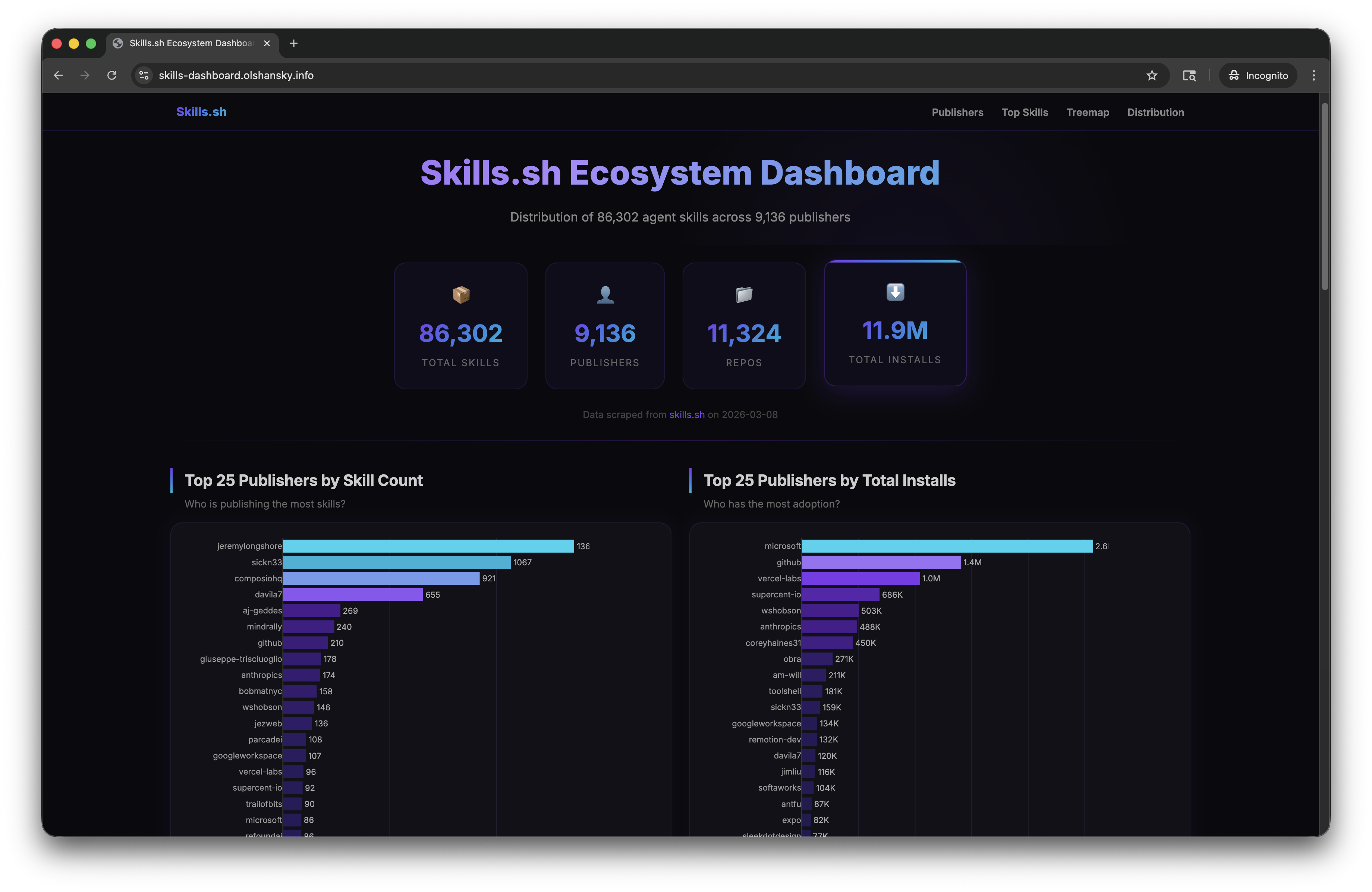
A live dashboard of the skills.sh ecosystem is available at skills-dashboard.olshansky.info.
It shows publisher distribution, install counts, top skills, and the long-tail power law of adoption. Regenerate it yourself with the cmd-skills-dashboard skill.
How It Works
Symlink Architecture
Two sources of truth feed into every tool's skills directory:
graph TB
    classDef workspace fill:#d4e6f1,stroke:#2980b9,stroke-width:2px,color:#000
    classDef dotdir fill:#fadbd8,stroke:#e74c3c,stroke-width:2px,color:#000

    subgraph sources["Source of Truth"]
        thirdparty["~/.agents/skills/*<br/>(third-party skills)"]
        repo["~/workspace/agent-skills/<br/>·  skills/*  ·  agents/*  ·<br/>(your skills)"]
    end

    subgraph claude["~/.claude/"]
        direction LR
        claude_skills["skills/*"]
        claude_md["CLAUDE.md"]
    end

    subgraph gemini["~/.gemini/"]
        direction LR
        gemini_skills["antigravity/skills/*"]
        gemini_md["GEMINI.md"]
    end

    subgraph codex["~/.codex/"]
        direction LR
        codex_skills["skills/*"]
        codex_md["AGENTS.md"]
    end

    repo -->|"symlink (wins on conflict)"| claude_skills
    repo -->|"symlink (wins on conflict)"| gemini_skills
    repo -->|"symlink (wins on conflict)"| codex_skills
    repo -->|"AGENTS.md"| claude_md
    repo -->|"AGENTS.md"| codex_md
    repo -->|"MEMORIES.md"| gemini_md

    thirdparty -->|"symlink"| claude_skills
    thirdparty -->|"symlink"| gemini_skills
    thirdparty -->|"symlink"| codex_skills

    class repo workspace
    class thirdparty,claude_skills,claude_md,gemini_skills,gemini_md,codex_skills,codex_md dotdir
| Skill type | Source of truth | Installed via | Symlink target |
|---|---|---|---|
| Your skills | skills/ (this repo) | make link-skills | ~/workspace/agent-skills/skills/* |
| Third-party | ~/.agents/skills/ | npx skills add | ~/.agents/skills/* |
Makefile Workflows
graph LR
    classDef default color:#000

    skills["agent-skills/skills/*"]
    agents["agent-skills/agents/"]

    subgraph outbound["Symlink OUT"]
        link["make link-skills"]
    end

    subgraph inbound["Copy IN"]
        sync["make sync"]
    end

    claude_dir["~/.claude/"]
    gemini_dir["~/.gemini/"]
    codex_dir["~/.codex/"]
    snapshots["~/workspace/configs/"]

    skills -->|"skills symlink"| link
    agents -->|"instructions symlink"| link
    link --> claude_dir
    link --> gemini_dir
    link --> codex_dir

    claude_dir -->|"file copy"| sync --> snapshots
    gemini_dir -->|"file copy"| sync
    codex_dir -->|"file copy"| sync
| Target | Description |
|---|---|
make link-skills | Symlink repo + third-party skills into Claude, Gemini, and Codex |
make list-skills | List all skills with descriptions |
make config-review | Review workstation configuration drift without changing files |
make config-secrets-check | Scan tracked workstation configuration for literal secrets |
make config-backup | Back up managed workstation configuration |
make config-snapshot | Snapshot selected live configuration outside the repository |
make config-setup | Back up and install canonical workstation configuration |
make setup | Set up workstation configuration and agent skill links |
make test | Validate skill frontmatter and repo consistency |
Workstation configuration is canonical in ~/workspace/configs.
The config-* targets delegate to that repository through CONFIGS_DIR; make setup runs configuration setup before restoring skill and instruction symlinks.
After npx skills add
npx skills add installs skills into ~/.agents/skills/ and creates symlinks in ~/.claude/skills/. Running make link-skills afterward restores your repo skills (which take precedence on name conflicts), removes stale entries previously installed from this repository, and extends third-party skills to Codex and Gemini.
Repo liên quan
Master programming by recreating your favorite technologies from scratch.
A curated meta-list of curated lists organized by technology domain. The repository acts as a directory pointing to hundreds of specialized awesome lists covering programming languages, platforms, frameworks, and tooling. All content is community-contributed under the CC0 public domain dedication.
Public APIs is a community-curated GitHub repository listing free, publicly accessible APIs across a wide range of categories, with auth type, HTTPS, and CORS noted for each entry. It's a browsable reference, not a library to install.
REA is an MCP server and CLI that gives AI coding agents the ability to reverse engineer binaries, JavaScript apps, .NET assemblies, and websites. It hooks into Hopper, Ghidra, or IDA Pro for native binary work, or runs static JavaScript analysis with just Node.js. Every investigation returns an Evidence bundle that includes what was found, what was not, and the reasoning path. Setup registers REA with supported agents and walks you through connecting an analysis engine. The CLI also works standalone for terminal-first workflows.
Trả lời nhanh
Đọc thêm về Olshansk/agent-skills ở đâu?
Trang TopGit này là một snapshot — tab "Readme" hiển thị nguyên văn README của repo (đã bỏ link, giữ ảnh). Repo GitHub ở github.com/Olshansk/agent-skills là nguồn chính thức.
Olshansk/agent-skills có phải mã nguồn mở không?
Có — Olshansk/agent-skills phát hành theo license MIT, nghĩa là mã nguồn mở để đọc, fork và (tùy license) tái sử dụng. Mã: github.com/Olshansk/agent-skills.
Olshansk/agent-skills là gì?
Olshansk/agent-skills (Olshansk/agent-skills) là dự án HTML TopGit theo dõi. Tính tới lần đồng bộ gần nhất, repo có 9 sao.
Đọc đầy đủ README ở tab phía trên.
Muốn nghe thêm một ý kiến về agent-skills?
Hỏi một AI đọc được trang này — một cú bấm là có ngay nhận định về agent-skills.