onevcat/Rainbow là dự án Swift với 1.9k sao trong nhóm Mobile. Delightful console output for Swift developers.
Tóm tắt dựng từ metadata GitHub của chính dự án — chưa có bài review TopGit. Trang sẽ tự động cập nhật khi bài review đầy đủ được xuất bản.
VÌ SAO CHƯA CÓ REVIEW
TopGit viết bài đầy đủ cho repo có nhiều sao nhất và được yêu cầu nhiều nhất. Trang này là snapshot trong thời gian chờ — xem README gốc ở tab READ ME.
Rainbow adds text color, background color and style for console and command
line output in Swift. It is born for cross-platform software logging
in terminals, working in both Apple's platforms and Linux.
Basic Usage
Nifty way, using the String extension, and print the colorized string.
Named Color & Style
import Rainbow

print("Red text".red)
print("Blue background".onBlue)
print("Light green text on white background".lightGreen.onWhite)

print("Underline".underline)
print("Cyan with bold and blinking".cyan.bold.blink)

print("Plain text".red.onYellow.bold.clearColor.clearBackgroundColor.clearStyles)
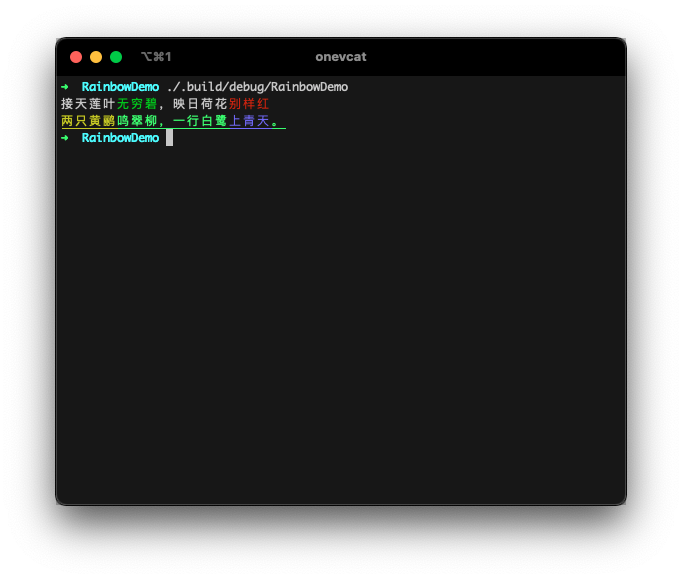
It gives you something like this:
Installation
Swift Package Manager
If you are developing a cross platform software in Swift,
Swift Package Manager might
be your choice for package management. Just add the url of this repo to your
Package.swift file as a dependency:
You could know more information on how to use Swift Package Manager in Apple's official page.
Running the Demo
Rainbow includes a comprehensive demo that showcases all features. To see it in action:
# Clone the repository
git clone https://github.com/onevcat/Rainbow.git
cd Rainbow

# Run the demo
swift run RainbowPlayground
The demo covers basic colors, background colors, text styles, 8-bit/24-bit colors, hex colors, HSL colors, builder pattern, and practical examples.
Performance Optimization
Rainbow v4.2.0+ includes performance optimizations for high-frequency styling operations.
Builder Pattern
For complex styling with multiple chained calls, use the builder pattern:
// Traditional chaining - creates multiple intermediate strings
let traditional = "Hello".red.bold.underline.onBlue

// Optimized builder pattern - lazy evaluation, single string generation
let optimized = "Hello".styled.red.bold.underline.onBlue.build()
Batch Operations
Apply multiple styles in a single operation:
// Traditional - multiple parsing cycles
let traditional = "Warning".red.bold.underline.italic

// Optimized - single parsing cycle
let optimized = "Warning".applyingAll(
    color: .named(.red),
    styles: [.bold, .underline, .italic]
)
Performance Guidelines
Use builder pattern (.styled...build()) for complex styling
Use batch operations (.applyingAll()) for multiple styles
Avoid repeated styling of the same strings in loops
See PERFORMANCE_GUIDE.md for detailed optimization strategies
Other Usage
String Interpolation & Nested
Swift string interpolation is supported. Define the color for part of the string. Or even create nested colorful strings. The inner color style will be kept:
A few terminal emulators supports 24-bit true color. If you are sure the 24-bit colors can be displayed in your user's
terminal, Rainbow has no reason to refuse them!
print("疏影横斜\("水清浅".bit24(36,116,181)),暗香浮动\("月黄昏".bit24(254,215,26))")
print("\("春色满园".hex("#ea517f", to: .bit24))关不住,\("一枝红杏".hex("#f43e06", to: .bit24))出墙来。")
HSL Colors
HSL (Hue, Saturation, Lightness) colors are also supported:
Rainbow supports conditional styling that allows you to apply colors and styles based on runtime conditions, making your code more readable and reducing the need for ternary operators:
// Basic conditional styling
let isError = true
let isWarning = false

print("Error occurred".colorIf(isError, .red).styleIf(isError, .bold))
print("Warning message".colorIf(isWarning, .yellow))

// Log level styling
enum LogLevel { case error, warning, info }
let level = LogLevel.error
let message = "Something happened"

print(message
    .colorIf(level == .error, .red)
    .colorIf(level == .warning, .yellow)
    .colorIf(level == .info, .cyan)
    .styleIf(level == .error, .bold))
Advanced Conditional Builder
For more complex conditional styling scenarios, use the fluent builder interface:
let isActive = true
let isWarning = false
let isError = false

let styledText = "Server Status: Running"
    .conditionalStyled
    .when(isActive).green.bold
    .when(isWarning).yellow
    .when(isError).red.underline
    .build()

print(styledText)

// With closure-based conditions
let progress = 75
let statusMessage = "Processing..."
    .conditionalStyled
    .when { progress < 33 }.red.italic
    .when { progress >= 33 && progress < 67 }.yellow
    .when { progress >= 67 }.green.bold
    .build()

print(statusMessage)
Output Target
By default, Rainbow should be smart enough to detect the output target, to determine if it is a tty. For example, it
automatically output plain text if written to a file:
This is useful for sharing the same code for logging to console and to a log file.
You can manually change this behavior. Rainbow follows these rules in priority:
Set the Rainbow.enabled in your code explicitly.
Pass FORCE_COLOR=1 to enable color even if the output is not a tty. (FORCE_COLOR has a higher priority than NO_COLOR)
Pass NO_COLOR=1 as environment value when executing your app to disable color.
Set the Rainbow.outputTarget yourself.
Verbose Way
You can also use the more verbose way if you want:
import Rainbow
let output = "The quick brown fox jumps over the lazy dog"
                .applyingCodes(Color.red, BackgroundColor.yellow, Style.bold)
print(output) // Red text on yellow, bold of course :)
Please remember, the string extensions (such as "Hello".red) is O(n). So if you are handling a huge string or very
complex nesting, there might be a performance issue or hard to make things in stream. The manual way is a rescue for these
cases.
Motivation and Compatibility
Thanks to the open source of Swift, developers now could write cross platform
programs with the same language. And I believe the command line software would be
the next great platform for Swift. Colorful and well-organized output always
helps us to understand what happens. It is really a necessary utility to create
wonderful software.
Rainbow should work well in both OS X and Linux terminals. It is smart enough
to check whether the output is connected to a valid text terminal or not, to
decide the log should be modified or not. This could be useful when you want to
send your log to a file instead to console.
Contact
Follow and contact me on Twitter or
Sina Weibo. If you find an issue,
just open a ticket on it. Pull
requests are warmly welcome as well.
Backers & Sponsors
Open-source projects cannot live long without your help. If you find Kingfisher is useful, please consider supporting this
project by becoming a sponsor. Your user icon or company logo shows up on my blog with a link to your home page.
Become a sponsor through GitHub Sponsors. :heart:
License
Rainbow is released under the MIT license. See LICENSE for details.
onevcat/Rainbow thuộc nhóm Mobile trên TopGit, cùng 5 topic GitHub. Trang Trending và Topics liệt kê các repo cùng số sao và cùng ngôn ngữ để so sánh.
Đọc thêm về onevcat/Rainbow ở đâu?
Trang TopGit này là một snapshot — tab "Readme" hiển thị nguyên văn README của repo (đã bỏ link, giữ ảnh). Repo GitHub ở github.com/onevcat/Rainbow là nguồn chính thức.
onevcat/Rainbow có bao nhiêu sao?
onevcat/Rainbow có 1.9k sao GitHub — tải lại trang để xem số mới nhất, hoặc xem trực tiếp github.com/onevcat/Rainbow. TopGit phản chiếu số sao của GitHub nhưng không cam kết đến từng phút.
onevcat/Rainbow có những chủ đề gì?
GitHub topics của onevcat/Rainbow: "ansi", "console", "log", "output", "swift". TopGit xếp repo vào nhóm Mobile.
onevcat/Rainbow có phải mã nguồn mở không?
Có — onevcat/Rainbow phát hành theo license MIT, nghĩa là mã nguồn mở để đọc, fork và (tùy license) tái sử dụng. Mã: github.com/onevcat/Rainbow.
onevcat/Rainbow có website riêng không?
TopGit chưa ghi nhận URL trang chủ cho onevcat/Rainbow. Phần README ở tab phía trên thường có link demo, hoặc xem mô tả GitHub của repo.
onevcat/Rainbow còn đang phát triển không?
Commit gần nhất trên onevcat/Rainbow là 30 ngày trước (theo timestamp GitHub). Repo có 114 fork — một chỉ báo về mức độ quan tâm của cộng đồng.
Đọc đầy đủ README ở tab phía trên.
Chưa chắc Rainbow có hợp với bạn?
Để ChatGPT, Claude hoặc Perplexity tìm hiểu giúp — bấm bên dưới và xem AI nói gì về Rainbow.
 /Rainbow