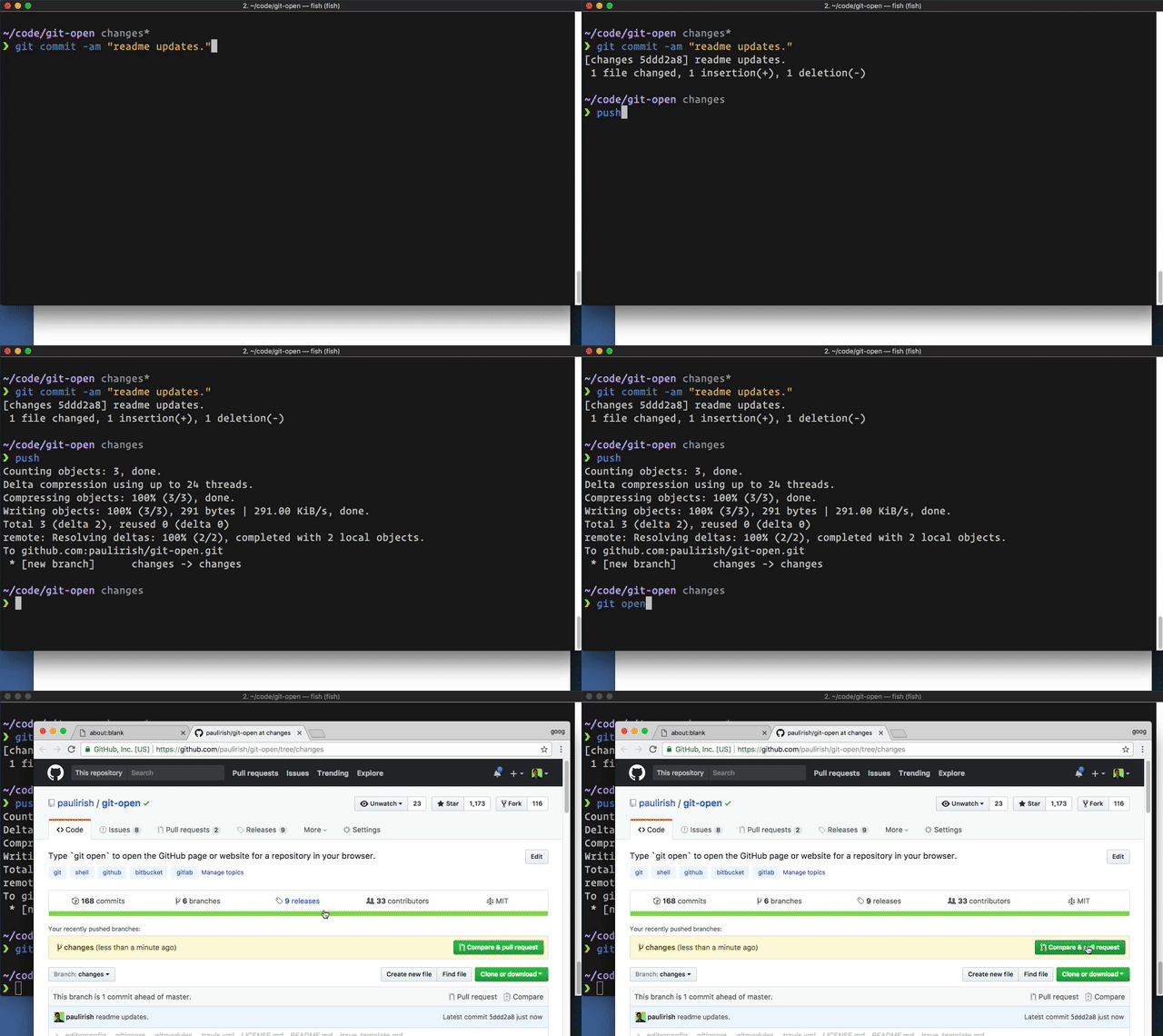
Điểm qua paulirish/git-open: 3.5k sao trên GitHub, viết chủ yếu bằng Shell, thuộc nhóm Developer Tools. Type `git open` to open the GitHub page or website for a repository in your browser.
Tóm tắt dựng từ metadata GitHub của chính dự án — chưa có bài review TopGit. Trang sẽ tự động cập nhật khi bài review đầy đủ được xuất bản.
VÌ SAO CHƯA CÓ REVIEW
TopGit viết bài đầy đủ cho repo có nhiều sao nhất và được yêu cầu nhiều nhất. Trang này là snapshot trong thời gian chờ — xem README gốc ở tab READ ME.
Type git open to open the repo website (GitHub, GitLab, Bitbucket) in your browser.
Usage
git open [remote-name] [branch-name]
    # Open the page for this branch on the repo website

git open --commit
git open -c
    # Open the current commit in the repo website

git open --issue
git open -i
    # If this branch is named like issue/#123, this will open the corresponding
    # issue in the repo website

git open --print
git open -p
    # Only print the url at the terminal, but don't open it
(git open works with these hosted repo providers, git open --issue currently only works with GitHub, Visual Studio Team Services and Team Foundation Server)
Examples
$ git open
# opens https://github.com/TRACKED_REMOTE_USER/CURRENT_REPO/tree/CURRENT_BRANCH

$ git open someremote
# opens https://github.com/PROVIDED_REMOTE_USER/CURRENT_REPO/tree/CURRENT_BRANCH

$ git open someremote somebranch
# opens https://github.com/PROVIDED_REMOTE_USER/CURRENT_REPO/tree/PROVIDED_BRANCH

$ git open --issue
# If branches use naming convention of issues/#123,
# opens https://github.com/TRACKED_REMOTE_USER/CURRENT_REPO/issues/123

$ git open --print
# prints https://github.com/TRACKED_REMOTE_USER/CURRENT_REPO/tree/CURRENT_BRANCH

$ git open --suffix pulls
# opens https://github.com/TRACKED_REMOTE_USER/CURRENT_REPO/pulls
Installation
Basic install
The preferred way of installation is to simply add the git-open script
somewhere into your path (e.g. add the directory to your PATH environment
or copy git-open into an existing included path like /usr/local/bin).
Install via NPM:
npm install --global git-open
Windows Powershell
Save git-open anywhere, say as ~/Documents/Scripts/git-open.sh and define
a function in your Powershell profile (see ~/Documents/WindowsPowerShell/profile.ps1) like this:
Save the git-open script in any place accessible via your %PATH% environment var.
ZSH
Antigen
Add antigen bundle paulirish/git-open to your .zshrc with your other bundle
commands.
Antigen will handle cloning the plugin for you automatically the next time you
start zsh, and periodically checking for updates to the git repository. You can
also add the plugin to a running zsh with antigen bundle paulirish/git-open
for testing before adding it to your .zshrc.
Add git-open to your plugin list - edit ~/.zshrc and change
plugins=(...) to plugins=(... git-open)
source ~/.zshrc
Zgen
Add zgen load paulirish/git-open to your .zshrc file in the same function
you're doing your other zgen load calls in. ZGen will take care of cloning
the repository the next time you run zgen save, and will also periodically
check for updates to the git repository.
Add git-open to your plugin list - edit ~/.bashrc and change
plugins=(...) to plugins=(... git-open)
source ~/.bashrc
Supported remote repositories
git-open can automatically guess the corresponding repository page for remotes
(default looks for origin) on the following hosts:
github.com
gist.github.com
gitlab.com
GitLab custom hosted (see below)
bitbucket.org
Atlassian Bitbucket Server (formerly Atlassian Stash)
Visual Studio Team Services
Team Foundation Server (on-premises)
AWS Code Commit
cnb.cool
Configuration
See the man page for more information on how to configure git-open.
Alternative projects
See hub for complete GitHub opening support.
It's the official GitHub project and provides hub browse.
Homebrew has an alternate git-open
that only works with GitHub but can open user profile pages, too.
@gerep has an alternate git-open that
works with a few providers. Of note, it opens the default view for BitBucket
instead of the source view.
And, of course, jasonmccreary's original gh
from which this plugin was forked.
Thanks
jasonmccreary did the initial hard work. Since then, many contributors have submitted great PRs.
Contributing & Development
Please provide examples of the URLs you are parsing with each PR.
Testing:
You'll need to install bats, the Bash automated testing system. It's also available as brew install bats
git submodule update --init # pull in the assertion libraries

# Run the test suite once:
bats test  # or `npm run unit`

# Run it on every change with `entr`
brew install entr
npm run watch
Related projects
git recent - View your most recent git branches
diff-so-fancy - Making the output of git diff so fancy
License
Copyright Jason McCreary & Paul Irish. Licensed under MIT.
http://opensource.org/licenses/MIT
paulirish/git-open thuộc nhóm Developer Tools trên TopGit, cùng 5 topic GitHub. Trang Trending và Topics liệt kê các repo cùng số sao và cùng ngôn ngữ để so sánh.
Đọc thêm về paulirish/git-open ở đâu?
Trang TopGit này là một snapshot — tab "Readme" hiển thị nguyên văn README của repo (đã bỏ link, giữ ảnh). Repo GitHub ở github.com/paulirish/git-open là nguồn chính thức.
paulirish/git-open có bao nhiêu sao?
paulirish/git-open có 3.5k sao GitHub — tải lại trang để xem số mới nhất, hoặc xem trực tiếp github.com/paulirish/git-open. TopGit phản chiếu số sao của GitHub nhưng không cam kết đến từng phút.
paulirish/git-open có những chủ đề gì?
GitHub topics của paulirish/git-open: "bitbucket", "git", "github", "gitlab", "shell". TopGit xếp repo vào nhóm Developer Tools.
paulirish/git-open có phải mã nguồn mở không?
Có — paulirish/git-open phát hành theo license MIT, nghĩa là mã nguồn mở để đọc, fork và (tùy license) tái sử dụng. Mã: github.com/paulirish/git-open.
paulirish/git-open có website riêng không?
TopGit chưa ghi nhận URL trang chủ cho paulirish/git-open. Phần README ở tab phía trên thường có link demo, hoặc xem mô tả GitHub của repo.
paulirish/git-open còn đang phát triển không?
Commit gần nhất trên paulirish/git-open là 5 tháng trước (theo timestamp GitHub). Repo có 271 fork — một chỉ báo về mức độ quan tâm của cộng đồng.
Đọc đầy đủ README ở tab phía trên.
Muốn nghe thêm một ý kiến về git-open?
Hỏi một AI đọc được trang này — một cú bấm là có ngay nhận định về git-open.

 /git-open