EfiFs - EFI File System Drivers
)
)
)
)



This is a GPLv3+ implementation of standalone EFI File System drivers, based on
the GRUB 2.0 read-only drivers.
For additional info as well as precompiled drivers, see https://efi.akeo.ie
Requirements
- Visual Studio 2022 (Windows),
MinGW (Windows), gcc (Linux) or EDK2.
- A git client able to initialize/update submodules
- QEMU v2.7 or later if debugging with Visual Studio
(NB: You can find QEMU Windows binaries here)
Compilation
Common
- Fetch the git submodules with
git submodule init and git submodule update.
NOTE This only works if you cloned the directory using git.
- Apply
0001-GRUB-fixes.patch to the grub\ subdirectory. This applies the
changes that are required for successful compilation of GRUB.
Visual Studio (non EDK2)
- Open the solution file and hit
F5 to compile and debug the default driver.
gcc (non EDK2)
- Run
make in the top directory. If needed you can also issue something like
make ARCH=<arch> CROSS_COMPILE=<tuple> where <arch> is one of ia32,
x64, arm, aa64, riscv64 or loongarch64 (the official UEFI
abbreviations for an arch, as used in /efi/boot/boot[ARCH].efi) and <tuple>
is the one for your cross-compiler, such as arm-linux-gnueabi- or
aarch64-linux-gnu-.
e.g. make ARCH=aa64 CROSS_COMPILE=aarch64-linux-gnu-
EDK2
Testing
If QEMU is installed, the Visual Studio solution will set up and test the
drivers using QEMU (by also downloading a sample image for each target file
system). Note however that VS debugging expects a 64-bit version of QEMU to be
installed in C:\Program Files\qemu\ (which you can download here).
If that is not the case, you should edit .msvc\debug.vbs accordingly.
For testing outside of Visual Studio, make sure you have at least one disk with
a target partition using the target filesystem, that is not being handled by
other EFI filesystem drivers.
Then boot into the EFI shell and run the following:
load fs0:\<fs_name>_<arch>.efi or wherever your driver was copiedmap -r this should make a new fs# available, eg fs2:- You should now be able to navigate and access content (in read-only mode)
- For logging output, set the
FS_LOGGING shell variable to 1 or more
- To unload use the
drivers command, then unload with the driver ID
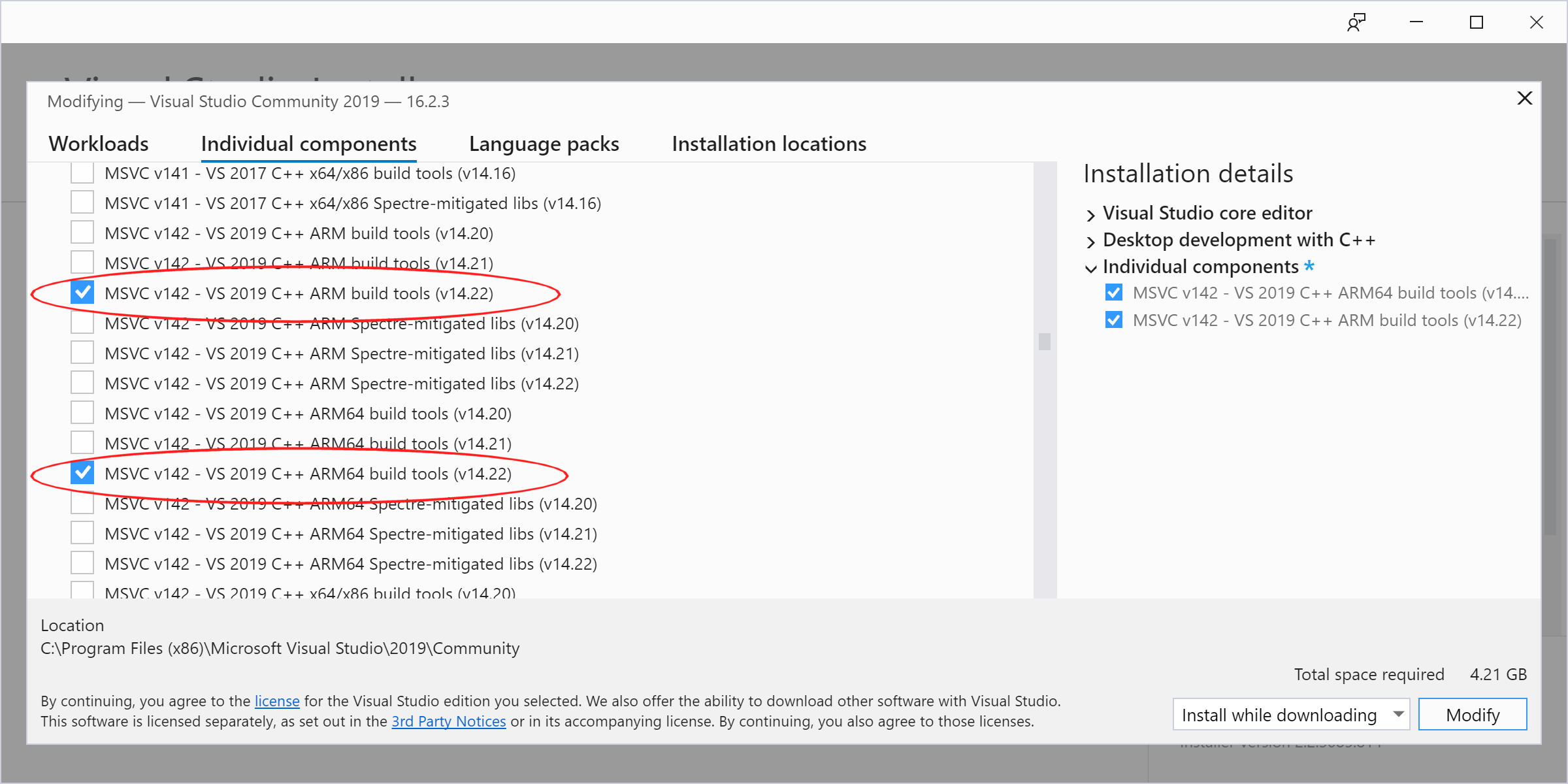
Visual Studio 2022 and ARM/ARM64 support
Please be mindful that, to enable ARM/ARM64 compilation support in Visual
Studio 2022, you MUST go to the Individual components screen in the setup
application and select the ARM compilers and libraries there, as they do NOT
appear in the default Workloads screen:
Additional Notes
This is a pure GPLv3+ implementation of EFI drivers. Great care was taken not to
use any code from non GPLv3 compatible sources, such as rEFInd's fsw_efi
(GPLv2 only) or Intel's FAT driver (requires an extra copyright notice).
Note however that some files (the non grub_#### sources under ./src/) are
licensed under GPLv2+ rather than GPLv3+ and that, just like the GPLv3+ sources,
we took great care of ensuring that we are fully compliant with any licensing
or relicensing matters, so that they can legally be reused into GPLv2+ works.
Bonus: Commands to compile EfiFs using EDK2 on a vanilla Debian GNU/Linux 10.x
sudo apt install nasm uuid-dev gcc-multilib gcc-aarch64-linux-gnu gcc-arm-linux-gnueabi gcc-riscv64-linux-gnu
git clone --recurse-submodules https://github.com/tianocore/edk2.git
cd edk2
make -C BaseTools
git clone --recurse-submodules https://github.com/pbatard/EfiFs.git EfiFsPkg
cd EfiFsPkg/grub
git apply ../0001-GRUB-fixes.patch
cd -
export GCC5_ARM_PREFIX=arm-linux-gnueabi-
export GCC5_AARCH64_PREFIX=aarch64-linux-gnu-
export GCC5_RISCV64_PREFIX=riscv64-linux-gnu-
source edksetup.sh --reconfig
./EfiFsPkg/set_grub_cpu.sh X64
build -a X64 -b RELEASE -t GCC5 -p EfiFsPkg/EfiFsPkg.dsc
./EfiFsPkg/set_grub_cpu.sh IA32
build -a IA32 -b RELEASE -t GCC5 -p EfiFsPkg/EfiFsPkg.dsc
./EfiFsPkg/set_grub_cpu.sh AARCH64
build -a AARCH64 -b RELEASE -t GCC5 -p EfiFsPkg/EfiFsPkg.dsc
./EfiFsPkg/set_grub_cpu.sh ARM
build -a ARM -b RELEASE -t GCC5 -p EfiFsPkg/EfiFsPkg.dsc
./EfiFsPkg/set_grub_cpu.sh RISCV64
build -a RISCV64 -b RELEASE -t GCC5 -p EfiFsPkg/EfiFsPkg.dsc
