pingcap/tiflash là dự án mã nguồn mở trên GitHub, viết chủ yếu bằng C++, với 1.0k sao. The analytical engine for TiDB and TiDB Cloud. Try free: https://tidbcloud.com/free-trial
Tóm tắt dựng từ metadata GitHub của chính dự án — chưa có bài review TopGit. Trang sẽ tự động cập nhật khi bài review đầy đủ được xuất bản.
VÌ SAO CHƯA CÓ REVIEW
TopGit viết bài đầy đủ cho repo có nhiều sao nhất và được yêu cầu nhiều nhất. Trang này là snapshot trong thời gian chờ — xem README gốc ở tab READ ME.
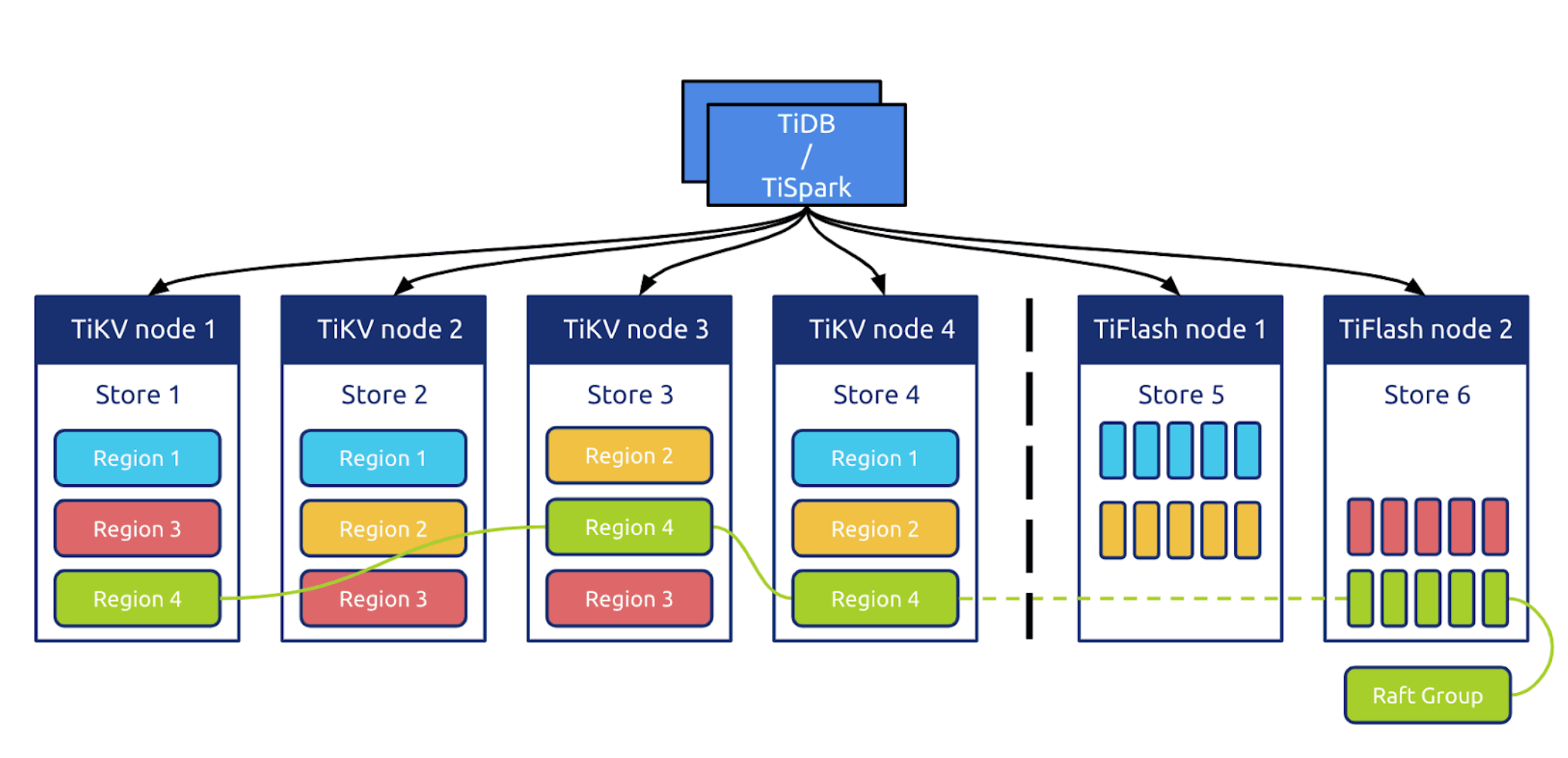
TiFlash is a columnar storage component of TiDB and TiDB Cloud, the fully-managed service of TiDB. It mainly plays the role of Analytical Processing (AP) in the Hybrid Transactional/Analytical Processing (HTAP) architecture of TiDB.
TiFlash stores data in columnar format and synchronizes data updates in real-time from TiKV by Raft logs with sub-second latency. Reads in TiFlash are guaranteed transactionally consistent with Snapshot Isolation level. TiFlash utilizes Massively Parallel Processing (MPP) computing architecture to accelerate the analytical workloads.
TiFlash repository is based on ClickHouse. We appreciate the excellent work of the ClickHouse team.
Quick Start
Start with TiDB Cloud
Quickly explore TiFlash with a free trial of TiDB Cloud.
See TiDB Cloud Quick Start Guide.
Start with TiDB
See Quick Start with HTAP and Use TiFlash.
Build TiFlash
TiFlash can be built on the following hardware architectures:
x86-64 / amd64
aarch64
And the following operating systems:
Linux
MacOS
1. Prepare Prerequisites
The following packages are required:
CMake 3.23.0+
Clang 17.0.0+
Rust
Python 3.0+
Ninja-Build or GNU Make
Ccache (not necessary but highly recommended to reduce rebuild time)
Detailed steps for each platform are listed below.
Ubuntu / Debian
sudo apt update

# Install Rust toolchain, see https://rustup.rs for details
curl https://sh.rustup.rs -sSf | sh -s -- --default-toolchain none
source $HOME/.cargo/env

# Install LLVM, see https://apt.llvm.org for details
# Clang will be available as /usr/bin/clang++-17
wget https://apt.llvm.org/llvm.sh
chmod +x llvm.sh
sudo ./llvm.sh 17 all

# Install other dependencies
sudo apt install -y cmake ninja-build zlib1g-dev libcurl4-openssl-dev ccache
Then, expose the LLVM17 toolchain as the default one in order to use it later in compile:
If you are facing "ld.lld: error: duplicate symbol: ssl3_cbc_digest_record":
It is likely because you have a pre-installed libssl3 where TiFlash prefers libssl1. TiFlash has vendored libssl1, so that you can simply remove the one in the system to make compiling work:
git clone https://github.com/pingcap/tiflash.git --recursive -j 20
cd tiflash
3. Build
To build TiFlash for development:
# In the TiFlash repository root:
cmake --workflow --preset dev
Or if you don't like the preset:
# In the TiFlash repository root:
mkdir cmake-build-debug
cd cmake-build-debug
cmake .. -GNinja -DCMAKE_BUILD_TYPE=DEBUG
ninja tiflash
Build Options
TiFlash has several CMake build options to tweak for development purposes. These options SHOULD NOT be changed for production usage, as they may introduce unexpected build errors and unpredictable runtime behaviors.
To tweak options, pass one or multiple -D...=... args when invoking CMake, for example:
cd cmake-build-debug
cmake .. -GNinja -DCMAKE_BUILD_TYPE=DEBUG -DFOO=BAR
                                          ^^^^^^^^^
Build Type:
-DCMAKE_BUILD_TYPE=RELWITHDEBINFO: Release build with debug info (default)
-DCMAKE_BUILD_TYPE=DEBUG: Debug build
-DCMAKE_BUILD_TYPE=RELEASE: Release build
Usually you may want to use different build directories for different build types, e.g. a new build directory named cmake-build-release for the release build, so that compile unit cache will not be invalidated when you switch between different build types.
Build with Unit Tests:
-DENABLE_TESTS=ON: Enable unit tests (enabled by default in debug profile)
-DENABLE_TESTS=OFF: Disable unit tests (default in release profile)
Build using GNU Make instead of ninja-build:
Click to expand instructions
To use GNU Make, simply don't pass -GNinja to cmake:
cd cmake-build-debug
cmake .. -DCMAKE_BUILD_TYPE=DEBUG
make tiflash -j
NOTE: Option -j (defaults to your system CPU core count, otherwise you can optionally specify a number) is used to control the build parallelism. Higher parallelism consumes more memory. If you encounter compiler OOM or hang, try to lower the parallelism by specifying a reasonable number, e.g., half of your system CPU core count or even smaller, after -j, depending on the available memory in your system.
Build with System Libraries:
Click to expand instructions
For local development, it is sometimes handy to use pre-installed third-party libraries in the system, rather than to compile them from sources of the bundled (internal) submodules.
Options are supplied to control whether to use internal third-party libraries (bundled in TiFlash) or to try using the pre-installed system ones.
WARNING: It is NOT guaranteed that TiFlash would still build if any of the system libraries are used.
Build errors are very likely to happen, almost all the time.
You can view these options along with their descriptions by running:
cd cmake-build-debug
cmake -LH | grep "USE_INTERNAL" -A3
All of these options are default as ON, as the names tell, using the internal libraries and build from sources.
There is another option to append extra paths for CMake to find system libraries:
PREBUILT_LIBS_ROOT: Default as empty, can be specified with multiple values, separated by ;
Build for AMD64 Architecture:
Click to expand instructions
To deploy TiFlash under the Linux AMD64 architecture, the CPU must support the AVX2 instruction set. Ensure that cat /proc/cpuinfo | grep avx2 has output.
If need to build TiFlash for AMD64 architecture without such instruction set, please use cmake option -DNO_AVX_OR_HIGHER=ON.
Run Unit Tests
Unit tests are automatically enabled in debug profile. To build these unit tests:
# In the TiFlash repository root:
cmake --workflow --preset unit-tests-all
More usages are available via ./dbms/gtests_dbms --help.
Run Sanitizer Tests
TiFlash supports testing with thread sanitizer and address sanitizer.
To build unit test executables with sanitizer enabled:
# In the TiFlash repository root:
cmake --workflow --preset asan-tests-all # or tsan-tests-all
There are known false positives reported from leak sanitizer (which is included in address sanitizer). To suppress these errors, set the following environment variables before running the executables:
LSAN_OPTIONS="suppressions=../tests/sanitize/asan.suppression" ./dbms/gtests_dbms ...
# or
TSAN_OPTIONS="suppressions=../tests/sanitize/tsan.suppression" ./dbms/gtests_dbms ...
Run Integration Tests
Check out the Integration Test Guide for more details.
Run MicroBenchmark Tests
To build micro benchmark tests, you need release profile and tests enabled:
# In the TiFlash repository root:
cmake --workflow --preset benchmarks
Then, to run these micro benchmarks:
cd cmake-build-release
./dbms/bench_dbms

# Or run with filter:
# ./dbms/bench_dbms --benchmark_filter=xxx
More usages are available via ./dbms/bench_dbms --help.
Generate LLVM Coverage Report
To build coverage report, run the script under release-linux-llvm
cd release-linux-llvm
./gen_coverage.sh
# Or run with filter:
# FILTER='*DMFile*:*DeltaMerge*:*Segment*' ./gen_coverage.sh

# After the script finished, it will output the directory of code coverage report, you can check out the files by webbrowser
python3 -m http.server --directory "${REPORT_DIR}" "${REPORT_HTTP_PORT}"
Contributing
Here is the overview of TiFlash architecture The architecture of TiFlash's distributed storage engine and transaction layer.
See TiFlash Development Guide and TiFlash Design documents.
Before submitting a pull request, please resolve clang-tidy errors and use format-diff.py to format source code, otherwise CI build may raise error.
NOTE: It is required to use clang-format 17.0.0+.
# In the TiFlash repository root:
merge_base=$(git merge-base upstream/master HEAD)
python3 release-linux-llvm/scripts/run-clang-tidy.py -p cmake-build-debug -j 20 --files `git diff $merge_base --name-only`
# if there are too much errors, you can try to run the script again with `-fix`
python3 format-diff.py --diff_from $merge_base
License
TiFlash is under the Apache 2.0 license. See the LICENSE file for details.
Trang TopGit này là một snapshot — tab "Readme" hiển thị nguyên văn README của repo (đã bỏ link, giữ ảnh). Repo GitHub ở github.com/pingcap/tiflash là nguồn chính thức.
pingcap/tiflash có bao nhiêu sao?
pingcap/tiflash có 1.0k sao GitHub — tải lại trang để xem số mới nhất, hoặc xem trực tiếp github.com/pingcap/tiflash. TopGit phản chiếu số sao của GitHub nhưng không cam kết đến từng phút.
pingcap/tiflash có phải mã nguồn mở không?
Có — pingcap/tiflash phát hành theo license Apache-2.0, nghĩa là mã nguồn mở để đọc, fork và (tùy license) tái sử dụng. Mã: github.com/pingcap/tiflash.
pingcap/tiflash còn đang phát triển không?
Commit gần nhất trên pingcap/tiflash là 11 ngày trước (theo timestamp GitHub). Repo có 428 fork — một chỉ báo về mức độ quan tâm của cộng đồng.
pingcap/tiflash là gì?
pingcap/tiflash (pingcap/tiflash) là dự án C++ trên GitHub. Theo mô tả gốc: The analytical engine for TiDB and TiDB Cloud. Try free: https://tidbcloud.com/free-trial
Đọc đầy đủ README ở tab phía trên.
tiflash có đáng để bạn bỏ thời gian?
ChatGPT, Claude và Perplexity đều đọc được trang này. Hỏi thử xem họ nghĩ gì về tiflash.

 /tiflash