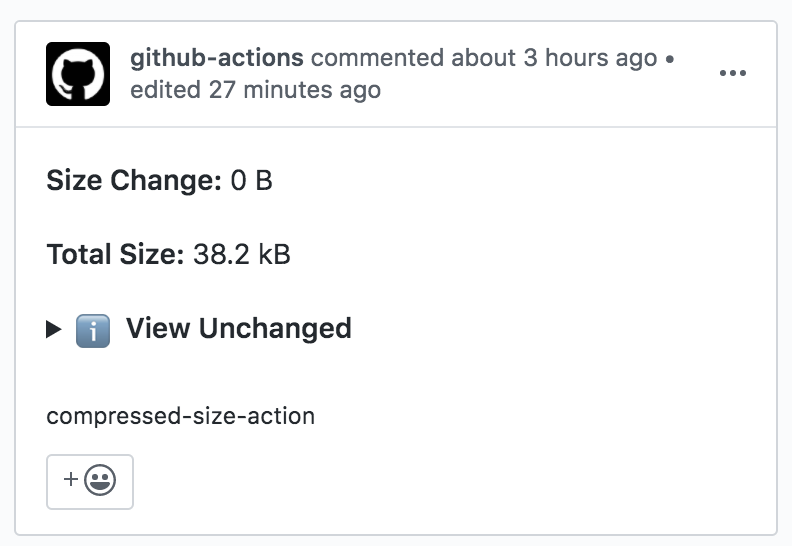
Điểm qua preactjs/compressed-size-action: 654 sao trên GitHub, viết chủ yếu bằng JavaScript, thuộc nhóm Automation. GitHub Action that adds compressed size changes to your PRs.
Tóm tắt dựng từ metadata GitHub của chính dự án — chưa có bài review TopGit. Trang sẽ tự động cập nhật khi bài review đầy đủ được xuất bản.
VÌ SAO CHƯA CÓ REVIEW
TopGit viết bài đầy đủ cho repo có nhiều sao nhất và được yêu cầu nhiều nhất. Trang này là snapshot trong thời gian chờ — xem README gốc ở tab READ ME.
Note: Due to GitHub's permission model, this action cannot safely create comments when it is triggered by a PR from a fork. It will, however, still generate the size comparison and print the comment it would've posted to the stdout of the action, allowing manual checking and you can copy/paste it into a comment if you wish.
The markdown comment that compressed-size-action posts to pull requests is also exposed as the comment-body output. This can be used by later workflow steps to archive the report, pass it to another job, or post the comment from a separate workflow with the permissions you need:
By default, compressed-size-action will install dependencies according to which lockfiles are present, if any. However, if you need to run a different installation command, you can pass a custom script to do so. For example, to use npm ci with the --workspace option:
By default, compressed-size-action will try to build your PR by running the "build" npm script in your package.json.
If you need to perform some tasks after dependencies are installed but before building, you can use a "postinstall" npm script to do so. For example, in Lerna-based monorepo:
It is also possible to define a "prebuild" npm script, which runs after "postinstall" but before "build".
You can also specify a completely different npm script to run instead of the default ("build"). To do this, add a build-script option to your yml workflow:
For repositories or custom monorepo setups where files are modified in ways that are not reset by npm ci && npm run build, it may be necessary to define a custom "clean" script. This script resets any file modifications after the upstream (target) build ends and your PR code (HEAD) is checked out, but before installation of npm dependencies for HEAD:
// package.json
{
  "scripts": {
    // example - a simple nested node_modules setup:
    "postinstall": "cd packages && npm i",
    // between the two builds, we need to delete the inner node_modules:
    "clean": "rm -rf packages/node_modules"
  }
}
Sorting the list of files
By default, the results table is sorted by filename in ascending order. You can customize this behavior using the sort-by option:
The format is "column:direction", where column is one of "Filename", "Size", or "Change" and direction is "asc" or "desc". For example, "Size:desc" sorts the table by file size in descending order.
Customizing the list of files
compressed-size-action defaults to tracking the size of all JavaScript files within dist/ directories - anywhere in your repository, not just at the root. You can change the list of files to be tracked and reported using the pattern and exclude options, both of which are minimatch patterns:
Files are collected by finding matches for pattern, then any of those that match exclude are ignored. For that reason, most projects don't need to modify exclude. The default values for pattern and exclude are as follows:
with:
  # Any JS files anywhere within a dist directory:
  pattern: "**/dist/**/*.{js,mjs,cjs}"

  # Always ignore SourceMaps and node_modules:
  exclude: "{**/*.map,**/node_modules/**}"
Dealing with hashed filenames
A strip-hash option was added in v2 that allows passing a custom Regular Expression pattern that will be used to remove hashes from filenames. The un-hashed filenames are used both for size comparison and display purposes.
By default, the characters matched by the regex are removed from filenames.
In the example below, a filename foo.abcde.js will be converted to foo.js:
strip-hash: "\\b\\w{5}\\."
This can be customized further using parens to create submatches, which mark where a hash occurs. When a submatch is detected, it will be replaced with asterisks. This is particularly useful when mix of hashed and unhashed filenames are present.
In the example below, a filename foo.abcde.chunk.js will be converted to foo.*****.chunk.js:
strip-hash: "\\.(\\w{5})\\.chunk\\.js$"
Increasing the required threshold
By default, a file that's been changed by a single byte will be reported as changed. If you'd prefer to require a certain minimum threshold for a file to be changed, you can specify minimum-change-threshold in bytes:
minimum-change-threshold: 100
In the above example, a file with a delta of less than 100 bytes will be reported as unchanged.
Compression
By default, files are compared after gzip compression, but it's possible to use other compression algorithms (gzip/brotli/none) or disable the compression.
compression: "none"
Specifying the base ref
Use the base-ref option to compare against a specific ref. Otherwise, the action compares against the PR's base branch.
For example, a project could set base-ref conditionally to use the PR target branch for feature PRs but compare against production for release PRs. Comparing against the previous release tag could show cumulative size change across all changes going into the release.
Checking multiple bundles
The action reuses the same comment each time it runs on a PR. In order to run the action multiple times against separate bundles for a single PR, you must provide a comment-key option, which the action will use to determine which comment to add or update for the run. The example below demonstrates this for separate "modern" and "legacy" bundles:
If you do not provide this key, the action will attempt to use (and therefore replace) the same comment for both bundles, hiding the output for whichever run finished last.
preactjs/compressed-size-action thuộc nhóm Automation trên TopGit, cùng 7 topic GitHub. Trang Trending và Topics liệt kê các repo cùng số sao và cùng ngôn ngữ để so sánh.
Đọc thêm về preactjs/compressed-size-action ở đâu?
Trang TopGit này là một snapshot — tab "Readme" hiển thị nguyên văn README của repo (đã bỏ link, giữ ảnh). Repo GitHub ở github.com/preactjs/compressed-size-action là nguồn chính thức.
preactjs/compressed-size-action có bao nhiêu sao?
preactjs/compressed-size-action có 654 sao GitHub — tải lại trang để xem số mới nhất, hoặc xem trực tiếp github.com/preactjs/compressed-size-action. TopGit phản chiếu số sao của GitHub nhưng không cam kết đến từng phút.
preactjs/compressed-size-action có những chủ đề gì?
GitHub topics của preactjs/compressed-size-action: "action", "actions", "bytes", "compressed", "prs", "size", "workflow". TopGit xếp repo vào nhóm Automation.
preactjs/compressed-size-action còn đang phát triển không?
Commit gần nhất trên preactjs/compressed-size-action là 1 tháng trước (theo timestamp GitHub). Repo có 108 fork — một chỉ báo về mức độ quan tâm của cộng đồng.
preactjs/compressed-size-action viết bằng ngôn ngữ gì?
preactjs/compressed-size-action chủ yếu viết bằng JavaScript. Trường "language" của GitHub dựa trên phần lớn byte ở nhánh mặc định.
Vì sao preactjs/compressed-size-action được xếp vào nhóm Automation?
TopGit xếp preactjs/compressed-size-action vào nhóm Automation dựa trên GitHub topics và mô tả của repo (gắn thẻ: "action", "actions", "bytes"). Việc phân loại dựa trên metadata thật của repo, không phải đoán theo cảm tính biên tập.
Đọc đầy đủ README ở tab phía trên.
Vẫn đang phân vân về compressed-size-action?
Một cú bấm sẽ gửi câu hỏi kèm trang này cho AI — xem AI nói gì về compressed-size-action.