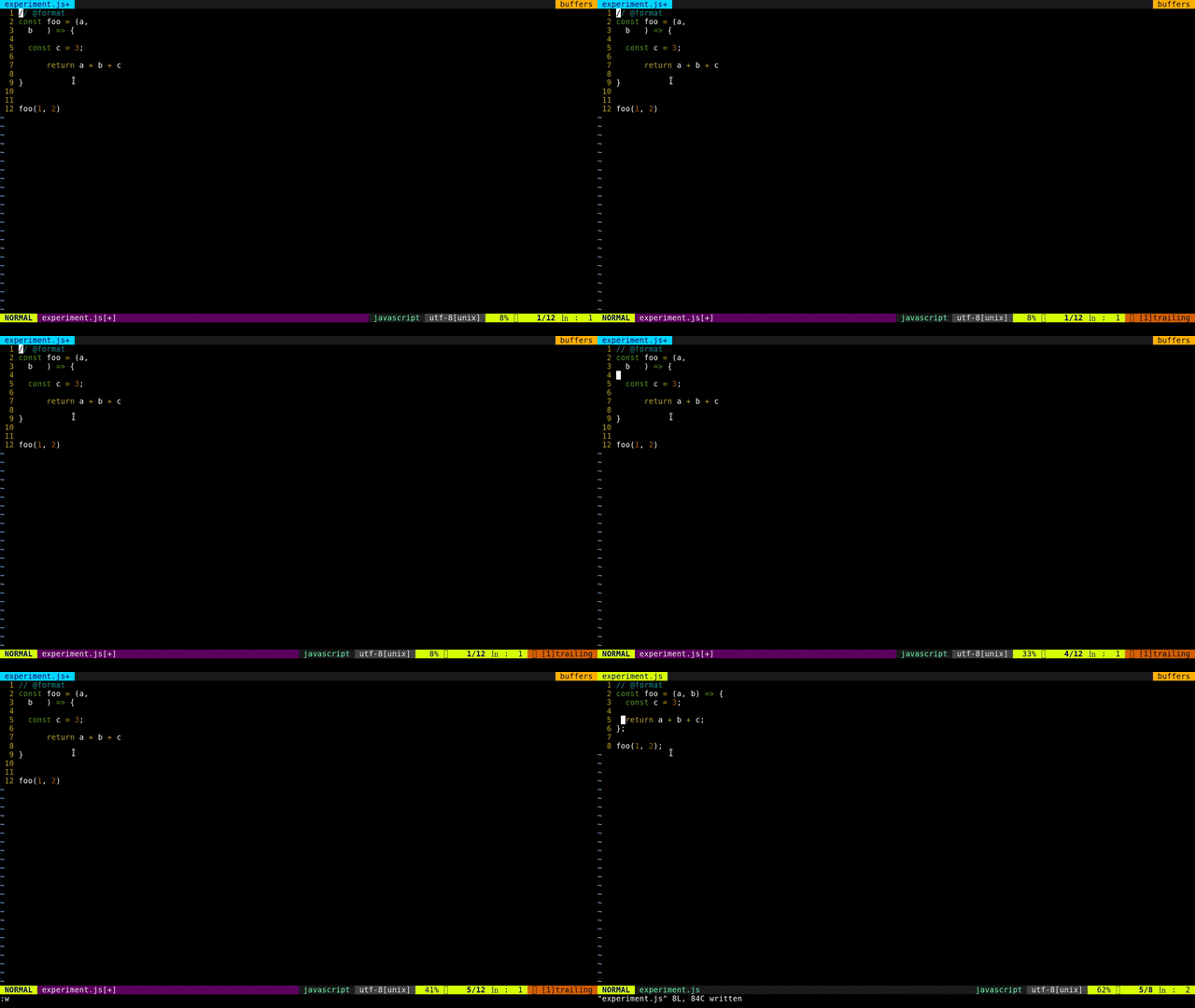
prettier/vim-prettier — 1.8k★ trên GitHub (Vim Script). A Vim plugin for Prettier
Tóm tắt dựng từ metadata GitHub của chính dự án — chưa có bài review TopGit. Trang sẽ tự động cập nhật khi bài review đầy đủ được xuất bản.
VÌ SAO CHƯA CÓ REVIEW
TopGit viết bài đầy đủ cho repo có nhiều sao nhất và được yêu cầu nhiều nhất. Trang này là snapshot trong thời gian chờ — xem README gốc ở tab READ ME.
If using other vim plugin managers or doing manual setup make sure to have
prettier installed globally or go to your vim-prettier directory and run
npm install --omit=dev.
Prettier Executable resolution
When installed via vim-plug, a default prettier executable is installed inside
vim-prettier.
vim-prettier executable resolution:
Look for user defined prettier cli path from vim configuration file
Traverse the current buffer's parents and search for Prettier installation inside node_modules
Look for a global prettier installation
Use locally installed vim-prettier prettier executable
Compatibility status
The 2.0.0 beta support policy is based on tested fixtures. Project-local
Prettier, configuration, and plugins take precedence over vim-prettier's bundled
fallback.
Tested editors are Vim 8.2 latest patch, latest stable Vim, Neovim 0.9 latest
patch, and latest stable Neovim. Formatting fixtures cover core Prettier
languages with the bundled Prettier baseline, Prettier 2.8.8, and latest
Prettier.
User installs are tested with Node.js 20.x and npm install --omit=dev.
Development and CI use the checked-in Yarn v1 lockfile with
yarn install --frozen-lockfile for reproducible test runs.
The root Dockerfile is deprecated and kept only for historical reference. It
uses Alpine 3.8, an unpinned testbed/vim:latest base image, and legacy editor
versions; it is not an authoritative compatibility environment.
For local editor-matrix smoke checks, use the pinned Docker runner:
The Docker runner defaults to linux/amd64 so Neovim release archives are
available consistently. Neovim targets currently assume x86_64 release archives;
do not override DOCKER_PLATFORM for Neovim unless the Dockerfile is updated to
select a matching asset. Override VIM_STABLE_VERSION to test a newer stable Vim
tag. Override DOCKER_MATRIX_COMMAND to run a different command inside the
matrix image. The checkout is mounted read-write, but node_modules and Yarn
cache are isolated in Docker volumes.
Prettier Stylelint
To use an alternative command, like
prettier-stylelint, set
this at the buffer level, e.g.:
au FileType css,scss let b:prettier_exec_cmd = "prettier-stylelint"
vim-prettier will look for the executable in the same places it looks for
prettier, and will fall back to prettier if it can't find
b:prettier_exec_cmd
USAGE
Prettier by default will run on auto save but can also be manually triggered by:
<Leader>p
or
:Prettier
If your are on vim 8+ you can also trigger async formatting by:
:PrettierAsync
You can send to prettier your entire buffer but ensure that it formats only your selection.
note: differs from :PrettierFragment by sending the entire buffer to prettier, allowing identation level to be preserved, but it requires the whole file to be valid.
:PrettierPartial
You can send to prettier your current selection as a fragment of same type as the file being edited.
note: differs from :PrettierPartial by sending only the current selection to prettier, this allows for faster formatting but wont preserve indentation.
:PrettierFragment
You can check what is the vim-prettier plugin version by:
:PrettierVersion
You can send commands to the resolved prettier cli by:
:PrettierCli <q-args>
You can check what is the resolved prettier cli path by:
:PrettierCliPath
You can check what is the resolved prettier cli version by:
:PrettierCliVersion
Configuration
Change the mapping to run from the default of <Leader>p
nmap <Leader>py <Plug>(Prettier)
Enable auto formatting of files that have "@format" or "@prettier" tag
let g:prettier#autoformat = 1
Allow auto formatting for files without "@format" or "@prettier" tag
let g:prettier#autoformat_require_pragma = 0
NOTE The previous two options can be used together for autoformatting files on save without @format or @prettier tags
let g:prettier#autoformat = 1
let g:prettier#autoformat_require_pragma = 0
Toggle the g:prettier#autoformat setting based on whether a config file can be found in the buffer's directory or any parent directory. Note that this will override the g:prettier#autoformat setting!
let g:prettier#autoformat_config_present = 1
A list containing all config file names to search from the buffer's directory and parent directories when using the g:prettier#autoformat_config_present option. The default list follows Prettier's documented file-based config names and keeps vim-prettier's legacy .prettierrc.config.js entry. It intentionally does not include package.json or package.yaml, because those files only count as Prettier configs when they contain a prettier key. Detection only controls whether autoformat runs; the selected Prettier executable and Node version still determine whether a detected config format can be parsed.
let g:prettier#exec_cmd_path = "~/path/to/cli/prettier"
The command :Prettier by default is synchronous but can also be forced async
let g:prettier#exec_cmd_async = 1
By default parsing errors will open the quickfix but can also be disabled
let g:prettier#quickfix_enabled = 0
By default selection formatting will be running :PrettierFragment but we can set
:PrettierPartial as the default selection formatting by:
let g:prettier#partial_format=1
By default we auto focus on the quickfix when there are errors but can also be disabled
let g:prettier#quickfix_auto_focus = 0
To run vim-prettier not only before saving, but also after changing text or leaving insert mode:
" when running at every change you may want to disable quickfix
let g:prettier#quickfix_enabled = 0

autocmd TextChanged,InsertLeave *.js,*.jsx,*.mjs,*.ts,*.tsx,*.css,*.less,*.scss,*.json,*.graphql,*.md,*.vue,*.yaml,*.html,*.php,*.xml PrettierAsync
Overwrite default prettier configuration
Note: vim-prettier default settings differ from prettier intentionally.
However they can be configured by:
" Max line length that prettier will wrap on: a number or 'auto' (use
" textwidth).
" default: 'auto'
let g:prettier#config#print_width = 'auto'

" number of spaces per indentation level: a number or 'auto' (use
" softtabstop)
" default: 'auto'
let g:prettier#config#tab_width = 'auto'

" use tabs instead of spaces: true, false, or auto (use the expandtab setting).
" default: 'auto'
let g:prettier#config#use_tabs = 'auto'

" flow|babylon|typescript|css|less|scss|json|graphql|markdown or empty string
" (let prettier choose).
" default: ''
let g:prettier#config#parser = ''

" Prettier plugin paths to load. Accepts a string or list of strings.
" Project-local Prettier installs should provide their own project-local plugins.
" default: []
let g:prettier#config#plugins = []

" cli-override|file-override|prefer-file
" default: 'file-override'
let g:prettier#config#config_precedence = 'file-override'

" always|never|preserve
" default: 'preserve'
let g:prettier#config#prose_wrap = 'preserve'

" css|strict|ignore
" default: 'css'
let g:prettier#config#html_whitespace_sensitivity = 'css'

" false|true
" default: 'false'
let g:prettier#config#require_pragma = 'false'

" Define the flavor of line endings
" lf|crlf|cr|all
" defaut: 'lf'
let g:prettier#config#end_of_line = get(g:, 'prettier#config#end_of_line', 'lf')
REQUIREMENT(S)
If the prettier executable can't be found by Vim, no code formatting will happen.
For normal use, install dependencies with Node.js 20.x and
npm install --omit=dev. For development and compatibility verification, use
yarn install --frozen-lockfile so the checked-in Yarn v1 lockfile is respected.
prettier/vim-prettier thuộc nhóm Developer Tools trên TopGit, cùng 4 topic GitHub. Trang Trending và Topics liệt kê các repo cùng số sao và cùng ngôn ngữ để so sánh.
Đọc thêm về prettier/vim-prettier ở đâu?
Trang TopGit này là một snapshot — tab "Readme" hiển thị nguyên văn README của repo (đã bỏ link, giữ ảnh). Repo GitHub ở github.com/prettier/vim-prettier là nguồn chính thức.
prettier/vim-prettier có phải mã nguồn mở không?
Có — prettier/vim-prettier phát hành theo license MIT, nghĩa là mã nguồn mở để đọc, fork và (tùy license) tái sử dụng. Mã: github.com/prettier/vim-prettier.
prettier/vim-prettier là gì?
prettier/vim-prettier (prettier/vim-prettier) là dự án Vim Script trên GitHub. Theo mô tả gốc: A Vim plugin for Prettier
prettier/vim-prettier so với các dự án Developer Tools khác thế nào?
prettier/vim-prettier được TopGit xếp vào nhóm Developer Tools, với 1.8k sao GitHub và viết bằng Vim Script. Xem trang chủ đề Developer Tools trên TopGit để so sánh với các dự án tương tự theo số sao và mức độ hoạt động.
Vì sao prettier/vim-prettier được xếp vào nhóm Developer Tools?
TopGit xếp prettier/vim-prettier vào nhóm Developer Tools dựa trên GitHub topics và mô tả của repo (gắn thẻ: "prettier", "prettier-js", "vim"). Việc phân loại dựa trên metadata thật của repo, không phải đoán theo cảm tính biên tập.
Đọc đầy đủ README ở tab phía trên.
Vẫn đang phân vân về vim-prettier?
Một cú bấm sẽ gửi câu hỏi kèm trang này cho AI — xem AI nói gì về vim-prettier.

 /vim-prettier