projectdiscovery/httpx

projectdiscovery/httpx là một trong những repo hướng lập trình viên mà TopGit theo dõi, hiện có 10.5k sao, viết chủ yếu bằng Go. httpx is a fast and multi-purpose HTTP toolkit that allows running multiple probes using the retryablehttp library.
Tóm tắt dựng từ metadata GitHub của chính dự án — chưa có bài review TopGit. Trang sẽ tự động cập nhật khi bài review đầy đủ được xuất bản.
TopGit viết bài đầy đủ cho repo có nhiều sao nhất và được yêu cầu nhiều nhất. Trang này là snapshot trong thời gian chờ — xem README gốc ở tab READ ME.
Snapshot
Cộng tác viên hàng đầu
Xem cộng tác viên hàng đầu






Features • Installation • Usage • Documentation • Notes • Join Discord
httpx is a fast and multi-purpose HTTP toolkit that allows running multiple probes using the retryablehttp library. It is designed to maintain result reliability with an increased number of threads.
Features
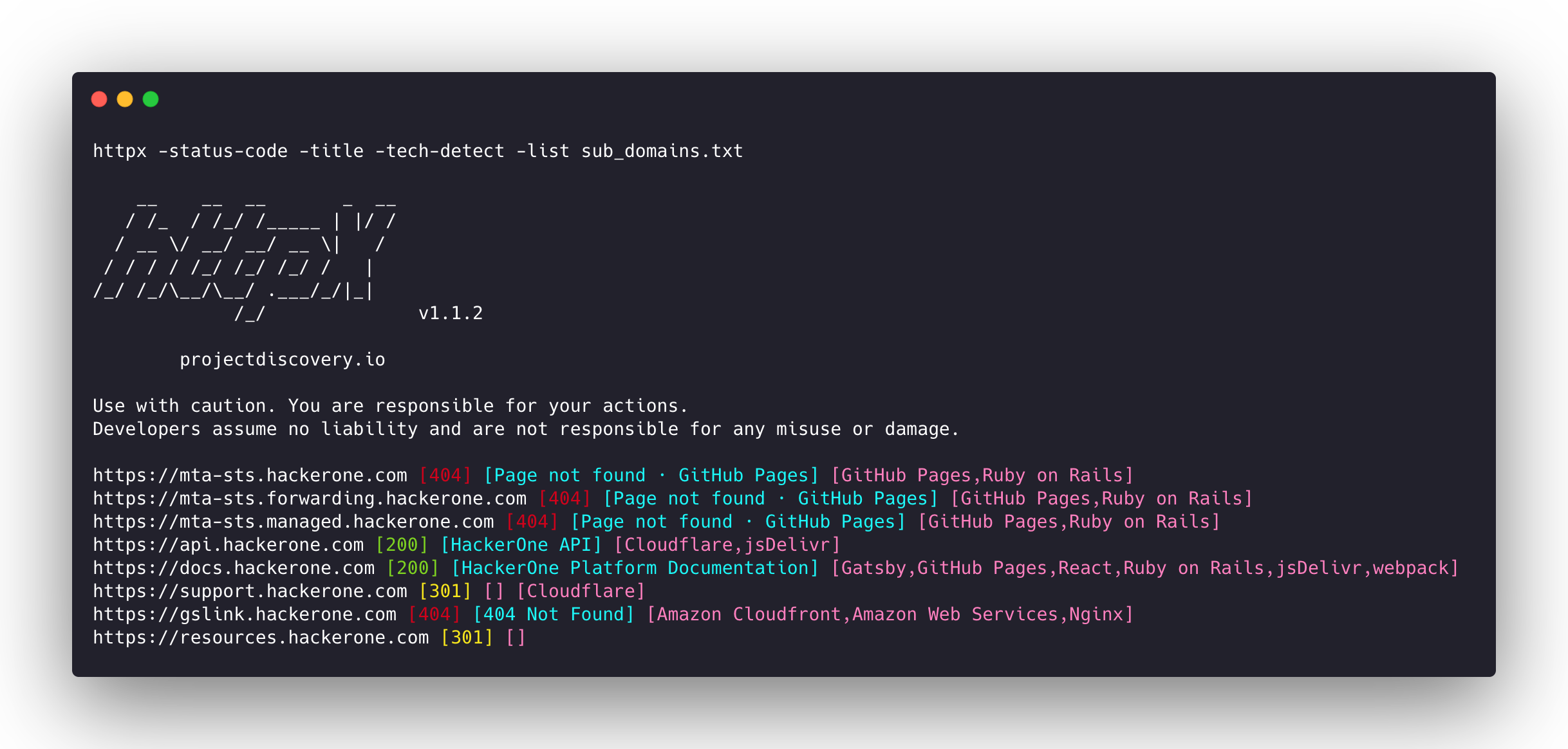
- Simple and modular code base making it easy to contribute.
- Fast And fully configurable flags to probe multiple elements.
- Supports multiple HTTP based probings.
- Smart auto fallback from https to http by default.
- Supports hosts, URLs and CIDR as input.
- Handles edge cases doing retries, backoffs etc for handling WAFs.
Supported probes
| Probes | Default check | Probes | Default check |
|---|---|---|---|
| URL | true | IP | true |
| Title | true | CNAME | true |
| Status Code | true | Raw HTTP | false |
| Content Length | true | HTTP2 | false |
| TLS Certificate | true | HTTP Pipeline | false |
| CSP Header | true | Virtual host | false |
| Line Count | true | Word Count | true |
| Location Header | true | CDN | false |
| Web Server | true | Paths | false |
| Web Socket | true | Ports | false |
| Response Time | true | Request Method | true |
| Favicon Hash | false | Probe Status | false |
| Body Hash | true | Header Hash | true |
| Redirect chain | false | URL Scheme | true |
| JARM Hash | false | ASN | false |
Installation Instructions
httpx requires go >=1.25.0 to install successfully. Run the following command to get the repo:
go install -v github.com/projectdiscovery/httpx/cmd/httpx@latest
To learn more about installing httpx, see https://docs.projectdiscovery.io/tools/httpx/install.
| :exclamation: Disclaimer |
|---|
| This project is in active development. Expect breaking changes with releases. Review the changelog before updating. |
| This project was primarily built to be used as a standalone CLI tool. Running it as a service may pose security risks. It's recommended to use with caution and additional security measures. |
Usage
httpx -h
This will display help for the tool. Here are all the switches it supports.
httpx is a fast and multi-purpose HTTP toolkit that allows running multiple probes using the retryablehttp library.

Usage:
  ./httpx [flags]

Flags:
INPUT:
   -l, -list string              input file containing list of hosts to process
   -rr, -request string          file containing raw request
   -u, -target string[]          input target host(s) to probe
   -im, -input-mode string       mode of input file (burp)

PROBES:
   -sc, -status-code                      display response status-code
   -cl, -content-length                   display response content-length
   -ct, -content-type                     display response content-type
   -location                              display response redirect location
   -favicon                               display mmh3 hash for '/favicon.ico' file
   -hash string                           display response body hash (supported: md5,mmh3,simhash,sha1,sha256,sha512)
   -jarm                                  display jarm fingerprint hash
   -rt, -response-time                    display response time
   -lc, -line-count                       display response body line count
   -wc, -word-count                       display response body word count
   -title                                 display page title
   -bp, -body-preview                     display first N characters of response body (default 100)
   -server, -web-server                   display server name
   -td, -tech-detect                      display technology in use based on wappalyzer dataset
   -cff, -custom-fingerprint-file string  path to a custom fingerprint file for technology detection
   -kb, -knowledge-base                   enable knowledge base classification
   -method                                display http request method
   -ws, -websocket                        display server using websocket
   -ip                                    display host ip
   -cname                                 display host cname
   -extract-fqdn, -efqdn                  get domain and subdomains from response body and header in jsonl/csv output
   -asn                                   display host asn information
   -cdn                                   display cdn/waf in use (default true)
   -probe                                 display probe status

HEADLESS:
   -ss, -screenshot                 enable saving screenshot of the page using headless browser
   -system-chrome                   enable using local installed chrome for screenshot
   -ho, -headless-options string[]  start headless chrome with additional options
   -esb, -exclude-screenshot-bytes  enable excluding screenshot bytes from json output
   -ehb, -exclude-headless-body     enable excluding headless header from json output
   -no-screenshot-full-page         disable saving full page screenshot
   -st, -screenshot-timeout value   set timeout for screenshot in seconds (default 10s)
   -sid, -screenshot-idle value     set idle time before taking screenshot in seconds (default 1s)
   -jsc, -javascript-code string[]  execute JavaScript code after navigation

MATCHERS:
   -mc, -match-code string            match response with specified status code (-mc 200,302)
   -ml, -match-length string          match response with specified content length (-ml 100,102)
   -mlc, -match-line-count string     match response body with specified line count (-mlc 423,532)
   -mwc, -match-word-count string     match response body with specified word count (-mwc 43,55)
   -mfc, -match-favicon string[]      match response with specified favicon hash (-mfc 1494302000)
   -ms, -match-string string[]        match response with specified string (-ms admin)
   -mr, -match-regex string[]         match response with specified regex (-mr admin)
   -mcdn, -match-cdn string[]         match host with specified cdn provider (cloudfront, fastly, google, etc.)
   -mrt, -match-response-time string  match response with specified response time in seconds (-mrt '< 1')
   -mdc, -match-condition string      match response with dsl expression condition

EXTRACTOR:
   -er, -extract-regex string[]   display response content with matched regex
   -ep, -extract-preset string[]  display response content matched by a pre-defined regex (url,ipv4,mail)

FILTERS:
   -fc, -filter-code string               filter response with specified status code (-fc 403,401)
   -fpt, -filter-page-type string[]       filter response with specified page type (e.g. -fpt login,captcha,parked)
   -fep, -filter-error-page               [DEPRECATED: use -fpt] filter response with ML based error page detection
   -fd, -filter-duplicates                filter out near-duplicate responses (only first response is retained)
   -fl, -filter-length string             filter response with specified content length (-fl 23,33)
   -flc, -filter-line-count string        filter response body with specified line count (-flc 423,532)
   -fwc, -filter-word-count string        filter response body with specified word count (-fwc 423,532)
   -ffc, -filter-favicon string[]         filter response with specified favicon hash (-ffc 1494302000)
   -fs, -filter-string string[]           filter response with specified string (-fs admin)
   -fe, -filter-regex string[]            filter response with specified regex (-fe admin)
   -fcdn, -filter-cdn string[]            filter host with specified cdn provider (cloudfront, fastly, google, etc.)
   -frt, -filter-response-time string     filter response with specified response time in seconds (-frt '> 1')
   -fdc, -filter-condition string         filter response with dsl expression condition
   -strip                                 strips all tags in response. supported formats: html,xml (default html)
   -lof, -list-output-fields              list of fields to output (comma separated)
   -eof, -exclude-output-fields string[]  exclude output fields output based on a condition

RATE-LIMIT:
   -t, -threads int              number of threads to use (default 50)
   -rl, -rate-limit int          maximum requests to send per second (default 150)
   -rlm, -rate-limit-minute int  maximum number of requests to send per minute

MISCELLANEOUS:
   -pa, -probe-all-ips        probe all the ips associated with same host
   -p, -ports string[]        ports to probe (nmap syntax: eg http:1,2-10,11,https:80)
   -path string               path or list of paths to probe (comma-separated, file)
   -tls-probe                 send http probes on the extracted TLS domains (dns_name)
   -csp-probe                 send http probes on the extracted CSP domains
   -tls-grab                  perform TLS(SSL) data grabbing
   -pipeline                  probe and display server supporting HTTP1.1 pipeline
   -http2                     probe and display server supporting HTTP2
   -vhost                     probe and display server supporting VHOST
   -ldv, -list-dsl-variables  list json output field keys name that support dsl matcher/filter

UPDATE:
   -up, -update                 update httpx to latest version
   -duc, -disable-update-check  disable automatic httpx update check

OUTPUT:
   -o, -output string                     file to write output results
   -oa, -output-all                       filename to write output results in all formats
   -sr, -store-response                   store http response to output directory
   -srd, -store-response-dir string       store http response to custom directory
   -ob, -omit-body                        omit response body in output
   -csv                                   store output in csv format
   -csvo, -csv-output-encoding string     define output encoding
   -j, -json                              store output in JSONL(ines) format
   -irh, -include-response-header         include http response (headers) in JSON output (-json only)
   -irr, -include-response                include http request/response (headers + body) in JSON output (-json only)
   -irrb, -include-response-base64        include base64 encoded http request/response in JSON output (-json only)
   -include-chain                         include redirect http chain in JSON output (-json only)
   -store-chain                           include http redirect chain in responses (-sr only)
   -svrc, -store-vision-recon-cluster     include visual recon clusters (-ss and -sr only)
   -pr, -protocol string                  protocol to use (unknown, http11, http2, http3)
   -fepp, -filter-error-page-path string  path to store filtered error pages (default "filtered_error_page.json")
   -rdb, -result-db                       store results in database
   -rdbc, -result-db-config string        path to database config file
   -rdbt, -result-db-type string          database type (mongodb, postgres, mysql)
   -rdbcs, -result-db-conn string         database connection string (env: HTTPX_DB_CONNECTION_STRING)
   -rdbn, -result-db-name string          database name (default "httpx")
   -rdbtb, -result-db-table string        table/collection name (default "results")
   -rdbbs, -result-db-batch-size int      batch size for database inserts (default 100)
   -rdbor, -result-db-omit-raw            omit raw request/response data from database

CONFIGURATIONS:
   -config string                   path to the httpx configuration file (default $HOME/.config/httpx/config.yaml)
   -r, -resolvers string[]          list of custom resolver (file or comma separated)
   -allow string[]                  allowed list of IP/CIDR's to process (file or comma separated)
   -deny string[]                   denied list of IP/CIDR's to process (file or comma separated)
   -sni, -sni-name string           custom TLS SNI name
   -random-agent                    enable Random User-Agent to use (default true)
   -auto-referer                    set the Referer header to the current URL
   -H, -header string[]             custom http headers to send with request
   -http-proxy, -proxy string       proxy (http|socks) to use (eg http://127.0.0.1:8080)
   -unsafe                          send raw requests skipping golang normalization
   -resume                          resume scan using resume.cfg
   -fr, -follow-redirects           follow http redirects
   -maxr, -max-redirects int        max number of redirects to follow per host (default 10)
   -fhr, -follow-host-redirects     follow redirects on the same host
   -rhsts, -respect-hsts            respect HSTS response headers for redirect requests
   -vhost-input                     get a list of vhosts as input
   -x string                        request methods to probe, use 'all' to probe all HTTP methods
   -body string                     post body to include in http request
   -s, -stream                      stream mode - start elaborating input targets without sorting
   -sd, -skip-dedupe                disable dedupe input items (only used with stream mode)
   -ldp, -leave-default-ports       leave default http/https ports in host header (eg. http://host:80 - https://host:443
   -ztls                            use ztls library with autofallback to standard one for tls13
   -no-decode                       avoid decoding body
   -tlsi, -tls-impersonate string    enable experimental client hello (ja3) tls impersonation (chrome, or ja3 full string)
   -no-stdin                        Disable Stdin processing
   -hae, -http-api-endpoint string  experimental http api endpoint
   -sf, -secret-file string         path to secret file for authentication

DEBUG:
   -health-check, -hc        run diagnostic check up
   -debug                    display request/response content in cli
   -debug-req                display request content in cli
   -debug-resp               display response content in cli
   -version                  display httpx version
   -stats                    display scan statistic
   -profile-mem string       optional httpx memory profile dump file
   -silent                   silent mode
   -v, -verbose              verbose mode
   -si, -stats-interval int  number of seconds to wait between showing a statistics update (default: 5)
   -nc, -no-color            disable colors in cli output
   -tr, -trace               trace

OPTIMIZATIONS:
   -nf, -no-fallback                  display both probed protocol (HTTPS and HTTP)
   -nfs, -no-fallback-scheme          probe with protocol scheme specified in input
   -maxhr, -max-host-error int        max error count per host before skipping remaining path/s (default 30)
   -e, -exclude string[]              exclude host matching specified filter ('cdn', 'private-ips', cidr, ip, regex)
   -retries int                       number of retries
   -timeout int                       timeout in seconds (default 10)
   -delay value                       duration between each http request (eg: 200ms, 1s) (default -1ns)
   -rsts, -response-size-to-save int  max response size to save in bytes (default 50000000)
   -rstr, -response-size-to-read int  max response size to read in bytes (default 50000000)

CLOUD:
   -auth                           configure projectdiscovery cloud (pdcp) api key (default true)
   -ac, -auth-config string        configure projectdiscovery cloud (pdcp) api key credential file
   -pd, -dashboard                 upload / view output in projectdiscovery cloud (pdcp) UI dashboard
   -tid, -team-id string           upload asset results to given team id (optional)
   -aid, -asset-id string          upload new assets to existing asset id (optional)
   -aname, -asset-name string      assets group name to set (optional)
   -pdu, -dashboard-upload string  upload httpx output file (jsonl) in projectdiscovery cloud (pdcp) UI dashboard
Running httpx
For details about running httpx, see https://docs.projectdiscovery.io/tools/httpx/running.
Using httpx as a library
httpx can be used as a library by creating an instance of the Option struct and populating it with the same options that would be specified via CLI. Once validated, the struct should be passed to a runner instance (to be closed at the end of the program) and the RunEnumeration method should be called. A minimal example of how to do it is in the examples folder.
Common Recipes
Below are practical one-liners for common use cases leveraging httpx's composable primitives. These recipes are validated in runner/wellknown_recipes_test.go.
Use -mdc with DSL helpers such as contains(content_type, ...) and contains(body, ...) to match response metadata and body content. (-mr/-ms match the full raw response; use -mdc for structured field matching.)
Well-known files
security.txt
Probe for a valid RFC 9116 security.txt file at the standard paths (/.well-known/security.txt, /security.txt):
echo target.com | httpx -path '/.well-known/security.txt,/security.txt' -mc 200 -mdc 'contains(content_type, "text/plain") && contains(body, "Contact:") && contains_any(body, "mailto:", "https://")'
-pathtests custom path(s)-mc 200matches HTTP 200-mdcmatches using DSL expressions on response fields such ascontent_typeandbody
robots.txt
echo target.com | httpx -path '/robots.txt' -mc 200 -mdc 'contains(content_type, "text/plain")'
sitemap.xml
echo target.com | httpx -path '/sitemap.xml' -mc 200 -mdc 'contains_any(content_type, "application/xml", "text/xml") && contains(body, "<urlset")'
humans.txt
echo target.com | httpx -path '/humans.txt' -mc 200 -mdc 'contains(content_type, "text/plain")'
ads.txt
echo target.com | httpx -path '/ads.txt' -mc 200 -mdc 'contains(content_type, "text/plain") && contains(body, "google.com")'
Well-known URIs
OpenID Connect discovery (spec)
echo target.com | httpx -path '/.well-known/openid-configuration' -mc 200 -mdc 'contains(content_type, "application/json") && contains(body, "\"issuer\"")'
Apple Universal Links
echo target.com | httpx -path '/.well-known/apple-app-site-association,/.well-known/apple-app-site-association.json' -mc 200 -mdc 'contains(content_type, "application/json") && contains(body, "\"applinks\"")'
Android App Links
echo target.com | httpx -path '/.well-known/assetlinks.json' -mc 200 -mdc 'contains(content_type, "application/json") && contains(body, "\"android_app\"")'
crossdomain.xml (legacy Flash policy file)
echo target.com | httpx -path '/crossdomain.xml' -mc 200 -mdc 'contains_any(content_type, "application/xml", "text/xml") && contains(body, "cross-domain-policy")'
Other well-known URIs (IANA registry):
echo target.com | httpx -path '/.well-known/security.txt,/.well-known/change-password,/.well-known/openid-configuration' -mc 200
Notes
- As default,
httpxprobe with HTTPS scheme and fall-back to HTTP only if HTTPS is not reachable. - Burp Suite XML exports can be used as input with
-l burp-export.xml -im burp - The
-no-fallbackflag can be used to probe and display both HTTP and HTTPS result. - Custom scheme for ports can be defined, for example
-ports http:443,http:80,https:8443 - Custom resolver supports multiple protocol (doh|tcp|udp) in form of
protocol:resolver:port(e.g.udp:127.0.0.1:53) - Secret files can be used for domain-based authentication via
-sf secrets.yaml. Supported auth types:BasicAuth,BearerToken,Header,Cookie,Query. Example:id: example-auth info: name: Example Auth Config static: - type: Header domains: - api.example.com headers: - key: X-API-Key value: secret-key-here - type: BasicAuth domains-regex: - ".*\\.internal\\.com$" username: admin password: secret - The following flags should be used for specific use cases instead of running them as default with other probes:
-ports-path-vhost-screenshot-csp-probe-tls-probe-favicon-http2-pipeline-tls-impersonate
Acknowledgement
Probing feature is inspired by @tomnomnom/httprobe work ❤️
httpx is made with 💙 by the projectdiscovery team and distributed under MIT License.

Repo liên quan
yt-dlp is a Python command-line downloader that pulls audio and video from thousands of sites and hands post-processing off to ffmpeg. It's a fork of youtube-dl built for people who want fast fixes when a site breaks, not a polished app.
Windows Terminal is Microsoft's open-source terminal application, developed in the microsoft/terminal GitHub repository (MIT license) alongside the original Windows Console Host. It adds tabs, rich text, globalization, configurable profiles, and theming on top of the console infrastructure the same repo maintains, and can be installed from the Microsoft Store, GitHub Releases, winget, or the unofficial Chocolatey and Scoop packages.
#1 PDF Application on GitHub that lets you edit PDFs on any device anywhere
fzf is a Go-based command-line fuzzy finder that turns any piped list — files, shell history, running processes — into an interactively searchable menu, with official shell integration for Bash, Zsh, Fish, and Nushell plus a Vim/Neovim plugin. It's released under the MIT license and distributed as a single binary across Homebrew, most Linux package managers, and Windows package managers like Scoop and Chocolatey.
Trả lời nhanh
Cùng nhóm Developer Tools còn repo nào?
projectdiscovery/httpx thuộc nhóm Developer Tools trên TopGit, cùng 10 topic GitHub. Trang Trending và Topics liệt kê các repo cùng số sao và cùng ngôn ngữ để so sánh.
Đọc thêm về projectdiscovery/httpx ở đâu?
Trang TopGit này là một snapshot — tab "Readme" hiển thị nguyên văn README của repo (đã bỏ link, giữ ảnh). Repo GitHub ở github.com/projectdiscovery/httpx là nguồn chính thức.
projectdiscovery/httpx có phải mã nguồn mở không?
Có — projectdiscovery/httpx phát hành theo license MIT, nghĩa là mã nguồn mở để đọc, fork và (tùy license) tái sử dụng. Mã: github.com/projectdiscovery/httpx.
projectdiscovery/httpx là gì?
projectdiscovery/httpx (projectdiscovery/httpx) là dự án Go trên GitHub. Theo mô tả gốc: httpx is a fast and multi-purpose HTTP toolkit that allows running multiple probes using the retryablehttp library.
projectdiscovery/httpx so với các dự án Developer Tools khác thế nào?
projectdiscovery/httpx được TopGit xếp vào nhóm Developer Tools, với 10.5k sao GitHub và viết bằng Go. Xem trang chủ đề Developer Tools trên TopGit để so sánh với các dự án tương tự theo số sao và mức độ hoạt động.
Vì sao projectdiscovery/httpx được xếp vào nhóm Developer Tools?
TopGit xếp projectdiscovery/httpx vào nhóm Developer Tools dựa trên GitHub topics và mô tả của repo (gắn thẻ: "bugbounty", "cli", "cybersecurity"). Việc phân loại dựa trên metadata thật của repo, không phải đoán theo cảm tính biên tập.
Đọc đầy đủ README ở tab phía trên.
httpx có đáng để bạn bỏ thời gian?
ChatGPT, Claude và Perplexity đều đọc được trang này. Hỏi thử xem họ nghĩ gì về httpx.