raysan5/raylib-project-creator là một trong những repo phía máy chủ mà TopGit theo dõi, hiện có 319 sao, viết chủ yếu bằng C. A simple and easy-to-use raylib project creator
Tóm tắt dựng từ metadata GitHub của chính dự án — chưa có bài review TopGit. Trang sẽ tự động cập nhật khi bài review đầy đủ được xuất bản.
VÌ SAO CHƯA CÓ REVIEW
TopGit viết bài đầy đủ cho repo có nhiều sao nhất và được yêu cầu nhiều nhất. Trang này là snapshot trong thời gian chờ — xem README gốc ở tab READ ME.
Welcome to rpc! The new tool to help you setup a professional raylib project structure!
When starting with raylib is common to create a simple .c code file in some directory and jump directly into coding, the raylib Windows Installer package already provides a pre-configured environment to do it that way; the compiler, the Npp editor and raylib library are already pre-configured to do so.
But as soon as a project starts growing, usually more complex project structures are required. Usually a build system for multiple code files, external libraries, project assets/resources, configuration files, executable icons and even some automatized CI/CD system. Configuring all those aspects usually requires a lot of time.
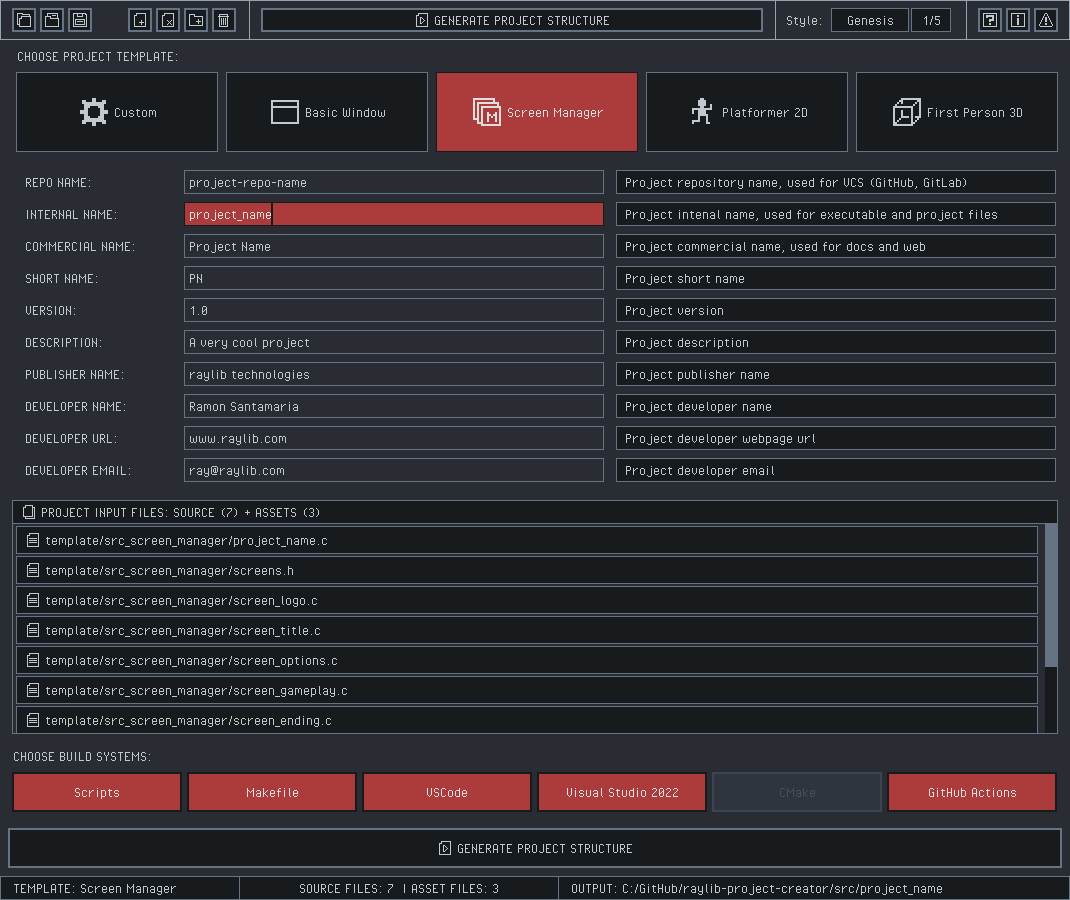
rpc is a visual tool to simplify that process and automatically create and pre-configure some common build systems for a project, just providing an input source code file to start with.
DISCLAIMER: Note that a project could be really complex in terms of source files, external dependencies, resources and build configurations. rpc does not pretend to support all possible options but the minimum ones to quickly generate a working project structure to be directly uploaded to GitHub and start working on a bigger project.
Features
Support .rpcproject configuration interchange file format
Shared with homonymous tool: rpb - raylib project builder
Select startup project from some game/tool templates
Select custom C code files to generate project
Select project assets to be included in the project
Generate preconfigured GitHub Actions, ready to run
WEB: Download generated template as a .zip file
Command-line support for automated project generation
Completely portable (no-dependencies)
Basic Usage
Open the tool, drag & drop your C code files and Asset files. Configure project properties, like repo name, project internal name, company and more. Selct desired build systems to be generated and press Generate Project Structure button.
rpc dektop version comes with command-line support for automated project(s) generation. You can check all available options with the following command:
rpc.exe --help
Build Systems
rpc generates the following project build systems:
Makefile [src/Makefile]: The default and recommended raylib build system, preconfigured for multiple platforms (Windows, Linux, FreeBSD, macOS, WebAssembly).
Scripts [projects/scripts/build.bat]: Command-line build scripts, for Windows CMD (build.bat)
WARNING: Script generated is currently Windows only (build.bat) and it calls the src/Makefile build system. A possible improvement for the future is calling directly the required process. Also, supporting some other shell would be nice.
VS2022 [projects/VS2022/*]: Visual Studio 2022 complete solution (.sln). The generated solution contains raylib sources to be build along the project, in case it needs to be debugged or customized for the project needs. It also includes multiple build configurations and preconfigured output paths for better organization. All build happens to projects/VS2022/build directory.
VSCode [projects/VSCode/*]: Visual Studio Code preconfigured tasks and settings for the project.-CHECK LIMITATIONS BELOW-
WARNING: VSCode project requires the compiler and tools available in the system path; it also calls the src/Makefile build system. It would be nice to make it more self-contained.
GitHub Actions [.github/workflows/*]: GitHub Actions workflows preconfigured to compile the project on multiple platforms (Windows, Linux, macOS, WebAssembly). Windows workflow use projects/VS2022 for building while Linux/macOS/WebAssembly use src/Makefile for project building. Note that those workflows are setup to automatically run and upload generated files to on new GitHub project Release creation. They can also be run manually.
Generated project structure
The generated structure follows the template structure and contrains the following elements:
.rpc configuration files are shared betten rpc and rpb tools. rpc generates a base configuration file on project generation with provided properties and rpb can use that config file information to build the project for multiple platforms.
.rpc is a text and open file format, following a .ini style, and can be freely edited with any text editor.
rpc project generation uses a pre-defined .rpc file as a base template to further update required values.
This tool has been created using the following open-source technologies:
raylib - A simple and easy-to-use library to enjoy videogames programming
raygui - A simple and easy-to-use immediate-mode-gui library
rini - A simple and easy-to-use config init files reader and writer
tinyfiledialogs - File dialogs for desktop platforms
Handmade Software
rpc is handmade software, it has been carefully developed using the C programming language, with great attention put on each line of code written.
This approach usually results in highly optimized and efficient code, but it is also more time-consuming and require a higher level of technical skills.
The result is great performance and small memory footprint.
rpc is self-contained in a portable package of about 3 MB.
Issues & Feedback
Issues and feedback can be reported at https://github.com/raysan5/raylib-project-creator.
For additional support, priority issues review or tool customization requests, please contact ray[at]raylib.com
License
This project sources are licensed under an unmodified zlib/libpng license, which is an OSI-certified, BSD-like license that allows static linking with closed source software. Check LICENSE for further details.
Copyright (c) 2024-2026 Ramon Santamaria (@raysan5)
raysan5/raylib-project-creator có 319 sao GitHub — tải lại trang để xem số mới nhất, hoặc xem trực tiếp github.com/raysan5/raylib-project-creator. TopGit phản chiếu số sao của GitHub nhưng không cam kết đến từng phút.
raysan5/raylib-project-creator có những chủ đề gì?
GitHub topics của raysan5/raylib-project-creator: "c", "gamedev", "open-source", "pipeline", "project-creator", "project-structure", "raylib", "tools". TopGit xếp repo vào nhóm Backend.
raysan5/raylib-project-creator còn đang phát triển không?
Commit gần nhất trên raysan5/raylib-project-creator là 12 ngày trước (theo timestamp GitHub). Repo có 17 fork — một chỉ báo về mức độ quan tâm của cộng đồng.
raysan5/raylib-project-creator là gì?
raysan5/raylib-project-creator (raysan5/raylib-project-creator) là dự án C trên GitHub. Theo mô tả gốc: A simple and easy-to-use raylib project creator
raysan5/raylib-project-creator so với các dự án Backend khác thế nào?
raysan5/raylib-project-creator được TopGit xếp vào nhóm Backend, với 319 sao GitHub và viết bằng C. Xem trang chủ đề Backend trên TopGit để so sánh với các dự án tương tự theo số sao và mức độ hoạt động.
raysan5/raylib-project-creator viết bằng ngôn ngữ gì?
raysan5/raylib-project-creator chủ yếu viết bằng C. Trường "language" của GitHub dựa trên phần lớn byte ở nhánh mặc định.
Vì sao raysan5/raylib-project-creator được xếp vào nhóm Backend?
TopGit xếp raysan5/raylib-project-creator vào nhóm Backend dựa trên GitHub topics và mô tả của repo (gắn thẻ: "c", "gamedev", "open-source"). Việc phân loại dựa trên metadata thật của repo, không phải đoán theo cảm tính biên tập.
Đọc đầy đủ README ở tab phía trên.
Vẫn đang phân vân về raylib-project-creator?
Một cú bấm sẽ gửi câu hỏi kèm trang này cho AI — xem AI nói gì về raylib-project-creator.
 /raylib-project-creator