Là một dự án di động, ReactiveCocoa/Loop đã đạt 76 sao trên GitHub, ngôn ngữ Swift. Composable unidirectional data flow with ReactiveSwift.
Tóm tắt dựng từ metadata GitHub của chính dự án — chưa có bài review TopGit. Trang sẽ tự động cập nhật khi bài review đầy đủ được xuất bản.
VÌ SAO CHƯA CÓ REVIEW
TopGit viết bài đầy đủ cho repo có nhiều sao nhất và được yêu cầu nhiều nhất. Trang này là snapshot trong thời gian chờ — xem README gốc ở tab READ ME.
Unidirectional Reactive Architecture. This is a ReactiveSwift counterpart of RxFeedback.
Documentation
Motivation
Requirements for iOS apps have become huge. Our code has to manage a lot of state e.g. server responses, cached data, UI state, routing etc. Some may say that Reactive Programming can help us a lot but, in the wrong hands, it can do even more harm to your code base.
The goal of this library is to provide a simple and intuitive approach to designing reactive state machines.
Core Concepts
State
State is the single source of truth. It represents a state of your system and is usually a plain Swift type (which doesn't contain any ReactiveSwift primitives). Your state is immutable. The only way to transition from one State to another is to emit an Event.
struct Results<T: JSONSerializable> {
    let page: Int
    let totalResults: Int
    let totalPages: Int
    let results: [T]

    static func empty() -> Results<T> {
        return Results<T>(page: 0, totalResults: 0, totalPages: 0, results: [])
    }
}

struct Context {
    var batch: Results<Movie>
    var movies: [Movie]

    static var empty: Context {
        return Context(batch: Results.empty(), movies: [])
    }
}

enum State {
    case initial
    case paging(context: Context)
    case loadedPage(context: Context)
    case refreshing(context: Context)
    case refreshed(context: Context)
    case error(error: NSError, context: Context)
    case retry(context: Context)
}
Event
Represents all possible events that can happen in your system which can cause a transition to a new State.
enum Event {
    case startLoadingNextPage
    case response(Results<Movie>)
    case failed(NSError)
    case retry
}
Reducer
A Reducer is a pure function with a signature of (State, Event) -> State. While Event represents an action that results in a State change, it's actually not what causes the change. An Event is just that, a representation of the intention to transition from one state to another. What actually causes the State to change, the embodiment of the corresponding Event, is a Reducer. A Reducer is the only place where a State can be changed.
static func reduce(state: State, event: Event) -> State {
    switch event {
    case .startLoadingNextPage:
        return .paging(context: state.context)
    case .response(let batch):
        var copy = state.context
        copy.batch = batch
        copy.movies += batch.results
        return .loadedPage(context: copy)
    case .failed(let error):
        return .error(error: error, context: state.context)
    case .retry:
        return .retry(context: state.context)
    }
}
Feedback
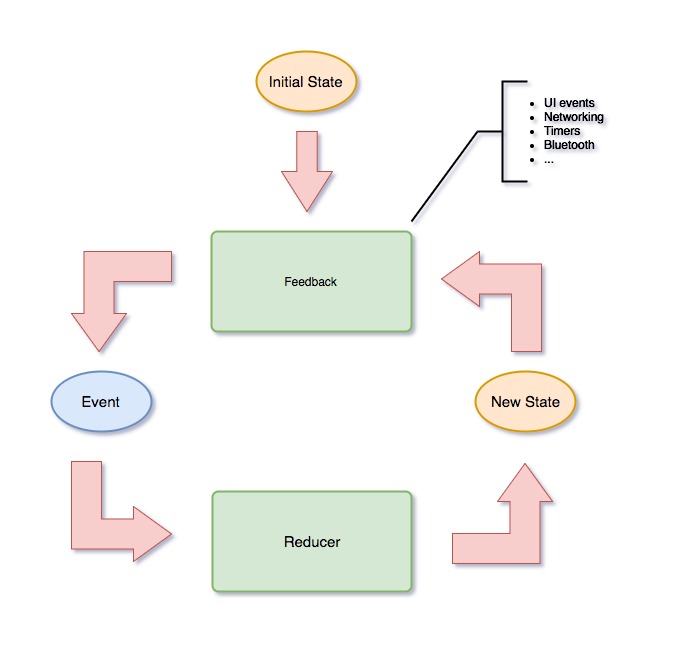
While State represents where the system is at a given time, Event represents a trigger for state change, and a Reducer is the pure function that changes the state depending on current state and type of event received, there is not as of yet any type to emit events given a particular current state. That's the job of the Feedback. It's essentially a "processing engine", listening to changes in the current State and emitting the corresponding next events to take place. It's represented by a pure function with a signature of Signal<State, NoError> -> Signal<Event, NoError>. Feedbacks don't directly mutate states. Instead, they only emit events which then cause states to change in reducers.
As you can see from the diagram above we always start with an initial state.
Every change to the State will be then delivered to all Feedback loops that were added to the system.
Feedback then decides whether any action should be performed with a subset of the State (e.g calling API, observe UI events) by dispatching an Event, or ignoring it by returning SignalProducer.empty.
Dispatched Event then goes to the Reducer which applies it and returns a new value of the State.
And then cycle starts all over (see 2).
Example
let increment = Feedback<Int, Event> { _ in
    return self.plusButton.reactive
        .controlEvents(.touchUpInside)
        .map { _ in Event.increment }
}

let decrement = Feedback<Int, Event> { _ in
    return self.minusButton.reactive
        .controlEvents(.touchUpInside)
        .map { _ in Event.decrement }
}

let system = SignalProducer<Int, NoError>.system(initial: 0,
    reduce: { (count, event) -> Int in
        switch event {
        case .increment:
            return count + 1
        case .decrement:
            return count - 1
        }
    },
    feedbacks: [increment, decrement])

label.reactive.text <~ system.map(String.init)
Advantages
TODO
Acknowledgements
This is a community fork of the ReactiveFeedback project (with the MIT license) from Babylon Health.
ReactiveCocoa/Loop thuộc nhóm Mobile trên TopGit, cùng 7 topic GitHub. Trang Trending và Topics liệt kê các repo cùng số sao và cùng ngôn ngữ để so sánh.
Đọc thêm về ReactiveCocoa/Loop ở đâu?
Trang TopGit này là một snapshot — tab "Readme" hiển thị nguyên văn README của repo (đã bỏ link, giữ ảnh). Repo GitHub ở github.com/ReactiveCocoa/Loop là nguồn chính thức.
ReactiveCocoa/Loop có bao nhiêu sao?
ReactiveCocoa/Loop có 76 sao GitHub — tải lại trang để xem số mới nhất, hoặc xem trực tiếp github.com/ReactiveCocoa/Loop. TopGit phản chiếu số sao của GitHub nhưng không cam kết đến từng phút.
ReactiveCocoa/Loop có những chủ đề gì?
GitHub topics của ReactiveCocoa/Loop: "ios", "rac", "reactivecocoa", "reactiveswift", "swift", "swiftui", "unidirectional-data-flow". TopGit xếp repo vào nhóm Mobile.
ReactiveCocoa/Loop còn đang phát triển không?
Commit gần nhất trên ReactiveCocoa/Loop là 8 tháng trước (theo timestamp GitHub). Repo có 5 fork — một chỉ báo về mức độ quan tâm của cộng đồng.
ReactiveCocoa/Loop viết bằng ngôn ngữ gì?
ReactiveCocoa/Loop chủ yếu viết bằng Swift. Trường "language" của GitHub dựa trên phần lớn byte ở nhánh mặc định.
Vì sao ReactiveCocoa/Loop được xếp vào nhóm Mobile?
TopGit xếp ReactiveCocoa/Loop vào nhóm Mobile dựa trên GitHub topics và mô tả của repo (gắn thẻ: "ios", "rac", "reactivecocoa"). Việc phân loại dựa trên metadata thật của repo, không phải đoán theo cảm tính biên tập.
Đọc đầy đủ README ở tab phía trên.
Vẫn đang phân vân về Loop?
Một cú bấm sẽ gửi câu hỏi kèm trang này cho AI — xem AI nói gì về Loop.

 /Loop