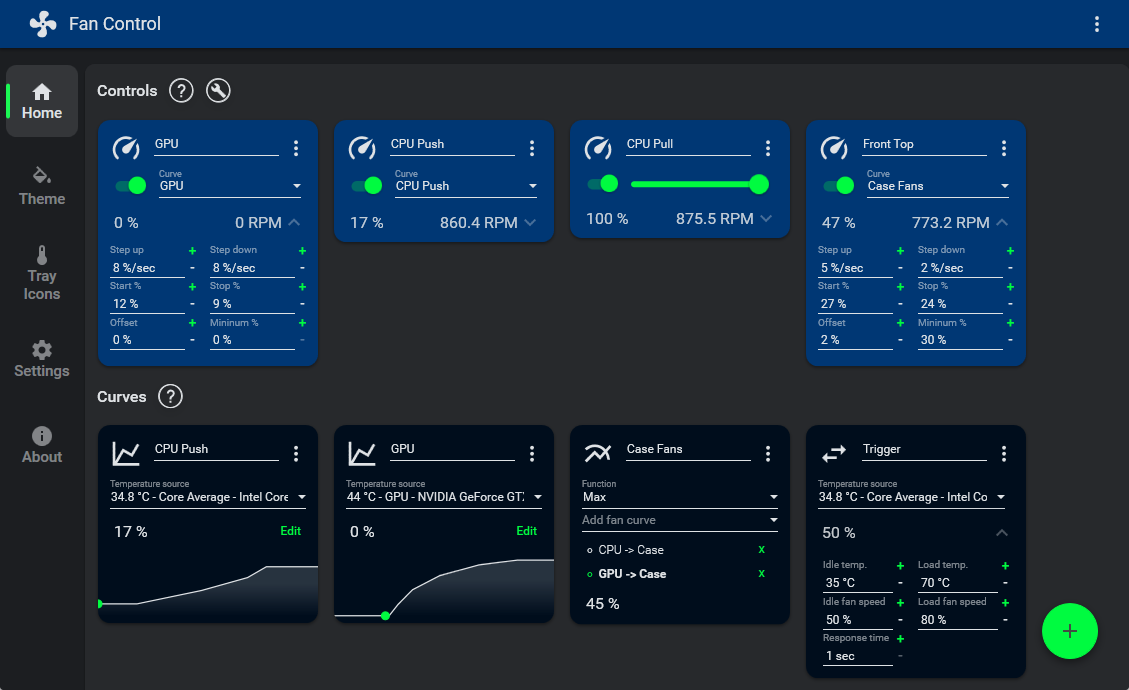
Rem0o/FanControl.Releases — 21.5k★ trên GitHub. This is the release repository for Fan Control, a highly customizable fan controlling software for Windows.
Tóm tắt dựng từ metadata GitHub của chính dự án — chưa có bài review TopGit. Trang sẽ tự động cập nhật khi bài review đầy đủ được xuất bản.
VÌ SAO CHƯA CÓ REVIEW
TopGit viết bài đầy đủ cho repo có nhiều sao nhất và được yêu cầu nhiều nhất. Trang này là snapshot trong thời gian chờ — xem README gốc ở tab READ ME.
A focused and highly customizable fan controlling software for Windows. Sources for this software are closed.
Featured On
JayzTwoCents — Everyone NEEDS this FREE piece of software... You will thank me!
Table of Contents
Announcement
Main Features
Installation & Uninstall
Plugins
Issues & Hardware Compatibility
FAQ
Libraries Used
GitHub Sponsors
Announcement
NEW: Fan Control can now be started on boot as a service, without any user session.
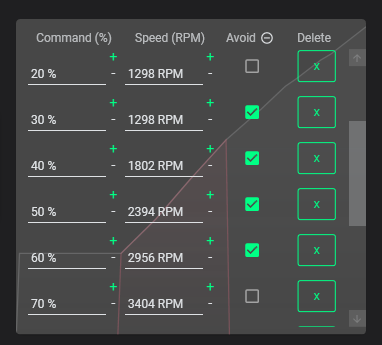
NEW: Calibration avoid points: set avoid points if you want your fans to never run in at a specific % that may rattle or emit an annoying noise.
FanControl, its installer and the updater now have a signed executable, which should help with AVs false flagging.
V238 and above now ships with a PawnIO build of LHM. This fixes the anti-virus problems encountered with WinRing0, as it is no longer shipped with FanControl. Note that as of 09/04/2025, WinRing0 (FanControl.sys) used in V237 and below is flagged as Trojan:Win32/Vigorf.A by Windows Defender, causing sensors to not be detected — updating to V238 or later is the recommended fix.
The FaceIT issue was fixed with the 2.1.0 PawnIO version.
Main Features
Guided setup process on first launch
Save, edit and load multiple profiles
Change the theme and color of the application
Multiple temperature sources (CPU, GPU, motherboard, hard drives...)
Multiple fan curve functions, including a custom graph
Mix fan curves or sensors together (max, min, average)
Low resource usage
Advanced tuning with steps, start %, stop %, response time and hysteresis
Full documentation is available at getfancontrol.com/docs.
Installation & Uninstall
Install
Download the latest archive or an installer from the release page.
Extract to the desired installation folder or run the installer.
Start FanControl.exe.
Other install methods (Scoop / Winget / Chocolatey)
Scoop
scoop bucket add extras
scoop install fancontrol
Winget
winget install Rem0o.FanControl
Chocolatey
choco install fancontrol
Uninstall
Portable — You can leave the files there for future use, or delete them.
Note: If you have Fan Control set to automatically start with Windows, either untick the checkbox in Fan Control, or manually delete the "Fan Control" task in Windows Task Scheduler.
Installer — Uninstall like any other Windows program through the Programs list.
Plugins
The plugin system lets you inject any type of sensor into FanControl. See the Plugins wiki for details.
From Rem0o
Plugin
Description
FanControl.IntelCtlLibrary
Intel ARC GPU support
FanControl.HWInfo
Import HWInfo sensor data
FanControl.DellPlugin
Old Dell laptops and some towers
From the Community
Notify me if I'm missing some.
Plugin
Description
FanControl.Thermaltake
Thermaltake devices (updated fork of fu-raz/FanControlThermaltake)
FanControl.LiquidCtl
AIO devices via liquidctl; updated fork with multi-fan controller support
FanControl.AsusWMI
ASUS motherboards via WMI
FanControl.AquacomputerDevices
Aquacomputer HighFlowNext, Quadro and Octo
FanControl.AquacomputerQuadro
Aquacomputer Quadro
FanControl.GPU-Z
GPU-Z sensor data
FanControl.CorsairLink
Corsair Commander controllers and Hydro liquid coolers
FanControl.Razer
Razer devices
FanControl.HomeAssistant
HomeAssistant temperature sensors (Philips Hue, HomeMatic, HomeKit, etc.)
FanControl.NzxtKraken
NZXT Kraken AIOs not yet in LHM (e.g. Kraken X2, X3 new PID)
FanControl.LianLi
LianLi L-Connect 3 fan controllers
FanControl.NvThermalSensors
Nvidia GPU Hot Spot and Memory Junction temperatures
FanControl.OpenFan
OpenFAN controller
FanControl.AIDA64
AIDA64 sensor readings
FanControl.RazerCoolingPadPlugin
Razer Laptop Cooling Pad
FanControl.GPDPlugin
GPD devices
FanControl.LenovoPlugin
Lenovo laptops with Lenovo ACPI-Compliant Virtual Power Controller
FanControl.GigabyteWaterforce
GIGABYTE AORUS WATERFORCE X AIO coolers — X240, X280, X360
FanControl.AcerPredatorPH315
Native fan control for the Acer Predator Helios 300 (PH315-53)
FanControl.DellWmiPlugin
WMI fan control for newer Dell laptops
FanControl.NzxtHub
NZXT Control Hub (1E71:2022): five fan-port controls and RPM monitoring
Experimental unofficial integrations
[!WARNING]
These plugins use reflection and implementation tricks rather than the official plugin API. They may break at any time.
Plugin
Description
FanControl.MCP
MCP server that lets AI assistants read sensors and tune fan curves
FanControl.MonitoringEcosystem
Monitoring and logging ecosystem: local log, network data server, remote sensors (monitoring only) and a configurator app
Issues and Hardware Compatibility
Fan Control is primarily a UI layer on top of existing hardware libraries. Any hardware compatibility issue is largely dependent on the upstream project:
LibreHardwareMonitor — the main sensor/driver backend
Please only open issues on this repository for the software itself: UI bugs, feature requests, etc. Hardware support requests will be closed with a link to this section.
If you have a hardware compatibility request and can provide a working code sample usable in .NET (e.g. via a Plugin), feel free to submit that.
FAQ
Q: What BIOS settings work best with FanControl?
Avoid any "smart" fan control from your BIOS. Setting a fixed default speed (e.g. 50%) works great for most people. Also check whether your BIOS uses PWM or DC mode — one may work better depending on your setup.
Q: Does it work on laptops?
Mostly no, as laptops do not interface their fans the same way desktop motherboards do. Most of them are not made to be interfaced by a 3rd party. However, if supported, a plugin may add support for a specific type of laptop. To be clear, you'll be able to install the software, but it won't find any fans or may throw errors.
Q: My NVIDIA GPU has 3 fans but only 2 control cards show up. Why?
Your card only has 2 channels; multiple fans are wired to the same channel.
Q: My NVIDIA GPU won't go below 30% and doesn't reach 0 RPM. Why?
See this wiki page.
Q: There are no control cards, or control cards aren't changing fan speeds. What's the issue?
See Issues & Hardware Compatibility.
Q: How does [FAN CURVE TYPE] work and what do its parameters do?
Click the card's icon at the top left — a dialog will explain it.
Q: What OS does it run on?
Windows 10 and Windows 11.
Libraries Used
Library
Purpose
LibreHardwareMonitor
Main sensor source
MaterialDesignInXamlToolkit
UI framework
NvAPIWrapper
Nvidia GPU fan control and sensor reading
ADLXWrapper
AMD GPU fan control and sensor reading
gong-wpf-dragdrop
Drag and drop interactions
GitHub Sponsors
The GitHub Sponsor button on this page is intended for the open-source work surrounding FanControl. This includes contributions to LibreHardwareMonitor, the plugin system and open-source plugins, and AMD GPU driver support via ADLXWrapper.
Your sponsorship helps maintain existing projects and develop new ones. It does not apply to the main FanControl program itself — use the PayPal button if your intent is to support FanControl directly.
Trang TopGit này là một snapshot — tab "Readme" hiển thị nguyên văn README của repo (đã bỏ link, giữ ảnh). Repo GitHub ở github.com/Rem0o/FanControl.Releases là nguồn chính thức.
Rem0o/FanControl.Releases có bao nhiêu sao?
Rem0o/FanControl.Releases có 21.5k sao GitHub — tải lại trang để xem số mới nhất, hoặc xem trực tiếp github.com/Rem0o/FanControl.Releases. TopGit phản chiếu số sao của GitHub nhưng không cam kết đến từng phút.
Rem0o/FanControl.Releases có phải mã nguồn mở không?
TopGit chưa ghi nhận license cho Rem0o/FanControl.Releases. Phần lớn repo public trên GitHub là mã nguồn mở, nhưng điều khoản khác nhau từng repo — mở file LICENSE để xác nhận.
Rem0o/FanControl.Releases có website riêng không?
TopGit chưa ghi nhận URL trang chủ cho Rem0o/FanControl.Releases. Phần README ở tab phía trên thường có link demo, hoặc xem mô tả GitHub của repo.
Rem0o/FanControl.Releases là gì?
Rem0o/FanControl.Releases (Rem0o/FanControl.Releases) là dự án đa ngôn ngữ trên GitHub. Theo mô tả gốc: This is the release repository for Fan Control, a highly customizable fan controlling software for Windows.
Đọc đầy đủ README ở tab phía trên.
Vẫn đang phân vân về FanControl.Releases?
Một cú bấm sẽ gửi câu hỏi kèm trang này cho AI — xem AI nói gì về FanControl.Releases.

 /FanControl.Releases