1.4k sao GitHub và vẫn tăng — rhysd/git-messenger.vim là dự án Vim Script mà TopGit đang theo dõi trên nền tảng. Vim and Neovim plugin to reveal the commit messages under the cursor
Tóm tắt dựng từ metadata GitHub của chính dự án — chưa có bài review TopGit. Trang sẽ tự động cập nhật khi bài review đầy đủ được xuất bản.
VÌ SAO CHƯA CÓ REVIEW
TopGit viết bài đầy đủ cho repo có nhiều sao nhất và được yêu cầu nhiều nhất. Trang này là snapshot trong thời gian chờ — xem README gốc ở tab READ ME.
git-messenger.vim is a Vim/Neovim plugin to reveal the hidden message from Git under the
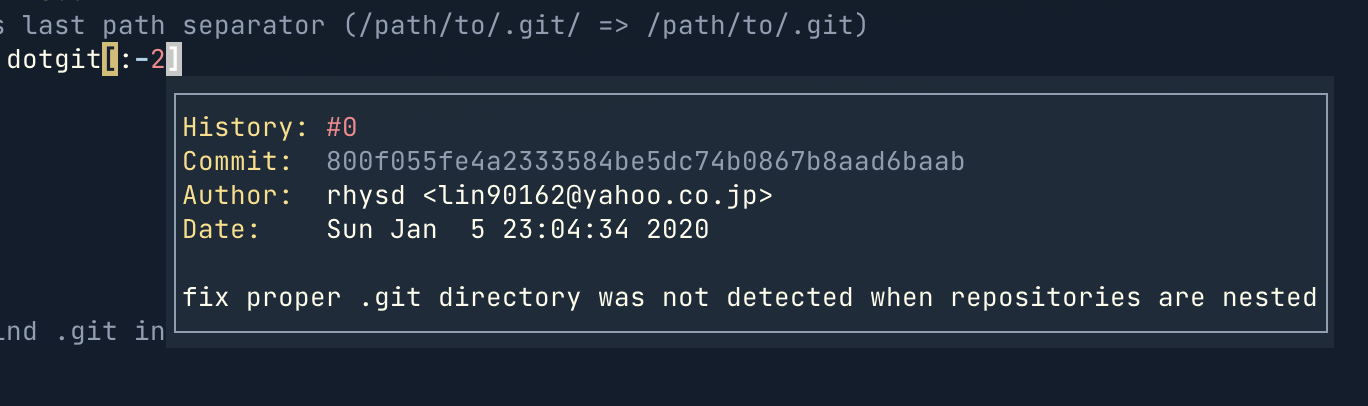
cursor quickly. It shows the history of commits under the cursor in popup window.
This plugin shows the message of the last commit in a 'popup window'. If the last commit is not
convenient, you can explore older commits in the popup window. Additionally you can also check diff
of the commit.
The popup window is implemented in
Floating window on Neovim (0.4 or later)
Preview window on Vim (8 or later) or Neovim (0.3 or earlier)
The floating window is definitely recommended since it can shows the information near the cursor.
I wrote a Japanese blogpost for this plugin.
Why?
When you're modifying unfamiliar codes, you would sometimes wonder 'why was this line added?' or
'why this value was chosen?' in the source code. The answer sometimes lays in a commit message,
especially in message of the last commit which modifies the line.
Screenshot
Show popup window with Neovim v0.4.0-dev
Exploring older commits
Exploring diff of the commit (you may be also interested in g:git_messenger_include_diff)
Switching unified diffs and word diffs
Installation
Please ensure the following requirement before installing this plugin.
Git v1.8.5 or later (for -C option of git command)
If you use any package manager, please follow its instruction.
if you use Vim's builtin packager, please follow the instruction at :help pack-add.
To enable a floating window support, you need to install Neovim 0.4 or later.
Please follow the official instruction.
To check if Neovim's floating window feature is available, try :checkhealth.
Usage
Only one mapping (or one command) provides all features of this plugin. Briefly, move cursor to
the position and run :GitMessenger or <Leader>gm. If you see an error message, please try
health check.
Commands
:GitMessenger
Behavior of this command is depending on the situation. You can do every operations only with this
mapping.
Normally, it opens a popup window with the last commit message
When a popup window is already open, it moves cursor into the window
When a cursor is within a popup window, it closes the window
It opens a popup window with the last commit message which modified the line at cursor. The popup
window shows following contents:
History:History: {page number} In popup window, o/O navigates to previous/next commit.
Commit:Commit: {hash} The commit hash
Author:Author: {name}<{email}> Author name and mail address of the commit
Committer:Committer: {name}<{email}> Committer name and mail address of the commit when
committer is different from author
Date:Date: {date} Author date of the commit in system format
When a committer date and an author date are different (e.g. the commit was created again with
git commit --amend), both Author Date: and Committer Date: are shown.
Summary: First line after Date: header line is a summary of commit
Body: After summary, commit body is put (if the commit has body)
The popup window will be automatically closed when you move the cursor so you don't need to close
it manually.
Running this command while a popup window is open, it moves the cursor into the window.
This behavior is useful when the commit message is too long and window cannot show the whole content.
By moving the cursor into the popup window, you can see the rest of contents by scrolling it.
You can also see the older commits.
Following mappings are defined within popup window.
Mapping
Description
q
Close the popup window
o
older. Back to older commit at the line
O
Opposite to o. Forward to newer commit at the line
d
Toggle unified diff hunks only in current file of the commit
D
Toggle all unified diff hunks of the commit
r
Toggle word diff hunks only in current file of the commit
R
Toggle all word diff hunks of current commit
?
Show mappings help
Mappings
<Plug>(git-messenger)
The same as running :GitMessenger command.
By default, this plugin defines following mapping.
nmap <Leader>gm <Plug>(git-messenger)
If you don't like the default mapping, set g:git_messenger_no_default_mappings to v:true in
your .vimrc or init.vim and map the <Plug> mapping to your favorite key sequence.
For example:
nmap <C-w>m <Plug>(git-messenger)
Some other additional <Plug> mappings. Please read :help git-messenger.
Variables
Some global variables are available to configure the behavior of this plugin.
When this value is set to v:false, a popup window is no longer closed automatically when moving a
cursor after the window is shown up.
g:git_messenger_include_diff (Default: "none")
One of "none", "current", "all".
When this value is not set to "none", a popup window includes diff hunks of the commit at showing
up. "current" includes diff hunks of only current file in the commit. "all" includes all diff
hunks in the commit.
Please note that typing d/D or r/R in popup window toggle showing diff
hunks even if this value is set to "none".
g:git_messenger_git_command (Default: "git")
git command to retrieve commit messages. If your git executable is not in $PATH directories,
please specify the path to the executable.
When this value is set to v:true, it does not define any key mappings. <Plug> mappings are still
defined since they don't make any conflicts with existing mappings.
When this value is set to v:true, the cursor goes into a popup window when running :GitMessenger
or <Plug>(git-messenger).
g:git_messenger_extra_blame_args (Default: "")
When this variable is set the contents will be appended to the git blame
command. Use it to add options (like -w).
g:git_messenger_preview_mods (Default: "")
This variable is effective only when opening preview window (on Neovim (0.3.0 or earlier) or Vim).
Command modifiers for opening preview window. The value will be passed as prefix of :pedit command.
For example, setting "botright" to the variable opens a preview window at bottom of the current
window. Please see :help <mods> for more details.
Setting v:true means adding margins in popup window. Blank lines at the top and bottom of popup
content are inserted. And every line is indented with one whitespace character.
Setting v:false to this variable removes all the margins.
Popup Window Highlight
This plugin uses color definitions from your colorscheme for highlighting stuffs in popup window by
default. This is done by linking highlight groups in syntax/gitmessengerpopup.vim
on gitmessengerpopup filetype. Highlights for diff are common with normal diff filetype syntax
highlighting.
If the groups don't fit, please rearrange the highlight with :hi link. For example:
" Normal color in popup window with 'CursorLine'
hi link gitmessengerPopupNormal CursorLine

" Header such as 'Commit:', 'Author:' with 'Statement' highlight group
hi link gitmessengerHeader Statement

" Commit hash at 'Commit:' header with 'Special' highlight group
hi link gitmessengerHash Special

" History number at 'History:' header with 'Title' highlight group
hi link gitmessengerHistory Title
For another example, if you want to define colors directly, defining the colors with :hi works
fine as follows.
hi gitmessengerPopupNormal term=None guifg=#eeeeee guibg=#333333 ctermfg=255 ctermbg=234
hi gitmessengerHeader term=None guifg=#88b8f6 ctermfg=111
hi gitmessengerHash term=None guifg=#f0eaaa ctermfg=229
hi gitmessengerHistory term=None guifg=#fd8489 ctermfg=210
Note: If your colorscheme does not allocate proper color for NormalFloat, you may need to set
proper color to gitmessengerPopupNormal.
Note: gitmessengerPopupNormal is only available on Neovim since winhighlight option is used.
On Vim, simply Normal highlight group is used for normal color.
Configuration for Popup Window
Filetype gitmessengerpopup is set in the popup window. Please hook FileType event to do some
local setup within a popup window.
For example:
function! s:setup_git_messenger_popup() abort
    " Your favorite configuration here

    " For example, set go back/forward history to <C-o>/<C-i>
    nmap <buffer><C-o> o
    nmap <buffer><C-i> O
endfunction
autocmd FileType gitmessengerpopup call <SID>setup_git_messenger_popup()
Recent Neovim supports adding border lines to floating windows. git_messenger_floating_win_opts
is available to set the options. And g:git_messenger_popup_content_margins can remove margins
within popup content if you feel margins are unnecessary.
let g:git_messenger_floating_win_opts = { 'border': 'single' }
let g:git_messenger_popup_content_margins = v:false
Health Check
This plugin supports a health checker on Neovim. When you see some error, please run :checkhealth
to check your environment is ready for use of this plugin.
On Vim, please install vim-healthcheck and run
:CheckHealth. It's a plugin to run :checkhealth on Vim.
Known Issues
On Windows, git command installed via MSYS does not work. Please use Git for Windows
for now. This issue is tracked at #57.
Trang TopGit này là một snapshot — tab "Readme" hiển thị nguyên văn README của repo (đã bỏ link, giữ ảnh). Repo GitHub ở github.com/rhysd/git-messenger.vim là nguồn chính thức.
rhysd/git-messenger.vim có những chủ đề gì?
GitHub topics của rhysd/git-messenger.vim: "git", "neovim", "popup-window", "vim", "vim-plugin". TopGit xếp repo vào nhóm Developer Tools.
rhysd/git-messenger.vim có phải mã nguồn mở không?
Có — rhysd/git-messenger.vim phát hành theo license MIT, nghĩa là mã nguồn mở để đọc, fork và (tùy license) tái sử dụng. Mã: github.com/rhysd/git-messenger.vim.
rhysd/git-messenger.vim có website riêng không?
TopGit chưa ghi nhận URL trang chủ cho rhysd/git-messenger.vim. Phần README ở tab phía trên thường có link demo, hoặc xem mô tả GitHub của repo.
rhysd/git-messenger.vim còn đang phát triển không?
Commit gần nhất trên rhysd/git-messenger.vim là 1.2 năm trước (theo timestamp GitHub). Repo có 36 fork — một chỉ báo về mức độ quan tâm của cộng đồng.
rhysd/git-messenger.vim dùng license gì?
rhysd/git-messenger.vim phát hành theo license MIT. Nên mở file LICENSE trên GitHub để xác nhận — license metadata đôi khi lệch với thực tế dự án.
Đọc đầy đủ README ở tab phía trên.
Muốn nghe thêm một ý kiến về git-messenger.vim?
Hỏi một AI đọc được trang này — một cú bấm là có ngay nhận định về git-messenger.vim.
 /git-messenger.vim