rhysd/NyaoVim — công cụ cho lập trình viên — đang có 2.2k sao GitHub trong nhóm Developer Tools. Web-enhanced Extensible Neovim Frontend
Tóm tắt dựng từ metadata GitHub của chính dự án — chưa có bài review TopGit. Trang sẽ tự động cập nhật khi bài review đầy đủ được xuất bản.
VÌ SAO CHƯA CÓ REVIEW
TopGit viết bài đầy đủ cho repo có nhiều sao nhất và được yêu cầu nhiều nhất. Trang này là snapshot trong thời gian chờ — xem README gốc ở tab READ ME.
This is a Neovim frontend built on Electron.
The Neovim editor is composed as a Web Component and users
can extend the UI with reusable Web Components, HTML, CSS and JavaScript.
:help design-not says:
Use Vim as a component from a shell or in an IDE.
NyaoVim is built in the same spirit. NyaoVim contains the Neovim editor as a Web Component and extends
its UI with web technology, as in other modern editors and IDEs (e.g. Atom,
VS Code, LightTable).
Goals
NyaoVim bundles no extended UI by default. It only provides the nice UI plugin architecture.
Users can compose their favorite UI with Web Components, HTML and CSS. It is also easy to make a NyaoVim
distribution where useful components are bundled.
Do not introduce another plugin manager. HTML for Web Components should be bundled with Vim plugins.
Therefore, a Vim plugin manager can handle UI components, letting us bundle JS and Vim script code.
Do not lose Vim's comfortability by default. It should be aware of performance.
UI component creators can use powerful APIs, packages and tools; Node.js APIs,
Electron APIs, Neovim msgpack-rpc APIs),
so many npm packages and Chrome DevTools.
Cross Platform (Linux, OS X, Windows)
Memo: 'nyao' is 'meow' in Japanese and its pronounce resembles 'neo'.
It is also an acronym for 'Not Yet Another Original'.
App Structure
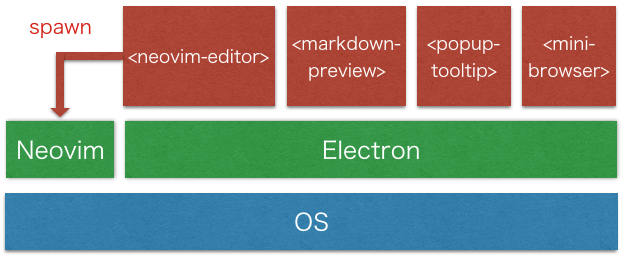
NyaoVim consists of Web Components on Electron as shown in the following figure. At first there is
only <neovim-editor> and you can add/remove additional components.
UI Plugin Examples
UI plugins are installable as easily as regular plugins. Each of them is written within 100~300 lines.
You can also create reusable Web Components and integrate them into NyaoVim.
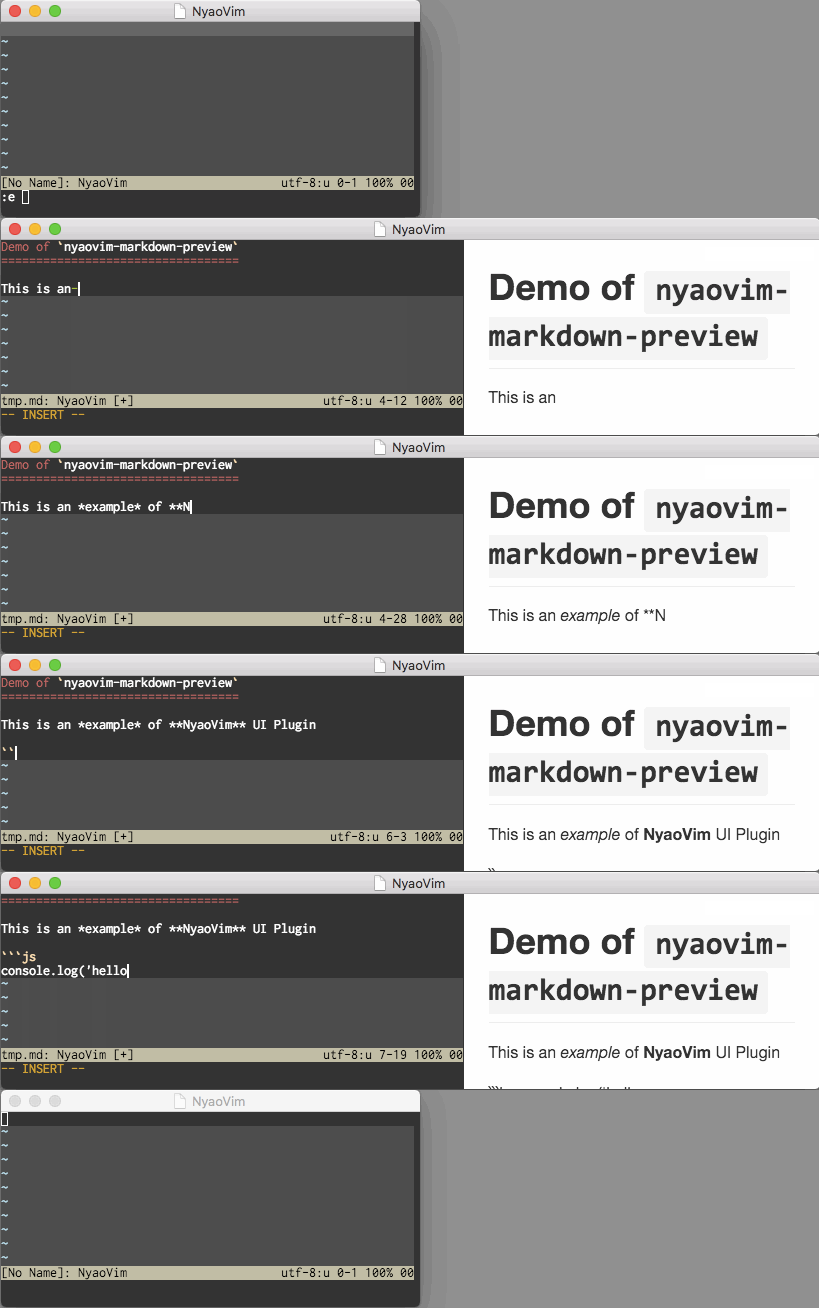
nyaovim-markdown-preview
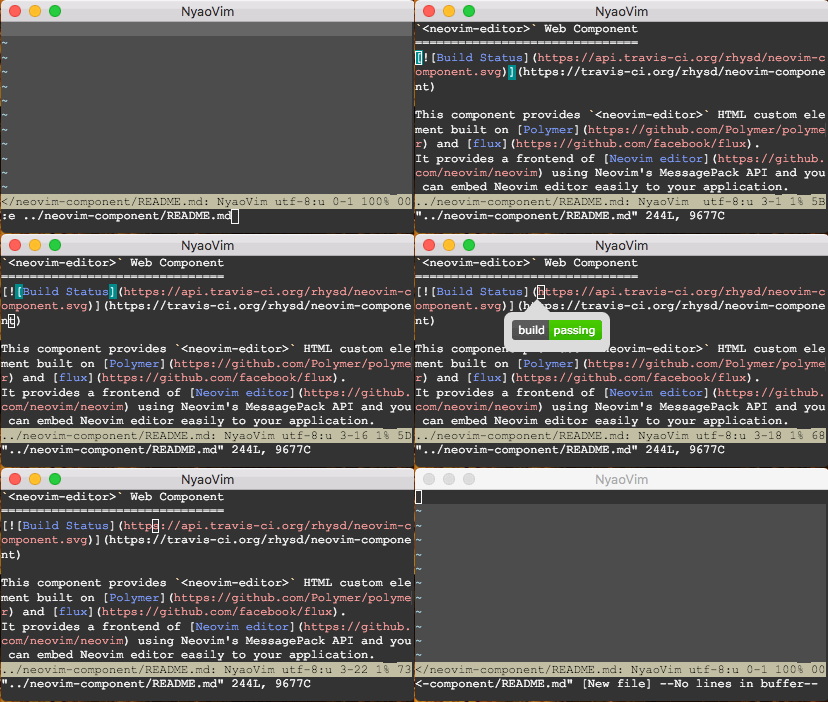
nyaovim-popup-tooltip
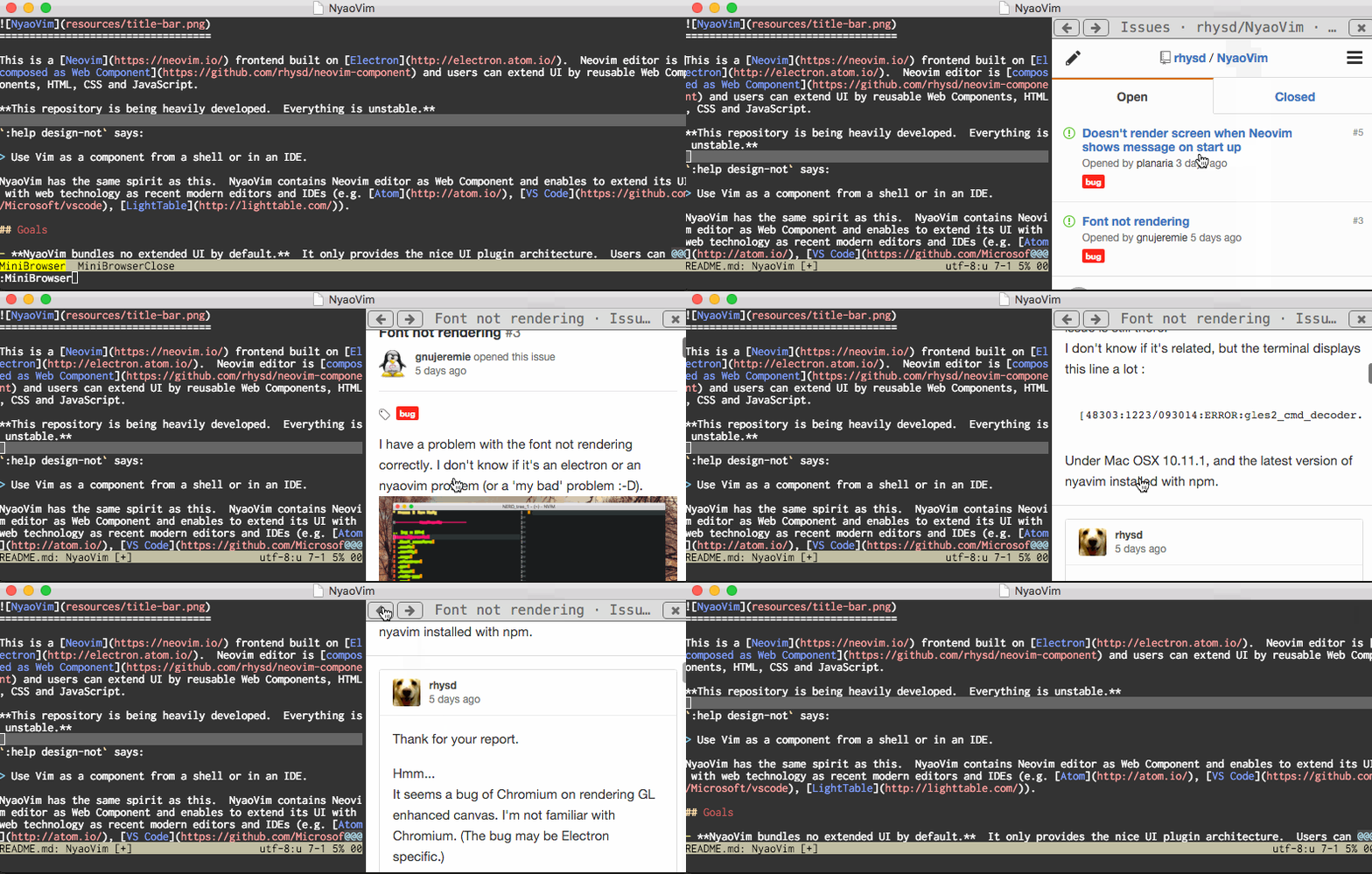
nyaovim-mini-browser
Usage
Getting Started
You can install NyaoVim as an npm package. Currently no packaging
release is available yet. If you use Windows and haven't installed Neovim yet, please read first tips first.
$ npm install -g nyaovim
npm may require sudo if you installed node pacakge via system package manager.
If you haven't installed Neovim yet, please install it following Neovim's instructions
because NyaoVim internally uses the nvim command. Note that nvim v0.1.6 or later is needed.
You can start NyaoVim with the nyaovim command if you install this app with npm.
$ nyaovim [files...]
You would see a minimal Neovim GUI editor (like gVim). This is an Electron app and Neovim is drawn
on <canvas>. You can see the DevTools of this app with the 'Developer Tools' menu item.
On first start up of NyaoVim, it creates ~/.config/nyaovim/nyaovimrc.html for UI configuration
(%AppData% instead of .config in Windows). Yes, you can extend and configure UI components with
HTML and CSS!
Configure Editor Options
I guess you're now thinking 'Hmm, font is not good and too small...'. You can configure some editor
options by properties of <neovim-editor> properties.
For example, below configures font face and font size by font and font-size properties. Then set
line-height to 1.5 (for example, Atom adopts 1.5 as line-height).
And you can also configure browser window options with browser-config.json (e.g. Preserving window
state, Single instance app, and so on). See tips for more detail.
Install UI Plugin
For example, let's install nyaovim-popup-tooltip.
As described in the Goals section, a UI plugin is a normal Neovim plugin. You can install it like
any other Neovim plugin. If you use vim-plug, all you need
is adding below line to your init.vim.
Plug 'rhysd/nyaovim-popup-tooltip'
Then you need to put the popup tooltip UI on your NyaoVim interface. Please open ~/.config/nyaovim/nyaovimrc.html
(%AppData% instead of .config in Windows). As described in the Goals section, a user can build
a UI with HTML and CSS with high customization.
Please add <popup-tooltip> tag under <neovim-editor> tag as below
<popup-tooltip> is a Polymer component.
editor="[[editor]]" is a data binding in Polymer framework to pass editor instance to <popup-tooltip>. It means
unidirectional data flow from parent to child.
After installing nyaovim-popup-tooltip as a Neovim plugin and adding UI to HTML, you're all done!
Open NyaoVim, move the cursor to any image path, and enter gi. NyaoVim will load the image and show
it in a popup tooltip as below.
Documents
There is more in documentation in the docs directory.
How to Make UI Plugin
Tips
FAQ
Runtime API
Browser Config
Versioning
NyaoVim is now under beta phase. Major version is fixed to 0 until it gets stable release.
Updating minor version means it contains breaking changes. And updating patch version means it contains
no breaking change, so you can update version easily.
License
MIT License.
Logo of this app is created based on Neovim logo licensed under CCA 3.0 Unported.
The Neovim logo by Jason Long is licensed under the Creative Commons Attribution 3.0 Unported License.
Trang TopGit này là một snapshot — tab "Readme" hiển thị nguyên văn README của repo (đã bỏ link, giữ ảnh). Repo GitHub ở github.com/rhysd/NyaoVim là nguồn chính thức.
rhysd/NyaoVim có bao nhiêu sao?
rhysd/NyaoVim có 2.2k sao GitHub — tải lại trang để xem số mới nhất, hoặc xem trực tiếp github.com/rhysd/NyaoVim. TopGit phản chiếu số sao của GitHub nhưng không cam kết đến từng phút.
rhysd/NyaoVim có phải mã nguồn mở không?
TopGit chưa ghi nhận license cho rhysd/NyaoVim. Phần lớn repo public trên GitHub là mã nguồn mở, nhưng điều khoản khác nhau từng repo — mở file LICENSE để xác nhận.
rhysd/NyaoVim còn đang phát triển không?
Commit gần nhất trên rhysd/NyaoVim là 8.6 năm trước (theo timestamp GitHub). Repo có 59 fork — một chỉ báo về mức độ quan tâm của cộng đồng.
rhysd/NyaoVim là gì?
rhysd/NyaoVim (rhysd/NyaoVim) là dự án TypeScript trên GitHub. Theo mô tả gốc: Web-enhanced Extensible Neovim Frontend
rhysd/NyaoVim so với các dự án Developer Tools khác thế nào?
rhysd/NyaoVim được TopGit xếp vào nhóm Developer Tools, với 2.2k sao GitHub và viết bằng TypeScript. Xem trang chủ đề Developer Tools trên TopGit để so sánh với các dự án tương tự theo số sao và mức độ hoạt động.
Đọc đầy đủ README ở tab phía trên.
Chưa chắc NyaoVim có hợp với bạn?
Để ChatGPT, Claude hoặc Perplexity tìm hiểu giúp — bấm bên dưới và xem AI nói gì về NyaoVim.

 /NyaoVim