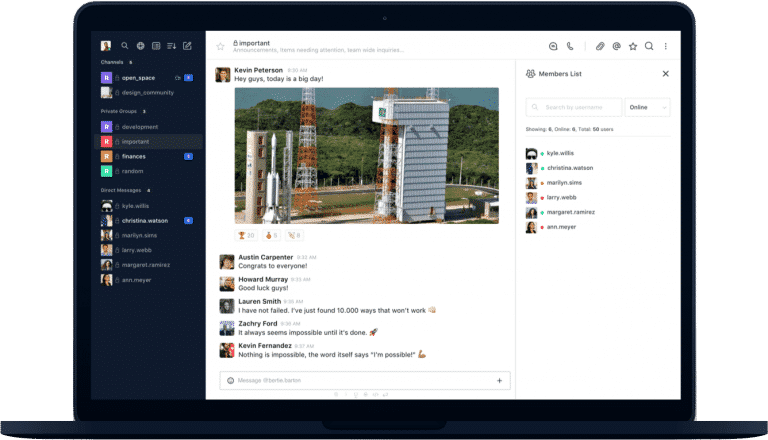
RocketChat/Rocket.Chat.Electron — 1.7k★ trên GitHub (TypeScript). Official Rocket.Chat desktop app for Windows, macOS, and Linux. Connect to multiple workspaces, get native notifications, and deploy at scale with silent installs and centrally managed settings. Built with Electron and TypeScript.
Tóm tắt dựng từ metadata GitHub của chính dự án — chưa có bài review TopGit. Trang sẽ tự động cập nhật khi bài review đầy đủ được xuất bản.
VÌ SAO CHƯA CÓ REVIEW
TopGit viết bài đầy đủ cho repo có nhiều sao nhất và được yêu cầu nhiều nhất. Trang này là snapshot trong thời gian chờ — xem README gốc ở tab READ ME.
The official desktop app for Rocket.Chat on Windows, macOS, and Linux, built with Electron.
The desktop app gives you everything in the Rocket.Chat web client, plus:
Multiple workspaces in one window: Add all your Rocket.Chat workspaces to the sidebar and switch between them.
Native notifications: Get system notifications with inline quick reply on Windows and macOS.
Runs in the background: Keep the app in the system tray or minimized so you never miss a message.
Built-in video call window: Open calls in an app window instead of a browser tab.
Centrally managed settings: IT teams can preset workspaces, lock settings, and install silently at scale.
Contents
Download and install
Configure the app for your organization
Develop
Branches and releases
Contribute
Get help
License
Download and install
Get the app from your platform's store:
You can also download an installer from the latest release.
Platform
Minimum version
Architectures
Formats
Windows
10
x64, ia32, arm64
NSIS (.exe), MSI
macOS
12 (Monterey)
Universal (x64 + Apple Silicon)
DMG, PKG, ZIP
Linux
Ubuntu 22.04 or equivalent
x64
AppImage, deb, rpm, snap, tar.gz
For step-by-step instructions, see Install desktop and mobile apps.
Silent installation
To deploy the app across many machines without user prompts, use the NSIS or MSI installer on Windows, the PKG installer on macOS, or the deb package on Linux. For example, on Windows:
For every installer option, see Silent installation for desktop app.
Configure the app for your organization
Admins can control how the app behaves on every device with two JSON files:
servers.json: Presets the workspaces that appear in the sidebar the first time a user opens the app. When you bundle it with the installer, users skip the Connect to server screen and go straight to the login screen.
overridden-settings.json: Enforces settings such as disabling auto-update, hiding the tray icon, or turning off quick reply in notifications. Combine "isAddNewServersEnabled": false with servers.json to stop users from adding workspaces. The app reads servers.json only when the sidebar has no workspaces, and it does not remove workspaces that users already have.
For file locations on each operating system and the full list of settings, see Preset workspaces and Override settings.
Develop
Prerequisites
Git
Node.js 22.0.0 or later
Yarn. The repository includes its own Yarn 4 release in .yarn/releases, and any recent Yarn install runs that release.
git clone https://github.com/RocketChat/Rocket.Chat.Electron.git
cd Rocket.Chat.Electron
yarn
yarn start
yarn start builds the app and watches for changes.
Project structure
The app is written in TypeScript. The source lives in src, and the build compiles it into app, which then contains the full, runnable application.
The build uses the Rollup bundler and has three entry points:
File
Runs in
Purpose
src/main.ts
Electron main process
Orchestrates the whole application.
src/rootWindow.ts
Root window
Renders the UI of the app's main window.
src/preload.ts
Privileged preload layer
Connects the app to the webviews that render the Rocket.Chat client.
[!IMPORTANT]
Only modules listed in dependencies in package.json are included in the distributable app. Put build and test tools in devDependencies.
Lint and test
yarn lint   # ESLint and TypeScript checks
yarn test   # Unit tests
Tests use Jest with the Jest Electron runner. The name and location of a spec decide which Jest project runs it (testMatch in jest.config.js):
Main-process specs live under src/<module>/main/, or are named src/<module>/main.spec.ts.
Renderer specs live in a nested folder such as src/<module>/<subfolder>/, or are named src/<module>/renderer.spec.ts(x).
Jest does not find a spec placed directly in src/<module>/ with any other name. To check that Jest finds a new spec, run yarn test --listTests --runTestsByPath <file>.
Package the app
yarn build
yarn release
yarn build compiles the current source into app. Run it first, because yarn release packages app as it is, and yarn install deletes app. yarn release then packages the app for the operating system you run it on, for the x64 architecture, and writes the installers to dist. Packaging is handled by electron-builder. See its configuration options to customize the output.
Branches and releases
Pull requests target dev, the default branch.
master holds only released code. Its tip is always the latest stable release.
release/X.Y.x branches carry patch releases for a shipped version and merge into master after each patch.
Releases are tag-driven. Pushing a semver tag triggers CI to build every platform and create a draft GitHub release, which a maintainer reviews and publishes.
Development and release flow: The branch model, versioning, and CI/CD.
Release process: The exact commands for alpha, stable, and patch releases.
Contribute
We welcome contributions. Before you open a pull request:
Read the contribution guidelines and the code of conduct.
For a new feature or a larger change, open an issue first so we can discuss it.
Run yarn lint and yarn test, and make sure both pass.
Found a bug? Open an issue with your app version, operating system, and steps to reproduce it.
Found a security issue? Don't open a public issue. Email [email protected] instead. See SECURITY.md.
Get help
Documentation: Rocket.Chat docs and developer guides
Community: Ask in #support on our community server or on the forums
Đọc thêm về RocketChat/Rocket.Chat.Electron ở đâu?
Trang TopGit này là một snapshot — tab "Readme" hiển thị nguyên văn README của repo (đã bỏ link, giữ ảnh). Repo GitHub ở github.com/RocketChat/Rocket.Chat.Electron là nguồn chính thức.
RocketChat/Rocket.Chat.Electron có bao nhiêu sao?
RocketChat/Rocket.Chat.Electron có 1.7k sao GitHub — tải lại trang để xem số mới nhất, hoặc xem trực tiếp github.com/RocketChat/Rocket.Chat.Electron. TopGit phản chiếu số sao của GitHub nhưng không cam kết đến từng phút.
RocketChat/Rocket.Chat.Electron có những chủ đề gì?
RocketChat/Rocket.Chat.Electron có phải mã nguồn mở không?
Có — RocketChat/Rocket.Chat.Electron phát hành theo license MIT, nghĩa là mã nguồn mở để đọc, fork và (tùy license) tái sử dụng. Mã: github.com/RocketChat/Rocket.Chat.Electron.
RocketChat/Rocket.Chat.Electron có trang demo không?
Dự án có trang chủ ở https://www.rocket.chat/download-apps. Tab "Readme" ở trang này thường có ảnh chụp và hướng dẫn bắt đầu nhanh.
RocketChat/Rocket.Chat.Electron còn đang phát triển không?
Commit gần nhất trên RocketChat/Rocket.Chat.Electron là 3 ngày trước (theo timestamp GitHub). Repo có 848 fork — một chỉ báo về mức độ quan tâm của cộng đồng.
Đọc đầy đủ README ở tab phía trên.
Muốn nghe thêm một ý kiến về Rocket.Chat.Electron?
Hỏi một AI đọc được trang này — một cú bấm là có ngay nhận định về Rocket.Chat.Electron.

 /Rocket.Chat.Electron