Một mục mã nguồn mở trong kho dữ liệu GitHub của TopGit: romkatv/nerd-fonts, 42 sao, CSS. Iconic font aggregator, collection, & patcher. 3,600+ icons, 50+ patched fonts: Hack, Source Code Pro, more. Glyph collections: Font Awesome, Material Design Icons, Octicons, & more
Tóm tắt dựng từ metadata GitHub của chính dự án — chưa có bài review TopGit. Trang sẽ tự động cập nhật khi bài review đầy đủ được xuất bản.
VÌ SAO CHƯA CÓ REVIEW
TopGit viết bài đầy đủ cho repo có nhiều sao nhất và được yêu cầu nhiều nhất. Trang này là snapshot trong thời gian chờ — xem README gốc ở tab READ ME.
Releases | Fonts | Font Patcher | Wiki Documentation | Stickers | VimDevIcons
Nerd Fonts is a project that patches developer targeted fonts with a high number of glyphs (icons). Specifically to add a high number of extra glyphs from popular 'iconic fonts' such as Font Awesome ➶, Devicons ➶, Octicons ➶, and others.
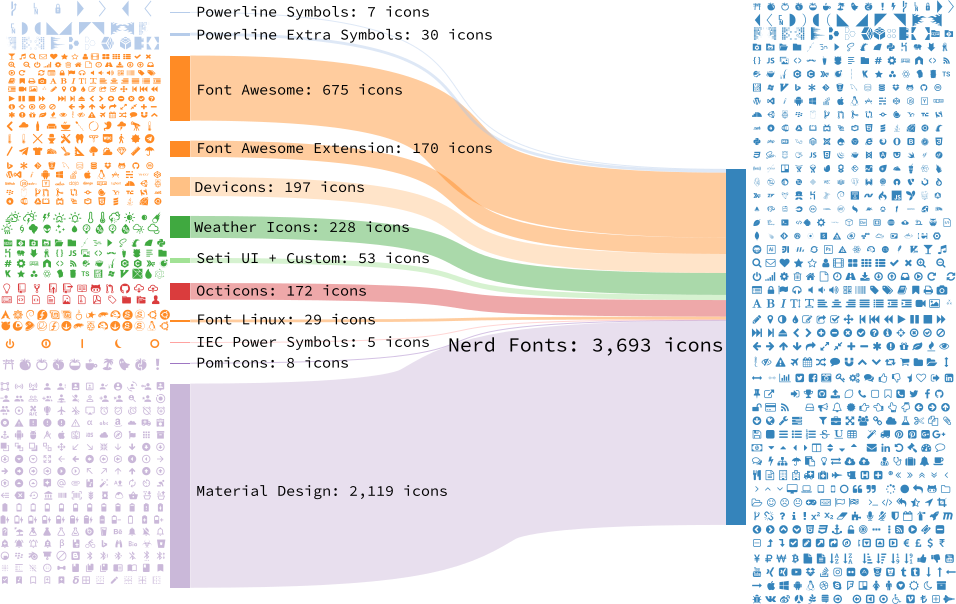
The following Sankey flow diagram shows the current glyph sets included:
Diagram created using @SankeyMATIC
Important Notices
master branch file paths are not considered stable. Verify your repository URI references
cloning this repository is not recommended (due to Repo size) unless you are going to be contributing to development
Table of Contents
TL;DR
Installation Options
1 - Manual
2 - Release Archive Download
3 - Install Script
4 - Homebrew Fonts (macOS (OS X))
5 - Clone Repo
6 - Ad Hoc Curl Download
7 - Arch User Repository (AUR) (Arch Linux)
8 - Patch Your Own Font
Features
Glyph/Icon sets
Patched Fonts
Combinations
Font Patcher
Developer / Contributor
Font Patcher
Gotta Patch 'em All Font Patcher!
Other Good Fonts to Patch
Contributing
Project Motivation
Additional Info
Unstable file paths on master
Changelog
License
TL;DR
Nerd Fonts takes popular programming fonts and adds a bunch of Glyphs.
There is also a font patcher available if your desired font isn't already patched.
For more high level information see the wiki. If you are looking for the Vim plugin see VimDevIcons ➶.
Various Download Options for Fonts
If you...
Option 1. want to quickly grab an individual font download from the patched-fonts/ directory
Option 2. want to download a font family package of variations (bold, italic, etc.) see download an archive
Option 3. want to automate installing or use in scripts see the Install Script
Option 4. are on macOS and want to use Homebrew see Homebrew Fonts
Option 5. want complete control then see cloning the repo
Option 6. want to use the curl command or use in scripts see Ad Hoc Curl Download
Option 7. are on Arch Linux and want to use AUR packages see Unofficial Arch User Repositories
Option 8. want to patch your own font see the Font Patcher
Features
A FontForge Python script to patch any font
Includes an option to create Monospaced (fixed-pitch, fixed-width)ordouble-width (non-monospaced) glyphs
For more details see the Font Patcher section
50 already patched font families
Over 1,428,000 unique combinations/variations of patched fonts (more details)
Over 2,600 glyphs/icons combined (more details)
Current glyph sets include: Powerline with Extra Symbols, Font Awesome, Material Design Icons, Weather, Devicons, Octicons, Font Logos (Formerly Font Linux), Pomicons
Monospaced (fixed-pitch, fixed-width)ordouble-width (non-monospaced) glyphs version of each font
This refers to the Nerd Font glyphs themselves not necessarily the Font as a whole
A Developer/Contributor provided bash script to re-patch all the fonts
Glyph Sets
:mag: :mag: You can now search for glyphs easily on NerdFonts.com via the Cheat Sheet
See Wiki: Glyph Sets and Codepoints for more details
Icon names in shell
See Wiki: Icon names in shell
Patched Fonts
Font Name
Font Name and Repository
*RFN
EM Size
Status
3270 Nerd Font
3270
NO
1000
Agave
Agave
NO
2048
Anonymice Nerd Font
Anonymous Pro
NO
2048
Arimo
Arimo
NO
2048
Aurulent Sans Mono Nerd Font
NO
1000
BigBlueTerminal
NO
1200
Bitstream Vera Sans Mono Nerd Font
NO
2048
Blex*
IBM Plex Mono
YES
1000
Caskaydia Cove Nerd Font*
Cascadia Code
YES
2048
Code New Roman Nerd Font
NO
2048
Cousine Nerd Font
Cousine
NO
1000
DaddyTimeMono
DaddyTimeMono
NO
1024
DejaVu Sans Mono Nerd Font
NO
2048
Droid Sans Mono Nerd Font
NO
2048
Fantasque Sans Nerd Font
Fantasque Sans
NO
2048
Fira Code Nerd Font
Fira Code
NO
1000
Fira Mono Nerd Font
Fira
NO
1000
Go Mono Nerd Font
Go-Mono
NO
1000
Gohu Nerd Font
Gohu TTF,Gohu
NO
1000
Hack Nerd Font
Hack
NO
2048
Hasklug Nerd Font*
Hasklig
YES
1000
Heavy Data Mono Nerd Font
NO
2048
Hermut Nerd Font
NO
1000
iM-Writing*
iA-Writer
YES
1000
Inconsolata Nerd Font
NO
1000
Inconsolata Go Nerd Font
NO
1000
Inconsolata LGC Nerd Font
NO
1000
Iosevka Nerd Font
Iosevka
NO
1000
#83
JetBrains Mono
JetBrains Mono
NO
1000
Lekton Nerd Font
NO
1000
Literation Mono Nerd Font*
Liberation
YES
2048
Meslo Nerd Font
NO
2048
Monofur Nerd Font
NO
2400
Monoid Nerd Font
NO
1536
Mononoki Nerd Font
Mononoki
NO
1024
M+ (MPlus) Nerd Font
NO
1000
Noto
NO
1000
OpenDyslexic
NO
1000
Overpass
NO
1000
ProFont (Windows tweaked) Nerd Font
NO
1200
ProFont (x11) Nerd Font
NO
1000
ProggyClean Nerd Font
NO
2048
Imperfect
Roboto Mono
NO
2048
Sauce Code Nerd Font
Source
YES
1000
Shure Tech Mono Nerd Font*
Share Tech Mono
YES
1000
Space Mono Nerd Font
Space Mono
NO
1000
Terminess Nerd Font*
Terminus Font
YES
1000
Tinos
NO
2048
Ubuntu Nerd Font
NO
1000
Ubuntu Mono Nerd Font
NO
1000
Victor Mono
Victor Mono
NO
1000
*RFN = Reserved Font Name
Combinations
Over 1,428,000 unique variations/combinations (Power Set) of patched fonts:
50 patched font typefaces
697 patched font families
2,788 'complete' variations/combinations
1,428,110possible variations/combinations
1,430,898 total calculated combinations (2,788 + 1,428,110)
Combinations for each font are any combination of Variations
Variations
no flags given (defaults to only Seti-UI + Custom and Devicons)
double (variable/proportional) or single (fixed/monospaced) width glyphs
Font Awesome
Font Awesome Extension
Material Design Icons
Weather
GitHub Octicons
Font Logos (Formerly Font Linux)
Powerline Extra Symbols
IEC Power Symbols
Pomicons
Windows Compatibility
Font Installation
Option 1: Download and Install Manually
Best option for quickly getting a specific individual font.
Download the specific patched font of your choice
Option 2: Release Archive Download
Best option if you want an archive or complete font family of variations (Bold, Italic, etc.).
Fonts are available for download as packages in the latest release
Option 3: Install Script
Best option if you want to automate installing or for use in scripts.
Note: Only for Linux & macOS (OS X)
Note: Requires cloning the repo as of now
All fonts:
Installs all the patched Fonts (Warning: This is a lot of Fonts adding up to a large size)
All fonts are available via Homebrew Cask Fonts on macOS (OS X)
brew tap homebrew/cask-fonts
brew cask install font-hack-nerd-font
Option 5: Clone the Repo
Best option for full control, all or most of the fonts, or contributing to development.
Cloning of this repository is not required nor efficient (mostly due to Repository size) if you are simply only interested in a limited set of fonts.
However if you do want to clone the repo be sure to shallow clone:
git clone --depth 1
Option 6: Ad Hoc Curl Download
Option if you want to use the curl command or for use in scripts.
Linux
mkdir -p ~/.local/share/fonts
cd ~/.local/share/fonts && curl -fLo "Droid Sans Mono for Powerline Nerd Font Complete.otf" https://github.com/ryanoasis/nerd-fonts/raw/master/patched-fonts/DroidSansMono/complete/Droid%20Sans%20Mono%20Nerd%20Font%20Complete.otf
Note: deprecated alternative paths: ~/.fonts
macOS (OS X)
cd ~/Library/Fonts && curl -fLo "Droid Sans Mono for Powerline Nerd Font Complete.otf" https://github.com/ryanoasis/nerd-fonts/raw/master/patched-fonts/DroidSansMono/complete/Droid%20Sans%20Mono%20Nerd%20Font%20Complete.otf
Option 7: Unofficial Arch User Repository (AUR)
Option for Arch Linux and wanting to use AUR packages.
The following fonts are available via AUR packages on Arch Linux:
Nerd Fonts Complete (double-width)
Nerd Fonts Complete (single-width) (out of date)
Nerd Fonts DejaVu Complete
Nerd Fonts Source Code Pro Complete
Nerd Fonts Git (out of date)
Option 8: Patch Your Own Font
The option for patching your own font or fully customizing the patched font.
Use the provided Python command line script to generate a patched font from your own font to get the extra new glyphs
See: Font Patcher for usage
use this option if you do not want to use one of the fonts provided
you will still need to copy the generated font to the correct font directory on your system
Patching the font of your own choosing for use with the VimDevIcons ➶:
requires: Python 2 (or Python 3), python-fontforge package (version 20141231 or later, see
the install instructions)
alternative install method on OSX: brew install fontforge
Usage:
./font-patcher PATH_TO_FONT
Alternative usage: Execute the patcher with the FontForge binary using the script flag:
./fontforge -script font-patcher PATH_TO_FONT
usage: font-patcher [-h] [-v] [-s] [-l] [-q] [-w] [-c] [--fontawesome]
                    [--fontawesomeextension] [--fontlinux] [--octicons]
                    [--powersymbols] [--pomicons] [--powerline]
                    [--powerlineextra] [--material] [--weather]
                    [--custom [CUSTOM]] [--postprocess [POSTPROCESS]]
                    [--removeligs] [--configfile [CONFIGFILE]]
                    [--progressbars | --no-progressbars] [--careful]
                    [-ext [EXTENSION]] [-out [OUTPUTDIR]]
                    font

Nerd Fonts Font Patcher: patches a given font with programming and development related glyphs

* Website: https://www.nerdfonts.com
* Version: 2.0.0
* Development Website: https://github.com/ryanoasis/nerd-fonts
* Changelog: https://github.com/ryanoasis/nerd-fonts/blob/master/changelog.md

positional arguments:
  font                  The path to the font to patch (e.g., Inconsolata.otf)

optional arguments:
  -h, --help            show this help message and exit
  -v, --version         show program's version number and exit
  -s, --mono, --use-single-width-glyphs
                        Whether to generate the glyphs as single-width not double-width (default is double-width)
  -l, --adjust-line-height
                        Whether to adjust line heights (attempt to center powerline separators more evenly)
  -q, --quiet, --shutup
                        Do not generate verbose output
  -w, --windows         Limit the internal font name to 31 characters (for Windows compatibility)
  -c, --complete        Add all available Glyphs
  --fontawesome         Add Font Awesome Glyphs (http://fontawesome.io/)
  --fontawesomeextension
                        Add Font Awesome Extension Glyphs (https://andrelzgava.github.io/font-awesome-extension/)
  --fontlinux, --fontlogos
                        Add Font Linux and other open source Glyphs (https://github.com/Lukas-W/font-logos)
  --octicons            Add Octicons Glyphs (https://octicons.github.com)
  --powersymbols        Add IEC Power Symbols (https://unicodepowersymbol.com/)
  --pomicons            Add Pomicon Glyphs (https://github.com/gabrielelana/pomicons)
  --powerline           Add Powerline Glyphs
  --powerlineextra      Add Powerline Glyphs (https://github.com/ryanoasis/powerline-extra-symbols)
  --material, --materialdesignicons, --mdi
                        Add Material Design Icons (https://github.com/templarian/MaterialDesign)
  --weather, --weathericons
                        Add Weather Icons (https://github.com/erikflowers/weather-icons)
  --custom [CUSTOM]     Specify a custom symbol font. All new glyphs will be copied, with no scaling applied.
  --postprocess [POSTPROCESS]
                        Specify a Script for Post Processing
  --removeligs, --removeligatures
                        Removes ligatures specified in JSON configuration file
  --configfile [CONFIGFILE]
                        Specify a file path for JSON configuration file (see sample: src/config.sample.json)
  --progressbars        Show percentage completion progress bars per Glyph Set
  --no-progressbars     Don't show percentage completion progress bars per Glyph Set
  --careful             Do not overwrite existing glyphs if detected
  -ext [EXTENSION], --extension [EXTENSION]
                        Change font file type to create (e.g., ttf, otf)
  -out [OUTPUTDIR], --outputdir [OUTPUTDIR]
                        The directory to output the patched font file to
Trang TopGit này là một snapshot — tab "Readme" hiển thị nguyên văn README của repo (đã bỏ link, giữ ảnh). Repo GitHub ở github.com/romkatv/nerd-fonts là nguồn chính thức.
romkatv/nerd-fonts có bao nhiêu sao?
romkatv/nerd-fonts có 42 sao GitHub — tải lại trang để xem số mới nhất, hoặc xem trực tiếp github.com/romkatv/nerd-fonts. TopGit phản chiếu số sao của GitHub nhưng không cam kết đến từng phút.
romkatv/nerd-fonts có phải mã nguồn mở không?
Có — romkatv/nerd-fonts phát hành theo license MIT, nghĩa là mã nguồn mở để đọc, fork và (tùy license) tái sử dụng. Mã: github.com/romkatv/nerd-fonts.
romkatv/nerd-fonts còn đang phát triển không?
Commit gần nhất trên romkatv/nerd-fonts là 3.6 năm trước (theo timestamp GitHub). Repo có 6 fork — một chỉ báo về mức độ quan tâm của cộng đồng.
romkatv/nerd-fonts dùng license gì?
romkatv/nerd-fonts phát hành theo license MIT. Nên mở file LICENSE trên GitHub để xác nhận — license metadata đôi khi lệch với thực tế dự án.
romkatv/nerd-fonts là gì?
romkatv/nerd-fonts (romkatv/nerd-fonts) là dự án CSS trên GitHub. Theo mô tả gốc: Iconic font aggregator, collection, & patcher. 3,600+ icons, 50+ patched fonts: Hack, Source Code Pro, more. Glyph collections: Font Awesome, Material Design Icons, Octicons, & more
romkatv/nerd-fonts viết bằng ngôn ngữ gì?
romkatv/nerd-fonts chủ yếu viết bằng CSS. Trường "language" của GitHub dựa trên phần lớn byte ở nhánh mặc định.
Đọc đầy đủ README ở tab phía trên.
Vẫn đang phân vân về nerd-fonts?
Một cú bấm sẽ gửi câu hỏi kèm trang này cho AI — xem AI nói gì về nerd-fonts.

 /nerd-fonts