Được TopGit lập chỉ mục từ metadata GitHub: RxSwiftCommunity/RxRealm có 1.2k sao, viết chủ yếu bằng Swift. RxSwift extension for RealmSwift's types
Tóm tắt dựng từ metadata GitHub của chính dự án — chưa có bài review TopGit. Trang sẽ tự động cập nhật khi bài review đầy đủ được xuất bản.
VÌ SAO CHƯA CÓ REVIEW
TopGit viết bài đầy đủ cho repo có nhiều sao nhất và được yêu cầu nhiều nhất. Trang này là snapshot trong thời gian chờ — xem README gốc ở tab READ ME.
This library is a thin wrapper around RealmSwift ( Realm Docs ).
Table of contents:
Observing object collections
Observing a single object
Write transactions
Automatically binding table and collection views
Example app
Observing object collections
RxRealm can be used to create Observables from objects of type Results, List, LinkingObjects or AnyRealmCollection. These types are typically used to load and observe object collections from the Realm Mobile Database.
Observable.collection(from:synchronousStart:)
Emits an event each time the collection changes:
let realm = try! Realm()
let laps = realm.objects(Lap.self)

Observable.collection(from: laps)
  .map {
    laps in "\(laps.count) laps"
  }
  .subscribe(onNext: { text  in
    print(text)
  })
The above prints out "X laps" each time a lap is added or removed from the database. If you set synchronousStart to true (the default value), the first element will be emitted synchronously - e.g. when you're binding UI it might not be possible for an asynchronous notification to come through.
Observable.array(from:synchronousStart:)
Upon each change fetches a snapshot of the Realm collection and converts it to an array value (for example if you want to use array methods on the collection):
let realm = try! Realm()
let laps = realm.objects(Lap.self)

Observable.array(from: laps)
  .map { array in
    return array.prefix(3) //slice of first 3 items
  }
  .subscribe(onNext: { text  in
    print(text)
  })
Observable.changeset(from:synchronousStart:)
Emits every time the collection changes and provides the exact indexes that has been deleted, inserted or updated:
let realm = try! Realm()
let laps = realm.objects(Lap.self)

Observable.changeset(from: laps)
  .subscribe(onNext: { results, changes in
    if let changes = changes {
      // it's an update
      print(results)
      print("deleted: \(changes.deleted)")
      print("inserted: \(changes.inserted)")
      print("updated: \(changes.updated)")
    } else {
      // it's the initial data
      print(results)
    }
  })
Combines the result of Observable.array(from:) and Observable.changeset(from:) returning an Observable<Array<T>, RealmChangeset?>
let realm = try! Realm()
let laps = realm.objects(Lap.self))

Observable.arrayWithChangeset(from: laps)
  .subscribe(onNext: { array, changes in
    if let changes = changes {
    // it's an update
    print(array.first)
    print("deleted: \(changes.deleted)")
    print("inserted: \(changes.inserted)")
    print("updated: \(changes.updated)")
  } else {
    // it's the initial data
    print(array)
  }
  })
Observing a single object
There's a separate API to make it easier to observe a single object:
This API uses the Realm object notifications under the hood to listen for changes.
This method will by default emit the object initial state as its first next event. You can disable this behavior by using the emitInitialValue parameter and setting it to false.
Finally you can set changes to which properties constitute an object change you'd like to observe for:
Writing objects to existing realm reference. You can add newly created objects to a Realm that you already have initialized:
let realm = try! Realm()
let messages = [Message("hello"), Message("world")]

Observable.from(messages)
  .subscribe(realm.rx.add())
Be careful, this will retain your Realm until the Observable completes or errors out.
Realm.rx.add()
Writing to the default Realm. You can leave it to RxRealm to grab the default Realm on any thread your subscribe and write objects to it:
let messages = [Message("hello"), Message("world")]

Observable.from(messages)
  .subscribe(Realm.rx.add())
Realm.rx.add(configuration:)
Writing to a custom Realm. If you want to switch threads and not use the default Realm, provide a Realm.Configuration. You an also provide an error handler for the observer to be called if either creating the realm reference or the write transaction raise an error:
var config = Realm.Configuration()
/* custom configuration settings */

let messages = [Message("hello"), Message("world")]
Observable.from(messages)
  .observeOn( /* you can switch threads here */ )
  .subscribe(Realm.rx.add(configuration: config, onError: {elements, error in
    if let elements = elements {
      print("Error \(error.localizedDescription) while saving objects \(String(describing: elements))")
    } else {
      print("Error \(error.localizedDescription) while opening realm.")
    }
  }))
If you want to create a Realm on a different thread manually, allowing you to handle errors, you can do that too:
let messages = [Message("hello"), Message("world")]

Observable.from(messages)
  .observeOn( /* you can switch threads here */ )
  .subscribe(onNext: {messages in
    let realm = try! Realm()
    try! realm.write {
      realm.add(messages)
    }
  })
rx.delete()
Deleting object(s) from an existing realm reference:
let realm = try! Realm()
let messages = realm.objects(Message.self)
Observable.from(messages)
  .subscribe(realm.rx.delete())
Be careful, this will retain your realm until the Observable completes or errors out.
Realm.rx.delete()
Deleting from the object's realm automatically. You can leave it to RxRealm to grab the Realm from the first object and use it:
RxRealm does not depend on UIKit/Cocoa and it doesn't provide built-in way to bind Realm collections to UI components.
a) Non-animated binding
You can use the built-in RxCocoa bindTo(_:) method, which will automatically drive your table view from your Realm results:
Observable.from( [Realm collection] )
  .bindTo(tableView.rx.items) {tv, ip, element in
    let cell = tv.dequeueReusableCell(withIdentifier: "Cell")!
    cell.textLabel?.text = element.text
    return cell
  }
  .addDisposableTo(bag)
b) Animated binding with RxRealmDataSources
The separate library RxRealmDataSources mimics the default data sources library behavior for RxSwift.
RxRealmDataSources allows you to bind an observable collection of Realm objects directly to a table or collection view:
// create data source
let dataSource = RxTableViewRealmDataSource<Lap>(
  cellIdentifier: "Cell", cellType: PersonCell.self) {cell, ip, lap in
    cell.customLabel.text = "\(ip.row). \(lap.text)"
}

// RxRealm to get Observable<Results>
let realm = try! Realm()
let lapsList = realm.objects(Timer.self).first!.laps
let laps = Observable.changeset(from: lapsList)

// bind to table view
laps
  .bindTo(tableView.rx.realmChanges(dataSource))
  .addDisposableTo(bag)
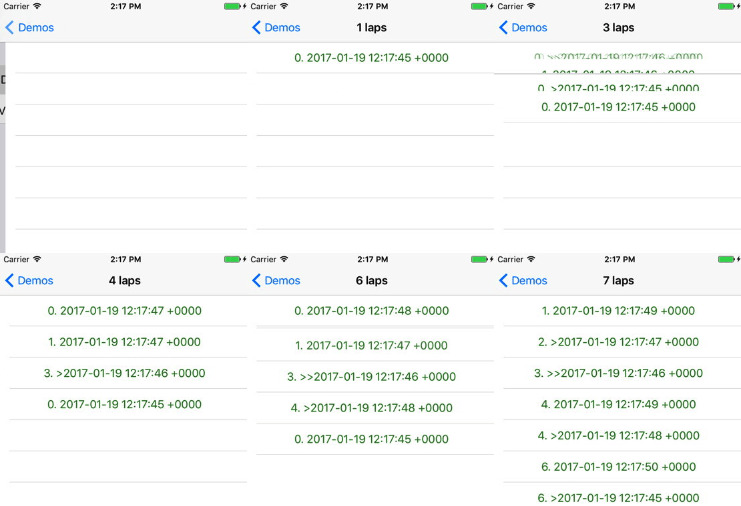
The data source will reflect all changes via animations to the table view:
If you want to learn more about the features beyond animating changes, check the RxRealmDataSources README.
Example app
To run the example project, clone the repo, and run pod install from the Example directory first. The app uses RxSwift, RxCocoa using RealmSwift, RxRealm to observe Results from Realm.
Further you're welcome to peak into the RxRealmTests folder of the example app, which features the library's unit tests.
Installation
This library depends on both RxSwift and RealmSwift 1.0+.
CocoaPods
RxRealm requires CocoaPods 1.1.x or higher.
RxRealm is available through CocoaPods. To install it, simply add the following line to your Podfile:
pod "RxRealm"
Carthage
To integrate RxRealm into your Xcode project using Carthage, specify it in your Cartfile:
github "RxSwiftCommunity/RxRealm"
Run carthage update to build the framework and drag the built RxRealm.framework into your Xcode project.
RxSwiftCommunity/RxRealm thuộc nhóm Data trên TopGit, cùng 5 topic GitHub. Trang Trending và Topics liệt kê các repo cùng số sao và cùng ngôn ngữ để so sánh.
Đọc thêm về RxSwiftCommunity/RxRealm ở đâu?
Trang TopGit này là một snapshot — tab "Readme" hiển thị nguyên văn README của repo (đã bỏ link, giữ ảnh). Repo GitHub ở github.com/RxSwiftCommunity/RxRealm là nguồn chính thức.
RxSwiftCommunity/RxRealm có phải mã nguồn mở không?
Có — RxSwiftCommunity/RxRealm phát hành theo license MIT, nghĩa là mã nguồn mở để đọc, fork và (tùy license) tái sử dụng. Mã: github.com/RxSwiftCommunity/RxRealm.
RxSwiftCommunity/RxRealm là gì?
RxSwiftCommunity/RxRealm (RxSwiftCommunity/RxRealm) là dự án Swift trên GitHub. Theo mô tả gốc: RxSwift extension for RealmSwift's types
RxSwiftCommunity/RxRealm so với các dự án Data khác thế nào?
RxSwiftCommunity/RxRealm được TopGit xếp vào nhóm Data, với 1.2k sao GitHub và viết bằng Swift. Xem trang chủ đề Data trên TopGit để so sánh với các dự án tương tự theo số sao và mức độ hoạt động.
Vì sao RxSwiftCommunity/RxRealm được xếp vào nhóm Data?
TopGit xếp RxSwiftCommunity/RxRealm vào nhóm Data dựa trên GitHub topics và mô tả của repo (gắn thẻ: "database", "reactive", "realm"). Việc phân loại dựa trên metadata thật của repo, không phải đoán theo cảm tính biên tập.
Đọc đầy đủ README ở tab phía trên.
Vẫn đang phân vân về RxRealm?
Một cú bấm sẽ gửi câu hỏi kèm trang này cho AI — xem AI nói gì về RxRealm.