Trên GitHub, s0md3v/Smap đã đạt 3.3k sao, ngôn ngữ Go. a drop-in replacement for Nmap powered by shodan.io
Tóm tắt dựng từ metadata GitHub của chính dự án — chưa có bài review TopGit. Trang sẽ tự động cập nhật khi bài review đầy đủ được xuất bản.
VÌ SAO CHƯA CÓ REVIEW
TopGit viết bài đầy đủ cho repo có nhiều sao nhất và được yêu cầu nhiều nhất. Trang này là snapshot trong thời gian chờ — xem README gốc ở tab READ ME.
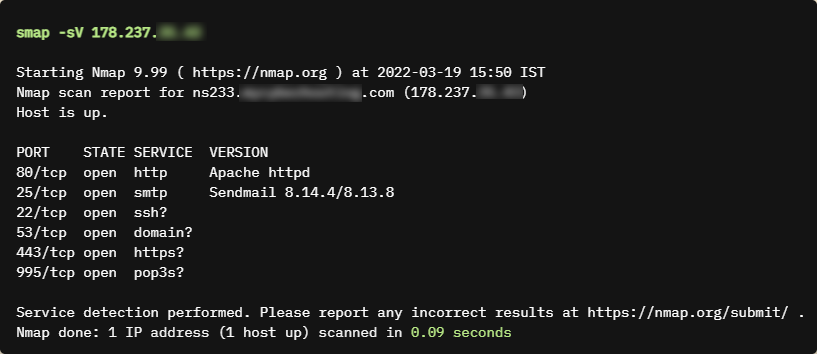
Smap is a passive port scanner built with shodan.io's free API. It takes the same command line arguments as Nmap and produces the same output, which makes it a drop-in replacement for Nmap.
Features
Scans 200 hosts per second
Doesn't require any account/api key
Vulnerability detection
Supports nmap's output formats
Service and version fingerprinting
Makes no contact to the targets in passive mode
Optional nmap acceleration using Shodan's reported ports
Installation
Binaries
You can download a pre-built binary from here and use it right away.
Manual
go install -v github.com/s0md3v/smap/cmd/smap@latest
Confused or something not working? For more detailed instructions, click here
AUR package
Smap is available on AUR as smap-git (builds from source) and smap-bin (pre-built binary).
Homebrew/Mac
Smap is also available on Homebrew.
brew update
brew install smap
Usage
Smap takes the same arguments as Nmap, but options other than -p, -h, -V, -o*, -iL, --concurrency, and --append-output are ignored in passive mode. Use --nmap to pass Nmap options to a real Nmap scan after passive port discovery. If you are unfamiliar with Nmap, here's how to use Smap.
Specifying targets
smap 127.0.0.1 127.0.0.2
You can also use a list of targets, separated by newlines.
Smap supports 7 output formats which can be used with -o* as follows:
smap example.com -oX output.xml
If you want to print the output to terminal, use hyphen (-) as filename.
Supported formats
oX    // nmap's xml format
oG    // nmap's greppable format
oN    // nmap's default format
oA    // output in all 3 formats above at once
oP    // IP:PORT pairs separated by newlines
oS    // custom smap format
oJ    // json
Note: Since Nmap doesn't scan/display vulnerabilities and tags, that data is not available in nmap's formats. Use -oS to view that info.
Specifying ports
Smap scans these ~4000 ports by default. If you want to display results for certain ports, use the -p option.
smap -p21-30,80,443 -iL targets.txt
Nmap acceleration
Use --nmap to narrow a scan with your local nmap. Smap first collects the union of ports reported by Shodan and then runs Nmap once against the original targets with that smaller port range.
smap --nmap -Pn -sV --version-light 1.1.1.1
Except for --nmap and --concurrency, the supplied arguments are passed to Nmap. Smap replaces the port range with the Shodan candidates; if you specify -p, it first limits the candidates to that range. Nmap handles the scan and output directly, so its options and output formats behave normally. Host-only operations such as -sL and -sn are passed through without passive port discovery.
Smap's custom output formats are passive-mode features; with --nmap, output options have their normal Nmap meanings. If Shodan reports no candidate ports, Nmap is not run.
This can save time if passive data is good enough for your use case.
Controlling concurrency
Smap defaults to 3 workers to avoid hitting Shodan too aggressively. You can change that with --concurrency.
smap --concurrency 5 -iL targets.txt
Considerations
Since Smap simply fetches existent port data from shodan.io, it is super fast but there's more to it. You should use Smap if:
You want
vulnerability detection
a super fast port scanner
no connections to be made to the targets
You are okay with
not being able to scan IPv6 addresses
results being up to 7 days old
some rare unreliable software detection in passive mode
Note: if you use --nmap, Smap will run nmap against the target and make active connections. Because Shodan's data can be stale or incomplete, using it as a port filter can miss open ports.
Trang TopGit này là một snapshot — tab "Readme" hiển thị nguyên văn README của repo (đã bỏ link, giữ ảnh). Repo GitHub ở github.com/s0md3v/Smap là nguồn chính thức.
s0md3v/Smap có bao nhiêu sao?
s0md3v/Smap có 3.3k sao GitHub — tải lại trang để xem số mới nhất, hoặc xem trực tiếp github.com/s0md3v/Smap. TopGit phản chiếu số sao của GitHub nhưng không cam kết đến từng phút.
s0md3v/Smap có những chủ đề gì?
GitHub topics của s0md3v/Smap: "network-scanner", "network-security", "nmap", "nmap-alternative", "port-scanner", "port-scanning", "scanner", "scanning". TopGit xếp repo vào nhóm mã nguồn mở.
s0md3v/Smap có phải mã nguồn mở không?
Có — s0md3v/Smap phát hành theo license AGPL-3.0, nghĩa là mã nguồn mở để đọc, fork và (tùy license) tái sử dụng. Mã: github.com/s0md3v/Smap.
s0md3v/Smap có website riêng không?
TopGit chưa ghi nhận URL trang chủ cho s0md3v/Smap. Phần README ở tab phía trên thường có link demo, hoặc xem mô tả GitHub của repo.
s0md3v/Smap còn đang phát triển không?
Commit gần nhất trên s0md3v/Smap là 3 tháng trước (theo timestamp GitHub). Repo có 323 fork — một chỉ báo về mức độ quan tâm của cộng đồng.
Đọc đầy đủ README ở tab phía trên.
Smap có đáng để bạn bỏ thời gian?
ChatGPT, Claude và Perplexity đều đọc được trang này. Hỏi thử xem họ nghĩ gì về Smap.

 /Smap