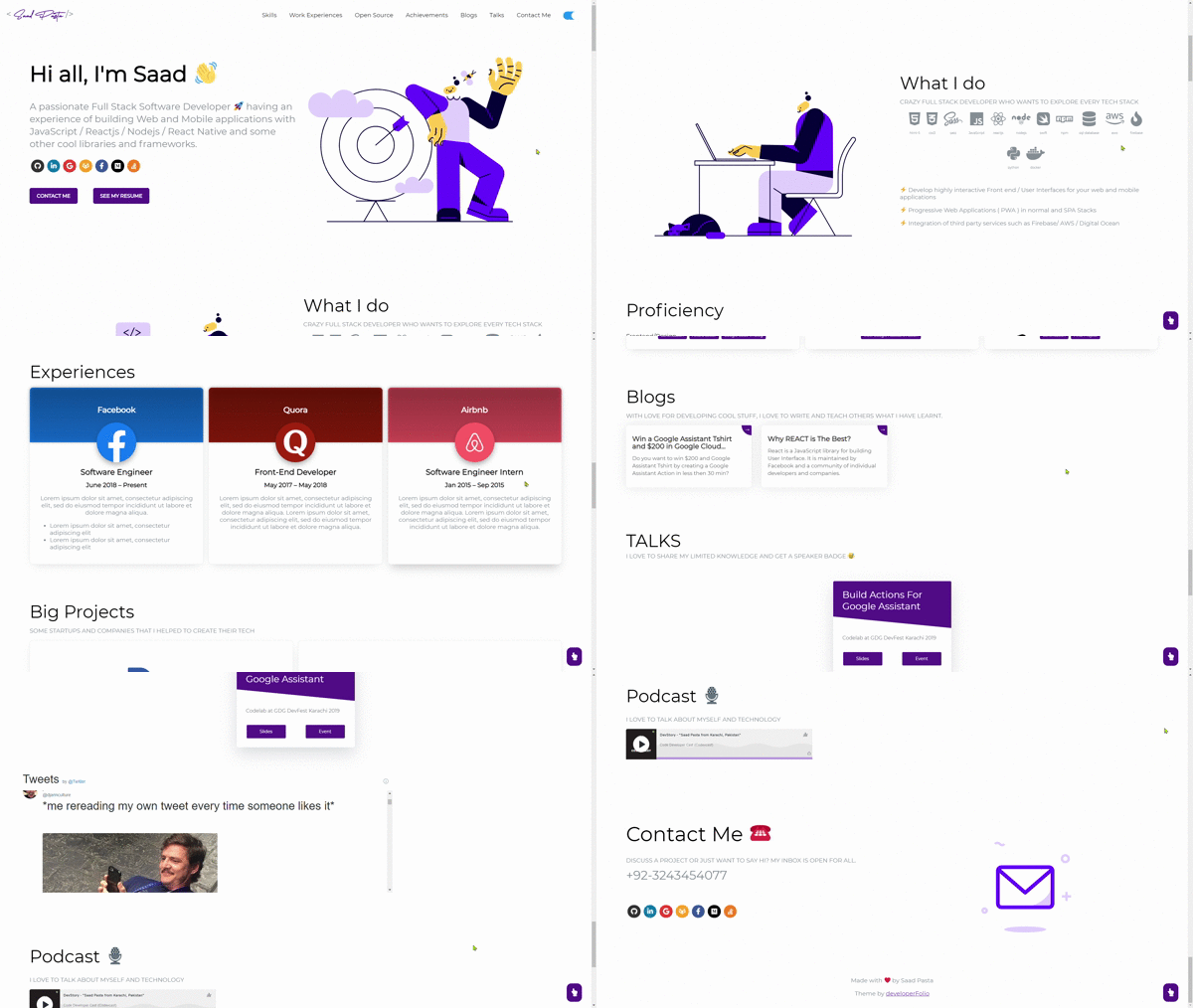
Một mục tập trung giao diện trong kho dữ liệu GitHub của TopGit: saadpasta/developerFolio, 6.7k sao, nhóm Frontend, JavaScript. 🚀 Software Developer Portfolio Template that helps you showcase your work and skills as a software developer. (This is currently not being actively maintained)
Tóm tắt dựng từ metadata GitHub của chính dự án — chưa có bài review TopGit. Trang sẽ tự động cập nhật khi bài review đầy đủ được xuất bản.
VÌ SAO CHƯA CÓ REVIEW
TopGit viết bài đầy đủ cho repo có nhiều sao nhất và được yêu cầu nhiều nhất. Trang này là snapshot trong thời gian chờ — xem README gốc ở tab READ ME.
A clean, beautiful and responsive portfolio template for Developers!
Just change src/portfolio.js to get your personal portfolio. Customize portfolio theme by using your own color scheme globally in the src/_globalColor.scss file. Feel free to use it as-is or personalize it as much as you want.
If you'd like to contribute and make this much better for other users, have a look at Issues.
Created something awesome for your fork of the portfolio and want to share it? Feel free to open a pull request.
Table of Contents
Sections
Getting Started
How to Use
Linking portfolio to GitHub
Linking blogs section to Medium
Change and Customize
Deployment
Technologies Used
Illustrations
For the Future
Contributors
Portfolio Sections
✔️ Summary and About me
✔️ Skills
✔️ Education
✔️ Work Experience
✔️ Open Source Projects Connected with GitHub
✔️ Big Projects
✔️ Achievements And Certifications 🏆
✔️ Blogs
✔️ Talks
✔️ Podcast
✔️ Contact me
✔️ Twitter Timeline
✔️ GitHub Profile
To view a live example, click here.
Getting Started
These instructions will get you a copy of the project up and running on your local machine for development and testing purposes.
You'll need Git and Node.js (which comes with npm) installed on your computer or use Docker.
1) BUILD IMAGE : docker build -t developerfolio:latest .
2) RUN IMAGE: docker run -t -p 3000:3000 developerfolio:latest
How To Use
From your command line, clone and run developerFolio:
# Clone this repository
git clone https://github.com/saadpasta/developerFolio.git

# Go into the repository
cd developerFolio

# Setup default environment variables

# For Linux
cp env.example .env
# For Windows
copy env.example .env

# Install dependencies
npm install

# Start a local dev server
npm start
Linking Portfolio to GitHub
Generate a classic GitHub personal access token following these instructions (make sure you don't select any scope just generate a simple token). If you are using GitHub Actions to deploy your portfolio you can skip this section.
Create a file called .env in the root directory of your project (if not done already in section: How To Use)
Note: Configuring environment variables before deploying your portfolio is highly recommended as some components depend on API data.
- DeveloperFolio
  - node_modules
  - public
  - src
  - .env         <-- create it here
  - env.example  <-- this is the base file
  - .gitignore
  - package-lock.json
  - package.json
Inside the .env file, add key REACT_APP_GITHUB_TOKEN and assign your GitHub token like this, also add your username as GITHUB_USERNAME
Set showGithubProfile to true or false to show Contact Profile using GitHub, defaults to false.
Warning: Treat your tokens like passwords and keep them secret. When working with the API, use tokens as environment variables instead of hardcoding them into your programs.
Note: Open Source Projects section only show pinned items of your GitHub.
If you are seeing something as shown below, follow these instructions.
If the above solution still doesn't work, visit the wiki page.
Linking blogs section to Medium
Optionally, you can link the blogs section to your medium user account:
Inside the .env file, add key MEDIUM_USERNAME and assign your Medium username
// .env
MEDIUM_USERNAME = "YOUR MEDIUM USERNAME"
For Github Action, change the environment variable MEDIUM_USERNAME in .github/workflows/deploy.yml
Set displayMediumBlogs to true or false in portofolio.js to display fetched Medium blogs, defaults to true.
Change and customize every section according to your need.
Personalize page content in /src/portfolio.js & modify it as per your need. You will also need to modify index.html to change the title and metadata to provide accurate SEO for your personal portfolio.
/* Change this file to get your Personal Porfolio */

const greeting = {
  /* Your Summary And Greeting Section */
  title: "Hi all I'm Saad",
  subTitle: emoji("A passionate Full Stack Software Developer 🚀"),
  resumeLink: "https://drive.google.com/file/d/1ofFdKF_mqscH8WvXkSObnVvC9kK7Ldlu/view?usp=sharing"
};

const socialMediaLinks = {
  /* Your Social Media Link */
  github: "https://github.com/saadpasta",
  linkedin: "https://www.linkedin.com/in/saadpasta/",
  gmail: "[email protected]",
  gitlab: "https://gitlab.com/saadpasta",
  facebook: "https://www.facebook.com/saad.pasta7"
};


const skillsSection = { .... }

const techStack = { .... }

const workExperience = { .... }

const openSource = { .... }

const bigProjects = { .... }

const achievementSection = { .... }

const blogSection = { .... }

const contactInfo = { .... }

const twitterDetails = { ... }
Resume upload
To upload your own resume, simply upload a pdf to src/containers/greeting/resume and rename the pdf to resume.pdf.
Using Emojis
For adding emoji 😃 into the texts in Portfolio.js, use the emoji() function and pass the text you need as an argument. This would help in keeping emojis compatible across different browsers and platforms.
Customize Lottie Animations
You can choose a Lottie and download it in json format from sites like this. In src/assets/lottie, replace the Lottie json file you want to alter with the same file name. If you want to change the Lottie options, go to src/components/displayLottie/DisplayLottie.js and change the defaultOptions object, you can refer lottie-react docs for more info on the defaultOptions object.
Adding Twitter Time line to your Page
Insert your Twitter username in portfolio.js to show your recent activity on your page.
When you are done with the setup, you should host your website online.
We highly recommend to read through the Deploying on GitHub Pages docs for React.
Configuring GitHub Actions (Recommended)
First you should enable, GitHub Actions for the repository you use.
The Profile and the Repository information from GitHub is only created at the time of deploy and the site needs to be redeployed if those information needs to be updated. So, a configurable CRON Job is setup which deploys your site every week, so that once you update your profile on GitHub it is shown on your portfolio. You can also trigger it manually using workflow_dispatch event, see this guide on how to do that.
When you are done with the configuration, we highly recommend to read through the GitHub Actions Configuring a workflow docs.
Deploying to GitHub Pages
This section guides you to deploy your portfolio on GitHub pages.
Navigate to package.json and enter your domain name instead of https://developerfolio.js.org/ in homepage variable. For example, if you want your site to be https://<your-username>.github.io/developerFolio, add the same to the homepage section of package.json.
In short you can also add /devloperFolio to package.json as both are exactly same. Upon doing so, you tell create-react-app to add the path assets accordingly.
Optionally, configure the domain. You can configure a custom domain with GitHub Pages by adding a CNAME file to the public/ folder.
Follow through the guide to setup GitHub pages from the official CRA docs here.
Deploying to Netlify
You could also host directly with Netlify by linking your own repository.
For more information, read hosting on Netlify.
Technologies Used
React
graphql
apollo-boost
react-twitter-embed
react-easy-emoji
react-headroom
color-thief
Illustrations
UnDraw
Lottie by Oblikweare
For the Future
If you can help us with these. Please don't hesitate to open a pull request.
Connect with LinkedIn to get Summary, Skills, Education and Experience
Move to Gatsby
Add More Sections
Project Maintainers
Saad Pasta
Kartik Choudhary
Naveen M K
Muhammad Hasham
Contributors
Thanks goes to these wonderful people (emoji key):
saadpasta/developerFolio thuộc nhóm Frontend trên TopGit, cùng 12 topic GitHub. Trang Trending và Topics liệt kê các repo cùng số sao và cùng ngôn ngữ để so sánh.
Đọc thêm về saadpasta/developerFolio ở đâu?
Trang TopGit này là một snapshot — tab "Readme" hiển thị nguyên văn README của repo (đã bỏ link, giữ ảnh). Repo GitHub ở github.com/saadpasta/developerFolio là nguồn chính thức.
saadpasta/developerFolio có phải mã nguồn mở không?
Có — saadpasta/developerFolio phát hành theo license GPL-3.0, nghĩa là mã nguồn mở để đọc, fork và (tùy license) tái sử dụng. Mã: github.com/saadpasta/developerFolio.
saadpasta/developerFolio là gì?
saadpasta/developerFolio (saadpasta/developerFolio) là dự án JavaScript trên GitHub. Theo mô tả gốc: 🚀 Software Developer Portfolio Template that helps you showcase your work and skills as a software developer. (This is currently not being actively maintained)
saadpasta/developerFolio so với các dự án Frontend khác thế nào?
saadpasta/developerFolio được TopGit xếp vào nhóm Frontend, với 6.7k sao GitHub và viết bằng JavaScript. Xem trang chủ đề Frontend trên TopGit để so sánh với các dự án tương tự theo số sao và mức độ hoạt động.
Vì sao saadpasta/developerFolio được xếp vào nhóm Frontend?
TopGit xếp saadpasta/developerFolio vào nhóm Frontend dựa trên GitHub topics và mô tả của repo (gắn thẻ: "developer-folio", "developer-portfolio", "hacktoberfest"). Việc phân loại dựa trên metadata thật của repo, không phải đoán theo cảm tính biên tập.
Đọc đầy đủ README ở tab phía trên.
Vẫn đang phân vân về developerFolio?
Một cú bấm sẽ gửi câu hỏi kèm trang này cho AI — xem AI nói gì về developerFolio.

 /developerFolio