Điểm qua scala/docs.scala-lang: 574 sao trên GitHub, viết chủ yếu bằng HTML. The Scala Documentation website
Tóm tắt dựng từ metadata GitHub của chính dự án — chưa có bài review TopGit. Trang sẽ tự động cập nhật khi bài review đầy đủ được xuất bản.
VÌ SAO CHƯA CÓ REVIEW
TopGit viết bài đầy đủ cho repo có nhiều sao nhất và được yêu cầu nhiều nhất. Trang này là snapshot trong thời gian chờ — xem README gốc ở tab READ ME.
This repository contains the source for the Scala documentation website, as well as the source for "Scala Improvement Process" (SIP) documents.
Dependencies
This site uses a Jekyll, a Ruby framework. You'll need Ruby and Bundler installed; see Jekyll installation instructions for the details.
Quickstart
To build and view the site locally:
bundle install
bundle exec jekyll serve -I
(Trouble on MacOS?)
For more details, read on.
Quickstart with Docker Compose
You need to have Docker Engine and Docker Compose installed on your machine.
Under macOS (Intel or Apple silicon), instead of installing Docker Desktop you can also use HomeBrew with Colima: brew install colima docker docker-compose.
UID and GID environment variables are needed to avoid docker from writing files as root in your directory.
By default, docker-compose will use the file docker-compose.yml which will build the website and serve it on 0.0.0.0:4000 .
If you just need to build the website, add -f docker-compose_build-only.yml
env UID="$(id -u)" GID="$(id -g)" docker-compose up
The generated site is available at http://localhost:4000.
When the website dependencies change (the content of the Gemfile),
you have to re-build the Docker image:
env UID="$(id -u)" GID="$(id -g)" docker-compose up --build
If you have problems with the Docker image or want to force the rebuild of the Docker image:
For more details on the Docker option, see also this issue.
Contributing
Please have a look at Add New Guides/Tutorials before making a contribution.
This document gives an overview of the type of documentation contained within the Scala Documentation repository and the repository's structure.
Small changes, or corrected typos will generally be pulled in right away. Large changes, like the addition of new documents, or the rewriting of
existing documents will be thoroughly reviewed-- please keep in mind that, generally, new documents must be very well-polished, complete, and maintained
in order to be accepted.
Building & Viewing
cd into the directory where you cloned this repository, then install the required gems with bundle install. This will automatically put the gems into ./vendor/bundle.
Start the server in the context of the bundle (use -I for incremental builds):
bundle exec jekyll serve -I
It might take around 5 minutes at first but incremental compilations will be fast.
The generated site is available at http://localhost:4000
If you add --watch at the end of the command line above, Jekyll will automatically watch for changes on the filesystem, and regenerate the site.
If you get incompatible encoding errors when generating the site under Windows, then ensure that the
console in which you are running jekyll can work with UTF-8 characters. As described in the blog
Solving UTF problem with Jekyll on Windows
you have to execute chcp 65001. This command is best added to the jekyll.bat-script.
Markdown
The markdown used in this site uses kramdown extensions.
Markdown Editor for OSX
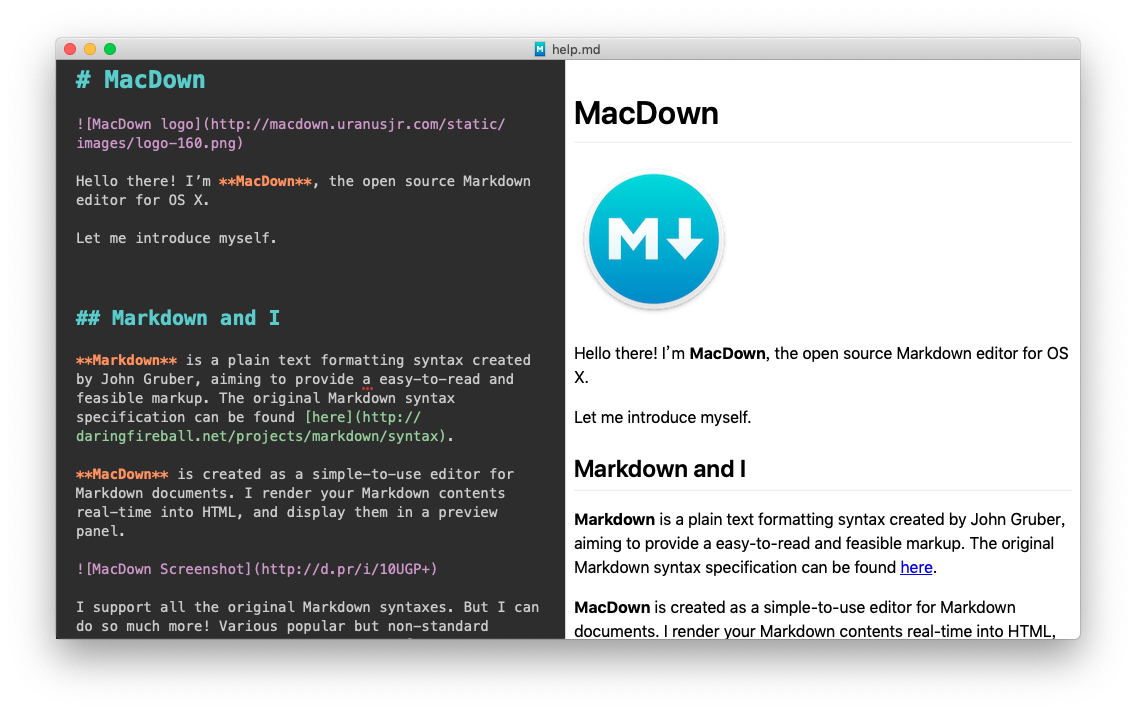
There's a free markdown editor for OSX called MacDown. It's quite convenient to work with, and it generates the translated Markdown in real-time alongside of your editor window, as can be seen here:
License
All documentation contained in this repository is licensed by EPFL under a Creative Commons Attribution-Share Alike 3.0 Unported license ("CC-BY-SA"), unless otherwise noted. By submitting a "pull request," or otherwise contributing to this repository, you implicitly agree to license your contribution under the above CC-BY-SA license. The source code of this website is licensed to EPFL under the Scala License, unless otherwise noted.
Trang TopGit này là một snapshot — tab "Readme" hiển thị nguyên văn README của repo (đã bỏ link, giữ ảnh). Repo GitHub ở github.com/scala/docs.scala-lang là nguồn chính thức.
scala/docs.scala-lang có những chủ đề gì?
GitHub topics của scala/docs.scala-lang: "scala", "scala-documentation". TopGit xếp repo vào nhóm mã nguồn mở.
scala/docs.scala-lang có phải mã nguồn mở không?
TopGit chưa ghi nhận license cho scala/docs.scala-lang. Phần lớn repo public trên GitHub là mã nguồn mở, nhưng điều khoản khác nhau từng repo — mở file LICENSE để xác nhận.
scala/docs.scala-lang có trang demo không?
Dự án có trang chủ ở http://docs.scala-lang.org. Tab "Readme" ở trang này thường có ảnh chụp và hướng dẫn bắt đầu nhanh.
scala/docs.scala-lang còn đang phát triển không?
Commit gần nhất trên scala/docs.scala-lang là 24 ngày trước (theo timestamp GitHub). Repo có 1.0k fork — một chỉ báo về mức độ quan tâm của cộng đồng.
Đọc đầy đủ README ở tab phía trên.
docs.scala-lang có đáng để bạn bỏ thời gian?
ChatGPT, Claude và Perplexity đều đọc được trang này. Hỏi thử xem họ nghĩ gì về docs.scala-lang.

 /docs.scala-lang