schollz/croc là một trong những repo hướng lập trình viên mà TopGit theo dõi, hiện có 39.9k sao, viết chủ yếu bằng Go. Easily and securely send things from one computer to another :crocodile: :package:
Tóm tắt dựng từ metadata GitHub của chính dự án — chưa có bài review TopGit. Trang sẽ tự động cập nhật khi bài review đầy đủ được xuất bản.
VÌ SAO CHƯA CÓ REVIEW
TopGit viết bài đầy đủ cho repo có nhiều sao nhất và được yêu cầu nhiều nhất. Trang này là snapshot trong thời gian chờ — xem README gốc ở tab READ ME.
This project’s future depends on community support. Become a sponsor today.
About
croc is a tool that allows any two computers to simply and securely transfer files and folders. AFAIK, croc is the only CLI file-transfer tool that does all of the following:
Allows any two computers to transfer data (using a relay)
You can also just paste it in the terminal for current session. On first run Docker will pull the image. croc via Docker will only work within the current directory and its subdirectories.
Build from Source
If you prefer, you can install Go and build from source (requires Go 1.26+):
go install github.com/schollz/croc/v11@latest
On Android
There are F-Droid apps available:
crocgui — original port (Go, basic UI)
croc-app — native Kotlin/Jetpack Compose client with a modern, mobile-first interface
FlCroc — cross-platform Flutter GUI (Android, Windows, Linux) that wraps the croc binary as its transfer core.
On Desktop
Community made desktop apps:
Croc GUI — unofficial desktop GUI for macOS, Windows, and Linux that bundles the croc binary for drag-and-drop transfers, QR codes, LAN mode, and relay/proxy options.
croc-desktop — unofficial desktop GUI for Linux, macOS, and Windows (experimental iOS/Android) built with Wails v3; embeds croc in-process for send/receive, QR codes, history, logs, and optional relay hosting.
Swamp Swap — unofficial PyQt6 GUI desktop app for macOS, Windows, and Linux, requires installing croc on its own normally in order to use. Made to be compact and simple.
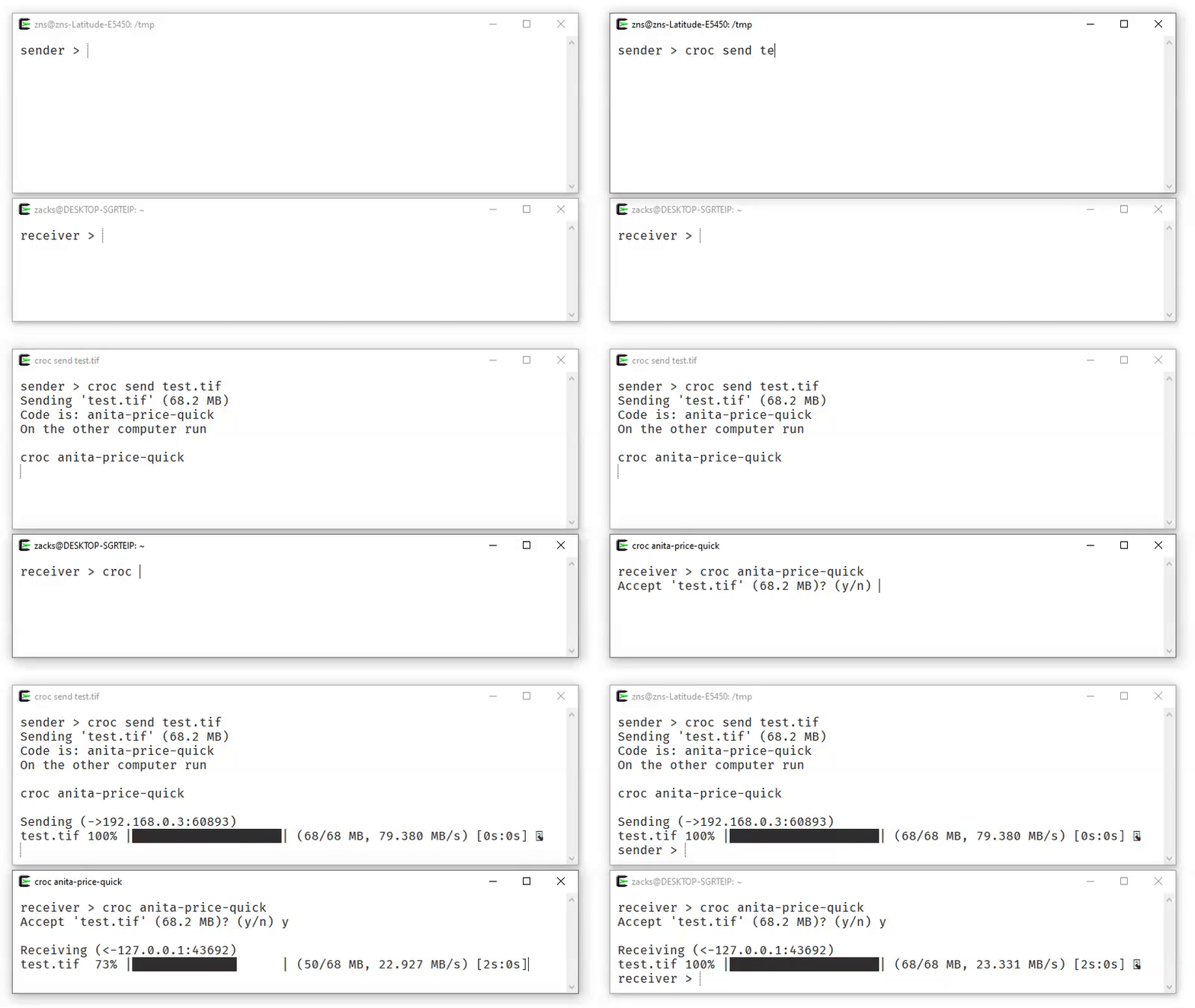
Then, to receive the file (or folder) on another computer, run:
croc code-phrase
The code phrase is used to establish password-authenticated key agreement (PAKE) which generates a secret key for the sender and recipient to use for end-to-end encryption.
Customizations & Options
Encrypted temporary storage
When an immediate peer-to-peer transfer is inconvenient, croc can upload
regular files as client-side encrypted ciphertext:
The command prints a browser link and a CLI token. The transfer expires after
the selected lifetime, measured from successful upload completion, or after
its configured number of receivers download, authenticate, and verify every
file—whichever happens first. The lifetime defaults to one day and accepts
whole minutes (m), hours (h), days (d), or weeks (w). The download
limit defaults to one. Both values are subject to server policy. Run croc
with no arguments and paste the token at the prompt to receive it. For
automation, keep the token out of the process list:
The browser link has the form
https://host/s/id#v1.decryption-key. The decryption key is after # because
URL fragments are not included in HTTP requests, so the storage service gets
the opaque transfer ID but not the key. The full link is still a secret: anyone
who has it can decrypt the files and claim one of the allowed downloads.
While a transfer remains available, its sender can delete it with the locally
saved revoke receipt:
croc --revoke [transfer-id]
Stored mode is opt-in and separate from croc's normal live relay transfers. A
self-hosted service can be selected with --store-url or CROC_STORE_URL.
See the stored-transfer design and operator guide
for protocol, privacy, limits, and deployment details.
Using croc on Linux or macOS
On Linux and macOS, the sending and receiving process is slightly different to avoid leaking the secret via the process name. You will need to run croc with the secret as an environment variable. For example, to receive with the secret ***:
CROC_SECRET=*** croc
For single-user systems, the default behavior can be permanently enabled by running:
croc --classic
Custom Code Phrase
You can send with your own code phrase (must be at least 6 characters):
For default public transfers, SHA-256 of the exact code modulo the ordered
three-relay pool determines which deployment both peers use. An automatically
generated sender probes all three relays and generates a normal EFF code that
maps to the first healthy one to respond. A custom code maps directly without probing
or fallback. --relay, CROC_RELAY, --ip, and local-only transfers bypass
this public routing rule. The generated sender caches the winning address in
best-relay alongside croc's other configuration files, then reuses it without
probing. A relay connection failure removes the cache so the following send
measures the pool again; deleting the file also forces a new measurement.
Allow Overwriting Without Prompt
To automatically overwrite files without prompting, use the --overwrite flag:
croc --yes --overwrite <code>
Keep Both Files Without Prompt
To keep an existing file and receive the incoming one under a new name (e.g. video (1).mkv), use the --rename flag:
croc --yes --rename <code>
Excluding Folders
To exclude folders from being sent, use the --exclude flag with comma-delimited exclusions. This does a case-insensitive substring match against each file's relative path, so any path containing one of the given strings anywhere is excluded:
croc send --exclude "node_modules,.venv" [folder]
If you need to exclude one specific file rather than every path containing a substring (for example, two files share a name at different depths and only one should be excluded), use --exclude-file instead. It takes comma-delimited relative paths and matches them exactly:
To use custom ports, set CROC_PORTS (comma-separated) or CROC_PORT (base port):
docker run -d -p 9010-9011:9010-9011 -e CROC_PORTS='9010,9011' -e CROC_PASS='YOURPASSWORD' docker.io/schollz/croc
Web client
The React/Vite client in web/ can send and receive multiple files
with normal croc CLI peers. The production client and its WebAssembly protocol
runtime are bundled only in the standalone croc-web server, keeping generated
assets and web-server code out of the cross-platform croc binary. Linux
amd64 builds of croc-web are published separately with each release. It
serves both the site and its same-origin WebSocket relay:
croc-web getcroc.com
This binds to 127.0.0.1:9014 by default for an HTTPS reverse proxy. /
serves the website and /ws bridges to the code-selected public relay at
1.getcroc.com, 2.getcroc.com, or 3.getcroc.com. For a directly
accessible local development server, croc-web localhost:5173 binds and
serves on localhost:5173. Use --bind, --relays, and --ports before the
website address to customize the local listener or upstream croc relay.
Run make build-web to generate the ignored production assets and build a
local server. See web/README.md for frontend development,
custom relay, and reverse-proxy instructions.
Deployment
Disco
Disco is used to deploy. The root Dockerfile and disco.json deploy the
croc-web web client and croc TCP relay as two Disco services built from the
same image.
Disco serves the website over HTTPS, while relay ports 9009-9017 are published
directly as TCP ports.
SITE_URL must be the public website hostname without https://. Change the
project name if it is not croc. The web service mounts the named
croc-store volume at /www/croc/storage, which is also its configured
--store-dir, so stored ciphertext and metadata survive container replacement
and redeployment. The web service also reserves published TCP port 9020 and
maps it to unused container port 65535. This deliberate port collision makes
Disco stop the previous volume-owning web service before starting its
replacement, avoiding concurrent access to the store. Port 9020 carries no
application traffic and should remain blocked by the server firewall.
The ports in CROC_RELAY_PORTS must match the publishedPorts entries in
the relay service in disco.json; do not include the web
service's deployment-only port 9020. Disco cannot generate host port mappings
from an environment variable. Make sure the relay TCP ports are also open in
the server's firewall or cloud security group.
Acknowledgements
croc has evolved through many iterations, and I am thankful for the contributions! Special thanks to:
schollz/croc thuộc nhóm Developer Tools trên TopGit, cùng 7 topic GitHub. Trang Trending và Topics liệt kê các repo cùng số sao và cùng ngôn ngữ để so sánh.
Đọc thêm về schollz/croc ở đâu?
Trang TopGit này là một snapshot — tab "Readme" hiển thị nguyên văn README của repo (đã bỏ link, giữ ảnh). Repo GitHub ở github.com/schollz/croc là nguồn chính thức.
schollz/croc có bao nhiêu sao?
schollz/croc có 39.9k sao GitHub — tải lại trang để xem số mới nhất, hoặc xem trực tiếp github.com/schollz/croc. TopGit phản chiếu số sao của GitHub nhưng không cam kết đến từng phút.
schollz/croc có những chủ đề gì?
GitHub topics của schollz/croc: "data-transfer", "file-sharing", "golang", "pake", "peer-to-peer", "tcp", "transfer". TopGit xếp repo vào nhóm Developer Tools.
schollz/croc còn đang phát triển không?
Commit gần nhất trên schollz/croc là 4 ngày trước (theo timestamp GitHub). Repo có 1.6k fork — một chỉ báo về mức độ quan tâm của cộng đồng.
schollz/croc viết bằng ngôn ngữ gì?
schollz/croc chủ yếu viết bằng Go. Trường "language" của GitHub dựa trên phần lớn byte ở nhánh mặc định.
Vì sao schollz/croc được xếp vào nhóm Developer Tools?
TopGit xếp schollz/croc vào nhóm Developer Tools dựa trên GitHub topics và mô tả của repo (gắn thẻ: "data-transfer", "file-sharing", "golang"). Việc phân loại dựa trên metadata thật của repo, không phải đoán theo cảm tính biên tập.
Đọc đầy đủ README ở tab phía trên.
Muốn nghe thêm một ý kiến về croc?
Hỏi một AI đọc được trang này — một cú bấm là có ngay nhận định về croc.
 /croc
/croc