schollz/find-lf là dự án Go với 1.0k sao. Track the location of every Wi-Fi device (:iphone:) in your house using Raspberry Pis and FIND
Tóm tắt dựng từ metadata GitHub của chính dự án — chưa có bài review TopGit. Trang sẽ tự động cập nhật khi bài review đầy đủ được xuất bản.
VÌ SAO CHƯA CÓ REVIEW
TopGit viết bài đầy đủ cho repo có nhiều sao nhất và được yêu cầu nhiều nhất. Trang này là snapshot trong thời gian chờ — xem README gốc ở tab READ ME.
This is a extension of FIND, the Framework for Internal Navigation and Discovery, which is based on the idea of Lucius Fox's sonar system in The Dark Knight that is used to track cellphones.
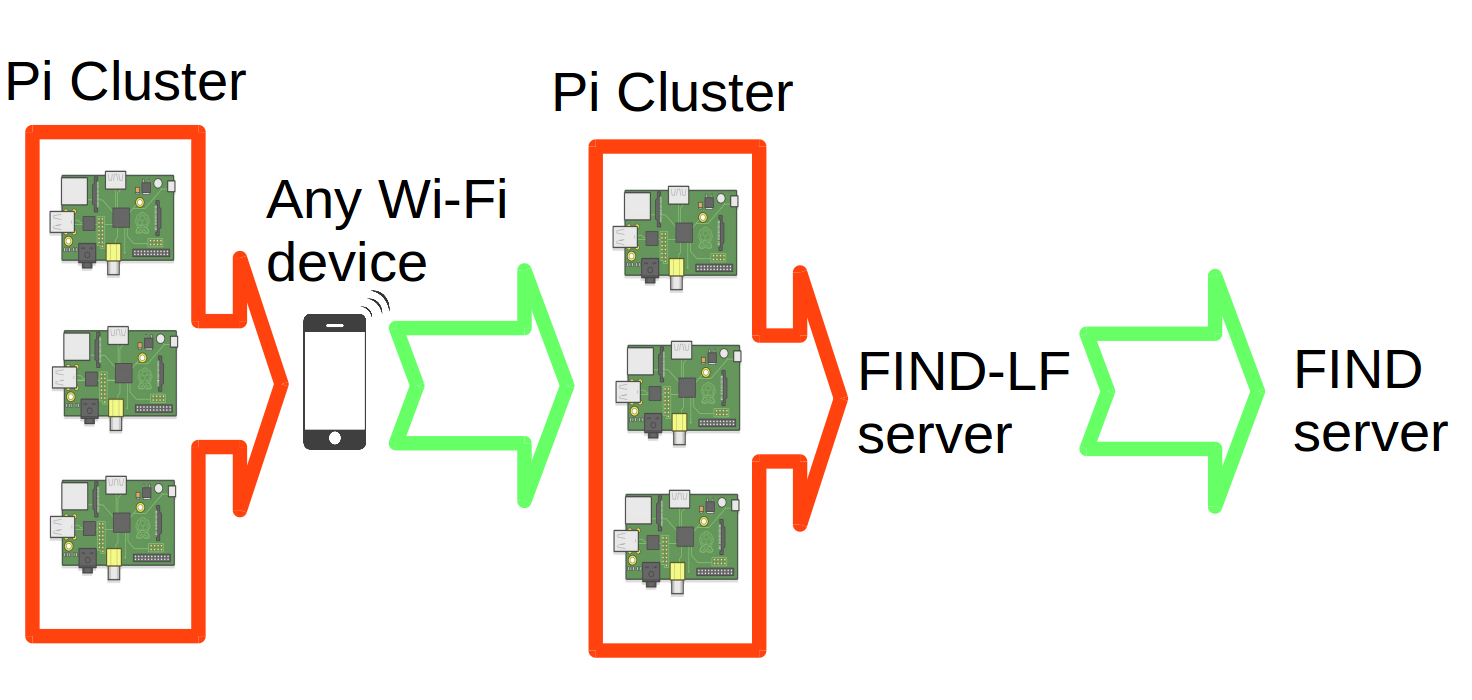
The system uses a network of Raspberry Pis which sniff the WiFi probe requests from WiFi-enabled devices and sends these parcels to a central server which compiles and forwards the fingerprint to the FIND server which then uses machine learning to classify the location based on the unique WiFi fingerprints.
This system does not require being logged into a particular WiFi - it will track any phone/device with WiFi enabled! (Caveat: for iOS devices it will only track if Wi-Fi is associated with a network - any network, though - because of MAC spoofing it uses for security). This system also does not require installing any apps on a phone. Tracking occurs anytime a WiFi chip makes a probe request (which is every minute or so). For this to work, it requires a one-time setup to populate the system with known fingerprints of known locations before it can pinpoint locations (see #3 below).
Note: It may be illegal to monitor networks for MAC addresses, especially on networks that you do not own. Please check your country's laws (for US Section 18 U.S. Code § 2511) - discussion.
How does it work?
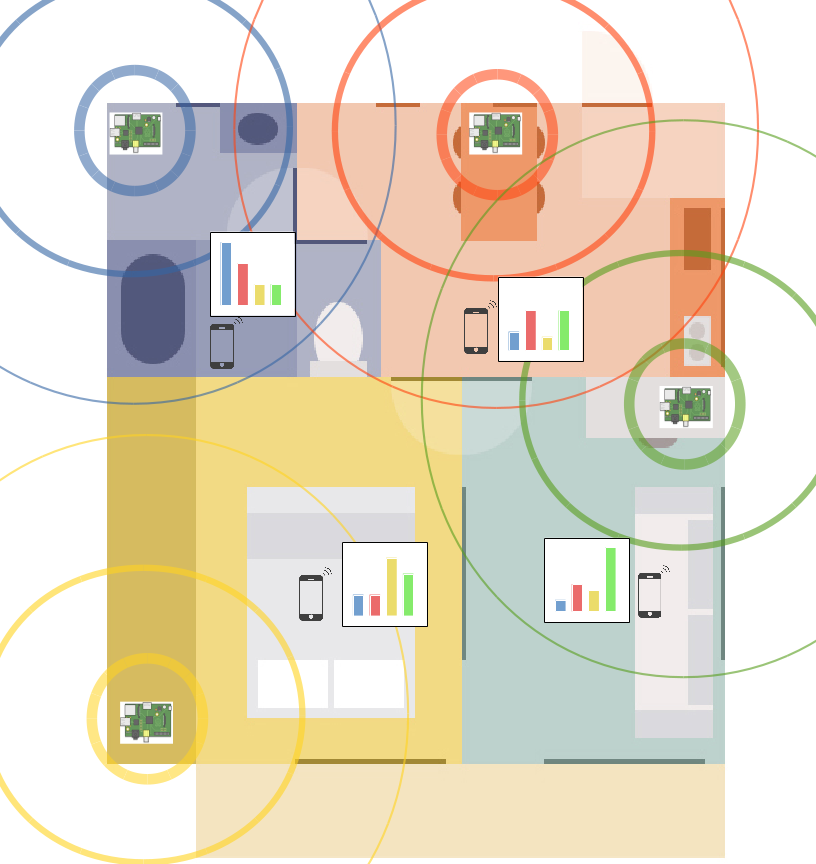
You can setup Raspberry Pis around a house in a way that they will see different signal strengths from various WiFi devices. Each WiFi-enabled device see requests from the various Raspberry Pis with different strengths (see colored bars in Figure below). These graphs are a fingerprint which can be used to uniquely classify the location.
The Raspberry Pi cluster gets probe requests to various WiFi devices, and compiles these and forwards them to a FIND-LF server. This FIND-LF server then sends a compiled fingerprint to a main server. This system uses WiFi probe requests, which occur on any WiFi enabled device, as long as WiFi is enabled. These probe requests generally occur when a scan takes place, which is every few minutes when the phone is being used.
Once sent to the FIND server, the location can be directly determined. For more information about this, see the FIND README.
Requirements
You will need a Raspberry Pi. Ones with built-in Wifi work best:
Raspberry Pi Zero W
Raspberry Pi 3
You will need a monitor-mode enabled wifi USB adapter. There are a number of possible USB WiFi adapters that support monitor mode. Here's a list that are popular:
USB Rt3070 $14
Panda PAU5 $14
Panda PAU6 $15
Panda PAU9 $36
Alfa AWUSO36NH $33
Alfa AWUS036NHA $40
Alfa AWUS036NEH $40
Sabrent NT-WGHU $15 (b/g) only
Namely you want to find a USB adapter with one of the following chipsets: Atheros AR9271, Ralink RT3070, Ralink RT3572, or Ralink RT5572.
Setup
1. Initialize Pis
Install Raspbian lite onto a Pi. If you don't use the pi user, make sure to give the user sudo acess. Then initialize the Raspberry Pi with the following script
sudo sh -c "$(curl -fsSL https://raw.githubusercontent.com/schollz/find-lf/master/node/initialize.sh)"
Alternatively, you can do this using my script for PiBakery.
Also edit /etc/network/interfaces and remove the wpa-conf line for wlan1.
Do this for several Pis and then plug in the WiFi adapter that has "monitor" mode.
to which you'll be asked for the information about your cluster. Choose any group that you want, but remember it, as you will need it to login to the FIND server. For the lf address, you can use the default (a public server) or set it to your own. See find-lf/server/README.md for more information.
To easily find which hostnames/IPs are on your network, use
python3 cluster.py list
Startup the Pi cluster using python3.py cluster start. You can check the status with python3 cluster.py status
3. Classify locations using Pi cluster
After the cluster is up in running, you need to do learning. Take a smart phone and identify its mac address, something like AA:BB:CC:DD:EE:FF. Take your phone to a location. Then activate the find-lf server to do learning either by switching on the find-lf website or running python3 cluster.py -u AA:BB:CC:DD:EE:FF -l location learn.
This is important! Before moving to a new location, make sure to turn off learning by switching to tracking. Activate this on the find-lf server using the the find-lf website or use python3 cluster.py track.
Repeat these steps for as many locations as you want.
4. Track all the cellphones!
Now just go to https://ml.internalpositioning.com and login using your group name to see tracking of all the phones!
You can also track a single phone using https://ml.internalpositioning.com/GROUP/dashboard?user=AA:BB:CC:DD:EE:FF.
License
Copyright 2015-2017 Zack Scholl ([email protected], @zack_118). All rights reserved. Use of this source code is governed by a AGPL license that can be found in the LICENSE file.
Todo
Determine the wlan0/1 of the Wi-Fi adapter automatically (currently it defaults to wlan1, which is right most of the time)
Trang TopGit này là một snapshot — tab "Readme" hiển thị nguyên văn README của repo (đã bỏ link, giữ ảnh). Repo GitHub ở github.com/schollz/find-lf là nguồn chính thức.
schollz/find-lf có bao nhiêu sao?
schollz/find-lf có 1.0k sao GitHub — tải lại trang để xem số mới nhất, hoặc xem trực tiếp github.com/schollz/find-lf. TopGit phản chiếu số sao của GitHub nhưng không cam kết đến từng phút.
schollz/find-lf có phải mã nguồn mở không?
Có — schollz/find-lf phát hành theo license AGPL-3.0, nghĩa là mã nguồn mở để đọc, fork và (tùy license) tái sử dụng. Mã: github.com/schollz/find-lf.
schollz/find-lf có trang demo không?
Dự án có trang chủ ở https://www.internalpositioning.com/plugins/#using-find-without-an-app. Tab "Readme" ở trang này thường có ảnh chụp và hướng dẫn bắt đầu nhanh.
schollz/find-lf là gì?
schollz/find-lf (schollz/find-lf) là dự án Go trên GitHub. Theo mô tả gốc: Track the location of every Wi-Fi device (:iphone:) in your house using Raspberry Pis and FIND
Đọc đầy đủ README ở tab phía trên.
Vẫn đang phân vân về find-lf?
Một cú bấm sẽ gửi câu hỏi kèm trang này cho AI — xem AI nói gì về find-lf.
 /find-lf