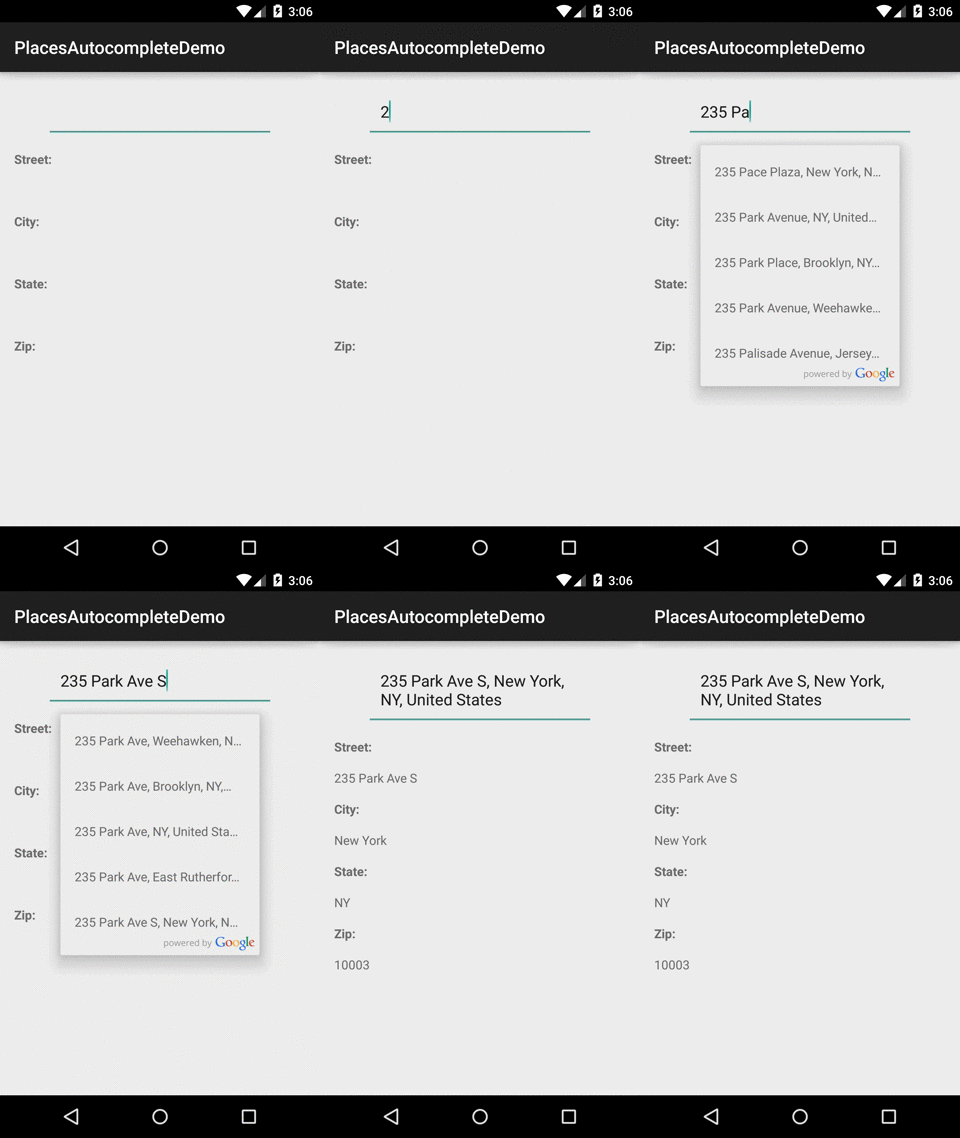
seatgeek/android-PlacesAutocompleteTextView — 276★ trên GitHub (Java). An address-autocompleting text field for Android
Tóm tắt dựng từ metadata GitHub của chính dự án — chưa có bài review TopGit. Trang sẽ tự động cập nhật khi bài review đầy đủ được xuất bản.
VÌ SAO CHƯA CÓ REVIEW
TopGit viết bài đầy đủ cho repo có nhiều sao nhất và được yêu cầu nhiều nhất. Trang này là snapshot trong thời gian chờ — xem README gốc ở tab READ ME.
An AutocompleteTextView that interacts with the Google Maps Places API
to provide location results and caches selected results in a history file for later use
Installing
The PlacesAutocompleteTextView is available from the sonatype snapshots repository.
Use the following in your build.gradle:
Finally, you'll likely want a listener in your UI to know when the user has selected an item from the dropdown:
placesAutocomplete.setOnPlaceSelectedListener(
       new OnPlaceSelectedListener() {
           @Override
           public void onPlaceSelected(final Place place) {
              // do something awesome with the selected place
           }
       }
);
That's it!
Note: you can treat the PlacesAutocompleteTextView the same as any AutocompleteTextView
as it extends from the framework AutocompleteTextView. This means you can use
custom styles with all the standard view properties.
Advanced usage/customization
XML properties
There are a few XML properties that can control some of the functionality of the autocomplete view:
xml property
java method
description
pacv_historyFile
setHistoryManager()
By default, the PlacesAutocompleteTextView will save the history of the selected Place's in a file on the file system. This is great for cases when your user may be typing in the same address in different parts of your UI or across different sessions. If you'd like to simply change the location of the file on the filesystem, you can specify the path string here. By default, the file is stored in the application cache dir under autocomplete/pacv_history.json. If this is a feature that you'd like to disable, you can set the property in xml to @null or call setHistoryManager(null).
pacv_resultType
setResultType()
The Places API can return various types of Places depending on what your application is looking to allow the user to select. By default, the PlacesAutocompleteTextView only requests items of type address, which returns locations associated with a full postal address, public or residential. You can change this to also be geocode for any address or establishment for non-residential addresses
pacv_adapterClass
setAdapter()
If you don't like the default Adapter for displaying the items in the dropdown list (it is pretty basic by default), you can override it by specifying your own in xml (by passing the fully-qualified classname) or using setAdapter(). An important note: because of how the filtering functionality works in the PlacesAutocompleteTextView, your custom adapter must extend AbstractPlacesAutocompleteAdapter.
pacv_clearEnabled
showClearButton()
Show the typicall X button to the right of the PlacesAutocompleteTextView to let user clear the text. Defaults to false. Other methods for controlling the clear button is setImgClearButton() Override the default Clear image and add your own, setOnClearListener() Override the clear listener like what should happen when the X is pressed, default is clear text, showClearButton() show/hide it.
Need more details? PlaceDetails
One of the requirements of our usage of this view was autofilling the payment and shipping addresses
in our checkout flow. By default, the returned Place from the Google Maps API doesn't have the
full set of address components (city, state, postal, street address, etc.) and instead provides it
"conveniently" in a human readable string like "235 Park Ave South, New York, NY 10003". Which is
probably pretty tricky to parse to get the address components. Enter the
"Place Details" API. The
PlacesAutocompleteTextView provides a helper method getDetailsFor(Place, DetailsCallback) that
you can use to easily fetch the extra details that you might need. The PlaceDetails object has a
lot more than just address components as well, so if you're building a complex UI around a location,
this is probably the API call that you'll need to make.
If you have concerns about configuration changes while the details request is in-flight, you can
grab the instance of the PlacesApi from PlacesAutoCompleteTextView#getApi() and manage the
details request yourself.
See the example project for this API in use.
Getting stylish
The PlacesAutocompleteTextView is styleable using the pacv_placesAutoCompleteTextViewStyle
global style attribute. The style should extend from PACV.Widget.PlacesAutoCompleteTextView to
get the default style's parameters, e.g.:
A common thing that you might want to do is bias the place results to the location of the user.
By default, the PlacesAutocompleteTextView will bias the results by a geoip lookup of
the device's IP address. If your app has different requirements for where you want to bias the
address results to or you want more accuracy than a geoip lookup, you can pass an Android
Location into the PlacesAutocompleteTextView using the #setCurrentLocation() method.
You can tweak the biasing radius by using the setRadiusMeters(Long) method.
If you'd like to disable biasing completely, you can setLocationBiasEnabled(false)
Purpose and "why not use Google Play Services?"
This project was started internally before the Places API was released on Google Play Services and
we needed a way to make entering your payment and shipping addresses in our Android app easier. The
reason that this project is still alive and hasn't migrated to Google Play Services is twofold:
It's still impossible to fetch the full PlaceDetails from the Google Play Services
implementation [ref], without
which you cannot get the full breakdown of address components
It handles hooking the UI components to the data for you to accelerate your development
process. With Google Play Services you still need to create your own FilterAdapter,
AutocompleteTextView, etc.
Contributing
Fork this repo and clone your fork
Make your desired changes
Add tests for your new feature and ensure all tests are passing
Commit and push
Submit a Pull Request through Github's interface and a project maintainer will
decide your change's fate.
Note: issues can be submitted via github issues
License
PlacesAutocompleteTextView is released under a BSD 2-Clause License, viewable here
Đọc thêm về seatgeek/android-PlacesAutocompleteTextView ở đâu?
Trang TopGit này là một snapshot — tab "Readme" hiển thị nguyên văn README của repo (đã bỏ link, giữ ảnh). Repo GitHub ở github.com/seatgeek/android-PlacesAutocompleteTextView là nguồn chính thức.
seatgeek/android-PlacesAutocompleteTextView có phải mã nguồn mở không?
Có — seatgeek/android-PlacesAutocompleteTextView phát hành theo license BSD-2-Clause, nghĩa là mã nguồn mở để đọc, fork và (tùy license) tái sử dụng. Mã: github.com/seatgeek/android-PlacesAutocompleteTextView.
seatgeek/android-PlacesAutocompleteTextView có website riêng không?
TopGit chưa ghi nhận URL trang chủ cho seatgeek/android-PlacesAutocompleteTextView. Phần README ở tab phía trên thường có link demo, hoặc xem mô tả GitHub của repo.
seatgeek/android-PlacesAutocompleteTextView dùng license gì?
seatgeek/android-PlacesAutocompleteTextView phát hành theo license BSD-2-Clause. Nên mở file LICENSE trên GitHub để xác nhận — license metadata đôi khi lệch với thực tế dự án.
seatgeek/android-PlacesAutocompleteTextView là gì?
seatgeek/android-PlacesAutocompleteTextView (seatgeek/android-PlacesAutocompleteTextView) là dự án Java trên GitHub. Theo mô tả gốc: An address-autocompleting text field for Android
Đọc đầy đủ README ở tab phía trên.
android-PlacesAutocompleteTextView có đáng để bạn bỏ thời gian?
ChatGPT, Claude và Perplexity đều đọc được trang này. Hỏi thử xem họ nghĩ gì về android-PlacesAutocompleteTextView.

 /android-PlacesAutocompleteTextView