seemoo-lab/frankenstein — 465★ trên GitHub (C). Broadcom and Cypress firmware emulation for fuzzing and further full-stack debugging
Tóm tắt dựng từ metadata GitHub của chính dự án — chưa có bài review TopGit. Trang sẽ tự động cập nhật khi bài review đầy đủ được xuất bản.
VÌ SAO CHƯA CÓ REVIEW
TopGit viết bài đầy đủ cho repo có nhiều sao nhất và được yêu cầu nhiều nhất. Trang này là snapshot trong thời gian chờ — xem README gốc ở tab READ ME.
Frankenstein provides a virtual environment to fuzz wireless firmwares.
Firmwares can be hooked during runtime to extract their current state (i.e., xmitstate through InternalBlue).
Then, they can be re-executed in a virtual environment for fuzzing.
To do so, the firmware image needs to be reassembled to an ELF file that can be
executed with QEMU. The firmware image reassembly is simplified by a web-based UI.
Frankenstein is currently optimized for the CYW20735 Bluetooth evaluation board.
The slightly newer CYW20819 Bluetooth evaluation board is already partially supported.
The port to the CYW20819 evaluation board is required due to CVE-2019-18614,
which prevents further fuzzing of connection states such as music streaming or tethering.
We are working on support for the Samsung Galaxy S10/S20—all of the European S10e/S10/S10+/Note 10/S20 models
feature the same chip.
If you already have symbols for one chip but are missing symbols for a chip that had similar compiler options,
you might find using Polypyus before running BinDiff helpful.
Table of Contents
Getting Started
Basic Setup
Attach Firmware to Host
Reproducing CVEs
Custom Firmware States
Heap Sanitizer
Dependencies
Start Your New Project
Vulnerabilities
ThreadX Heap Exploitation
EIR RCE Exploit (CVE-2019-11516)
LE Heap Overflow (CVE-2019-13916)
Device to Host and Host to Device Buffer Misconfiguration (CVE-2019-18614)
BlueFrag (CVE-2020-0022) - Fixed in the Android February 2020 release. Look at our ACL fuzzer.
Miscellaneous
Master Thesis by Jan Ruge
Basic Setup
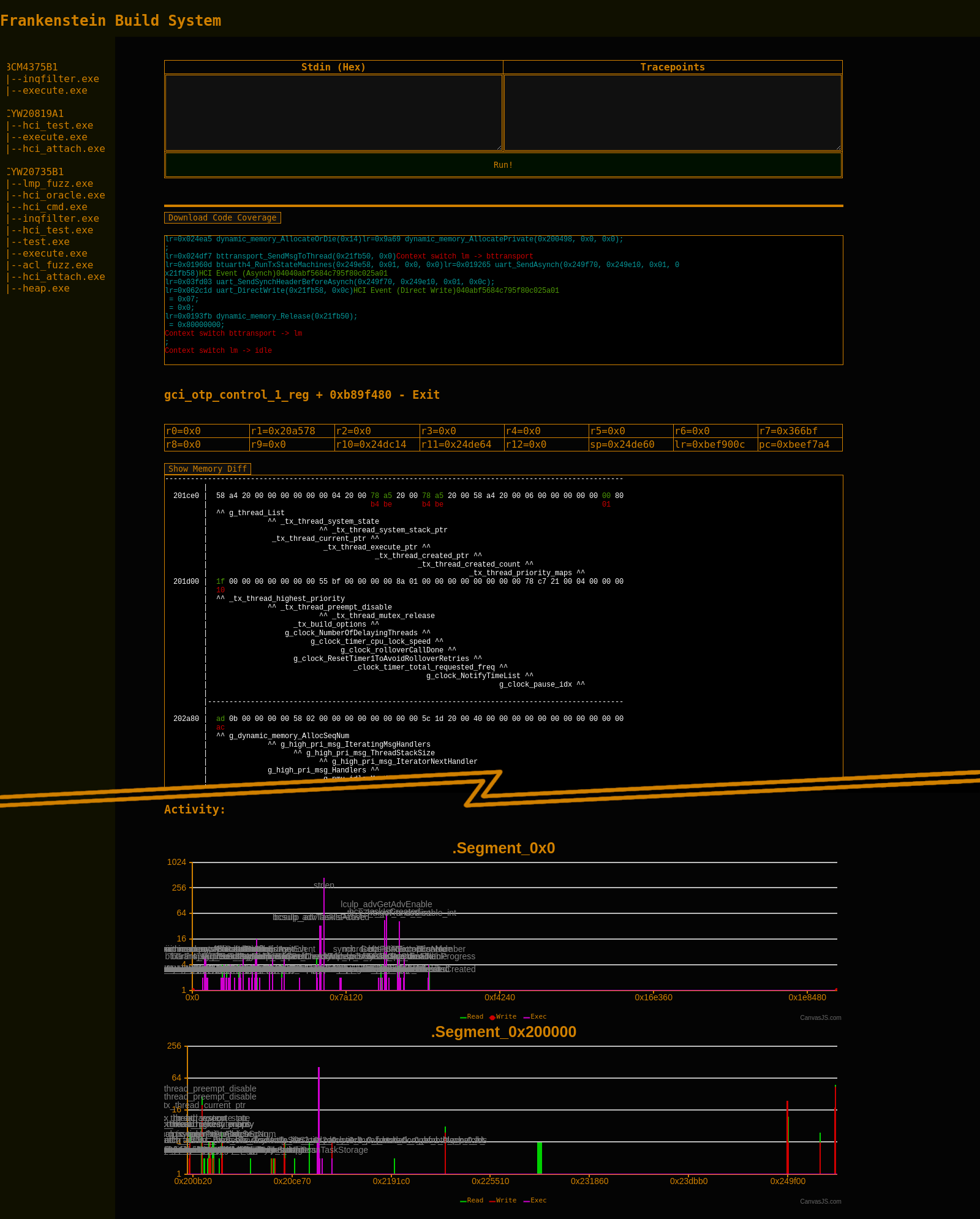
This tool contains a web-based UI to configure the build.
This includes management of symbols and memory dumps.
The Makefile and linker scripts are generated automatically by the build system.
The build system can be launched by the following command and navigating the browser to http://127.0.0.1:8000/
python3 manage.py runserver
The build system already contains symbols and an initial memory dump. You can browse through the available projects
and the dump without having the actual hardware, IDA Pro or Ghidra database, etc. Symbols are truncated to the first 1k
symbols, so do not worry if something you know does not show up in the list immediately.
Each firmware version is located in a different project stored in projects.
A project contains the file project.json, which holds the symbol names and the memory layout including memory dumps.
The available symbols can be used to generate patches in C as well as for firmware emulation.
To build all patches and emulators for the CYW20735 evaluation board run:
make -C projects/CYW20735B1
In general, having the project built is sufficient to run emulation with QEMU. However, for fuzzing it can
be quite interesting to hold the firmware at a different state and continue fuzzing from there. So, if you currently
do not have any of our supported hardware, you can skip the xmitstate step later.
After rebuilding the project using make -C projects/CYW20735B1, the firmware state can be emulated, until the Idle thread is entered.
For this, execute:
qemu-arm projects/CYW20735B1/gen/execute.exe
Or execute it from the web frontend and get even more insights:
Attaching the Firmware to a Host
The basic execute.exe ELF file does not communicate to the outside world. Thus, it terminates in the
Idle thread. However, for fuzzing the firmware, it needs to be attached to a real host and obtain random
"wireless" inputs.
We provide an additional patch in hci_attach.exe that abstracts the calling conventions for the Bluetooth Core Scheduler (BCS).
The BCS normally takes inputs from the hardware registers that contain decoded packets from the physical layer.
We replace the invocation of the interrupt handler bluetoothCoreInt_C that calls the BCS every 312.5µs (1/2 Bluetooth clock cycle).
This interrupt handler is now reading data from standard input (STDIN) of the Linux host.
You can feed arbitrary inputs, i.e., data from /dev/urandom.
Note that hci_attach.exe also calls the btattach command on the host, which is part of the Linux Bluez Bluetooth
stack. Once you run this file, your host will have a new Bluetooth device. You can list the current devices
with hciconfig. The hook to pass UART data from the emulated device to the Linux host is installed in the
firmware functions uart_directWrite and similar functions.
Depending on the host's exact behavior, you might need to reset the chip immediately after starting QEMU.
Otherwise, emulation will get stuck or segfault. On a current (September 2019) Debian testing, this is not
done automatically by the host and can be done manually as follows:
After successful reset, the emulation keeps running, which means that you will see a lot of output within
short time on the terminal that started the hci_attach.exe.
Now you can start actions on the host that cause interaction with the emulated Bluetooth firmware.
For example, you can scan for Bluetooth LE devices:
hcitool -i hci1 lescan
If you open Wireshark while doing so, you will notice a lot of weird and invalid packets. Nonetheless,
the scanning output will show a lot of devices with random addresses within short time,
with some of these even returning mal-formatted names.
Reproducing CVEs
To trigger CVE-2019-11516, run hcitool -i hci1 scan and wait a couple of seconds to minutes.
For debugging purposes, our heap sanitizer is currently writing 0x42 to released memory.
Now let's trigger CVE-2019-13916. As this vulnerability is within parsing of BLE PDUs,
all you need to do is to successfully establish a connection to another LE device. If you
connect to random addresses, this will succeed at some point in time. Usually, this takes
a couple of minutes and in some cases the emulator crashes instead and you need to restart
the emulation. Be patient!
while true; do hcitool -i hci1 lecc ca:fe:ba:be:13:37; done
To dump a custom state, the most important patch is patch/xmit_state.h.
It generates re-executable firmware states.
It is used in a custom InternalBlue extension internalBlueMod.py.
If you are running on a native Linux and want to access the raw HCI device,
you need superuser rights.
(sudo) python3 internalBlueMod.py
In this extension, we can run the following command to generate a re-executable state:
> xmitstate target_function
Depending on the target function, this might crash sometimes. Just try again.
Once you successfully dumped a state, InternalBlue will finish with
[*] Received fuill firmware state
If the firmware crashes afterwards, you can ignore this.
Now, reload the web UI running on http://127.0.0.1:8000/.
It will list your new dump in the Segment Groups view, i.e., internalBlue_09.24.2019_18.32.09.
The most recent dump will automatically be set to the Active state. You can now build the project
again.
If you were running InternalBlue with sudo, you might need to adjust access rights to the
generated state. To do so, run:
Now you will get detailed output about heap violations, i.e., caused by memcpy and the function
which called it. Depending on what you debug, you might need to adjust the definitions in patch/heap_sanitizer.c.
Important Notes & Dependencies
Frankenstein depends on InternalBlue. Projects must be named by the chip descriptions in the InternalBlue
firmware files. For example, internalblue/fw/fw_0x4208.py contains the firmware for the CYW20735 evaluation
board and contains the identifier FW_NAME = "CYW20735B1". Thus, the Frankenstein project name is CYW20735B1.
For QEMU, you need to install the qemu-user package.
Compilation of the project requires gcc-arm-none-eabi.
Trang TopGit này là một snapshot — tab "Readme" hiển thị nguyên văn README của repo (đã bỏ link, giữ ảnh). Repo GitHub ở github.com/seemoo-lab/frankenstein là nguồn chính thức.
seemoo-lab/frankenstein có bao nhiêu sao?
seemoo-lab/frankenstein có 465 sao GitHub — tải lại trang để xem số mới nhất, hoặc xem trực tiếp github.com/seemoo-lab/frankenstein. TopGit phản chiếu số sao của GitHub nhưng không cam kết đến từng phút.
seemoo-lab/frankenstein có những chủ đề gì?
GitHub topics của seemoo-lab/frankenstein: "arm", "bluetooth", "broadcom", "cypress", "heap", "qemu", "threadx". TopGit xếp repo vào nhóm mã nguồn mở.
seemoo-lab/frankenstein có phải mã nguồn mở không?
Có — seemoo-lab/frankenstein phát hành theo license Apache-2.0, nghĩa là mã nguồn mở để đọc, fork và (tùy license) tái sử dụng. Mã: github.com/seemoo-lab/frankenstein.
seemoo-lab/frankenstein có website riêng không?
TopGit chưa ghi nhận URL trang chủ cho seemoo-lab/frankenstein. Phần README ở tab phía trên thường có link demo, hoặc xem mô tả GitHub của repo.
seemoo-lab/frankenstein còn đang phát triển không?
Commit gần nhất trên seemoo-lab/frankenstein là 2.5 năm trước (theo timestamp GitHub). Repo có 66 fork — một chỉ báo về mức độ quan tâm của cộng đồng.
Đọc đầy đủ README ở tab phía trên.
Vẫn đang phân vân về frankenstein?
Một cú bấm sẽ gửi câu hỏi kèm trang này cho AI — xem AI nói gì về frankenstein.
 /frankenstein