Là một dự án mã nguồn mở, seemoo-lab/owl đã đạt 1.5k sao trên GitHub, ngôn ngữ C. An open Apple Wireless Direct Link (AWDL) implementation written in C
Tóm tắt dựng từ metadata GitHub của chính dự án — chưa có bài review TopGit. Trang sẽ tự động cập nhật khi bài review đầy đủ được xuất bản.
VÌ SAO CHƯA CÓ REVIEW
TopGit viết bài đầy đủ cho repo có nhiều sao nhất và được yêu cầu nhiều nhất. Trang này là snapshot trong thời gian chờ — xem README gốc ở tab READ ME.
Open Wireless Link (OWL) is an open implementation of the Apple Wireless Direct Link (AWDL) ad hoc protocol for Linux and macOS written in C and part of the Open Wireless Link project.
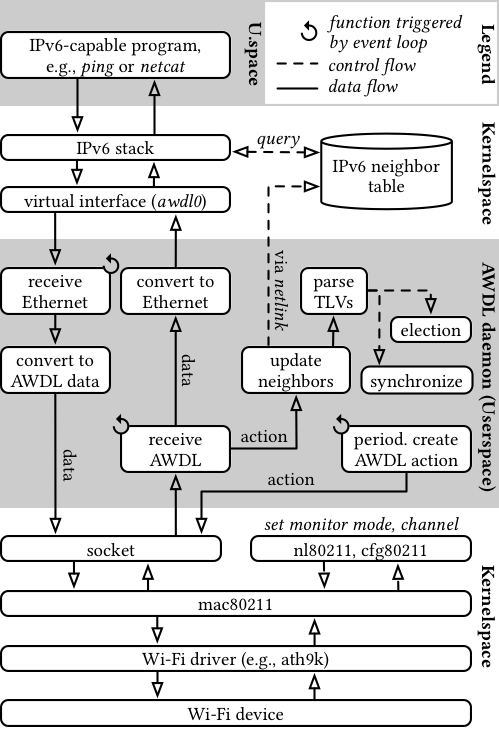
OWL runs in user space and makes use of Linux’s Netlink API for Wi-Fi specific operations such as channel switching and to integrate itself in the Linux networking stack by providing a virtual network interface such that existing IPv6-capable programs can use AWDL without modification.
You can use OWL to in combination with OpenDrop to enable Apple AirDrop functionality on Linux-based systems such as a Raspberry Pi 3.
Disclaimer
OWL is experimental software and is the result of reverse engineering efforts by the Open Wireless Link project.
Therefore, it does not support all features of AWDL or might be incompatible with future AWDL versions.
OWL is not affiliated with or endorsed by Apple Inc. Use this code at your own risk.
Requirements
Wi-Fi card with active monitor mode. To use OWL, you will need a Wi-Fi card supporting active monitor mode with frame injection. We recommend the Atheros AR9280 chip (IEEE 802.11n) which we used to develop and test this code. Configurations that do not support active monitor mode, i.e., ACK received frames, might suffer from throughput degradation because the sender will re-transmit each frame up to 7 times as per the IEEE 802.11 standard. Have a look at issue #9 if you want to find out whether your card meets the requirements.
No support for virtual machines and WSL. OWL requires direct access to the Wi-Fi card which means that virtualized environments (except with USB or PCIe passthrough) and Windows Subsystem for Linux (WSL, see issue #8), are not supported.
OWL requires libpcap for frame injection and reception, libev for event handling, and libnl (Linux only) for interactions with the system's networking stack which have to be installed on the target system.
The project is build using CMake. To build the project, simply clone this repository in <OWLDIR> and run
cd <OWLDIR>
git submodule update --init
mkdir build
cd build
cmake ..
make
sudo make install
Use
Simply run
sudo owl -i <WLAN_IFACE>
You can specify a wireless channel using the -c parameter. Available channels are 6, 44 and 149. Note that only some of these channels may be available for use in your country based on your regulatory domain. OWL will warn you if it is unable to use the specified channel, in which case you will only be able to monitor the network.
On Linux, you can check which channels are available for use in your country using iw list in Frequencies section. A channel is not available if it is listed as disabled or no IR.
You may increase the log level with -v and -vv and daemonize the program with -D. For other options, have a look at daemon/owl.c.
Warning: do not use the -N flag in setups without Nexmon such as this as it will likely cause several problems.
When started, OWL creates a virtual network interface awdl0 with a link-local IPv6 address. Discovered AWDL peers are automatically added (and removed) to (and from) the system's neighbor table. Run ip n to see a list of all current neighbors.
Architecture
The following figure shows the core structure of OWL.
Code Structure
We provide a coarse structure of the most important components and files to facilitate navigating the code base.
daemon/ Contains the active components that interact with the system.
core.{c,h} Schedules all relevant functions on the event loop.
io.{c,h} Platform-specific functions to send and receive frames.
netutils.{c,h} Platform-specific functions to interact with the system's networking stack.
owl.c Contains main() and sets up the core based on user arguments.
googletest/ The runtime for running the tests.
radiotap/ Library for parsing radiotap headers.
src/ Contains platform-independent AWDL code.
channel.{c,h} Utilities for managing the channel sequence.
election.{c,h} Code for running the election process.
frame.{c,h} The corresponding header file contains the definitions of all TLVs.
peers.{c,h} Manages the peer table.
rx.{c,h} Functions for handling a received data and action frames including parsing TLVs.
schedule.{c,h} Functions to determine when and which frames should be sent.
tx.{c,h} Crafting valid data and action frames ready for transmission.
version.{c,h} Parse and create AWDL version numbers.
wire.{c,h} Mini-library for safely reading and writing primitives types from and to a frame buffer.
tests/ The actual test cases for this repository.
README.md This file.
Current Limitations/TODOs
OWL uses static election metric and counter values, so it either takes part as a slave (low values) or wins the election (high values). See AWDL_ELECTION_METRIC_INIT and AWDL_ELECTION_COUNTER_INIT and in include/election.h.
The channel sequence does not adjust itself automatically to current network load and/or other triggers. This would require a better understanding of Apple's implementation. Currently, the channel sequence is fixed when initializing. See awdl_chanseq_init_static() in src/state.{c,h}.
OWL does not allow a concurrent connection to an AP. This means, that when started, the Wi-Fi interface exclusively uses AWDL. To work around this, OWL could create a new monitor interface (instead of making the Wi-Fi interface one) and adjust its channel sequence to include the channel of the AP network.
Our Papers
Milan Stute, Sashank Narain, Alex Mariotto, Alexander Heinrich, David Kreitschmann, Guevara Noubir, and Matthias Hollick. A Billion Open Interfaces for Eve and Mallory: MitM, DoS, and Tracking Attacks on iOS and macOS Through Apple Wireless Direct Link.28th USENIX Security Symposium (USENIX Security ’19), August 14–16, 2019, Santa Clara, CA, USA. Link
Milan Stute, David Kreitschmann, and Matthias Hollick. One Billion Apples’ Secret Sauce: Recipe for the Apple Wireless Direct Link Ad hoc Protocol.The 24th Annual International Conference on Mobile Computing and Networking (MobiCom '18), October 29–November 2, 2018, New Delhi, India. ACM. doi:10.1145/3241539.3241566
Milan Stute, David Kreitschmann, and Matthias Hollick. Demo: Linux Goes Apple Picking: Cross-Platform Ad hoc Communication with Apple Wireless Direct Link.The 24th Annual International Conference on Mobile Computing and Networking (MobiCom '18), October 29–November 2, 2018, New Delhi, India. ACM. doi:10.1145/3241539.3267716
Trang TopGit này là một snapshot — tab "Readme" hiển thị nguyên văn README của repo (đã bỏ link, giữ ảnh). Repo GitHub ở github.com/seemoo-lab/owl là nguồn chính thức.
seemoo-lab/owl có bao nhiêu sao?
seemoo-lab/owl có 1.5k sao GitHub — tải lại trang để xem số mới nhất, hoặc xem trực tiếp github.com/seemoo-lab/owl. TopGit phản chiếu số sao của GitHub nhưng không cam kết đến từng phút.
seemoo-lab/owl có phải mã nguồn mở không?
Có — seemoo-lab/owl phát hành theo license GPL-3.0, nghĩa là mã nguồn mở để đọc, fork và (tùy license) tái sử dụng. Mã: github.com/seemoo-lab/owl.
seemoo-lab/owl còn đang phát triển không?
Commit gần nhất trên seemoo-lab/owl là 2.6 năm trước (theo timestamp GitHub). Repo có 109 fork — một chỉ báo về mức độ quan tâm của cộng đồng.
seemoo-lab/owl dùng license gì?
seemoo-lab/owl phát hành theo license GPL-3.0. Nên mở file LICENSE trên GitHub để xác nhận — license metadata đôi khi lệch với thực tế dự án.
seemoo-lab/owl là gì?
seemoo-lab/owl (seemoo-lab/owl) là dự án C trên GitHub. Theo mô tả gốc: An open Apple Wireless Direct Link (AWDL) implementation written in C
seemoo-lab/owl viết bằng ngôn ngữ gì?
seemoo-lab/owl chủ yếu viết bằng C. Trường "language" của GitHub dựa trên phần lớn byte ở nhánh mặc định.
Đọc đầy đủ README ở tab phía trên.
Chưa chắc owl có hợp với bạn?
Để ChatGPT, Claude hoặc Perplexity tìm hiểu giúp — bấm bên dưới và xem AI nói gì về owl.