serverless/serverless-graphql

serverless/serverless-graphql — dự án mã nguồn mở — đang có 2.7k sao GitHub. Serverless GraphQL Examples for AWS AppSync and Apollo
Tóm tắt dựng từ metadata GitHub của chính dự án — chưa có bài review TopGit. Trang sẽ tự động cập nhật khi bài review đầy đủ được xuất bản.
TopGit viết bài đầy đủ cho repo có nhiều sao nhất và được yêu cầu nhiều nhất. Trang này là snapshot trong thời gian chờ — xem README gốc ở tab READ ME.
Snapshot
Cộng tác viên hàng đầu
Xem cộng tác viên hàng đầu
📦 Archived - This repository is archived and preserved for reference only. No updates, issues, or pull requests will be accepted. If you have questions, please reach out to our support team.
Introduction
Part 1: Running a scalable & reliable GraphQL endpoint with Serverless
Part 2: AppSync Backend: AWS Managed GraphQL Service
Part 3: AppSync Frontend: AWS Managed GraphQL Service
Serverless GraphQL
This starter kit is an opinionated set of tools combined to help you get started building a Serverless application with a GraphQL endpoint and deploy them to production in minutes.
This example uses the following technologies:
-
Frontend
- AWSAppSyncClient
- Apollo Client 2.0
- React App
- GraphiQL
- GraphQL Playground (GraphiQL replacement)
- Netlify Integration
-
Backend
- Serverless
- AWS AppSync DynamoDB, Elasticsearch and Lambda Integrations
- AWS Lambda & AWS API Gateway
- Apollo Server Lambda 2.0
- DynamoDB
- RDS (MySQL, PostGres and Aurora)
- REST API
- Plugins
- Serverless Appsync Plugin
- Serverless Webpack
- Serverless Offline
- Serverless DynamoDB Local
- Serverless DynamoDB Client
- Serverless Finch
-
Other Utilities and Integrations
- Faker
- Prettier
- Apollo Tracing
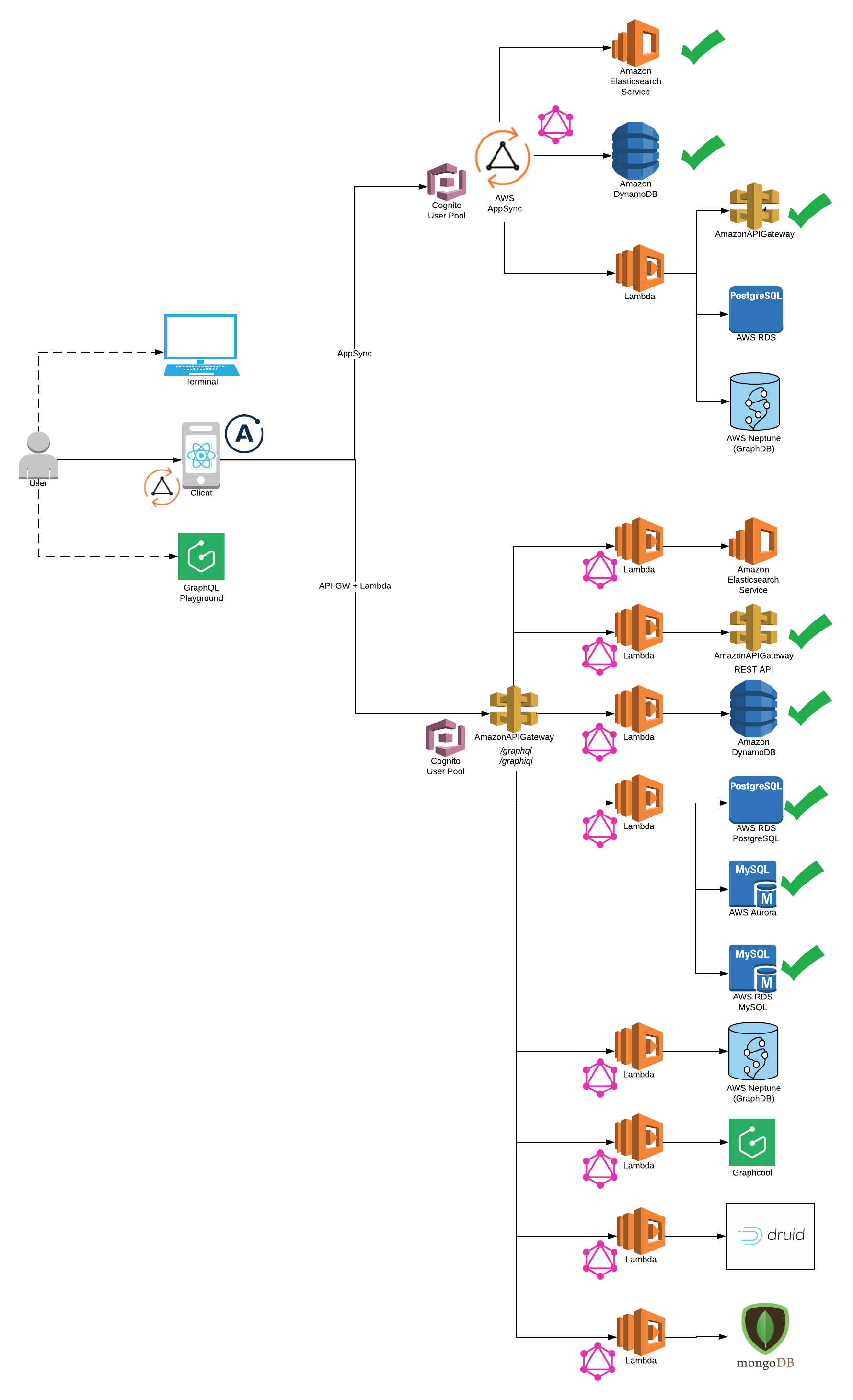
System Architecture
Quick Setup
You need to have Node 6 or higher installed.
npm install -g serverless
npm install -g yarn
npm install -g netlify-cli
Install Dependencies.
yarn install
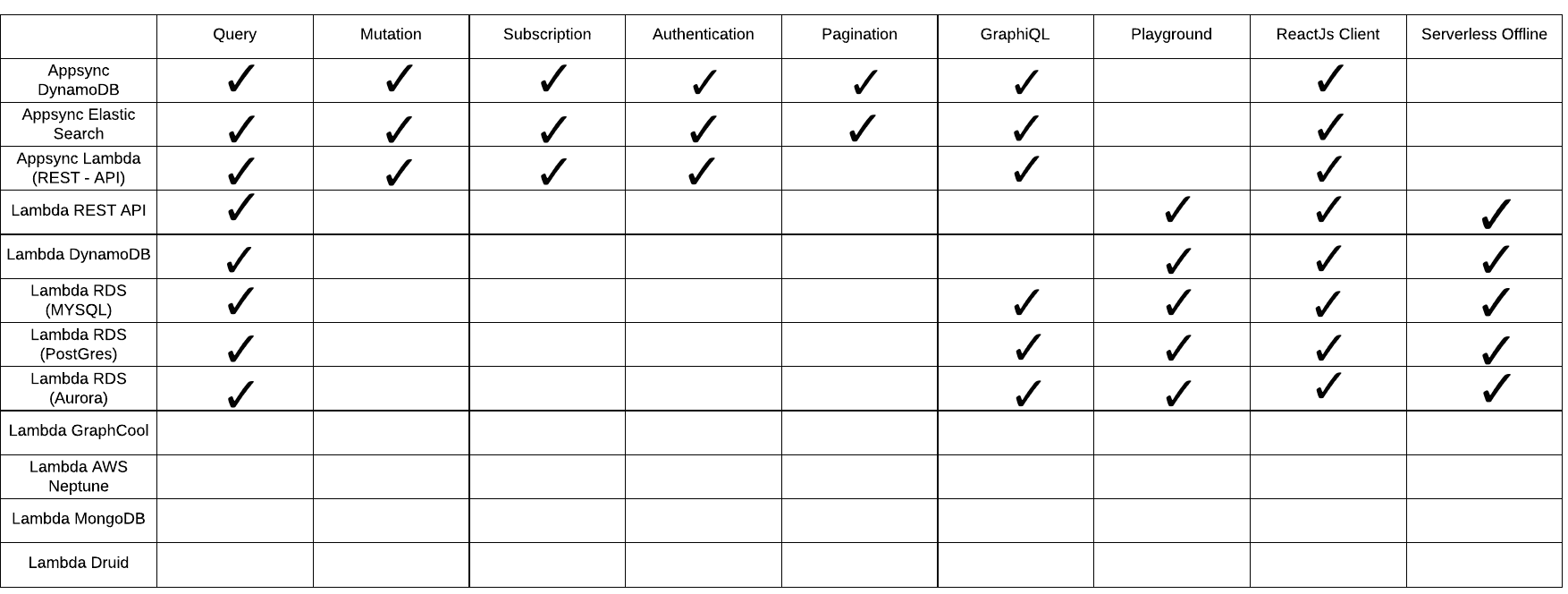
Feature Support in this repository
Quick Start (Serverless Offline)
Please note: AWS CLI is required to be installed on your system
- Select Backend
-
AWS Appsync (Serverless Offline does not support Appsync at this point)
- AWS DynamoDB
- AWS ElasticSearch
- AWS Lambda
-
Lambda Backend (Serverless Offline Supported)
- Twitter Rest API
cd app-backend/rest-api
yarn start
Generate your Consumer Key and Secret Key for a Twitter App and update config
-
DynamoDB
cd app-backend/dynamodb yarn start -
RDS
cd app-backend/rds
yarn start
- Twitter Rest API
- Start FrontEnd (Apollo Client or Appsync Client)
-
For Appsync Backend please select Appsync Client Integration:
cd app-client/appsync-client/ yarn start -
For Lambda Backend please select Apollo Client Integration:
cd app-client/apollo-client/
yarn start
Also, please make sure GraphQL endpoint is configured correctly in config/security.env.local to run client on local.
- Start GraphiQL
http://localhost:4000/graphiql
- Start GraphQL Playground (GraphiQL replacement - coming soon)
http://localhost:4000/playground
rest-api and dynamodb backends route GET and POST to the same /graphql endpoint handler
http://localhost:4000/graphql
- Sample Query for GraphiQL, Playground or GraphQL
{
  getUserInfo(handle: "Madalyn61") {
    name
    tweets {
      items {
        retweeted
        retweet_count
        favorited
        tweet
      }
    }
    topTweet {
      retweeted
      retweet_count
      favorited
    }
  }
}
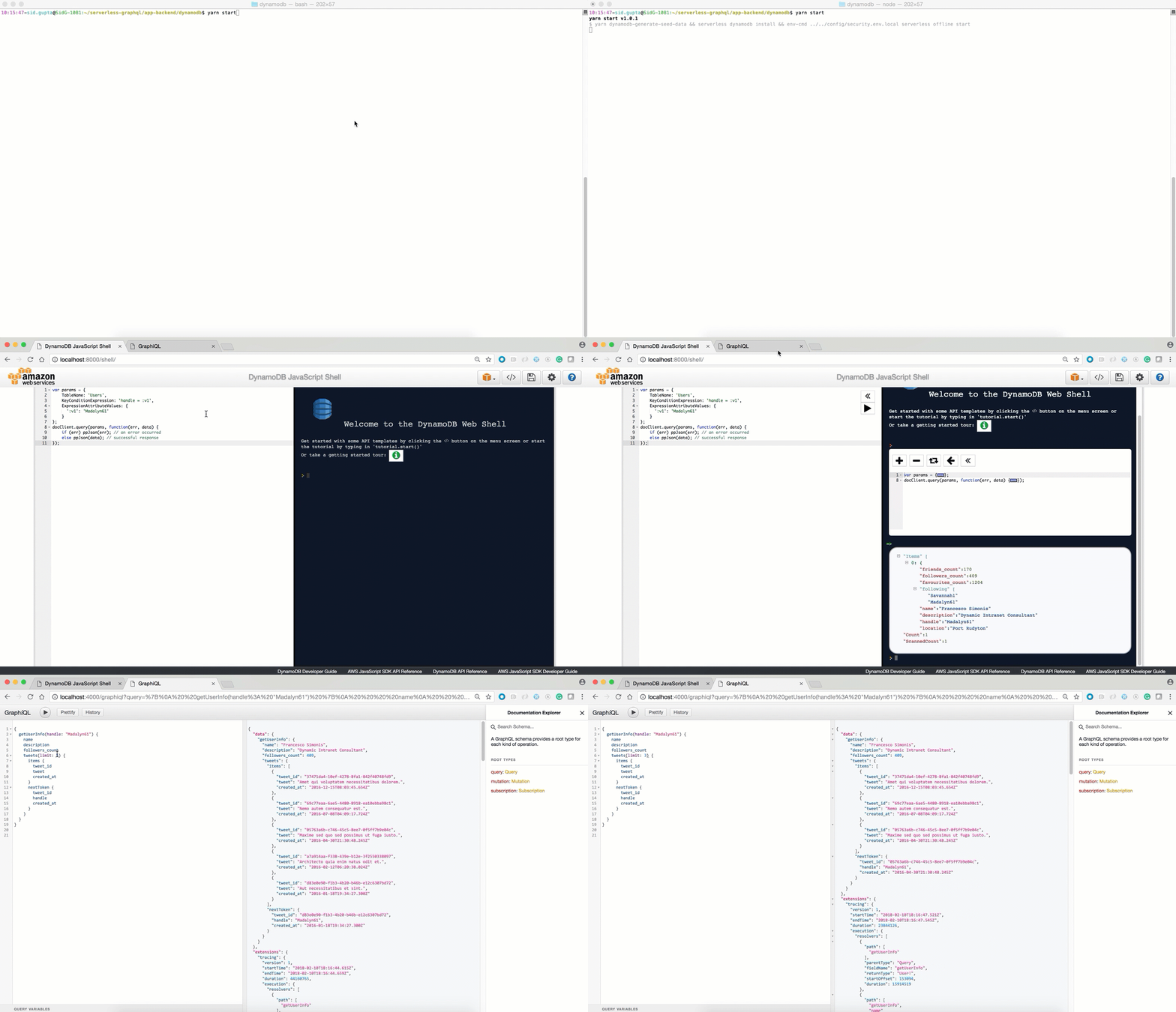
If you've followed me this far, DynamoDB will now be available and running on your local machine at http://localhost:8000/shell:
Setup for Production (Deploy resources to AWS)
Configure your AWS keys. Here you can find a 2min walkthrough how to do retrieve the keys.
sls config credentials --provider aws --key <your_aws_access_key> --secret <your_aws_secret_key>

You need to make sure you have access to your deployed lambda functions.
- Select Backend
- AWS Appsync (Supported by Serverless-AppSync-Plugin)
Note Please make sure latest serverless package is installed npm install -g serverless@latest
To use aws appsync you will need to create cognito user pool to authenticate the API Reference
- AWS DynamoDB
    cd app-backend/appsync/dynamodb
    yarn deploy-prod
    yarn deploy-appsync

- AWS ElasticSearch

    cd app-backend/appsync/dynamo-elasticsearch-lambda
    yarn deploy-prod
    yarn deploy-appsync

- AWS Lambda

    cd app-backend/appsync/lambda
    yarn deploy-prod
    yarn deploy-appsync
-
Lambda Backend (Serverless Offline Supported)
-
Twitter Rest API
cd app-backend/rest-api yarn deploy-prod -
DynamoDB
cd app-backend/dynamodb yarn deploy-prod -
RDS
-
Create RDS Instance. For example - PostGres Tutorial
-
Please make sure connectivity to production RDS instance works (For example: test via razersql)
-
Edit the
config/security.env.prodfile and replace theDATABASE_URLvariable with your amazon rds endpoint (eg: postgres://${username}:{password}@${endpoint):5432/${dbName}). -
Run the deployment command
cd app-backend/rds
yarn deploy-prod
-
-
- Config: Get your /graphql POST endpoint as shown below and use it in config/security.env.prod NOTE Please remove all quotes and <> and place only your POST endpoint url otherwise you will get 405 method not allowed error on POST to your endpoint

- Select Frontend (apollo-client or appsync-client)
-
Note:
- For lambda please use apollo-client
- For appsync backend please use appsync-client
- Please note that backend is deployed before deploying frontend.
- You can deploy the client on AWS S3 or Netlify.
-
AWS S3
-
First you will need to choose custom s3 bucket name for client. For ex: s3-firstname-serverless-graphql. Please note that bucket name must be unique across all aws buckets.
-
Now, in
app-client/<client-name>/serverless.ymledit thecustom.client.bucketNameproperty and replace it the bucket name above. -
Now, in
app-client/<client-name>/package.jsonedit thehomepageproperty withhttps://${yourBucketName}.s3-website-us-east-1.amazonaws.com. For ex: https://s3-bucketname-serverless-graphql.s3-website-us-east-1.amazonaws.com -
Run the deployment command
cd app-client/<client-name>/ yarn deploy-s3 # Your deployment url will be printed on the console -
Your deployment url will be : https://s3.amazonaws.com/[bucket-name]/index.html
-
-
Netlify
-
First you will need to create a new account. Please see https://www.netlify.com/docs/cli/ for details.
-
Remove homepage property in
app-client/<client-name>/package.json. This property is not required while deploying to netlify but is required for aws s3 deployment. -
The first time you use the cli tool, you’ll be asked to authenticate through the browser. After you authenticate netlify will store an access token in a global ~/.netlify/config
-
Run deployment command
cd app-client/<client-name>/ yarn deploy-netlify- ? No site id specified, create a new site (Y/n) Y
- ? Path to deploy? (current dir) build
-
Your deployment url will be printed on the console
-
Example: Appsync Backend Integration
- GraphQL Schema:
type Mutation {
	# Create a tweet for a user
	# consumer keys and tokens are not required for dynamo integration
	createTweet(
		tweet: String!,
		consumer_key: String,
		consumer_secret: String,
		access_token_key: String,
		access_token_secret: String,
		created_at: String!
	): Tweet!

	# Delete User Tweet
	deleteTweet(
	    tweet_id: String!,
	    consumer_key: String,
        consumer_secret: String,
        access_token_key: String,
        access_token_secret: String
    ): Tweet!

	# Retweet existing Tweet
	reTweet(
	    tweet_id: String!,
	    consumer_key: String,
        consumer_secret: String,
        access_token_key: String,
        access_token_secret: String
    ): Tweet!

	# Update existing Tweet
	updateTweet(tweet_id: String!, tweet: String!): Tweet!

    # Create user info is available in dynamo integration
	updateUserInfo(
		location: String!,
		description: String!,
		name: String!,
		followers_count: Int!,
		friends_count: Int!,
		favourites_count: Int!,
		followers: [String!]!
	): User!
}

type Query {
	meInfo(consumer_key: String, consumer_secret: String): User!
	getUserInfo(handle: String!, consumer_key: String, consumer_secret: String): User!

	# search functionality is available in elasticsearch integration
	searchAllTweetsByKeyword(keyword: String!): TweetConnection
}

type Subscription {
	addTweet: Tweet
		@aws_subscribe(mutations: ["createTweet"])
}

type Tweet {
	tweet_id: String!
	tweet: String!
	retweeted: Boolean
	retweet_count: Int
	favorited: Boolean
	created_at: String!
}

type TweetConnection {
	items: [Tweet!]!
	nextToken: String
}

type User {
	name: String!
	handle: String!
	location: String!
	description: String!
	followers_count: Int!
	friends_count: Int!
	favourites_count: Int!
	followers: [String!]!
	topTweet: Tweet
	tweets(limit: Int!, nextToken: String): TweetConnection

	# search functionality is available in elasticsearch integration
    searchTweetsByKeyword(keyword: String!): TweetConnection
}

schema {
	query: Query
	mutation: Mutation
	subscription: Subscription
}
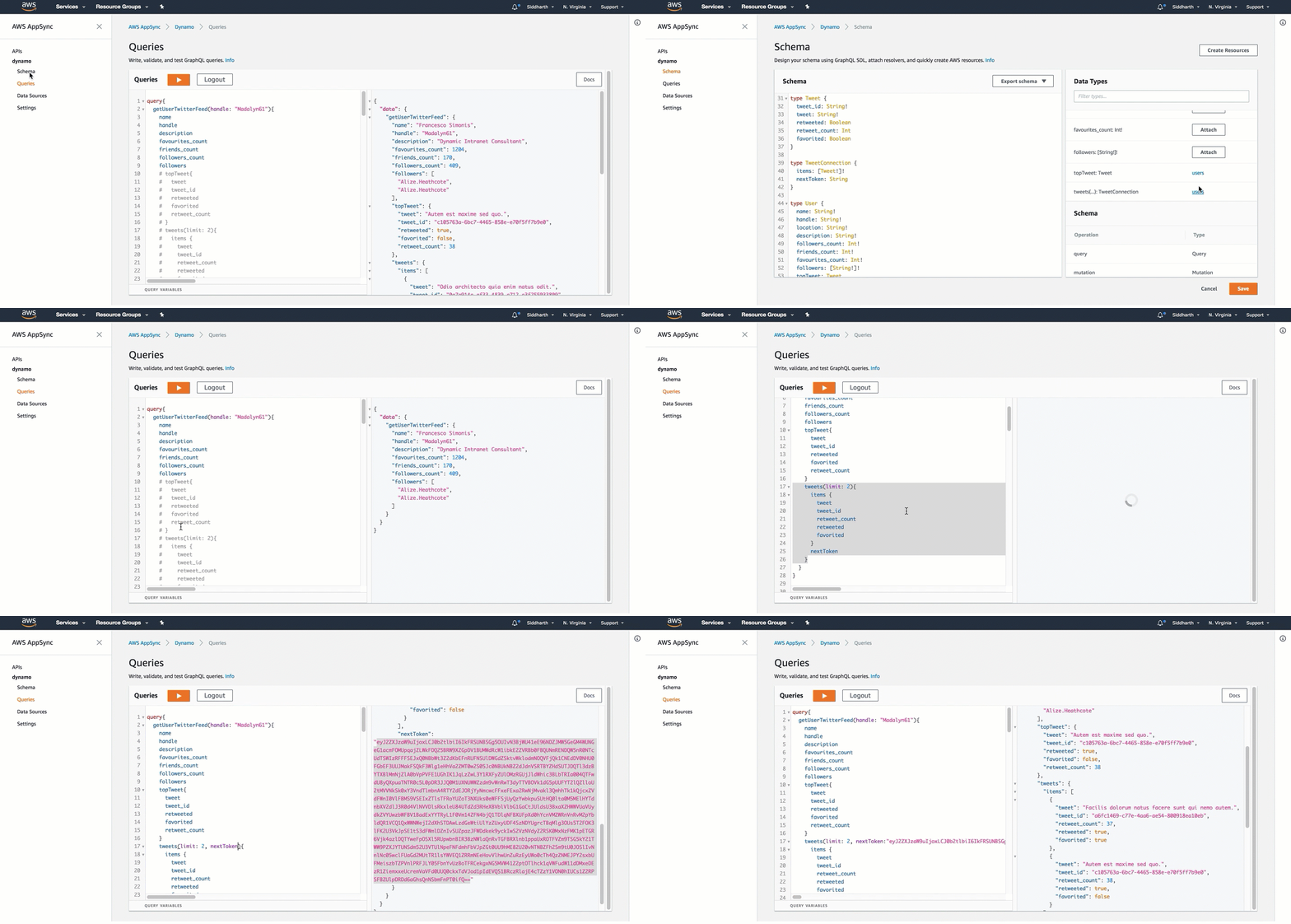
- GraphQL Query:
Directory Layout
.
├── /app-client/                             # React JS Client Integrations
│   ├── /appsync-client                         # Appsync Client Itegrations
│   │   ├── /public/                            # front End Utils
│   │   │   ├── /index.html                     # main html file to render react app
│   │   │   ├── /...                            # front end metadata
│   │   ├── /src/                               # react app code logic
│   │   │   ├── /components/                    # react components
│   │   │   ├── /App.js                         # react application logic
│   │   │   ├── /index.js                       # react dom render
│   │   │   ├── /aws-exports.js                 # AWS Authentication
│   │   │   ├── /...                            # etc.
│   │   ├── /package.json                       # react app dependencies
│   │   ├── /serverless.yml                     # Serverless yaml for AWS deployment
│   ├── /apollo-client                       # Apollo Client Itegrations
│   │   ├── /public/                            # front End Utils
│   │   │   ├── /index.html                     # main html file to render react app
│   │   │   ├── /...                            # front end metadata
│   │   ├── /src/                               # react app code logic
│   │   │   ├── /components/                    # react components
│   │   │   ├── /App.js                         # react application logic
│   │   │   ├── /index.js                       # react dom render
│   │   │   ├── /...                            # etc.
│   │   ├── /package.json                       # react app dependencies
│   │   ├── /serverless.yml                     # Serverless yaml for AWS deployment
├── /app-backend/                            # Server Backend Integrations
├   ├── /appsync/                               # AWS Appsync Integrations
├   ├   ├── /dynamodb/*                         # AWS Appsync Dynamodb
├   ├   ├── /elasticsearch/*                    # AWS Appsync Elasticsearch
├   ├   ├── /lambda/                            # AWS Appsync Lambda
│   ├── /dynamodb                            # Integration with DynamodDB Backend
│   │   ├── /seed-data/                         # seed test data
│   │   │   ├── /create_seed_data.js            # Create Seed data to be inserted in dynamodb local and remote
│   │   │   ├── /insert_seed_data_prod.js       # Insert seed data in aws dynamodb (serverless)
│   │   │   ├── /sample-query.txt               # Test Query on DynamoDB Local Client http://localhost:8000
│   │   ├── /handler.js                         # AWS Lambda - Apollo Lambda Server
│   │   ├── /package.js                         # server side dependencies
│   │   ├── /resolvers.js                       # graphql resolvers
│   │   ├── /schema.js                          # graphql schema
│   │   ├── /serverless.yml                     # Serverless yaml for AWS deployment
│   │   ├── /webpack.config.js                  # Webpack server side code with ES6
│   ├── /rest-api                           # Integration with REST API Backend
│   │   ├── /handler.js                         # AWS Lambda - Apollo Lambda Server
│   │   ├── /package.js                         # server side dependencies
│   │   ├── /resolvers.js                       # graphql resolvers
│   │   ├── /schema.js                          # graphql schema
│   │   ├── /serverless.yml                     # Serverless yaml for AWS deployment
│   │   ├── /webpack.config.js                  # Webpack server side code with ES6
│   ├── /rds                                # Integrations for PostGres, MySQL and Aurora Backend
│   │   ├── /seed-data/                         # seed test data
│   │   │   ├── /create_seed_data.js            # Create Seed data to be inserted in dynamodb local and remote
│   │   │   ├── /seed_local.js                  # Insert seed data in aws dynamodb (serverless)
│   │   │   ├── /seed_prod.js                   # Test Query on DynamoDB Local Client http://localhost:8000
│   │   ├── /migrations/                        # Create DDL statements
│   │   ├── /knexfile.js                        # Database Configurations
│   │   ├── /handler.js                         # AWS Lambda - Apollo Lambda Server
│   │   ├── /package.js                         # server side dependencies
│   │   ├── /resolvers.js                       # graphql resolvers
│   │   ├── /schema.js                          # graphql schema
│   │   ├── /serverless.yml                     # Serverless yaml for AWS deployment
│   │   ├── /webpack.config.js                  # Webpack server side code with ES6
├── /config/                                # Configuration files
│   ├── /security.env.local                     # local config
│   ├── /security.env.prod                      # production config
Coming Soon
- Schema Stitching
- Lambda Backend: GraphCool, Druid
- Aggregations at Scale - Druid
- Lambda Backend: Authentication and Authorization
- Lambda Backend: Pagination
- Swagger Integration
- Integration with Azure, IBM and Google Coud
Who uses Serverless GraphQL Apollo?
As the Serverless GraphQL Apollo community grows, we'd like to keep track of who is using the platform. Please send a PR with your company name and @githubhandle if you may.
Currently officially using Serverless GraphQL Apollo :
- Serverless @nikgraf
- Glassdoor @sid88in
- @pradel
- EMC School @JstnEdr
Feedback

Send your questions or feedback at: @nikgraf, @sidg_sid
Repo liên quan
Master programming by recreating your favorite technologies from scratch.
A curated meta-list of curated lists organized by technology domain. The repository acts as a directory pointing to hundreds of specialized awesome lists covering programming languages, platforms, frameworks, and tooling. All content is community-contributed under the CC0 public domain dedication.
Public APIs is a community-curated GitHub repository listing free, publicly accessible APIs across a wide range of categories, with auth type, HTTPS, and CORS noted for each entry. It's a browsable reference, not a library to install.
freeCodeCamp is a free, self-paced curriculum for learning to code, published as open source at freeCodeCamp/freeCodeCamp. It's a 501(c)(3) nonprofit funded by donor support, structured around six certifications in its Full-Stack Developer Curriculum, each gated by required projects instead of open-book quizzes. The repository also carries beta language certifications for developers, interview-prep resources, and the code that runs the live freecodecamp.org platform.
Trả lời nhanh
Đọc thêm về serverless/serverless-graphql ở đâu?
Trang TopGit này là một snapshot — tab "Readme" hiển thị nguyên văn README của repo (đã bỏ link, giữ ảnh). Repo GitHub ở github.com/serverless/serverless-graphql là nguồn chính thức.
serverless/serverless-graphql có bao nhiêu sao?
serverless/serverless-graphql có 2.7k sao GitHub — tải lại trang để xem số mới nhất, hoặc xem trực tiếp github.com/serverless/serverless-graphql. TopGit phản chiếu số sao của GitHub nhưng không cam kết đến từng phút.
serverless/serverless-graphql có phải mã nguồn mở không?
Có — serverless/serverless-graphql phát hành theo license MIT, nghĩa là mã nguồn mở để đọc, fork và (tùy license) tái sử dụng. Mã: github.com/serverless/serverless-graphql.
serverless/serverless-graphql có tag gì không?
Bản đồng bộ chưa ghi nhận topic GitHub nào cho serverless/serverless-graphql. GitHub topics hiển thị ở thanh bên phải trang repo — đó là nơi đáng kiểm tra nhất.
serverless/serverless-graphql có trang demo không?
Dự án có trang chủ ở https://www.serverless.com. Tab "Readme" ở trang này thường có ảnh chụp và hướng dẫn bắt đầu nhanh.
serverless/serverless-graphql còn đang phát triển không?
Commit gần nhất trên serverless/serverless-graphql là 1.7 năm trước (theo timestamp GitHub). Repo có 359 fork — một chỉ báo về mức độ quan tâm của cộng đồng.
Đọc đầy đủ README ở tab phía trên.
Muốn nghe thêm một ý kiến về serverless-graphql?
Hỏi một AI đọc được trang này — một cú bấm là có ngay nhận định về serverless-graphql.