SheetJS/j là dự án Developer Tools trên GitHub, viết chủ yếu bằng JavaScript, với 358 sao. :x: Multi-format spreadsheet CLI (now merged in http://github.com/sheetjs/js-xlsx )
Tóm tắt dựng từ metadata GitHub của chính dự án — chưa có bài review TopGit. Trang sẽ tự động cập nhật khi bài review đầy đủ được xuất bản.
VÌ SAO CHƯA CÓ REVIEW
TopGit viết bài đầy đủ cho repo có nhiều sao nhất và được yêu cầu nhiều nhất. Trang này là snapshot trong thời gian chờ — xem README gốc ở tab READ ME.
NOTE: this library / tool is a relic from a time when the SheetJS Spreadsheet
Parsing and Writing libraries were separate entities. They have been unified in
the js-xlsx project, xlsx on NPM.
New projects should be using that library directly.
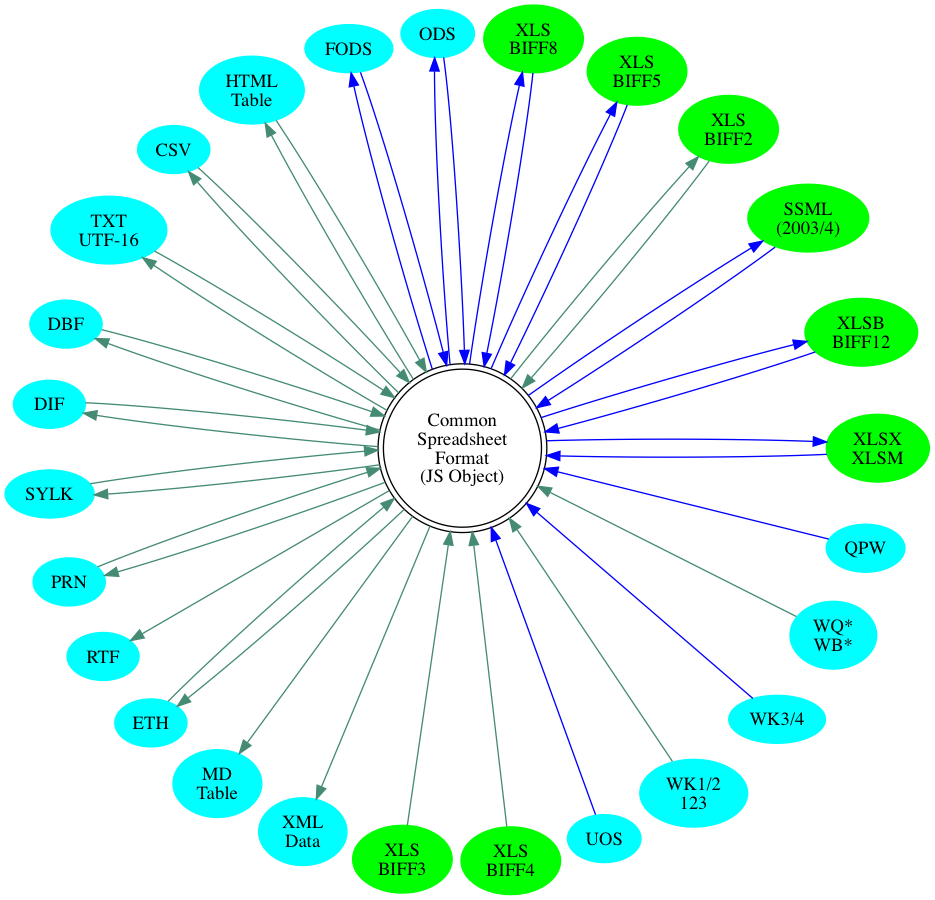
Simple data wrapper that attempts to wrap SheetJS libraries to provide a uniform
way to access data from Excel and other spreadsheet files:
JS-XLSX: xlsx on NPM
JS-XLS: xlsjs on NPM
JS-HARB: harb on NPM
Excel files are parsed based on the content (not by extension). For example, CSV
files can be renamed to .XLS and excel will do the right thing.
Supported Formats:
Format
Read
Write
Excel Worksheet/Workbook Formats
:-----:
:-----:
Excel 2007+ XML Formats (XLSX/XLSM)
:o:
:o:
Excel 2007+ Binary Format (XLSB BIFF12)
:o:
:o:
Excel 2003-2004 XML Format (XML "SpreadsheetML")
:o:
:o:
Excel 97-2004 (XLS BIFF8)
:o:
:o:
Excel 5.0/95 (XLS BIFF5)
:o:
:o:
Excel 4.0 (XLS/XLW BIFF4)
:o:
Excel 3.0 (XLS BIFF3)
:o:
Excel 2.0/2.1 (XLS BIFF2)
:o:
:o:
Excel Supported Text Formats
:-----:
:-----:
Delimiter-Separated Values (CSV/TXT)
:o:
:o:
Data Interchange Format (DIF)
:o:
:o:
Symbolic Link (SYLK/SLK)
:o:
:o:
Lotus Formatted Text (PRN)
:o:
:o:
UTF-16 Unicode Text (TXT)
:o:
:o:
Other Workbook/Worksheet Formats
:-----:
:-----:
OpenDocument Spreadsheet (ODS)
:o:
:o:
Flat XML ODF Spreadsheet (FODS)
:o:
:o:
Uniform Office Format Spreadsheet (标文通 UOS1/UOS2)
:o:
dBASE II/III/IV / Visual FoxPro (DBF)
:o:
:o:
Lotus 1-2-3 (WKS/WK1/WK2/WK3/WK4/123)
:o:
Quattro Pro Spreadsheet (WQ1/WQ2/WB1/WB2/WB3/QPW)
:o:
Other Common Spreadsheet Output Formats
:-----:
:-----:
HTML Tables
:o:
:o:
Rich Text Format tables (RTF)
:o:
Ethercalc Record Format (ETH)
:o:
:o:
Markdown Tables
:o:
XML Data (XML)
:o:
Installation
$ npm install -g j
Node Library
var J = require('j');
J.readFile(filename) opens file specified by filename and returns an array
whose first object is the parsing object (XLS or XLSX) and whose second object
is the parsed file.
J.utils has various helpers that expect an array like those from readFile:
Format
utility function
Excel 2007+ XML Formats (XLSX/XLSM)
to_xlsx/to_xlsm
Excel 2007+ Binary Format (XLSB BIFF12)
to_xlsb
Excel 2.0/2.1 (XLS BIFF2)
to_biff2
Delimiter-Separated Values (CSV/TSV/DSV)
to_csv/to_dsv
Data Interchange Format (DIF)
to_dif
Symbolic Link (SYLK/SLK)
to_sylk
OpenDocument Spreadsheet (ODS)
to_ods
Flat XML ODF Spreadsheet (FODS)
to_fods
HTML Tables
to_html
Markdown Tables
to_md
XML Data (XML)
to_xml
Ethercalc Record Format (ETH)
to_socialcalc
JSON Row Objects
to_json
List of Formulae
to_formulae
CLI Tool
The node module ships with a binary j which has a help message:
$ j --help

  Usage: j.njs [options] <file> [sheetname]

  Options:

    -h, --help               output usage information
    -V, --version            output the version number
    -f, --file <file>        use specified workbook (- for stdin)
    -s, --sheet <sheet>      print specified sheet (default first sheet)
    -N, --sheet-index <idx>  use specified sheet index (0-based)
    -p, --password <pw>      if file is encrypted, try with specified pw
    -l, --list-sheets        list sheet names and exit
    -o, --output <file>      output to specified file
    -B, --xlsb               emit XLSB to <sheetname> or <file>.xlsb
    -M, --xlsm               emit XLSM to <sheetname> or <file>.xlsm
    -X, --xlsx               emit XLSX to <sheetname> or <file>.xlsx
    -Y, --ods                emit ODS  to <sheetname> or <file>.ods
    -8, --xls                emit XLS  to <sheetname> or <file>.xls (BIFF8)
    -5, --biff5              emit XLS  to <sheetname> or <file>.xls (BIFF5)
    -2, --biff2              emit XLS  to <sheetname> or <file>.xls (BIFF2)
    -6, --xlml               emit SSML to <sheetname> or <file>.xls (2003 XML)
    -T, --fods               emit FODS to <sheetname> or <file>.fods (Flat ODS)
    -S, --formulae           emit list of values and formulae
    -j, --json               emit formatted JSON (all fields text)
    -J, --raw-js             emit raw JS object (raw numbers)
    -A, --arrays             emit rows as JS objects (raw numbers)
    -H, --html               emit HTML to <sheetname> or <file>.html
    -D, --dif                emit DIF  to <sheetname> or <file>.dif (Lotus DIF)
    -U, --dbf                emit DBF  to <sheetname> or <file>.dbf (MSVFP DBF)
    -K, --sylk               emit SYLK to <sheetname> or <file>.slk (Excel SYLK)
    -P, --prn                emit PRN  to <sheetname> or <file>.prn (Lotus PRN)
    -E, --eth                emit ETH  to <sheetname> or <file>.eth (Ethercalc)
    -t, --txt                emit TXT  to <sheetname> or <file>.txt (UTF-8 TSV)
    -r, --rtf                emit RTF  to <sheetname> or <file>.txt (Table RTF)
    -x, --xml                emit XML
    -m, --markdown           emit markdown table
    -F, --field-sep <sep>    CSV field separator
    -R, --row-sep <sep>      CSV row separator
    -n, --sheet-rows <num>   Number of rows to process (0=all rows)
    --sst                    generate shared string table for XLS* formats
    --compress               use compression when writing XLSX/M/B and ODS
    --read                   read but do not generate output
    --all                    parse everything; write as much as possible
    --dev                    development mode
    -q, --quiet              quiet mode
License
Please consult the attached LICENSE file for details. All rights not explicitly granted by the Apache 2.0 license are reserved by the Original Author.
Using J for diffing spreadsheet files
Using git textconv, you can use J to generate more meaningful diffs!
One-time configuration (misc/gitdiff.sh):
#!/bin/bash

# Define a sheetjs diff type that uses j
git config --global diff.sheetjs.textconv "j"

# Configure a user .gitattributes file that maps the xls{,x,m} files
touch ~/.gitattributes
cat <<EOF >>~/.gitattributes
*.xls diff=sheetjs
*.xlsb diff=sheetjs
*.xlsm diff=sheetjs
*.xlsx diff=sheetjs
*.XLS diff=sheetjs
*.XLSB diff=sheetjs
*.XLSM diff=sheetjs
*.XLSX diff=sheetjs
EOF

# Set the .gitattributes to be used for all repos on the system:
git config --global core.attributesfile '~/.gitattributes'
If you just want to compare formulae (for example, in a sheet using NOW):
git config --global diff.sheetjs.textconv "j -S"
NOTE: There are some known issues regarding global modules in Windows. The best
bet is to npm install j in your git directory before diffing.
SheetJS/j thuộc nhóm Developer Tools trên TopGit, cùng 14 topic GitHub. Trang Trending và Topics liệt kê các repo cùng số sao và cùng ngôn ngữ để so sánh.
Đọc thêm về SheetJS/j ở đâu?
Trang TopGit này là một snapshot — tab "Readme" hiển thị nguyên văn README của repo (đã bỏ link, giữ ảnh). Repo GitHub ở github.com/SheetJS/j là nguồn chính thức.
SheetJS/j có bao nhiêu sao?
SheetJS/j có 358 sao GitHub — tải lại trang để xem số mới nhất, hoặc xem trực tiếp github.com/SheetJS/j. TopGit phản chiếu số sao của GitHub nhưng không cam kết đến từng phút.
TopGit chưa ghi nhận license cho SheetJS/j. Phần lớn repo public trên GitHub là mã nguồn mở, nhưng điều khoản khác nhau từng repo — mở file LICENSE để xác nhận.
SheetJS/j có trang demo không?
Dự án có trang chủ ở http://sheetjs.com. Tab "Readme" ở trang này thường có ảnh chụp và hướng dẫn bắt đầu nhanh.
SheetJS/j còn đang phát triển không?
Commit gần nhất trên SheetJS/j là 8.7 năm trước (theo timestamp GitHub). Repo có 44 fork — một chỉ báo về mức độ quan tâm của cộng đồng.
Đọc đầy đủ README ở tab phía trên.
j có đáng để bạn bỏ thời gian?
ChatGPT, Claude và Perplexity đều đọc được trang này. Hỏi thử xem họ nghĩ gì về j.
 /j
/j