
Shubhamsaboo/openclaw-vertexai-memorybank

Một mục mã nguồn mở trong kho dữ liệu GitHub của TopGit: Shubhamsaboo/openclaw-vertexai-memorybank, 165 sao, TypeScript. Vertex AI Memory Bank Plugin for OpenClaw
Tóm tắt dựng từ metadata GitHub của chính dự án — chưa có bài review TopGit. Trang sẽ tự động cập nhật khi bài review đầy đủ được xuất bản.
TopGit viết bài đầy đủ cho repo có nhiều sao nhất và được yêu cầu nhiều nhất. Trang này là snapshot trong thời gian chờ — xem README gốc ở tab READ ME.
Snapshot
Cộng tác viên hàng đầu
Xem cộng tác viên hàng đầu
Agent Platform Memory Bank for OpenClaw and Hermes
Managed long-term memory for OpenClaw and Hermes Agent, powered by Agent Platform Memory Bank on Google Cloud.
Compatibility identifier: The npm package and OpenClaw plugin retain
openclaw-vertexai-memorybankfor compatibility. It is not the visible project name.
Why memory beyond an agent runtime's core memory
Runtime-local memory is commonly limited to an agent or session. This integration adds user-scoped memory that can work across agents, so preferences, decisions, and context can persist across sessions. Scope by user, project, or another deliberate isolation boundary.
Why Agent Platform Memory Bank
Agent Platform Memory Bank is managed on Google Cloud: no vector database to run and no embeddings infrastructure to maintain. It generates and retrieves long-term memories within your Google Cloud project. Generated memories can be consolidated against existing memories in their exact scope.
Token-efficient and effective
Memories are extracted facts, not raw conversation logs. OpenClaw recalls only relevant memories with similarity search before a turn, while Hermes agents explicitly invoke MCP tools when memory is needed.
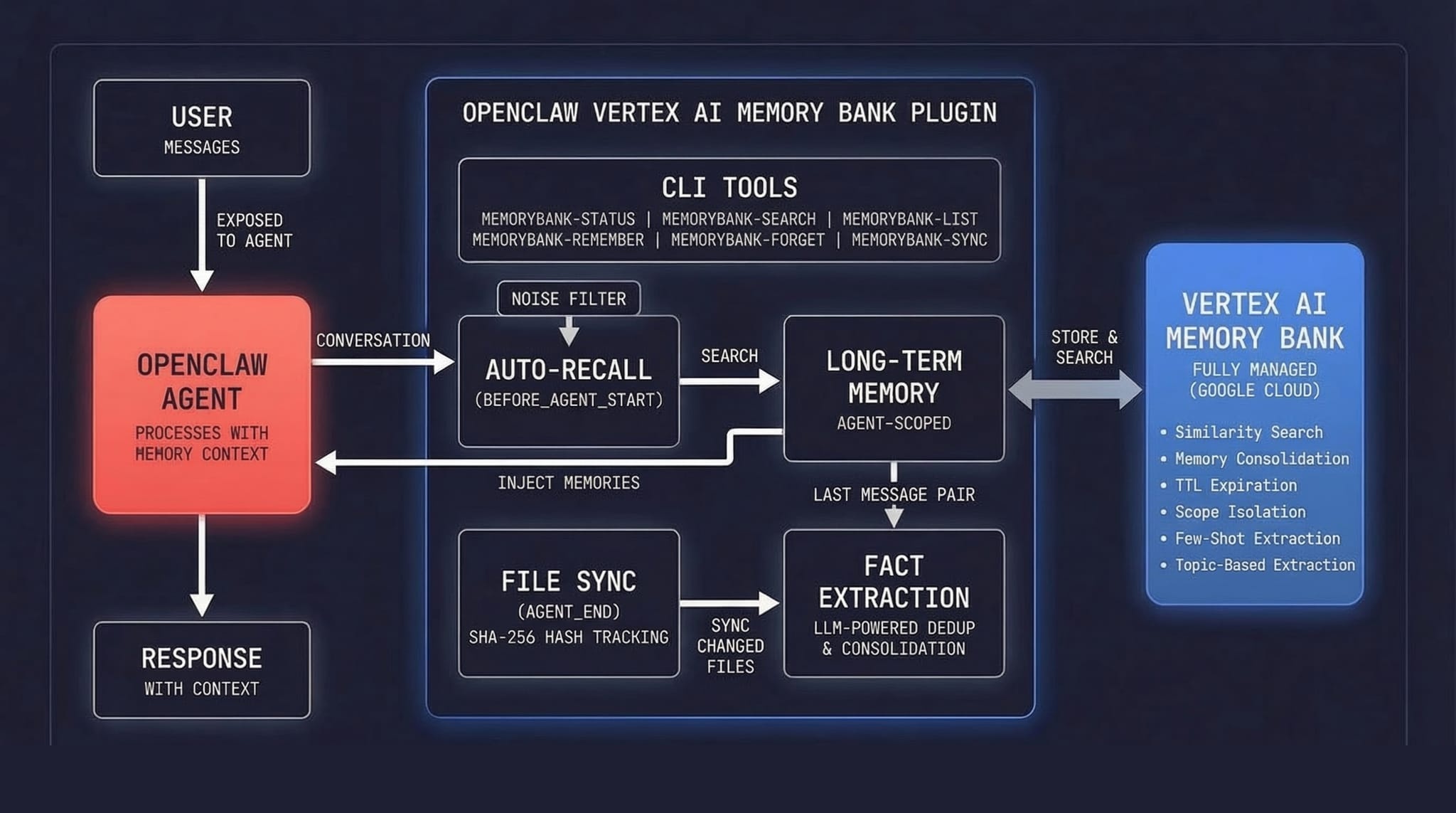
Diagram source:
architecture.svg. Regenerate the included 1600×1000 JPEG directly from the SVG (no browser screenshot) withnpm run render:architecture.
Disclaimer: This is not an officially supported Google product.
Integration capabilities
| Capability | OpenClaw plugin | Hermes MCP server |
|---|---|---|
| Native lifecycle auto-recall | Yes, before each agent turn | No; an agent invokes memorybank_search explicitly |
| Native lifecycle auto-capture | Yes, after substantive turns | No; an agent invokes memorybank_remember explicitly |
| Workspace memory-file sync | Yes | No |
| Reasoning-engine topic sync | Yes, on plugin startup | No |
| Memory operations | OpenClaw agent tools and CLI commands | Five user-invoked MCP tools over stdio |
| Shared memory | Yes, with matching project, location, reasoning engine, and scope | Yes, with the same matching configuration |
Hermes has no native lifecycle auto-recall or auto-capture. Its MCP server exposes only explicit, user-invoked tools.
Prerequisites
- A Google Cloud project with billing enabled and the Agent Platform API enabled. Enabling services requires
serviceusage.services.enable, normally throughroles/serviceusage.serviceUsageAdmin(or a broader role). - IAM roles for the identity that runs an integration:
roles/aiplatform.userto create or update a Memory Bank instance.roles/aiplatform.memoryUserto read, write, and generate memories. Use narrower Memory Bank viewer/editor roles where appropriate.
- A reasoning engine / Memory Bank instance. The following compatibility SDK identifiers remain required by the current API surface:
pip install google-cloud-aiplatform>=1.111.0import vertexai client = vertexai.Client(project="YOUR_PROJECT", location="us-central1") agent_engine = client.agent_engines.create() print(agent_engine.api_resource.name) # Save the reasoning engine ID - Application Default Credentials (ADC), for example:
gcloud auth application-default login
See the official setup guide and API quickstart.
Install: OpenClaw plugin
1. Add plugin config to openclaw.json
Add configuration before installing the plugin so it can validate the required fields:
{
  "plugins": {
    "entries": {
      "openclaw-vertexai-memorybank": {
        "enabled": true,
        "config": {
          "projectId": "your-gcp-project-id",
          "location": "us-central1",
          "reasoningEngineId": "your-reasoning-engine-id"
        }
      }
    }
  }
}
2. Clone, build, and install
git clone https://github.com/Shubhamsaboo/google-memorybank-plugin.git
cd google-memorybank-plugin
npm ci && npm run build
openclaw plugins install .
3. Add to the allowlist (recommended)
{
  "plugins": {
    "allow": ["openclaw-vertexai-memorybank"],
    "entries": { "...": "..." }
  }
}
The legacy plugin ID above is intentionally retained as a compatibility identifier. Add it after installation because OpenClaw validates allowlisted plugins.
4. Restart OpenClaw
openclaw restart
Bootstrapping from existing sessions
After installation, ask the agent to generate memories from selected prior sessions. The agent can parse that history and submit it for extraction; review scope and source content before backfilling.
Install: Hermes MCP server
The package provides a dedicated MCP JSON-RPC-over-stdio server for Hermes. MCP responses are written only to stdout and diagnostics only to stderr.
1. Clone and build
git clone https://github.com/Shubhamsaboo/google-memorybank-plugin.git
cd google-memorybank-plugin
npm ci && npm run build
2. Configure Hermes with the checkout command
Add an entry to ~/.hermes/config.yaml, replacing the placeholder with the absolute path to this checkout. This node command is the primary installation path and works directly from a clone:
mcp_servers:
  agent_platform_memorybank:
    command: "node"
    args: ["/absolute/path/google-memorybank-plugin/bin/hermes-mcp.js"]
    env:
      MEMORYBANK_PROJECT_ID: "your-gcp-project-id"
      MEMORYBANK_LOCATION: "us-central1"
      MEMORYBANK_REASONING_ENGINE_ID: "your-reasoning-engine-id"
      # Hermes filters the stdio child environment. Pass service-account ADC explicitly.
      GOOGLE_APPLICATION_CREDENTIALS: "/absolute/path/service-account.json"
      # Or use user ADC created by `gcloud auth application-default login`:
      # HOME: "${HOME}"
      # Match OpenClaw's scope exactly to enable sharing.
      MEMORYBANK_SCOPE: '{"user_id":"your-user-id"}'
    trust: untrusted
    tools:
      include:
        - memorybank_search
        - memorybank_remember
        - memorybank_forget
        - memorybank_correct
        - memorybank_stats
Optionally, after building, run npm link in the checkout (or install the package globally) to put agent-platform-memorybank-hermes on your PATH. Only then may the configuration use command: "agent-platform-memorybank-hermes" instead of the node command and absolute script path above.
Hermes supports ${ENV_VAR} interpolation but deliberately filters stdio-child environments. Pass either an absolute GOOGLE_APPLICATION_CREDENTIALS service-account path or HOME for user ADC. Unresolved ${...} values in required Memory Bank settings are rejected. Review and trust the command path before adding it.
The mcp_servers key is user-chosen. This guide recommends agent_platform_memorybank, which produces mcp__agent_platform_memorybank__memorybank_search; choosing another key changes the mcp__<key>__... prefix. The allowlist limits discovery to these five tools; include mutating tools only where appropriate.
3. Test and reload
hermes mcp test agent_platform_memorybank
Then use /reload-mcp in Hermes after configuration changes.
Hermes MCP tool surface
memorybank_search(query, top_k?)memorybank_remember(fact)memorybank_forget(memory_id)memorybank_correct(memory_id, new_fact)memorybank_stats()
Malformed JSON-RPC requests and invalid arguments receive protocol errors or clean isError responses; stack traces are not sent over stdout.
How it works
OpenClaw lifecycle
User message arrives
        |
        v
  [before_agent_start]    Retrieve top-K memories by similarity,
  (auto-recall)           optionally filter by distance, inject context
        |
        v
   Agent processes message
        |
        v
  [agent_end]             For substantive turns, submit the last pair
  (auto-capture)          to GenerateMemories for extraction/consolidation
        |
        v
  [agent_end]             Sync changed workspace memory files
  (file sync)             through GenerateMemories
Hermes explicit MCP flow
Hermes does not register native lifecycle hooks. A Hermes user or agent explicitly calls an MCP tool: memorybank_search retrieves relevant facts, memorybank_remember writes a fact, and the remaining tools correct, forget, or inspect scoped memory.
Shared Memory Bank operations
- Recall/search calls
RetrieveMemorieswith semantic similarity search in the configured scope. Returned results are ordered from shortest to greatest Euclidean similarity distance.maxDistanceis an OpenClaw plugin-side filter. - OpenClaw capture and file sync call
GenerateMemories. This extracts memories from source content and can consolidate generated facts with memories in the exact same scope. - Direct remember calls
CreateMemory. It writes the supplied fact immediately and can create duplicates until a later generation/consolidation run; it is not aGenerateMemoriescall. - OpenClaw noise filtering skips capture when the user message is under 20 characters or the final message pair is under 100 characters.
- OpenClaw topic sync configures extraction topics, perspective, and examples on the reasoning engine.
- Authentication uses ADC.
For official details, see generate memories and fetch memories.
Configuration
OpenClaw plugin options
| Option | Type | Default | Description |
|---|---|---|---|
projectId | string | required | Google Cloud project ID or number |
location | string | required | Google Cloud region, for example us-central1 |
reasoningEngineId | string | required | reasoning engine ID; retained API/config identifier |
scope | object | {"agent_name":"openclaw"} | immutable Memory Bank scope; exact matching regardless of key order |
autoRecall | boolean | true | retrieve memories before each turn |
autoCapture | boolean | true | generate memories after each turn |
autoSyncFiles | boolean | true | generate memories from changed workspace markdown files |
autoSyncTopics | boolean | true | configure extraction topics on startup |
memoryTopics | array | built-in topics | custom memory topics |
perspective | "first" | "third" | "third" | generation perspective |
topK | number | 10 | maximum similarity-search results |
maxDistance | number | none | plugin-side maximum similarity distance; lower is stricter |
backgroundGenerate | boolean | true | fire-and-forget capture/file generation; true does not wait for completion |
ttlSeconds | number | none | plugin configuration mapped to generated-memory TTL settings; affects only generated memories, not direct CreateMemory remembers |
introspection | "off" | "scores" | "scores" | plugin presentation setting for recalled context; not an official API field name |
Hermes MCP environment variables
| Variable | Required | Description |
|---|---|---|
MEMORYBANK_PROJECT_ID | yes | Google Cloud project ID or number |
MEMORYBANK_LOCATION | yes | Agent Platform location |
MEMORYBANK_REASONING_ENGINE_ID | yes | reasoning engine identifier (required compatibility configuration name) |
MEMORYBANK_SCOPE | no | JSON scope; default {"agent_name":"hermes"} |
MEMORYBANK_TOP_K | no | similarity-search result count, integer 1–100 |
Shared memory scoping
Scope isolates memories and determines which memories are eligible for consolidation. It is a dictionary with these official constraints:
- At most five key/value pairs.
- Values cannot contain
*. - Scope matching is exact and independent of key order.
- Scope is immutable after a memory is created.
Use a user_id-only scope for cross-runtime sharing, or include an agent key for deliberate isolation:
{ "user_id": "shubham" }
// or
{ "user_id": "shubham", "agent_name": "openclaw" }
The Hermes default scope intentionally isolates this runtime. To share memory with OpenClaw, configure the identical scope object and MEMORYBANK_SCOPE value.
Memory profiles
Agent Platform Memory Bank also supports structured Memory Profiles: one source-of-truth profile per schema and scope, maintained through the generation pipeline. This implementation currently handles natural-language memories only; it does not create, retrieve, or manage profile schemas. See the official Memory Profiles guide.
OpenClaw plugin defaults: topics, examples, and recall presentation
Unless memoryTopics is overridden, the OpenClaw plugin configures managed USER_PREFERENCES, EXPLICIT_INSTRUCTIONS, and KEY_CONVERSATION_DETAILS topics plus custom technical_decisions, project_context, and action_items topics. Built-in few-shot examples teach generation to retain decisions and preferences while ignoring short acknowledgments and transient debugging chatter.
introspection controls the OpenClaw plugin's recalled-context presentation: scores (the default) includes the returned similarity distance alongside each fact; off injects facts only. It does not change the Memory Bank API response.
GenerateMemories does not propagate caller metadata to generated memories in this implementation. Metadata is available to direct create/update calls; tagging generated results would require a later list-and-patch step, which this implementation does not perform.
OpenClaw plugin surface
The OpenClaw plugin runs alongside OpenClaw's built-in memory-core and adds cloud-backed long-term memory.
Agent tools
These four tools are registered for the OpenClaw agent:
| Tool | Behavior |
|---|---|
memorybank_search | RetrieveMemories similarity search; returns facts, similarity distance, topics, timestamps, and IDs |
memorybank_forget | deletes one memory by ID or resource name |
memorybank_correct | updates a fact, with a delete-and-regenerate fallback that attempts to restore the old direct memory on failure |
memorybank_stats | returns a scoped count and topic breakdown |
CLI commands
The actual OpenClaw CLI commands are distinct from agent tools:
| Command | Options / behavior |
|---|---|
memorybank-status | displays plugin configuration, connection state, and tracked-file state; refreshes the scoped count |
memorybank-search <query> | --top-k N, --show-ids; similarity search with returned distances |
memorybank-list | --count-only, --show-ids; paginated scoped listing or lightweight count |
memorybank-sync | synchronizes changed workspace memory files |
memorybank-remember <fact> | direct CreateMemory write; duplicates can persist until later generation consolidation |
memorybank-forget <memoryId> | deletes a memory; IDs come from search/list --show-ids |
The count cache is in-memory for five minutes and is adjusted after direct create/delete operations; count-only/status can force a fresh paginated count. GetMemory fetches one named memory, RetrieveMemories is for all-in-scope or similarity retrieval, and ListMemories enumerates memories with pagination.
Mutation isolation and error handling
OpenClaw and Hermes share the same search, list, stats, direct remember, forget, and correction operations. Their lifecycle hooks and response presentation remain specific to each runtime.
Forget and correct accept a bare memory ID, a resource name using the configured project spelling, or the canonical project-number name returned by Vertex. The server reads the target through the configured project, region, and engine, verifies any project alias against that response, and checks the complete scope before mutating. All mutations also use the configured parent. Failed lookups, unverified aliases, and scope mismatches leave the memory untouched. This requires permission to read the target memory as well as update/delete it; no Resource Manager permission is added just to resolve project aliases.
Correction reuses the verified original fact for recovery. If a fallback is needed but that fact is unavailable, it refuses to delete. Restoration after regeneration failure is best effort and can create a new memory ID; it is not an atomic rollback of all metadata or concurrent changes.
SDK initialization is awaited before dispatching shared operations so credential failures return tool errors. The MCP server does not swallow unrelated unhandled rejections. The subprocess tests wait for protocol responses, with a 15-second failure deadline to accommodate cold SDK startup.
Troubleshooting and security
- Use ADC (
gcloud auth application-default login) locally, or an explicit service-account path in Hermes. Never commit credential files. - Hermes runs the configured command as a local process. Review its absolute path and use
tools.includeto limit access, especially tomemorybank_forgetandmemorybank_correct. - Use identical project, location, reasoning engine, and scope in Hermes and OpenClaw to share memories. Scope mismatches intentionally return separate memory sets.
- Check stderr for
[memorybank]diagnostics; stdout is MCP JSON-RPC only.
For more operational details and official-operation references, see FAQ.md.
Pricing
As of 2026-08-21, the official pricing page says Agent Platform Memory Bank billing begins September 1, 2026:
- Agent Storage: $0.000410959 per GiB-hour, with the first 1 GiB-month free.
- Agent Compute: $0.085 per vCPU-hour. Memory Bank meters one vCPU-hour per 3 million reads and per 1 million writes; the first 50 vCPU-hours are free.
- Model generation and embedding tokens: charged separately at the applicable model rates.
Pricing and free-tier terms can change; use the canonical Gemini Enterprise Agent Platform pricing page, not repository cost estimates.
Development
npm ci
npm run build
npm test
npm pack --dry-run
License
MIT
Repo liên quan
Master programming by recreating your favorite technologies from scratch.
A curated meta-list of curated lists organized by technology domain. The repository acts as a directory pointing to hundreds of specialized awesome lists covering programming languages, platforms, frameworks, and tooling. All content is community-contributed under the CC0 public domain dedication.
Public APIs is a community-curated GitHub repository listing free, publicly accessible APIs across a wide range of categories, with auth type, HTTPS, and CORS noted for each entry. It's a browsable reference, not a library to install.
REA is an MCP server and CLI that gives AI coding agents the ability to reverse engineer binaries, JavaScript apps, .NET assemblies, and websites. It hooks into Hopper, Ghidra, or IDA Pro for native binary work, or runs static JavaScript analysis with just Node.js. Every investigation returns an Evidence bundle that includes what was found, what was not, and the reasoning path. Setup registers REA with supported agents and walks you through connecting an analysis engine. The CLI also works standalone for terminal-first workflows.
Trả lời nhanh
Đọc thêm về Shubhamsaboo/openclaw-vertexai-memorybank ở đâu?
Trang TopGit này là một snapshot — tab "Readme" hiển thị nguyên văn README của repo (đã bỏ link, giữ ảnh). Repo GitHub ở github.com/Shubhamsaboo/openclaw-vertexai-memorybank là nguồn chính thức.
Shubhamsaboo/openclaw-vertexai-memorybank có phải mã nguồn mở không?
Có — Shubhamsaboo/openclaw-vertexai-memorybank phát hành theo license MIT, nghĩa là mã nguồn mở để đọc, fork và (tùy license) tái sử dụng. Mã: github.com/Shubhamsaboo/openclaw-vertexai-memorybank.
Shubhamsaboo/openclaw-vertexai-memorybank có tag gì không?
Bản đồng bộ chưa ghi nhận topic GitHub nào cho Shubhamsaboo/openclaw-vertexai-memorybank. GitHub topics hiển thị ở thanh bên phải trang repo — đó là nơi đáng kiểm tra nhất.
Shubhamsaboo/openclaw-vertexai-memorybank có website riêng không?
TopGit chưa ghi nhận URL trang chủ cho Shubhamsaboo/openclaw-vertexai-memorybank. Phần README ở tab phía trên thường có link demo, hoặc xem mô tả GitHub của repo.
Shubhamsaboo/openclaw-vertexai-memorybank còn đang phát triển không?
Commit gần nhất trên Shubhamsaboo/openclaw-vertexai-memorybank là 1 tháng trước (theo timestamp GitHub). Repo có 30 fork — một chỉ báo về mức độ quan tâm của cộng đồng.
Shubhamsaboo/openclaw-vertexai-memorybank dùng license gì?
Shubhamsaboo/openclaw-vertexai-memorybank phát hành theo license MIT. Nên mở file LICENSE trên GitHub để xác nhận — license metadata đôi khi lệch với thực tế dự án.
Đọc đầy đủ README ở tab phía trên.
Muốn nghe thêm một ý kiến về openclaw-vertexai-memorybank?
Hỏi một AI đọc được trang này — một cú bấm là có ngay nhận định về openclaw-vertexai-memorybank.