Là một dự án di động, SoySauceLab/CollectionKit đã đạt 4.5k sao trên GitHub, ngôn ngữ Swift. Reimagining UICollectionView
Tóm tắt dựng từ metadata GitHub của chính dự án — chưa có bài review TopGit. Trang sẽ tự động cập nhật khi bài review đầy đủ được xuất bản.
VÌ SAO CHƯA CÓ REVIEW
TopGit viết bài đầy đủ cho repo có nhiều sao nhất và được yêu cầu nhiều nhất. Trang này là snapshot trong thời gian chờ — xem README gốc ở tab READ ME.
A modern Swift framework for building composable data-driven collection view.
Migration Guide
v2.0
Features
Rewritten UICollectionView on top of UIScrollView.
Automatically diff data changes and update UI.
Superb performance through cell reuse, batched reload, visible-only diff, & the use of swift value types.
Builtin layout & animation systems specifically built for collections.
Composable sections with independent layout.
Strong type checking powered by Swift Generics.
Install
# CocoaPods
pod "CollectionKit"

# Carthage
github "SoySauceLab/CollectionKit"
Getting Started
To start using CollectionKit, use CollectionView in place of UICollectionView. CollectionView is CollectionKit's alternative to UICollectionView. You give it a Provider object that tells CollectionView how to display a collection.
The simpliest way to construct a provider is by using BasicProvider class.
BasicProvider
To build a BasicProvider, here is what you need:
DataSource
an object that supplies data to the BasicProvider.
ViewSource
an object that maps each data into a view, and update the view accordingly
SizeSource
an function that gives the size for each cell.
It sounds complicated, but it really isn't. Here is a short example demostrating
how it all works.
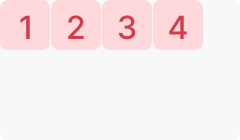
let dataSource = ArrayDataSource(data: [1, 2, 3, 4])
let viewSource = ClosureViewSource(viewUpdater: { (view: UILabel, data: Int, index: Int) in
  view.backgroundColor = .red
  view.text = "\(data)"
})
let sizeSource = { (index: Int, data: Int, collectionSize: CGSize) -> CGSize in
  return CGSize(width: 50, height: 50)
}
let provider = BasicProvider(
  dataSource: dataSource,
  viewSource: viewSource,
  sizeSource: sizeSource
)

//lastly assign this provider to the collectionView to display the content
collectionView.provider = provider
Note that we used ArrayDataSource & ClosureViewSource here. These two classes are built-in to CollectionKit, and should be able to serve most jobs. You can implement other dataSource and viewSource as well. Imagine implementing a NetworkDataSource in your project, that retrives json data and parse into swift objects.
Reload
It is easy to update the CollectionView with new data.
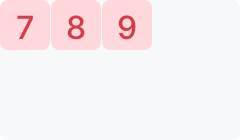
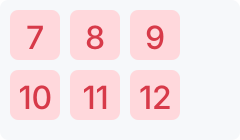
dataSource.data = [7, 8, 9]
This will trigger an update of the CollectionView that is served by this dataSource.
Note that append and other array mutating methods will also work.
We updated the array three times in this example. Each update is triggering a reload. You might be thinking that this is very computational intensive, but it isn't. CollectionKit is smart enough to only update once per layout cycle. It will wait until the next layout cycle to actually reload.
After executing the 3 lines above, CollectionView will still show [7, 8, 9]. But once the current run loop cycle is completed, CollectionView will update immediately. Your user won't notice any lag from this process.
To trigger an update immediately, you can call collectionView.reloadData() or provider.reloadData() or dataSource.reloadData().
To make collectionView reload on the next layout cycle, you can call collectionView.setNeedsReload() or provider.setNeedsReload() or dataSource.setNeedsReload(). You might already noticed, once you update the array inside ArrayDataSource, it is basically calling setNeedsReload() for you.
Note that if you assign an array to the dataSource and later update that array instead. It won't actually update the CollectionView
var a = [1, 2 ,3]
dataSource.data = a
a.append(5) // won't trigger an update be cause dataSource.data & a is now two different array.
a = [4 ,5 ,6] // also won't trigger an update
Layout
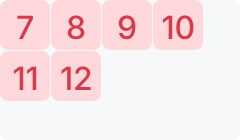
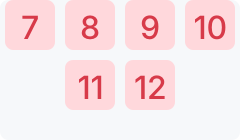
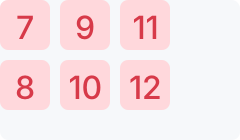
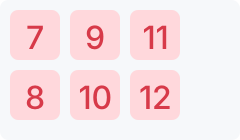
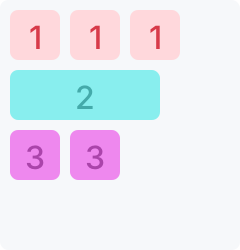
Up to this point, the collection is still a bit ugly to look at. Every cell is left aligned and doesn't have space in between. You might want the views to be evenly spaced out, or you might want to add some spacing in between items or lines.
These can be achieved with Layout objects. Here is an example.
FlowLayout is a Layout class that it built-in to CollectionKit. There are many more built-in layouts including WaterfallLayout & RowLayout. You can also easily create your own layout.
FlowLayout is basically a better UICollectionViewFlowLayout that aligns items in row by row fashion. It supports lineSpacing, interitemSpacing, alignContent, alignItems, & justifyContent.
Every layout also supports inset(by:) and transposed() methods.
inset(by:) adds an outer padding to the layout and return the result layout as InsetLayout.
There can be a lot to talk about with Layouts. We will create more tutorial later to teach you how to create your own layout and show you some advance usages. In the mean time, feel free to dive in the source code. I promise you it is not complecated at all.
Composing (ComposedProvider)
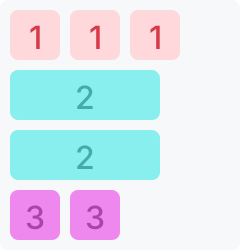
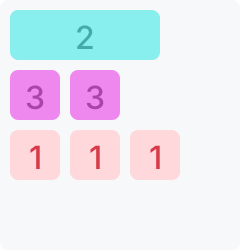
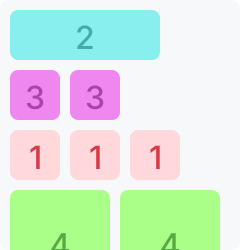
The best feature of CollectionKit, is that you can freely combine providers together into multiple sections within one CollectionView. And it is REALLY EASY to do so.
let finalProvider = ComposedProvider(sections: [provider1, provider2, provider3])

collectionView.provider = finalProvider
To update individual sections, just update its own dataSource.
You can even put ComposedProvider into another ComposedProvider no problem.
let trulyFinalProvider = ComposedProvider(sections: [finalProvider, provider5])

collectionView.provider = trulyFinalProvider
How cool is that!
Animation
CollectionKit offers a animation system which allows you to create fancy animations and adjust how cells are displayed.
Here are some examples of custom animators that is included in the example project. They can be used in combination with any layout. Here we are using a transposed waterfall layout.
Wobble
Edge Shrink
Zoom
Animator can also perform animations when a cell is added/moved/deleted. Here is an example showing a 3d scale animation with a cascading effect.
It is easy to use an Animator. You can assign it to providers, cells, or to entire CollectionView.
// apply to the entire CollectionView
collectionView.animator = ScaleAnimator()

// apply to a single section, will override CollectionView's animator
provider.animator = FadeAnimator()

// apply to a single view, will take priority over all other animators
view.collectionAnimator = WobbleAnimator()
Note: that in order to use WobbleAnimator, you have to include pod "CollectionKit/WobbleAnimator" subspec to your podfile.
Please checkout the example project to see many of these examples in action.
SoySauceLab/CollectionKit thuộc nhóm Mobile trên TopGit, cùng 5 topic GitHub. Trang Trending và Topics liệt kê các repo cùng số sao và cùng ngôn ngữ để so sánh.
Đọc thêm về SoySauceLab/CollectionKit ở đâu?
Trang TopGit này là một snapshot — tab "Readme" hiển thị nguyên văn README của repo (đã bỏ link, giữ ảnh). Repo GitHub ở github.com/SoySauceLab/CollectionKit là nguồn chính thức.
SoySauceLab/CollectionKit có phải mã nguồn mở không?
Có — SoySauceLab/CollectionKit phát hành theo license MIT, nghĩa là mã nguồn mở để đọc, fork và (tùy license) tái sử dụng. Mã: github.com/SoySauceLab/CollectionKit.
SoySauceLab/CollectionKit có website riêng không?
TopGit chưa ghi nhận URL trang chủ cho SoySauceLab/CollectionKit. Phần README ở tab phía trên thường có link demo, hoặc xem mô tả GitHub của repo.
SoySauceLab/CollectionKit dùng license gì?
SoySauceLab/CollectionKit phát hành theo license MIT. Nên mở file LICENSE trên GitHub để xác nhận — license metadata đôi khi lệch với thực tế dự án.
SoySauceLab/CollectionKit là gì?
SoySauceLab/CollectionKit (SoySauceLab/CollectionKit) là dự án Swift trên GitHub. Theo mô tả gốc: Reimagining UICollectionView
Vì sao SoySauceLab/CollectionKit được xếp vào nhóm Mobile?
TopGit xếp SoySauceLab/CollectionKit vào nhóm Mobile dựa trên GitHub topics và mô tả của repo (gắn thẻ: "collectionkit", "ios", "swift"). Việc phân loại dựa trên metadata thật của repo, không phải đoán theo cảm tính biên tập.
Đọc đầy đủ README ở tab phía trên.
CollectionKit có đáng để bạn bỏ thời gian?
ChatGPT, Claude và Perplexity đều đọc được trang này. Hỏi thử xem họ nghĩ gì về CollectionKit.
 /CollectionKit